This package is designed for Players or DMs who would like to try out the DMFI package and / or use the package on a multiplayer server.
The DM-Friendly Initiative (DMFI) Tools Package is a community-built package that aims to improve the player and DM experience in multiplayer games.
This download package contains end-user files for both DMs and Players:
DMFI NWN2 Tools hak (required)
Version 1.10 readme
DMFI demo/tutorial module
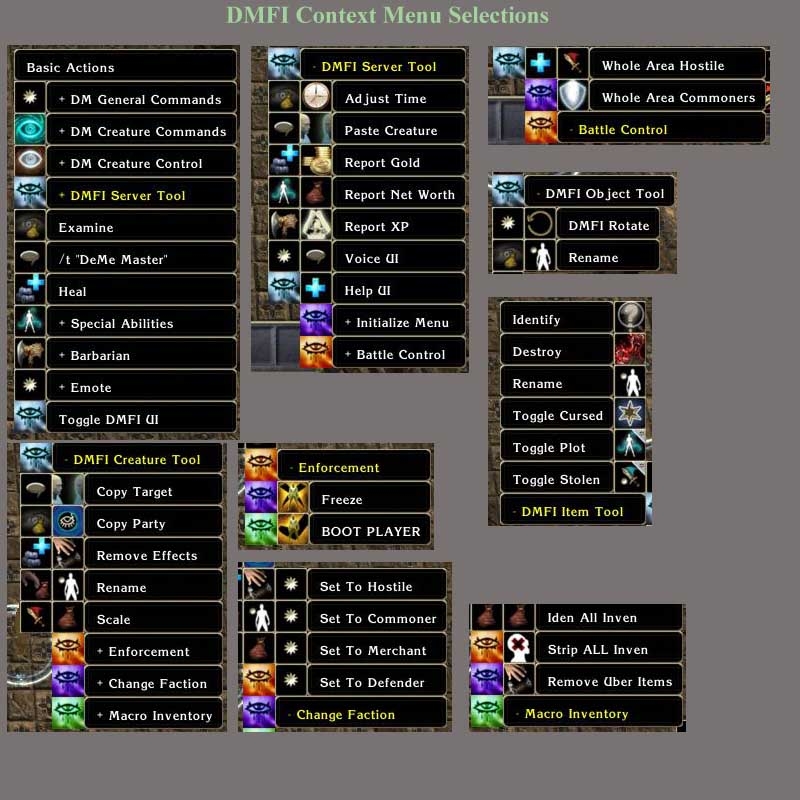
NEW FEATURES IN 1.10 - The target tool: this new UI screen will take care of all the functions in the old contextmenu. It's separated by two panes, one for the server options and another for the object options. It will show the name of the current target and the buttons will fire the commands.
- The manager tool: This UI screen will store items and creatures in a database to retrieve them later. Up to 20 slots.
- Battle tool: 2 more buttons to add or decrease Spell Resistance.
- Placeables: Make placeable "plot", destroy placeable, and destroy placeables in 3 different radius.
- Report Location: will show a screen with PC's locations, PublicCDKeys, Current Hit Points and debug numbers.
- Weather: added weather functions.
- DM Party Tools:
GetOutOfMyWay: fires the new OEI joke, gets players out of the way who are around you.
Jump a party to DM: Jump all players to DM and jump player to his party leader.
Create Teleport Portals.
Send Message Popups to all players or targeted party.
- Added FOLLOW buttons to DM bar.
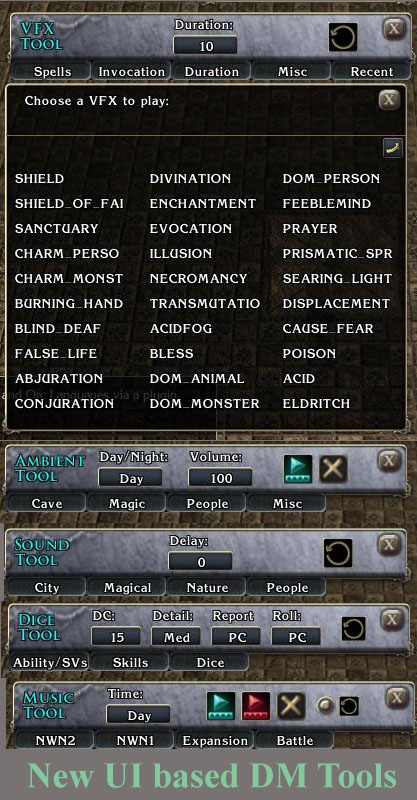
- VFX Tool, added support for Custom NWN2 effects. Just type the name of the effect and fire it on location or target.
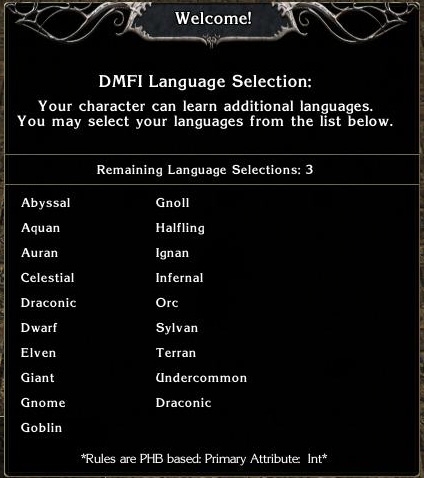
- Added a little button to DMFI text which allows a player's language to be changed quickly.
DOWNLOAD:
Download the version 1.10b package.
INSTALLATION:
Place the DMFI hak file into your NWN2/hak folder.
Feedback and suggestions are always welcomed. Visit the DMFI guild forums for discussion and latest news.
Would appreciate a more detailed description of the issue. I have not seen any issues with the DM client context menus associated with the patch 1.13 update. The context menu file itself is not required, just the hak.
This version of DMFI breaks the context menus in 1.13. I loved it in 1.12, I hope someone's willing to make a fix, though. _________________________ "Trying is the first step towards failure." - Homer Simpson
That's actually not the case with the OnClientEnter call.
The Player Tools will not show up unless the directions on the Developer page are followed: "Place the dmfi_mod_pcload script in the On PC Loaded Script event of your module."
This is a developer issue, as mentioned, and does not affect this client package.
Posted by Rami_Ahmed at 2008-07-17 05:58:24 Voted 9.50 on 07/17/08
Hi,
I just found out after a long time of wondering - I couldn't get anything to show in game (just like ekieron) - that you need to call DMFI_ClientEnter(GetEnteringObject()); in the OnClientEnter event, to make something work. I still can't make the emote stuff to show up though, really strange. I know this is supposed to be posted at the developer page, but I thought I'd answer ekierons cry for help.
Terrific set of scripts though, a bit more and better documentation could be great still. _________________________ NWN2 stuff:
- Persistent Player Owned Shop System
I have associated the hak with the module, compiled the scripts, saved, yet nothing works in game. Do I need to do something on the developer side with the UI files?
Thanks. _________________________ Kieron
Posted by -vendalus- at 2008-04-01 15:01:18 Voted 10.00 on 04/01/08
Just realized I had not voted yet. This is a must have.
As you must know, the dmfi tools can be used in different languages as Demetrious thought in multilanguage support.
So i give a call to all the dmfi users that use to work with DMFI tools and doesn't usually play in english to... send your translation files or give us a call that you have a full working transation for the 1.10 package.
I'll be glad to include them in the dmfi page and help the developers to insert it, just to be sure that all the world wide can use dmfi tools in his own language.
At the moment i have the spanish one (i'm spanish and i have contacts :D), so i'm looking for translations to...
- French
- Italian
- German
Mainly these (as they're supported in nwn2)but i'll accept another languages such as russian, polish or japanese, even in catalan, euskera or tumbuctu
Thanks :)
(for the comments too, i really apreciate that you love the new dmfi enviroment) _________________________ The Ancient NWN Spanish Community Link
Academy for Modding Excellence Link
The Everfire Forge, a weapon for your hero Link
Awesome work on the getting the bugfixes out, I had just noticed this last night when I was trying to migrate our server to the new tools. All of your hard work is immensely appreciated and some of the new tools are simply great.
Has been noticed three major bugs related to translatd text, inventory manager and blueprints.
I have it fixed, will upload the fixed version soon, today (after testing), you'll only to cahnge some scripts, no problems with UI.
Sorry and thanks for your patience. _________________________ The Ancient NWN Spanish Community Link
Academy for Modding Excellence Link
The Everfire Forge, a weapon for your hero Link
Posted by puket at 2007-11-25 12:40:33 Voted 10.00 on 11/25/07
thank you..:)
Posted by Senalaya at 2007-11-25 04:38:28 Voted 10.00 on 11/25/07
About time!
Great job, thanks! :)
Posted by Cladius at 2007-11-25 03:04:24 Voted 10.00 on 11/25/07
WOOT !
Fantastic stuff, these really add some fantastic additions to the game.
Thanks to Design Team lead Qkrch and a number of DMFI members and testers, the version 1.10 package has now been uploaded. Please see the readme file for details on new features, fixes, and known issues.
Posted by maero at 2007-11-12 21:33:43 Voted 9.75 on 11/12/07
Here is the fix for the DMFI UI not showing up with MotB installed (I can't take credit for this - a Google search found it in a post in the official forums and in the Lands of Algia forums):
1. Copy the "ingameguix1.ini" file from your installation folder (by default, c:\Program Files\Atari\Neverwinter Nights 2\ui\default) into the corresponding spot in your "my documents" folder (My Documents\Neverwinter Nights 2\ui\default).
2. Open the "ingamegui.ini" file that was already in My Documents\ui\default, using notepad or a text editor. There should be a block of several lines in that file that include DMFI references (for example, there is a line with "SCREEN_DMFI_PLAYER=dmfiplayerui.xml").
3. Copy the entire block of lines that include such DMFI references, then open your new copy of ingameguix1.ini (now located in my documents\neverwinter nights 2\ui\default) and paste them into it. I put them at the end of the [MandatoryGUI] section.
10 - A Masterpiece, Genuinely Groundbreaking 9 - Outstanding, a Must Have 8 - Excellent, Recommended to Anyone 7 - Very Good, Deserves a Look 6 - Good, Qualified Recommendation 5 - Fair, Solid yet Unremarkable 4 - Some Merit, Requires Improvements 3 - Poor Execution, Potential Unrealized 2 - Very Little Appeal 1 - Not Recommended to Anyone






 Site
Site









 at 2012-09-21 22:54:54
 at 2009-03-01 16:59:56
 at 2008-06-14 14:09:17


