THUNDER SOUND INDOORS: By default, the thunder clap sounds are now TURNED OFF whenever the PC goes indoors. However, if you prefer to have the thunder sound play when they go inside, simply comment out or completely remove the following line inside the area's ON CLIENT ENTER script:
VERY IMPORTANT: The ON CLIENT ENTER needs to be attached to EVERY AREA in your module, including INTERIOR ones, as this code turns off the thunder when you enter an interior area.
FOG COLOUR SETTINGS: I not very good when it comes to colour (being colour blind) and so I often find my colours (fog related ones included) may not be to your liking. Kamal has posted some other settings in the posts below. Please feel free to post any other settings you feel may benefit the system!
NOTE TO USERS OF VERSION 1.00: There have been many changes from the original. You will need to replace the original hak for the new one. (Or copy the files and overwrite existing ones if you use the campaign folder.) Furthermore, you need to add a new Sound Object (the Blizzard/Dust storm sound) to each area as a fifth sound object. Lastly, the core include script has undergone many changes and will also need to be imported over the original. I would recommend importing the new erf and overwriting all files.
UPDATES WITH v1.05
==================
1) Made some clarifications in the manual to emphasise the ON CLIENT ENTER script should be placed on every area.
2) Set default weather timer to 300 seconds from 60 seconds.
FIXES WITH v1.04
================
1) Fixed transition between interior and exterior and weather setup system. Ensured system would restart from an interior, while not setting up when indoors.
=======================
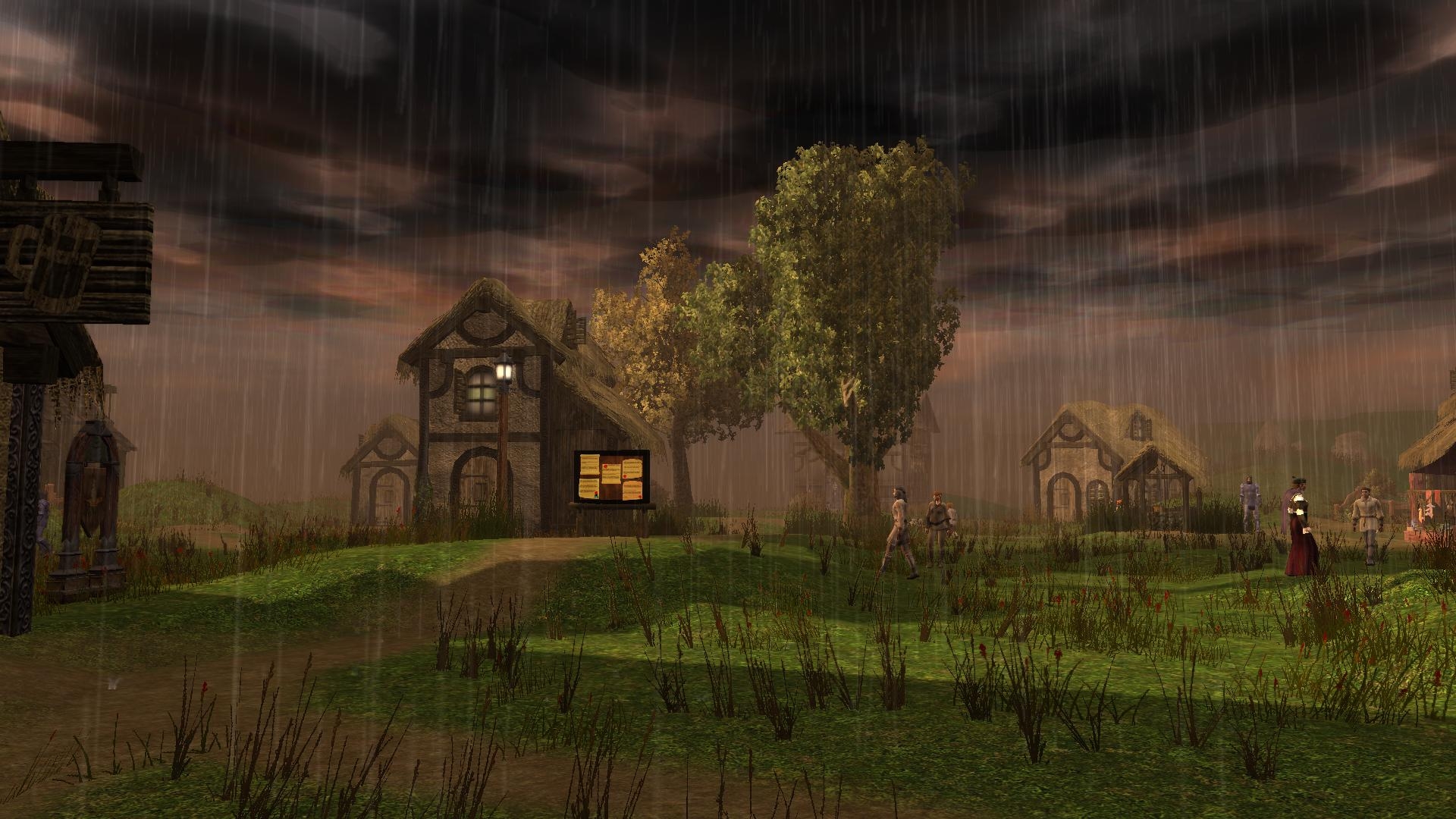
An easy to implement comprehensive weather system. Automatic variation in weather according to time of year.
Features Incuded:-
1) Sound variations (including thunder - close and distant).
2) Three cloud covers: Grey, dark grey and black. (Auto use correction check.)
3) Lightning flashes wth thunder claps.
4) Three snow types: Light, heavy and blizzard.
5) Three dust storm settings.
6) Fog added to help blend the sky and horizon contrast.
Advanced Settings:
==================
A GLOBAL variable can be set to immediately update the weather condition for the module.
A LOCAL variable can be set on an area to force "desert" or "snow" settings.
A LOCAL variable can be set on an area to override the automatic cloud setting.
Simple Setup:
=============
It takes only four easy steps to have the basic system up and running in your module:-
1) Import the erf.
2) Associate the hak.
3) Place the five sound objects in each outdoor area using the system.
4) Attach the On Client Enter script to EVERY area using the system, including interior areas, as the code turns off thunder when entering an interior area.
A PDF (v1.05) has been included to help explain the running of the system and step by step setup and FAQ. (Contains the updates and fixes since v1.00)
Version 1.04 fixes a problem when the system checks an interior area by mistake and thereafter messes up the system timer.
Changes were made to the alb_weather_system iclude file, which means any scripts that call this file must be recompiled before use. This has been done for you in the latest download.
Lance. _________________________ World of Althéa Blog: Link
You beat me to it .... I was going to post your settings here today as well. I will make a comment in the main post to look here and offer other users to post their fog settings if they want to.
Cheers,
Lance. _________________________ World of Althéa Blog: Link
Easy to work with. Does what it says and is documented. If only we could texture swap the ground in an area for those heavy snowstorms.
I'm using an alternate set of fogs, fog is controlled by the function SetFogColors in Lance's scripts, you can replace it with the following if you prefer.
void SetFogColours(int iCurrentPower, object oArea)
{
if(iCurrentPower == 1){LBResetAllNWN2Fog(oArea);}
if(iCurrentPower == 2){LBSetAllNWN2Fog(oArea, 8947848, 0.0, 125.0);}
if(iCurrentPower == 3){LBSetAllNWN2Fog(oArea, 7829367, -5.0, 100.0);} //negative number means thicker start fog.
if(iCurrentPower == 4){LBSetAllNWN2Fog(oArea, 6710886, -25.0, 75.0);}
if(iCurrentPower == 5){LBSetAllNWN2Fog(oArea, 4473924, -50.0, 50.0);}
if(iCurrentPower == 6){LBSetAllNWN2Fog(oArea, 12303291, 0.0, 125.0);}
if(iCurrentPower == 7){LBSetAllNWN2Fog(oArea, 12303291, -10.0, 90.0);}
if(iCurrentPower == 8){LBSetAllNWN2Fog(oArea, 12303291, -20.0, 60.0);}
if(iCurrentPower == 9){LBSetAllNWN2Fog(oArea, 13013019, 0.0, 125.0);} //pulled from the smoke tga used by the dust fx
if(iCurrentPower == 10){LBSetAllNWN2Fog(oArea, 13013019, -25.0, 90.0);}
if(iCurrentPower == 11){LBSetAllNWN2Fog(oArea, 13013019, -50.0, 50.0);}
} _________________________ Shadow Thief: Crimmor and Path of Evil blog Link
My initial use is purely for atmosphere. However, I do have at least one script that looks for clear weather, and so weather will affect that one.
That said, because all the weather conditions are defined by a single global variable, then it would be very easy to add the impact of weather conditions across a number of scripts. I did even think about a Call Lightning spell in stormy conditions only .... ;)
I already have a penalty for resting outdoors and studying spells, and so that is already catered for. I suppose the weather could add a variable to this factor though ... good idea. :)
Thanks,
Lance. _________________________ World of Althéa Blog: Link
Posted by ponfyr at 2012-10-11 16:00:33 Voted 9.75 on 10/11/12
A quick question if I may� Is this solely for ambiance or do you plan weather (player) effects? Like penalties for listen and spot checks, the dc increase of casting in violent weather or inclement weather preventing a mage from studying his spell book.
This version (v1.02) will be the final version unless there are any major issues I have missed or are reported to me. I hope you enjoy its application!
Don't forget to vote! :)
Lance. _________________________ World of Althéa Blog: Link
Thanks for the vote! I am working on a fix to correct z axis placements to make the VFX (effects) undulate with any ground beneath them. This will (hopefully) help the VFXs sit better with the ground and make them appear at the correct heights. There will (unfortunately) be one or two minor points that won't quite sit right, but I will add a variable option to turn these off if they look to bad.
Cheers!
Lance. _________________________ World of Althéa Blog: Link
Posted by PJ156 at 2012-10-08 15:16:37 Voted 10.00 on 10/08/12
Easy to install, flexible to play about with and, most importantly to me, a step forward in creating more dynamic areas.
Ground breaking? In it's application, very much so for me.
Thanks for sharing your time Lance.
PJ
You must be Logged In to post comments in this section.
10 - A Masterpiece, Genuinely Groundbreaking 9 - Outstanding, a Must Have 8 - Excellent, Recommended to Anyone 7 - Very Good, Deserves a Look 6 - Good, Qualified Recommendation 5 - Fair, Solid yet Unremarkable 4 - Some Merit, Requires Improvements 3 - Poor Execution, Potential Unrealized 2 - Very Little Appeal 1 - Not Recommended to Anyone






 Site
Site









 at 2013-05-04 13:35:14
 at 2012-10-14 07:17:01
 at 2012-10-11 16:00:33
 at 2012-10-08 15:16:37


