Coded by Sentiment based on whippings from Stormseer. Released only with the blessing of the Grand Gerbil Ratgutz.
Flagrant disregard for QA process by Falx and Slimer.
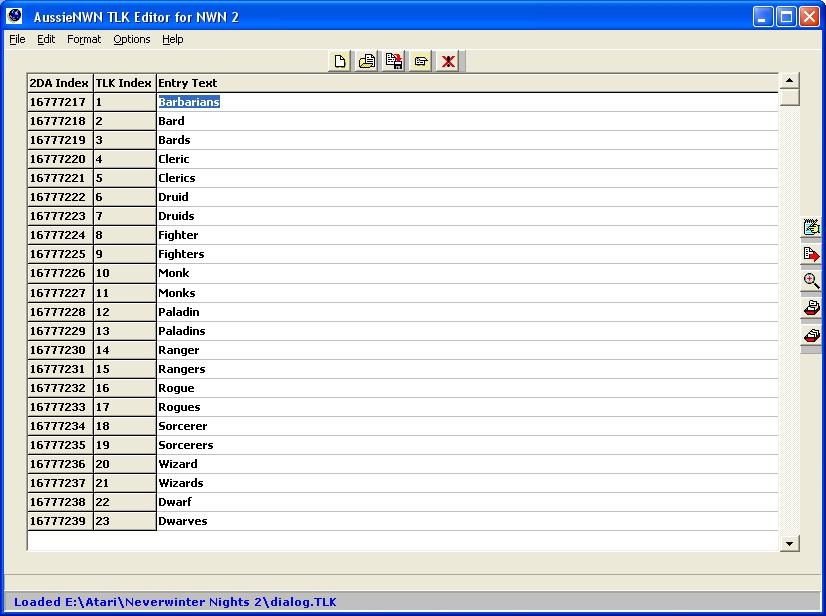
Features:
* Load from NWN or NWN2 TLK files
* Save as NWN2 TLK files
* Create New File
* Goto Line #
* Auto-Pad New Entries
* Full Word Search
* Copy 2DA Reference to clipboard
* Configurable Function Keys
* Configurable Font Size
* Quick Buttons
* Scrollable Grid
Known Issues:
* None that we found
Upcoming features:
1. User-configurable TLK file merge utility
2. XML support
3. Will test and fix and any compatability issues with Custom TLK files when available in game
Hope you enjoy it!
Updated to Version 1.1 19/11/2006
Version 1.1 New features:
1. Vastly improved file load time
2. Somewhat improved file save time
3. Somewhat improved edit/traversal speed
4. Dockable speed buttons
5. Goto last (non-null) entry function
Updated to Version 1.2 19/11/2006
Version 1.2 New features:
1. Mouse Wheel support for grid
Yeah, not sure how often this particular TLK editor is looked at... since its been over a year since the last post and update, but ive started to get the same issue with its latest version that CID-78 was getting with the pasteing from word... thing is...
Im not using Word, this was just copying and pasting from within the TLK editor itself. Thing is if i remove the offending TLK entry close and save after removing the offending line it still throws up an error and the next line above it becomes corrupted when i restart the tlk editor and reopen the TLK file(lots of odd stuff at the end of the text) and so on... which basically indicates to me that the .TLK file is fubared, not nice when youve done alot and suddenly all your works down the drain.
I quite liked your editor up to this point... ive also not used the multiline tools. However I do suffer from the missing hidden line break things.
Posted by Myridian at 2007-08-30 09:12:28 Voted 9.00 on 08/30/07
Very efficient and clear tool
Posted by nikademo at 2006-12-27 05:26:11 Voted 9.75 on 12/27/06
can you Please Ignore the "file is in use" check. i want to beable to work with my .tlk without closing the toolset. and beable to open and brows dialog.tlk even if the toolset is using it.
Posted by Wizard Of AZ at 2006-12-11 06:57:59 Voted 10.00 on 12/11/06
You know I think you guys are great...aka River "Ruby" Harmony _________________________ If you love RP you'll love! Link
We have identified some additional problems with the TLK when pasting from other applications (not just MS Office). We will rectify these in the integrated 2DA release (which is also not 100% solid on all test platforms). Stay tuned.
We regret to advise that AussieNWN utilities do not support the Microsoft Office family of products.
The main reason you can't paste multi-line text from an Office program into a TLK file entry is NWN line breaks are single-character (0xA).
Windows/Office/etc. uses the "DOS" double-character linebreak (0xD0xA). Even if the utility saves and loads again successfully (which you will find it does on XP with a Office XP or greater), it's likely to choke your NWN.
You will find that if you use the embedded multi-line editor (Alt+E then M, or configure a fuction key or press the speed button), you can really muck about with your TLK entries sans crashola.
We do note that on some systems the editor will "hide" the 0xA NWN linebreaks. If you can't see them, be very gentle with whitespace. We will look at this one in the next version.
(To save by keyboard do Alt+F then S or configure a function key.)
1) well it doesn't work on my system. for some reason. every time i try to paste that entry into dialog.tlk from word it will crash on save. last time the error message was: access volation at adress 00401C76 in module NWN2TLKEditor.exe writting of adress 73696420. i am using the same tags as the other races entries. and i am saving to the same file that is open. (by the way i am missing CTRL-S) running on windows XP proffessional, with word 2000 if that matters. the thing is that i can paste and save the exact same entry in a smaller file without problems. and custom .tlk support is still missing in patch 1.03 and i don't want to wait anylonger so i am using the same entries but with 16777216 added to them. (so i can create a custom .tlk at the same time as i am modifying a copy of dialog.tlk
2) reducing the size would give better accuraancy. so that you don't jump that many steps with a small scroll. i am fully aware of the gopost_new_comment_data_id=13
Er, yes you can ... at least on the machines we've tested (a tlk editor is not much good if you can't save your stuff). I thought maybe entry 251 might have been special, so I changed the text to:
Shield Wombat
The petty wombat thralldoms of long ago became locked in eternal wars with dingo-kind and other dwellers in the Underdeck. One by one, the wombat empires of the north failed, leaving only scattered survivors in the termite-ridden sections of the Underdeck. The root and leaf eaters that survived these battles are the shield wombats, and they are the most common type of wombat seen throughout the Rheums.
... and saved it. No problem. PLEASE NOTE: as the program tries to tell you, I did not modify any wacky control characters. They are a bit funky and weird.
There is an email address on one of the help pages. If you send me your system config, I might be able to make sense of it. We thought testing this on both Windows 2000 and XP would do the trick, but perhaps not.
2. Scroll bar button too big
Well, maybe. You move it half way down the form and you're half way through your tlk file, which is what it's supposed to do, yeah? There are also page keys and goto functions. In conjunction, they work for us.
Sorry slow response, we're presently integrating the TLK editor with a multiple file 2DA thingy.
Ideally you should be pointing the 2da to a new entry in a custom TLK file, or risk loosing your changes with a future NWN2 upgrade.
Custom TLK files are currently believed to be available after 1.03 patch. _________________________ AussieNWN - Dark Ages (now deceased) Link
Admin, Dev, DM
i have downloaded 1.2 but the program still have bugs. i can't change dialog.tlk
*example rename rogue to thief will work but replacing entry 251 (shield dwarf description) with
Dwarf
The dwarven kingdoms of long ago became locked in eternal wars with goblin-kind and other dwellers in the Underdark. One by one, the dwarven empires of the north failed, leaving only scattered survivors in the mountains or unconquered sections of the Underdark. The clans that survived these battles are the dwarves, and they are the most common type of dwarf seen throughout the Realms.
- Darkvision: Dwarves can see in the dark up to 60 feet.
- Level Adjustment +3: Dwarfs are more powerful and gain levels more slowly than other races. It will take much more experience for a dwarf to reach level 2 than it would for normal races, for example.
allways fails with either program error, pointer error or memory access error. i have tested to add the string to a small .tlk and that worked fine. so it might be a problem with file size.
1) if you open dialog.tlk make a change and try to save it again it will fail at 100% with a incorrect memory access. with the result that the file will not be changed at all.
2) The Scrollbar "box" is to big on large files so it's almost useless on a large file such as dialog.tlk
Posted by Arvirago at 2006-11-22 06:03:13 Voted 9.25 on 11/22/06
Excellent job, thx. Now let's see if tlks work in 1.03... _________________________ Reino de Aldor
Posted by Thomas_B at 2006-11-19 05:34:05 Voted 9.00 on 11/19/06
Would you believe the computer I wrote this on had a mouse without a wheel? Sad but true. You'll actually get around much quicker using the scrollbar or configuring a function key to open the "Goto Line ..." dialog, but mousewheel support added for completeness. Will be uploaded just as soon as it gets past ANWN QA.
I found a issue, or lack of support really. it doesn't allow you to scroll with the mouse wheel beyond the current page. it will probably enoy other people more then me, since I use the keyboard more frequently then the mouse but I think it should be there. I will come back and vote after they have realised patch 1.03 and I can put this to use. it's good that you added the custom .tlk index on the side. save me some thinking and probably the forum from some newbiee questions.
Thanks for the feedback so far.
Feel free to make suggestions and we will take them on board for future improvements _________________________ AussieNWN - Dark Ages (now deceased) Link
Admin, Dev, DM
Posted by Drucinda at 2006-11-18 14:24:51 Voted 10.00 on 11/18/06
Nice work, thanks! I'll keep my eye peeled for updates :)
Posted by jallaix at 2006-11-18 12:39:14 Voted 8.00 on 11/18/06
67 downloads and no votes.... Following the official rules (see below "Submit": I search for the notation system with with the search engine finding nothing, and I came back... I sould buy glasses !), I vote less than I used to do... But still, it's the first TLK editor for NWN2 and it works. It just misses advanced functionalities it will soon have (XML, merge, and so on). _________________________ Spellcasting Framework Wild/Dead Magic Zone (Spellcasting Framework add-on)
You must be Logged In to post comments in this section.
10 - A Masterpiece, Genuinely Groundbreaking 9 - Outstanding, a Must Have 8 - Excellent, Recommended to Anyone 7 - Very Good, Deserves a Look 6 - Good, Qualified Recommendation 5 - Fair, Solid yet Unremarkable 4 - Some Merit, Requires Improvements 3 - Poor Execution, Potential Unrealized 2 - Very Little Appeal 1 - Not Recommended to Anyone






 Site
Site









 at 2008-09-24 14:26:58


