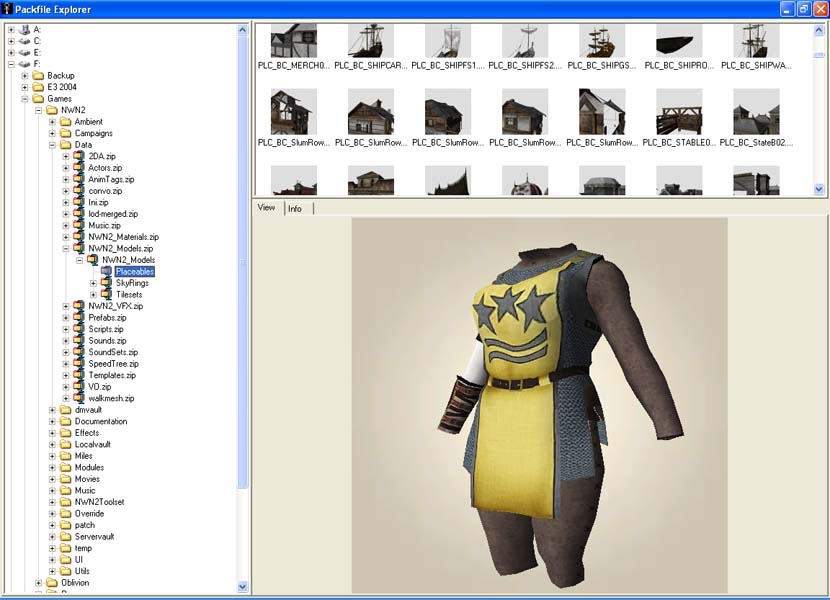
Added support for Neverwinter Nights 2 to Packfile Explorer last night. Thumbnail images can be generated for all textures and most models. Model preview shows the diffuse texture only. XFile exporter currently exports skinned models as a rigid mesh.
First try at an update here, hope this works... Full change log inside as usual. Fixed loading of textures from the Override directory and the same directory as the model. Changes to the UI to allow a couple of default window layouts. Added a optional details style view to the files window.
Fixed near clipping in thumbnail renders, model can now be moved and scaled in the view window. More UI improvements, sort in details view, dir forward / back / up added to toolbar.
Added support for Neverwinter Nights 2 to Packfile Explorer last night. Thumbnail images can be generated for all textures and most models. Model preview shows the diffuse texture only. XFile exporter currently exports skinned models as a rigid mesh.
I'll have to do some investigating... The only idea I have at the moment is that the model templates are causing the discrepancy. If I remember correctly there is a model scale value in there somewhere. Version 1.57 that you have can parse a few of the files in template.zip and display the models with their correct tint values... Once I get the GFF parser working a bit better and add the skeleton, I should be able to extract the entire model with all it's attachments at the correct scale from template.zip or the original model part from the MDB as I do now.
Ok, heres a little suggestion but i dont know if its possible, but could save some time... i been extracting few mesh from nwn2, and each time i save as .x it seems that they dont fit since some mesh are too big and some too small... is it possible that when saving as .x file they fit and look the right size as original mdb?
Hi DarkLobo, As usual my two second attention span means I am jumping back a forth between several games as the mood takes me. Version 1.57 is on Paines site if you haven't seen it, mostly improvements for Bloodlines so I didn't bother to post it here.
Just use something like WinRAR to extract the three files in the archive to anywhere you like on your pc then double click on PackfileExplorer.exe to run it.
Hi tazpn, Been a bit hectic with new year and all I'll post a fix real soon.
Anda, 'Control t' to generate thumbnail images for the current directory or 'Control r' to recursively generate for all directories below the currently selected one. All hot keys are listed below the legal mumbo jumbo when you start the program.
Posted by tazpn at 2007-01-01 15:18:01 Voted 9.50 on 01/01/07
Very nice. I wish I noticed it sooner as we need a good MDB previewer. I have one request for a future enhancement: If I inspect MDB files in the override directory or somewhere else then the tool does not find the textures. It would be nice to specify a set of paths/zipfiles for texture lookup or for you to detect the common ones automatically from the NWN2 install registry location.
Posted by Thomas_B at 2006-12-16 06:33:41 Voted 8.00 on 12/16/06
Agree with Girruuth, at least a link to some page of that Packfile Explorer you talk about should have been provided. _________________________ Reino de Aldor
The generic icons were originally only meant to be a placeholder until you generate thumbnail images of all of the models and textures. Thinking about it some more, as the creation of thumbnails is optional and there are plenty of non graphic file types this sounds like a good idea. Probably give me a good incentive to fix all the window re-sizing code I broke months and months ago with the 1.00 total re-write too.
This is not directed exclusively at you Czud, but to all creators. It would be nice if content creators would use the Description field to actually inform downloaders as to what the program is supposed to do. I understand that this is an update from the NWN 1 version, and I can infer that it has something to do with images and textures, but more details would be helpful if I have never seen this before. It might also be useful to describe some examples of uses for this program. Thanks to all creators out there, but we need to be more thorough please.
Cheers, _________________________ If you like the United Colors mod, check out this extension for it! Link
Posted by Anda at 2006-12-12 01:57:31 Voted 9.25 on 12/12/06
Great job and excellent tool.
I do however ask for a request and that is to be able to choose the style of "File Type" since you have everything as Icons. I personally hate them and would prefer names myself.
You may consider an options/setup to enable the change from each: Icon (Large or Small), Filename, etc.
Having the option of Column(s) as well would come in handy for various information, being able to sort by Name, Size and so on.
Other than that I'm giving this a 9.25 _________________________ I see repented people
You must be Logged In to post comments in this section.
10 - A Masterpiece, Genuinely Groundbreaking 9 - Outstanding, a Must Have 8 - Excellent, Recommended to Anyone 7 - Very Good, Deserves a Look 6 - Good, Qualified Recommendation 5 - Fair, Solid yet Unremarkable 4 - Some Merit, Requires Improvements 3 - Poor Execution, Potential Unrealized 2 - Very Little Appeal 1 - Not Recommended to Anyone






 Site
Site










 at 2007-01-01 15:18:01


