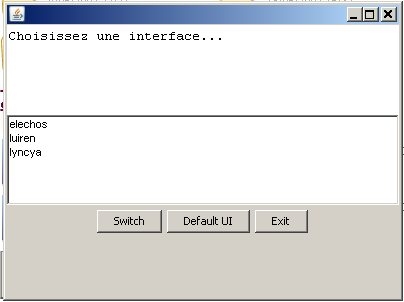
A simple mini tool to switch to an ui in some clicks instead of modifying manually the nwn.ini. Screenshot shows French language but if your virtual machine is not configured in French, the text will be in English.
To get the tool work, you need to have a Java Virtual Machine(JVM) installed. You can find it here : Link
After that you'll just have to download the .jar and to launch it in your My Documents\Neverwinter Nights 2 directory.
Français
Un simple petit outil pour se faciliter la vie et switcher plus rapidement d'une UI à l'autre sans avoir à modifier manuellement le fichier nwn.ini. Pour faire fonctionner ce petit outil vous aurez besoin d'une machine virtuelle java. Si vous n'en avez pas d' installée sur votre système vous pouvez en téléchargez une à l'adresse suivante : Link
Il ne vous reste plus alors qu'à placer le fichier dans votre répertoire Neverwinter Nights 2 de Mes Documents et à le lancer.
Salut, est-ce que ce serait possible de mettre a jour pout MotB S.T.P.? L'application cherche pour le vieil nwn.ini et cause une erreur. Merci! _________________________ E.C.Patterson Gaming Parents Studios
Posted by charlievale at 2007-06-16 14:25:54 Voted 7.00 on 06/16/07
Ok, got that. Pretty neet. Here are a few suggestions:
1. It would be more useful to me to have a checkbox for each ui/custom directory. I generally use them in combinations, rather than only one at a time.
2. It would be nice if resizing the window kept the title at the top and the buttons at the bottom, to make more room in the middle (I have lots of UI directories :).
You just have to place the program in C:\Documents and Settings\Administrator\My Documents\Neverwinter Nights 2. In really the Neverwinter Nights 2 can be everywhere but it have to be in the directory where your nwn.ini(in mydocs not the other one) is, this directory is the parent of the directory "ui\custom". It's in this directory that the program will go searching the UIs. In the case of the screenshot I have a directory ui\custom\luiren, ui\custom\elechos and ui\custom\lyncya. If it doesn't work(blank list) on your on your PC, there is two possibility :
-You didn't place the program in the right directory.
or
-You don't have subdirectories in ui\custom.
Anthra _________________________ Légendes du Luiren : Link
Posted by charlievale at 2007-06-16 05:29:40 Voted 7.00 on 06/16/07
10 - A Masterpiece, Genuinely Groundbreaking 9 - Outstanding, a Must Have 8 - Excellent, Recommended to Anyone 7 - Very Good, Deserves a Look 6 - Good, Qualified Recommendation 5 - Fair, Solid yet Unremarkable 4 - Some Merit, Requires Improvements 3 - Poor Execution, Potential Unrealized 2 - Very Little Appeal 1 - Not Recommended to Anyone






 Site
Site











 at 2007-06-17 00:01:38


