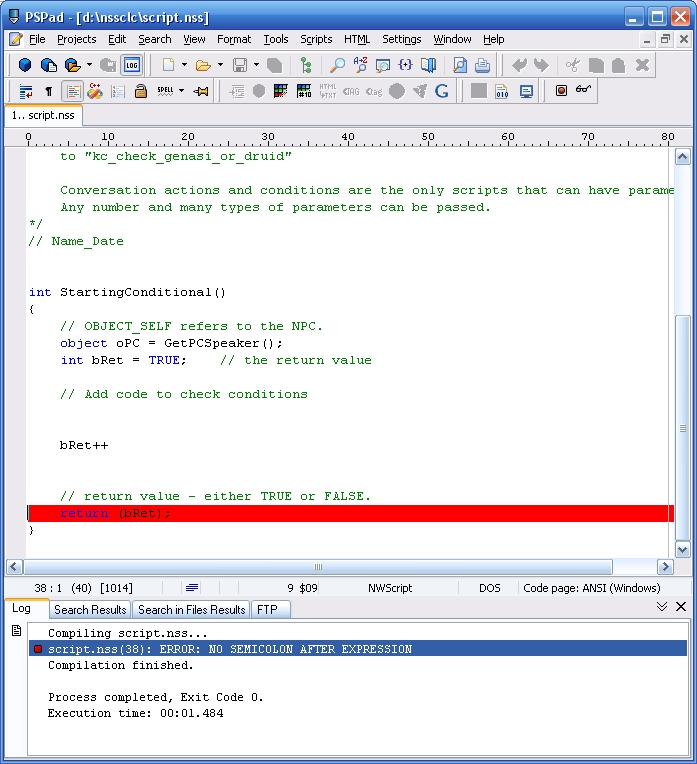
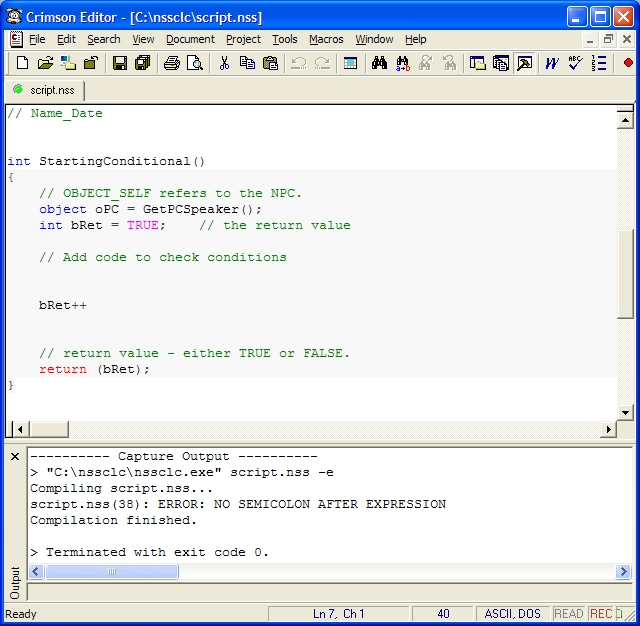
nssclc (standing for NSS Command-Line Compiler) is a stand alone compiler for NWScript source files (.nss files), available in the form of a command-line program. Basically, it takes one or more .nss files as input, generates the corresponding compiled files (.ncs files) and displays any compilation error on the command-line interface.
nssclc relies on some of the toolset DLLs to do the actual compilation work. From this specificity comes its two main features:
- Stand alone - nssclc can work on computers where Neverwinter Nights 2 is not installed, it's only a matter of copying a few files from your NWN2 installation.
- Standard - Generated files and compilation errors are exactly the same as the ones you would get in the toolset.
Typical use cases for this program are:
- NWScript validator for text editors - Check from within your favorite text editor if the code you just wrote has errors. Configuration instructions for many popular text editors are included in chapter "Installation". Additional nwscript support for your text editor (syntax highlighting, autocomplete and more) can be installed from Fancy Colors.
- Various compilation works - Automatize mass-compilation of .nss files for a persistent world, compile one huge script that for a reason or another causes stability problems in the toolset...
What nssclc Is Not
As nssclc is more or less a "wrapper" for the compilation functionality available in the toolset, don't expect the produced compiled files to be "lighter", "faster", or any kind of "better compiled" thing. Furthermore, any shortcomings to the actual NWScript compilation in the toolset will most likely be lurking in nssclc too.
Even if some text editors have plugin architectures, nssclc is not a plugin nor does it include one. To be used from within a text editor, we will use a functionality more widely available (and which doesn't require specific code on my side), the possibility to call external programs.
Version History
1.04 - 16/05/2009 - Feature release: several #include directories and source files can be specified, force and verbose parameters added, underlying parameter parser (Ndesk.Options) changed, localization capabilities, French localization added, license changed.
1.03 - 08/04/2008 - Feature release: includedir parameter added, exit codes added.
1.02 - 02/03/2008 - Maintenance release: bug fix (if output folder specified, it would prevent compilation if it already existed).
1.01 - 20/01/2008 - Maintenance release: bug fix (file extension in upper case would prevent compilation), exit codes changed.
1.00 - 12/01/2008 - Initial release.
nssclc (acronyme correspondant à NSS Command-Line Compiler) est un compilateur « autonome » pour fichiers source NWScript (fichiers .nss), disponible sous forme d'un programme en ligne de commande. Ce programme prend un ou plusieurs fichiers .nss en entrée, génère les fichiers compilés correspondants (fichiers .ncs) et affiche les éventuelles erreurs de compilation sur l'interface de ligne de commande.
nssclc s'appuie sur plusieurs DLLs de l'éditeur pour réaliser la compilation proprement dite. De cette particularité proviennent ses deux principales caractéristiques :
- Autonome - nssclc peut être utilisé sur des ordinateurs sur lesquels Neverwinter Nights 2 n'est pas installé, il suffit de copier quelques fichiers provenant d'une installation de NWN2.
- Standard - Les fichiers générés ainsi que les erreurs de compilation détectées sont exactement les mêmes que ceux obtenus sous l'éditeur officiel.
Les utilisations typiques de ce programme sont les suivantes :
- Valideur NWScript pour éditeurs de texte - Vérifiez depuis votre éditeur de texte préféré si le code que vous venez d'écrire contient des erreurs. Le chapitre « Installation » contient des instructions de configuration pour de nombreux éditeurs de texte. D'autres fonctionnalités dédiées au support du nwscript (coloration syntaxique, autocomplétion) peuvent être obtenu sous votre éditeur de texte en installant Fancy Colors.
- Travaux divers de compilation - Automatiser une compilation de masse de fichiers .nss pour un module persistant, compiler un gros script qui pose des problèmes de stabilité sous l'éditeur du fait de sa taille, etc.
Ce que nssclc n'est pas
Comme nssclc se contente plus ou moins « d'encapsuler » la fonctionnalité de compilation de l'éditeur, ne vous attendez pas à obtenir des fichiers compilés « plus légers », « plus rapides », ou quoi que ce soit de « mieux compilés » par rapport à l'éditeur. De plus, tout problème ou inconvénient relatif au compilateur de l'éditeur a de grandes chances de se retrouver aussi dans nssclc.
Par ailleurs, bien qu'un certain nombre d'éditeurs de texte permettent l'utilisation de plugins, nssclc lui-même n'est pas un plugin et l'archive à télécharger n'en contient pas. Afin d'utiliser nssclc depuis un éditeur de texte, nous mettrons à profit une fonctionnalité beaucoup plus répandue (et ne nécessitant pas de code supplémentaire de ma part !), qui est la possibilité de lancer des programmes externes.
Historique des versions
1.04 - 16/05/2009 - Nouvelles fonctionnalités : plusieurs dossiers #include et fichiers source peuvent être indiqués, paramètres force et verbose ajoutés, analyseur pour les paramètres (Ndesk.Options) changé, fonctionnalité de localisation ajoutée, localisation française ajoutée, licence changée.
1.03 - 08/04/2008 - Nouvelles fonctionnalités : paramètre includedir ajouté, codes de sortie ajoutés.
1.02 - 02/03/2008 - Maintenance : correction de bogue (si un dossier de sortie était indiqué et qu'il existait déjà, la compilation n'était pas réalisée).
1.01 - 20/01/2008 - Maintenance : correction de bogue (si une extension de fichier en majuscule était trouvée, la compilation n'était pas réalisée), codes de sortie changés.
1.00 - 12/01/2008 - Version initiale.
Yay, we made it! ^_^ Thanks for reporting back, and for the vote.
Posted by sjk77 at on06/16/09
Ah, yes, that's what was causing the screen weirdness, sorry about that. I had them all turned on the old exe before I knew what was causing the problem and it migrated to the new one for some reason. Anyway, thanks a lot for fixing the problem! It works perfectly now.
Posted by Elf at 2009-06-1613:10:57
sjk77, can you check you do not have any specific compatibility settings set, by right-clicking on nssclc.exe, Properties then Compatibility tab?
Posted by sjk77 at on06/16/09
That new .exe worked (it compiled correctly), but it minimized my screen resolution and colors while it was running. It seems to do that whether I'm running it using cmd.exe or just dragging a file on top of it.
Posted by sjk77 at on06/16/09
Okay, the error is this: Could not load file or assembly 'ManagedResourceInterface, Version=1.0.3344.3267 8, Culture=neutral, PublicKeyToken=6bb96f3d82daa243' or one of its dependencies. An attempt was made to load a program with an incorrect format. nssclc at nssclc.NssclcNWN2ToolsetMainForm.Initialize(String sModuleDir, Boolean bGe nerateDebugInfo, String[] sIncludeDirs) at nssclc.Program.Main(String[] args) Error: Unsupported compilation error.
Posted by sjk77 at on06/16/09
Coincidentally, my dad's computer has the exact same version for .NET framework. Also, the game itself wasn't installed on my dad's computer, I just copied the necessary files from my installation.
Posted by sjk77 at on06/16/09
Yes, I've been using the toolset exclusively to compile my scripts since I reinstalled the game (which was just a few days ago). I had to update my direct X version at first to get it to work, though. Also, my .NET framework version is 3.5.30729.01
Posted by Elf at 2009-06-1408:06:40
My bad, instead of just launching the toolset, can you tell me if you can compile any nss file in the toolset without getting errors?
Posted by sjk77 at on06/16/09
It seems it isn't a problem with my game files because it works perfectly on my dad's computer. I shared my exact setup, including my nwn2 files, of course, and it ran without a hitch. It must be a Vista issue, then. My dad's computer is 32-bit XP.
Posted by sjk77 at on06/16/09
Unfortunately, I didn't mess up my install. As for reproducing the error, I think we're out of luck there too because it always gives me that error no matter how or what I try to compile. I tried dragging a script file on to the .exe and, using a shortcut, and using windows cmd.exe and the error is always the same. Like I said, it does this for every .nss file I try, including ones that are blank or with an empty main. If it matters, I'm on Vista 64 and my game is a mix of direct2drive and disc installs. The base game was direct2drive, the first expansion was installed from a disc, and the second was again direct2drive.
10 - A Masterpiece, Genuinely Groundbreaking 9 - Outstanding, a Must Have 8 - Excellent, Recommended to Anyone 7 - Very Good, Deserves a Look 6 - Good, Qualified Recommendation 5 - Fair, Solid yet Unremarkable 4 - Some Merit, Requires Improvements 3 - Poor Execution, Potential Unrealized 2 - Very Little Appeal 1 - Not Recommended to Anyone






 Site
Site