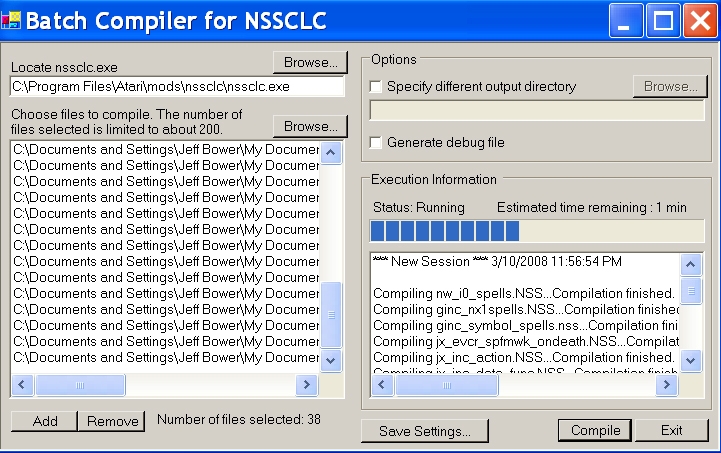
Have you ever needed to compile 10, 50, 200, or 1000 scripts? This utility automates this process as easily as possible. Essentially it is a GUI interface that allows you to select multiple scripts at once and compiles them one at a time using the NSS Command-Line Compiler.
*** Installation ***
1. Get the NSS Command Line Compiler and carefully follow their installation instructions. Here is a link�
Using the Batch Compiler should be self-explanatory by following the labels on the GUI window. However, I recommend you read the documentation for the NSS Command-Line Compiler to understand what my program is doing.
*** Compatibility ***
Platform - This application was created on a Windows XP se system. I do not know how it will perform on different operating systems.
.net - Requires the .net framework 2.0.
*** Known Issues ***
The NSS Command-Line Compiler allows you to specify an output directory other than the directory the scripts are in. Currently, this feature does not seem to be working properly. However, I have enabled this feature in case there is a fix soon. Select a different output directory at your own risk.
*** Updates ***
v1.1 - 03-03-2008 - A complete overhaul has made the Batch Compiler nicer to use. Here is a list of changes.
- Suppressed the DOS command window. Now you may run this program in the background as you work (or play).
- Captured the NSSCLC output into a text box.
- Removed the auto exit option. It was absolutely unnecessary now that the NSSCLC output is captured.
- Changed the file select window to a proper list box.
- Enabled the option to select a different output directory.
- Added a browse button that opens a folder selection dialog for the output directory.
- Added a progress bar.
- Added a timer that estimates the time left until completion. Updates after every compile.
- Created a spiffy icon for the executable. =)
v1.2 - 03-10-2008 - The following features were added.
- Added a �Add� button that will let you add additional files to the compile list.
- Added a �Remove� button that will let you remove selected files from the compile list.
- Changed the output text box to a list box that now captures the all the nssclc output during a compiling session and presents it in a time stamped list for your viewing pleasure.
- Replaced a couple of text boxes with plain text for a more �professional� look.
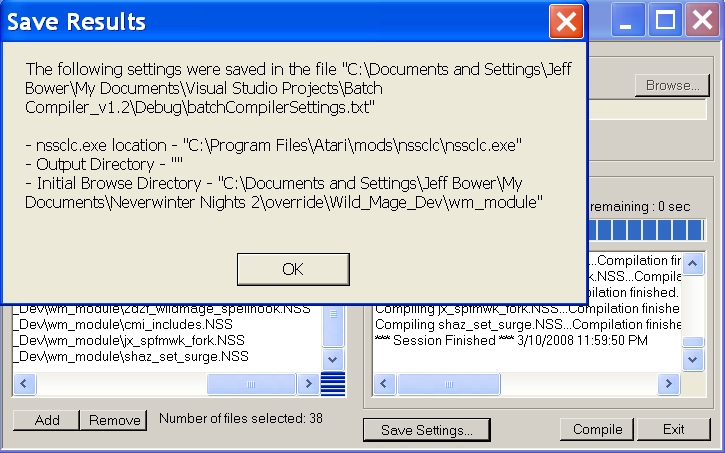
- Added a �Save Settings� button that will create a text file in the working directory of the batch compiler that stores the nssclc.exe location, the last directory browsed, and the output directory if enabled. This file is read when the program loads automatically restoring your saved settings for your compiling convenience.
I kid a bit, but I do want to make this program as usable as possible. I belive that I can implement maian's suggestions yet again. However, this time I may take a little longer to do an update.
@maian-
The reason the number of files is limited is that the open file dialog function can only open so many. Oddly, in the documentation it says that it is limited to 200, but I have gotten it up to about 360. Your milage may vary. Note, not that there is an add button you can add files to the list to the limit that a listbox will hold.
- It seems to me that when you launch nssclc synchronously, i.e. your app spawns nssclc and waits until it finishes. This is obvious in the way that the GUI becomes unresponsive when the compile button is hit. You should instead launch the nssclc process asynchronously, i.e. don't wait for the process to finish and instead set an exit handler that is run when the process finishes. This way, the user can use the GUI during compilation, including looking at the compilation results. Again, I don't know how to do this is .NET but it should be possible.
- If the output box is already scrolled to the bottom, it should autoscroll to the bottom during compilation. If the output box isn't scrolled to the bottom, then continue to do nothing (current behavior).
- The "Compiling ...Compilation finished" should be printed in two steps. The "Compiling ..." should be printed when just starting the compilation for that file. Then the "compilation finished" should be printed after compilation finishes for that file.
- "Error: input does not exist" doesn't tell me which file it non-existent. Again, it should show "Compiling ..." before attempting to find and compile the file.
- The blank line after "*** New session ..." should be removed.
- A "Clear" button that clears the output box would be nice.
- Pressing delete key on a file should remove it from the list.
- Adding a file that already is in the list should do nothing.
- Settings should automatically be saved when changing nssclc path. There should be no need for a Save Settings button.
- The list of files should also be saved in the settings file.
- You should consider changing the settings file into an INI if you plan to store more settings in it besides the nssclc path.
- When removing a file, the file just after the removed file should be highlighted, or if the removed file was the last file, the previous file should be highlighted. (Goes in hand with the delete key).
- Files that don't contain a "void main" function, i.e. include files, should not be compiled. To be specific, if a file does not have a line that matches the regexp "^\w*void\w+main\w*\(", don't compile it. That's a Perl-style regexp - I dunno if .NET supports them directly.
- Using WinXP and the buttons look weird - standard WinXP buttons should have rounded corners and very light shadows. Your buttons don't follow the theming rules of WinXP.
- Is there a reason why the # files is limited to around 200?
Some more comments (much nitpicking):
1) It still looks pretty rough. All the ">>>>" stuff should be unnecessary, and the text to the right of them should just be plain text rather than textboxes. Well, just make it look professional :)
2) "Specify diffrent output directory" - different is misspelled.
3) Should be able to select, add, and delete files from the list.
4) It should remember where nssclc is located after subsequent launches.
5) It would be nice if the output of each compilation is concatenated, so the user gets to see the result of each compilation.
Posting here too, in case you'd miss the comments on nssclc page: output directory bug should have been taken care of, and a new version is up. Keep me posted on the results! ^_^
Thanks for the feedback. Those are some good suggestions. I agree that it would be better if the command window didn't pop up for every script that is compiled basically interupting anything else you might want to do when the program runs. When NSSCLC is updated to fix the output directory bug I'll take a stab at this suggestion. To be honest, I have no idea how to "capture" the output like you said, but I enjoy figuring this stuff out. However, if it is going to take mountains of code and involve importing custom classes and libraries I may pass as I really just intended this to be a small simple app.
I can however make the window a list.
Also, I thought about removing the "auto exit" option, but left it in because it is informative, if you are only compiling a couple of scripts, that everything is working. Perhaps I'll re-word it to be more clear.
Just tried it and it works. A couple suggestions:
1) Don't spawn shells when launching nssclc. Instead, capture the output and display the results in a textbox. I don't know how to do that in .NET but it should be possible.
2) Show some sort of progress bar instead.
3) Make the list of files an actual list, rather than just a textbox.
4) The option "auto exit" is confusing, because the user could think that it means the batch gui exits after compilation. I think you should just remove it, since I can't imagine a case where it should be unchecked.
And of course, it's pretty slow, but that's the fault of nssclc, not your app.
You must be Logged In to post comments in this section.
10 - A Masterpiece, Genuinely Groundbreaking 9 - Outstanding, a Must Have 8 - Excellent, Recommended to Anyone 7 - Very Good, Deserves a Look 6 - Good, Qualified Recommendation 5 - Fair, Solid yet Unremarkable 4 - Some Merit, Requires Improvements 3 - Poor Execution, Potential Unrealized 2 - Very Little Appeal 1 - Not Recommended to Anyone






 Site
Site









 at 2008-05-17 07:56:29


