**UPDATED TO VERSION 1.03**
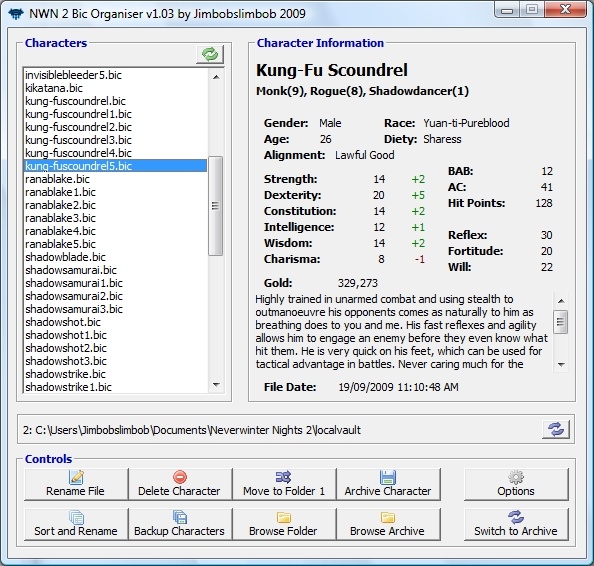
This program is used to view, archive, backup and open Neverwinter Nights 2 bic (character) files. Features include:
- Ability to sort and rename files by date.
- View info on selected characters
- Archive and Backup characters
- Rename and delete characters
- Can switch between 2 character folders (eg, the one in the main NWN2 folder and the one in your user Documents folder).
-Ability to select an external 'character editor' like the GFF Editor available. When done, you can double-click a character to open it with this program.
NOTE TO VISTA USERS:
You will need to 'Run as Administrator' for the program to read and write to your 'localvault' folder in 'Program Files'.
V1.03 Changes:
- Added a switch to view files in the 'Archive'.
- Added ability to rename and delete files in the Archive.
- Added ability to move files back from the archive to the current BIC folder.
- Added a splash screen.
- Added box asking if you want to overwrite a file that already exists (moving to and from archive folder).
- Added ability to swap a bic file to and from your first/second bic folder.
- Some other minor improvements and changes.
V1.02 Changes:
- Can now be minimized (god only knows why or how I disabled that option!).
- Added the following additional character info:
- Alignment
- Hit Points
- Gold
- When opening the external GFF editor, the sent filename is enclosed in quotes. This may help other editors out there determine what is being sent via the command line. Note: Thus far I have still only tested it with 'GFF Editor', which still works fine.
- The default 2nd bic folder looks for the localvault folder in the current user's 'Documents' folder.
- Default 'Archive' folder is also now in the user's 'Documents' folder.
- When switching folders and one of them does not exist it no longer switches 'BIC Folder' to that folder.
- Added a 'Refresh' button for the BIC list.
- Minor cosmetic changes.
- Options screen now highlights incorrect files/folders in red.
- Additional error control for missing GFF program added.
- 'Rename File' box now loads at the center of the main screen (as apposed to the Windows Default).
- Error message box added for when no bic file is selected and a 'Rename', 'Delete' or 'Archive' is attempted.
To give everyone that's interested the heads up, I have already made quite a few changes. Version 1.01 (which is not yet uploaded as I am still working on it) has the following changes/improvements:
- The default 1st bic folder looks for the localvault folder
in the current user's 'Documents' folder.
- Default 'Archive' folder is also now in the user's 'Documents' folder.
- When switching folders and one of them does not exist it no longer switches 'BIC Folder' to that folder.
- Added a 'Refresh' button for the BIC list.
- Minor cosmetic changes.
- Options screen now highlights incorrect files/folders in red.
- Additional error control for missing GFF program added.
- 'Rename File' box now loads at the center of the main screen (as apposed to the Windows Default).
- Error message box added for when no bic file is selected and a 'Rename', 'Delete' or 'Archive' is attempted.
If anyone comes accross anything else, please let me know and i'll try and include it in the update.
Glad its been received so well, I am in the process of looking for any bugs or improvements to make it even better so please keep the comments coming in. Hope its as useful to everyone as it is to me.
Posted by Dragonsbane777 at 2009-10-29 06:13:57 Voted 10.00 on 10/29/09
BAM! _________________________ Talernon3 - Age of Dragons Link
Talernon Team Submissions: Link
3C Music Compilation: Link
Posted by nicethugbert at 2009-10-28 21:27:54 Voted 10.00 on 10/28/09
10 - A Masterpiece, Genuinely Groundbreaking 9 - Outstanding, a Must Have 8 - Excellent, Recommended to Anyone 7 - Very Good, Deserves a Look 6 - Good, Qualified Recommendation 5 - Fair, Solid yet Unremarkable 4 - Some Merit, Requires Improvements 3 - Poor Execution, Potential Unrealized 2 - Very Little Appeal 1 - Not Recommended to Anyone






 Site
Site