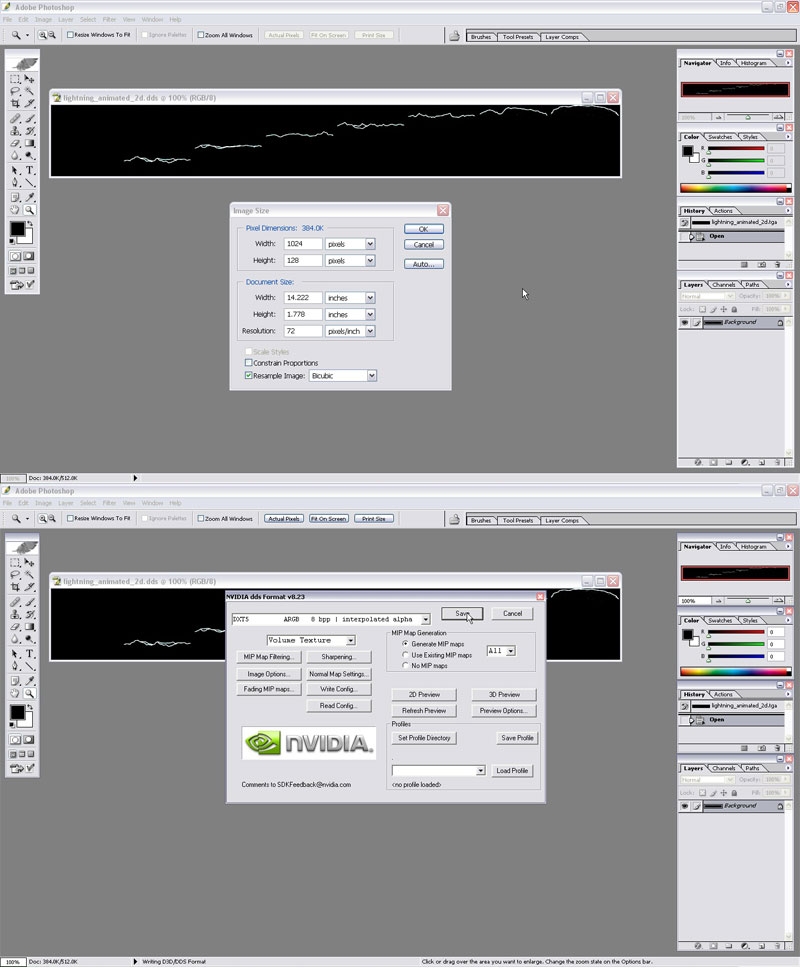
Create an image file of sizes: 128x256, 128x512, 128x768, 128x1024, 128x1280, etc (Height is 128, Width is 128 multiplied by 2, 4, 6, 8, etc). You can change the heigh, but then the width must match using the same simple formula.
Start creating your animation. Using 128 as the base height, then each 128x128 square on the image is a "cell" or frame of animation. Just like a flipbook, each should be slightly different than the next. This quick tuturial isn't going over animation method, but one helpful hint is to create a 128x128 layer and start Copy/Pasting that over to the next cell. Either that or at least set up a 128x128 set of guidelines.
When you are finished with your animation FIRST save the file as PSD or TGA or something. This is the ONLY way you will be able to save the file for opening later!!
Next save it as a DDS file using nVidia's DDS export plugin: Link
Use DXT5 and Volume Texture (see pics).
Now you have your animated texture, and can apply it to a billboard or other FX :)
PS: this tutorial is quick and simple, created as a 10 minute project to answer a question. It should get you going, though.






 Site
Site