Being new to the NWN2 toolkit I set out in search of a tutorial to show me a terrain shadowing tricks. I couldn�t find any so I set to dissecting one of the areas that came with the main quest to see what I could see. The process I used was very helpful to me so I thought I would run through it here for you guys.
The first thing I did was copy one of the areas from the main quest, 2200_Port Llast. From the C:/Program Files/Atari/NWN2/Modules folder. Copy it into your /My Documents/Neverwinter Nights 2/Modules folder.
Now open the same module up in your tool kit. Then load the area named 2200_Port Llast.
Under the �Show/Hide� option turn off the tree�s so they are not showing on the area overview.
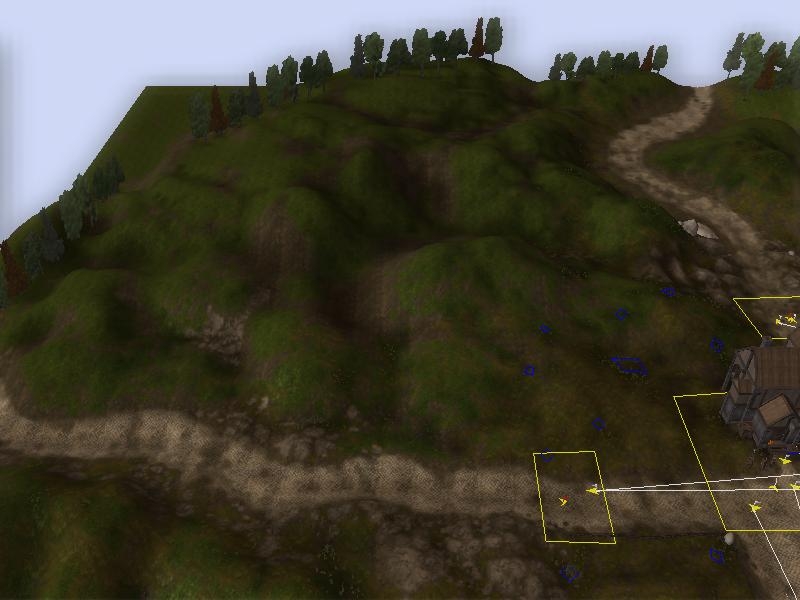
Go a spot that has lots of shading, like this one.
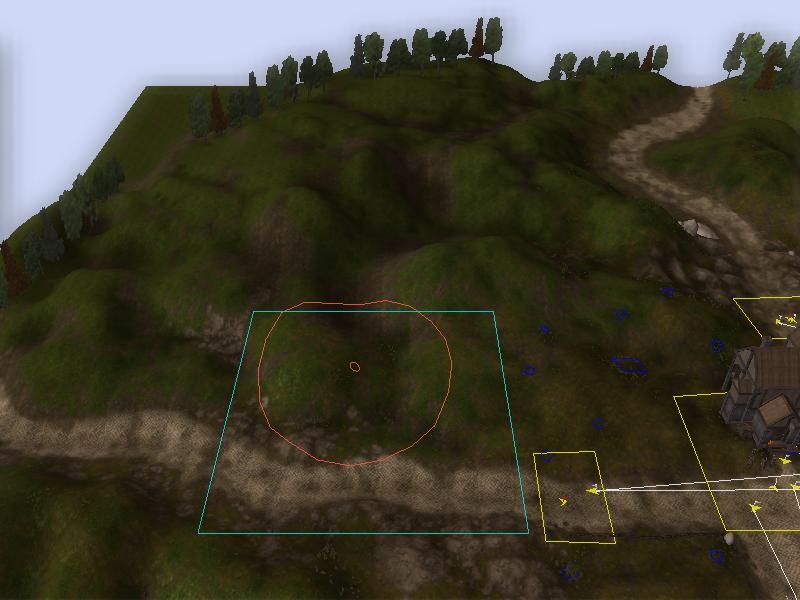
In your toolkit, go to the Terrain tab and click on the �color �option. Set your color to the top left most white color under the palette and set the diameter of your brush to a wide diameter like this
Now starting at the bottom of the screen left click and hold and the left mouse button and drag the red circle over the area on the screen until it looks clear of shading like this.
Now, this is where you learn shading. Under the Edit drop down on the toolkit, click on the undo button. It should make all of the shading you just erased reappear. You can hit redo now and bring it back. Do this several times, moving the camera around to diiferent angles, and note how the darker shades are used in certain places and lighter shades usually surround it. You can do this with any area, and it really opens your eyes in some cases.
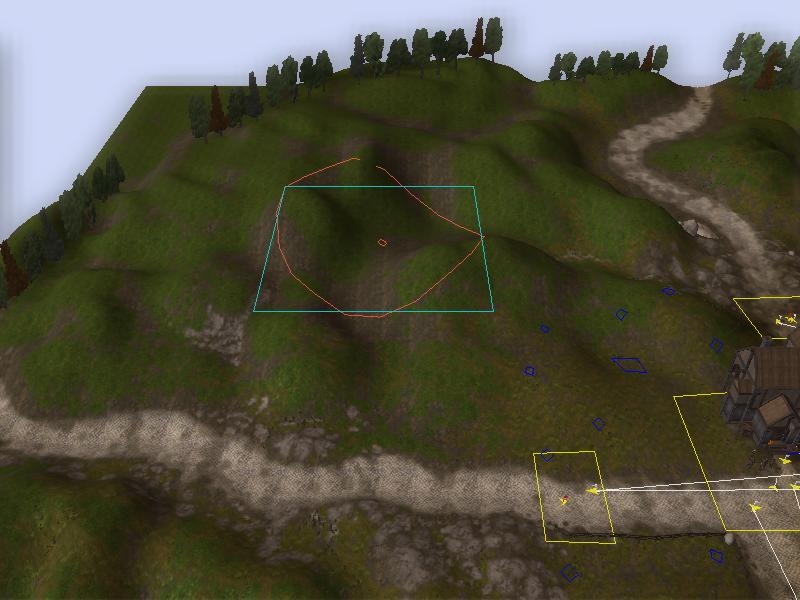
(To experience this from your browser. Open both pics Exp1 and Exp3 from above and place them on top of each other. Then just take turns clicking the pics.)
Next you want to �undo� the area so once again you have the shades on the hills. This time take one of the larger hills and erase only half the shades off of it with a smaller brush so that it looks like this.
Now set your brush to a small size, around 2 inner and 4-5 outter, and play with the gray colors on the second from the top line of colors on the palette. I usually start with the grey color on the left most side and work my way right, using smaller brushes with the darker grays.
What you want to do is recreate the shades on the hill so that it fits in. Once you have this down you can shade your own modules fairly easy. Using other areas from the main quest to model your own areas by. I know this seems simple to some, but when your starting fresh with a toolkit like this, little things like this help a lot.
Louis Vuitton symbolizes both the social status and noble elegance. It has long been the unparalleled symbol for mainstream fashion. Louis Vuitton as the leading luxury brand in globle luxury industry, traditional craftsmanship is the avant-garde of fashion without compromising. _________________________ Louis Vuitton gives luxury and noble looking for both men and women. You may only be a person in this world, but for someone, Louis Vuitton handbags, you're the world. Show your style with authentic Louis Vuitton handbags at Louis Vuitton outlet store. We Are Authentic Louis Vuitton Outlet Offers Wide Range Of Authentic Pre-Owned Louis Vuitton Handbags, Louis Vuitton Wallets, and Louis Vuitton Luggage! 30-Day Returns And Free Worldwide Shipping!
Posted by smachkem bashem at 2008-09-28 09:54:32 Voted 7.75 on 09/28/08
The format is usefull in showing those that think colouring and shading is not worth the effort the error of there ways.
It also encourages experimentation rather than read, remember, repeat learning allowing which is always a plus :p Since if everyone waited to read first there would be no guides out there. _________________________ Midgardsaga - Link
Posted by smachkem bashem at 2008-09-28 09:52:26 Voted 7.75 on 09/28/08
The format is usefull in showing those that think colouring and shading is not worth the effort the error of there ways.
It also encourages experimentation rather than read, remember, repeat learning allowing which is always a plus :p Since if everyone waited to read first there would be no guides out there. _________________________ Midgardsaga - Link
Although the tutorial doesn't actually give any specifics, it gets you to teach yourself. Brilliant idea! If people work through the exercise, they will certainly improve.
It's possible to use other base colours rather than just greyscale - the effects are easy to overdo though.
Posted by jlf2n at 2008-09-05 11:25:41 Voted 10.00 on 01/25/08
Opps, the linked pic 3 is wrong. Its the same as pic 1. It should look like the hosted pic #3 on the right side of the screen.
Posted by jlf2n at 2008-01-25 19:14:47 Voted 10.00 on 01/25/08
Thanks SKG73, its amazing how many people leave out gray scaling and shading. Its as important as anything else you do.
Posted by SGK73 at 2007-12-04 07:40:36 Voted 8.50 on 12/04/07
A good tutorial, well written and easy to understand.
One thing that I've learned is that something in the baking/save/load routines is really broken in the toolset regarding to vertex colours. It seems that each time you bake, save or load, I haven figured out which or more then one is broken, the colours are interpolated again and so over time they wash out especially when doing spots of colours against white.
So doing the colours last and in one session then bake the area is a good idea.
I've found that exaggerating the colours a bit in prefab areas is a good thing as it can then take 3-5 rebakes when people modifies them and rebakes.
You must be Logged In to post comments in this section.
10 - A Masterpiece, Genuinely Groundbreaking 9 - Outstanding, a Must Have 8 - Excellent, Recommended to Anyone 7 - Very Good, Deserves a Look 6 - Good, Qualified Recommendation 5 - Fair, Solid yet Unremarkable 4 - Some Merit, Requires Improvements 3 - Poor Execution, Potential Unrealized 2 - Very Little Appeal 1 - Not Recommended to Anyone






 Site
Site











 at 2008-09-05 11:25:41


