I've downloaded and installed quite a few of the UI mods and haven't seen one that addresses one of the most annoying aspects of the default UI.
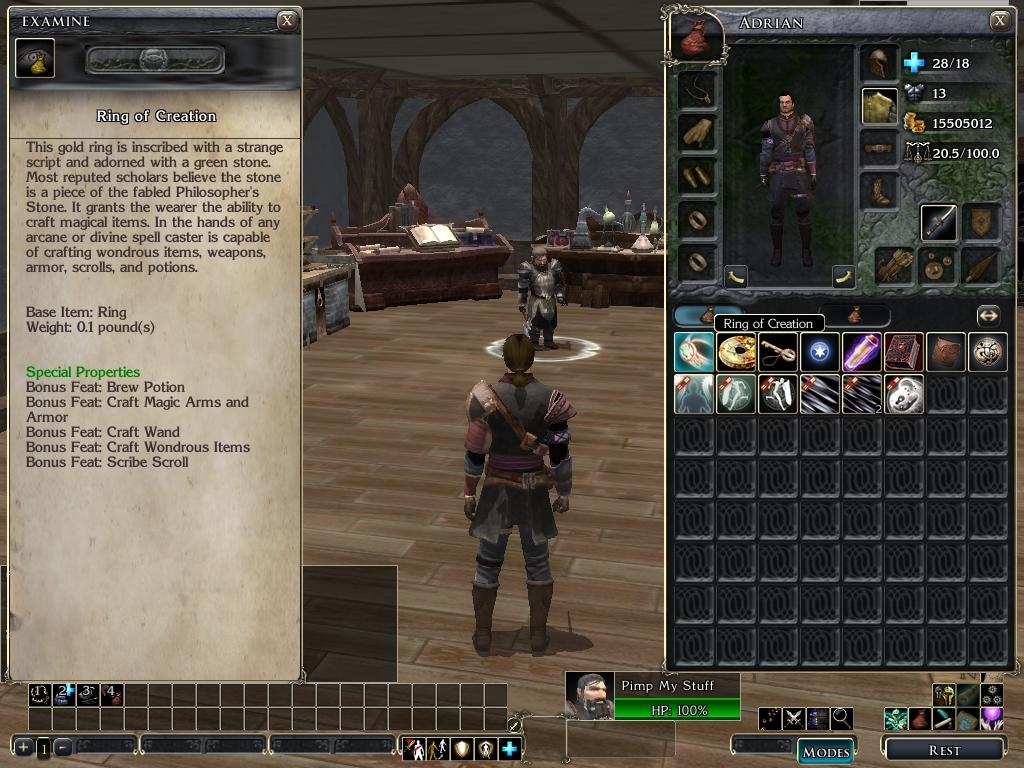
Everytime I examined an item, I'd need to scroll down in NWN2's default tiny inspection window to actualy see the item's stats. After the X hundreth tiime and an aching hand later, I decided to do something about this, so I modified the examine screen to display a larger area, which eliminates the need to scroll down when examining items for most items in the game.
!NOTE: This is optimized for 1024x768 resolution.
I also modified the Slim UI green skin examine window (for 1024x768) to do the same thing, as I was using that UI for awhile; however, I uninstalled it because the {Slim GUI} hotbar buttons did not work correctly. I included my modification to Slider's GreenUI for posterity.
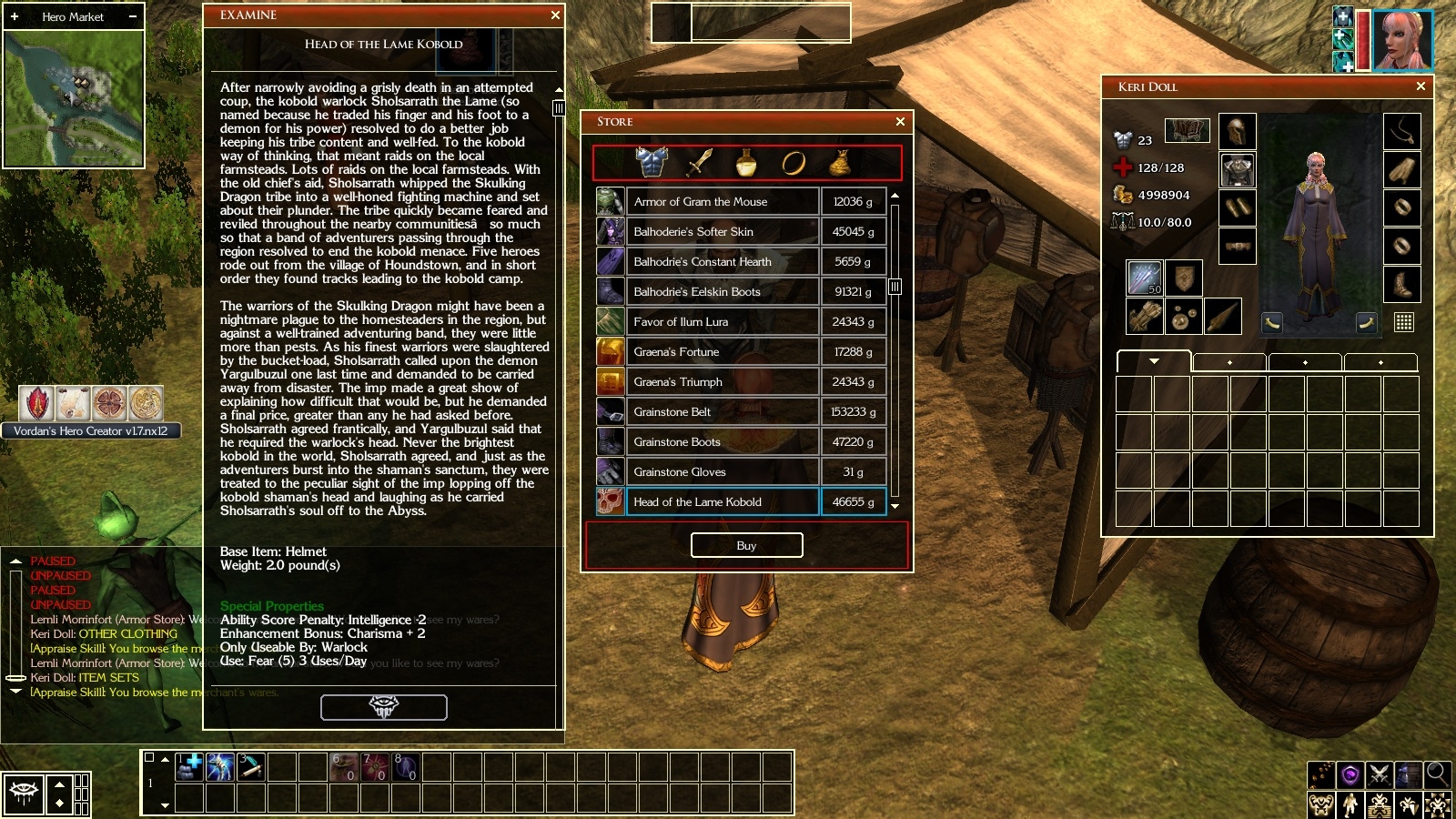
*Update 10/16/2012 - Provided a 1600x900 sreeen resolution optimized version of the Slim GUI Gold inspection screen.
This should work will all versions of NWN2. Tested with Storm of Zehir patch 1.23.
Posted by pelhikano at 2009-08-14 07:01:25 Voted 10.00 on 08/14/09
Thank you, this is great!
Posted by BlueSilver at 2008-08-01 09:51:03 Voted 10.00 on 08/01/08
Thanks a lot for this! _________________________ 33 Voicesets for NWN1 and NWN2: Link
270 Portraits for NWN2: Link
Posted by sardoniks at 2008-07-26 11:32:19 Voted 8.50 on 07/26/08
Alzikar, I appreciate this mod. Like you, my wrist gets tired from all the scrolling. I see a class-action lawsuit against Obsidian in the future for all the Repetitive-Stress-Injuries.
Is there a way to rearrange the order in which the Flavor Text, Item Stats, and Special Properties are displayed? If I had my way, all that annoying text would be at the bottom of the window. Let the people who WANT to read that stuff scroll down to read it. I've never read any of it, myself. _________________________ The appearance of sincerity counts for more than actual truthfulness. -Morley Dotes
Posted by theobeau at 2008-06-20 07:49:07 Voted 10.00 on 06/20/08
Alzikar,
Thanks again for your advice. I have to up my vote for your continued great service!
Best wishes!
Posted by theobeau at 2008-06-18 03:28:34 Voted 10.00 on 06/20/08
Hi there,
As an aside, is there a means of designing a similar mod to increase the number of items displayed on the examination windows that are associated with the various bags of holding?
I find it annoying that so few items are displayed and there is so much scrolling around so that we can micro-manage inventories.
Cheers!
Posted by theobeau at 2008-06-13 19:24:01 Voted 10.00 on 06/20/08
Alzikar,
Your mod works well. The additional change to the interface improves gameplay in a subtle but very effective manner.
Keep up the good work.
PS: An extra +0.5 for your earlier technical support!
Posted by theobeau at 2008-06-11 04:22:01 Voted 10.00 on 06/20/08
Thanks for your reply. Your own experiences suggests that it shouldn't be a problem.
I will follow your suggestions and hope to have a problem free experience (I will certainly vote if it works as described).
It should be compatible with any and everything. It changes only one file (examine.xml), which contains no custom scripts or calls of anykind. If you're using another custom UI, you could drag and drop this examine.xml into your NWN2\UI\custom folder after installing your own preferred UI. In this way, you can "mix and match" components of any number of UIs that you like.
For example, for my UI, I use the hotbars and quickcast from CleanUI, the minimap, playerbar, and container from LiteUI, the inventory screen from a modified Charlie's UI, Cyric's horizontal targetbar, Slate's Tiny Spellbook and my own examine window. :-)
Hope this helps. :-)
Posted by theobeau at 2008-06-08 01:15:03 Voted 10.00 on 06/20/08
Hi there,
Is this compatible with other Vault UIs (in particular, xUI which I use)?
Thanks
Posted by charlievale at 2008-06-07 13:22:22 Voted 10.00 on 06/07/08
10 - A Masterpiece, Genuinely Groundbreaking 9 - Outstanding, a Must Have 8 - Excellent, Recommended to Anyone 7 - Very Good, Deserves a Look 6 - Good, Qualified Recommendation 5 - Fair, Solid yet Unremarkable 4 - Some Merit, Requires Improvements 3 - Poor Execution, Potential Unrealized 2 - Very Little Appeal 1 - Not Recommended to Anyone






 Site
Site









 at 2009-08-14 07:01:25


