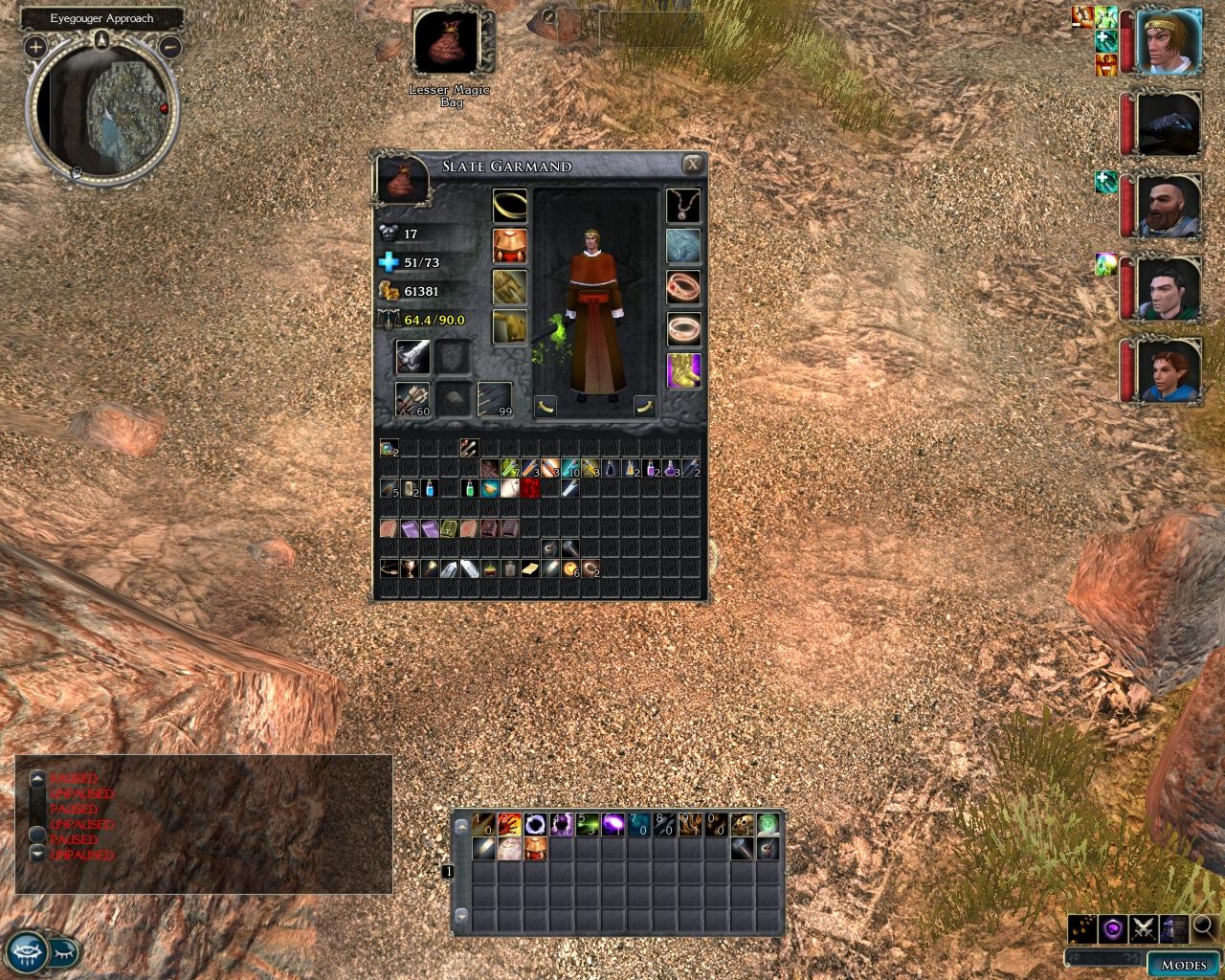
The default inventory uses really large icons and sorts your carried items over 4 "bags" (pages) of inventory. I wanted to be able to see all of my inventory at the same time. Given that motivation, I created this Tiny Inventory mod.
I'm going to try this out, mostly cause I keep losing stuff in the tabs and I end up selling most of what I pick up or looking at the full description anyway.
Posted by Shirle_Illios at 2006-11-13 16:26:11 Voted 8.00 on 11/12/06
Posted by SLATE at 2006-11-12 22:34:28 Voted 9.00 on 11/09/06
Shirle_Illios:
I've noticed that too - the disappearing inventory issue. I havent been able to pinpoint the issue yet. I'll post an update when/if I figure it out.
Posted by Shirle_Illios at 2006-11-12 02:19:42 Voted 8.00 on 11/12/06
I love this mod (and I�m running at 1680x1050). Sure it makes the icons smaller, but the big benefit of it is that you no longer have 4 tabs and instead have everything on one page.
When getting new stuff I inspect them anyway, and after that I simply organize my inventory so I know more or less what is where (which I needed to do with the default GUI anyway; just don�t have the �drag to tab� step in between anymore).
I do have a problem with it though. It seems that with this mod installed quite often if open the inventory of a character, close it, and then open it again the inventory will appear completely empty. This is fixed by switching controlled character or equipping/unequipping equipment, which seems to refresh the inventory view. But that�s not always practical (or possible).
Posted by SLATE at 2006-11-10 15:24:56 Voted 9.00 on 11/09/06
They aren't as small on low resolutions. This isn't a mod for people who use high resolutions. In fact, at 1280x1024, I don't even use this. Its just a mod I made for others, I'm sure someone will find it useful.
Posted by Mordaedil at 2006-11-10 13:58:06 Voted 9.50 on 11/10/06
At first I thought the icons were too small... Then you made them smaller. I forgive you because I can finally organize everything without needing to open each "bag" individually.
Don't bother. I figured out how to do it. Check out my "Big Inventory Icons and More Tabs" submission, once it's approved.
I was totally inspired by you! You'll notice two of your UI improvements in the screenshot I submitted with it. _________________________ Big Inventory Icons and Character Info Link
Readable Books Link
Less Obtrusive Spell Buffs Link
Posted by SLATE at 2006-11-09 05:44:29 Voted 9.00 on 11/09/06
Yeah, this is not a mod for people with high res. :P
clubok:
I'll see what I can do.
Posted by Mithoron at 2006-11-09 05:15:27 Voted 10.00 on 11/09/06
So far loving ALL of Slate's mods...this one's a tad too small for higher resolutions (running at 1900x1200); however, it still deserves a 10!
Posted by Lord Malek at 2006-11-09 04:53:19 Voted 10.00 on 11/09/06
Adding 10 vote! _________________________ NWN2 Voting Ranks:
Research on what rating I gave you! Link
I'd like to see the opposite of this. Can you make the inventory screen and icons bigger, so they would be easier to recognize? More tabs would be good too, so I can better organize my stuff in categories. _________________________ Big Inventory Icons and Character Info Link
Readable Books Link
Less Obtrusive Spell Buffs Link
Posted by Lord Malek at 2006-11-08 06:29:41 Voted 10.00 on 11/09/06
Kind of hard to tell in the screenie if it will be too small for my resolution and monitor.
So far Slate is pumping out some nice things, will definately try this out tonight.
His 2 row hotbar was great can't wait to try the 5 row. _________________________ NWN2 Voting Ranks:
Research on what rating I gave you! Link
I had my doubts when I downloaded and after trying it out, I have to say they were confirmed. The NWN2 inventory icons were already small and indistuingishable, this just makes it much harder to see what's actually in your inventory. Nice try, but this isn't the way to clean up the cluttered inventory.
You must be Logged In to post comments in this section.
10 - A Masterpiece, Genuinely Groundbreaking 9 - Outstanding, a Must Have 8 - Excellent, Recommended to Anyone 7 - Very Good, Deserves a Look 6 - Good, Qualified Recommendation 5 - Fair, Solid yet Unremarkable 4 - Some Merit, Requires Improvements 3 - Poor Execution, Potential Unrealized 2 - Very Little Appeal 1 - Not Recommended to Anyone






 Site
Site









 at 2007-10-08 22:51:34


