Neverwinter Vault

Expand AllContract All -Site -My Profile -Features

Neverwinter Nights 2

-NWN2 Files -NWN2 Game Info -NWN2 Resources -NWN2 Community

Neverwinter Nights

-NWN Files -NWN Game Info -NWN Resources -NWN Community

Vault Network
RPG Vault
VN Boards
IGN Vault
Vault Wiki
· Age of Conan
· Anarchy Online
· Asheron's Call
· Dark Age of Camelot
· City of Heroes
· D&D
· EVE Online
· EverQuest
· EverQuest 2
· Final Fantasy
· Guild Wars
· Lineage 2
· Lord of the Rings Online
· Middle Earth
· Neverwinter Nights
· Pirates of the Burning Sea
· Rise of the Argonauts
· Star Wars Galaxies
· Tabula Rasa
· The Matrix Online
· The Witcher
· Titan Quest
· Two Worlds
· Vanguard
· Warhammer
· World of Warcraft

Planet Network
Planet Hub

IGN
Games
Cheats
Entertainment

The Web   The Site  


NWN2 UI

- Jump to comments -
Name  Smaller and longer partybar
Author  Shiva1608
Submitted / Updated  10-31-2009 / 11-01-2009
Category  Minor UI change
Patch  1.23
NWN2Game  All
Description
I always love to have as much free space as possible on my screen- and so I've made this.


Description:

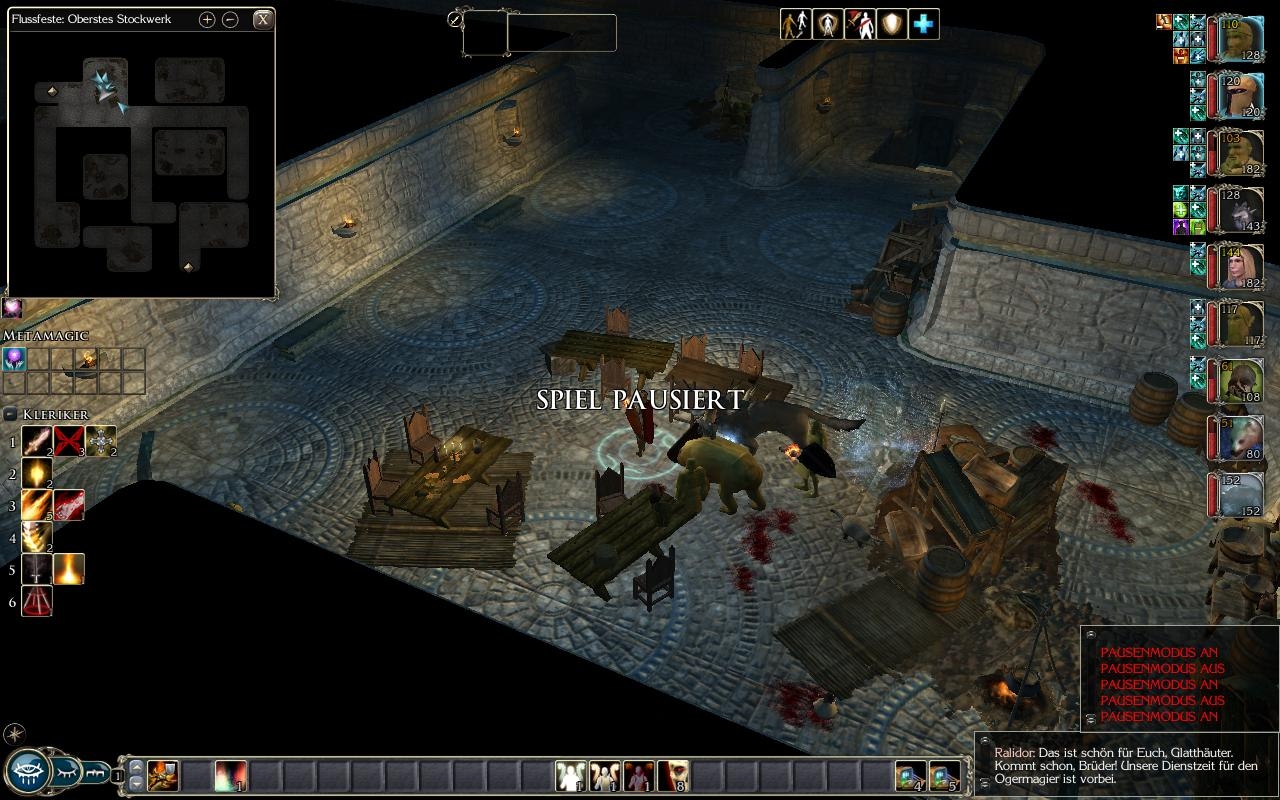
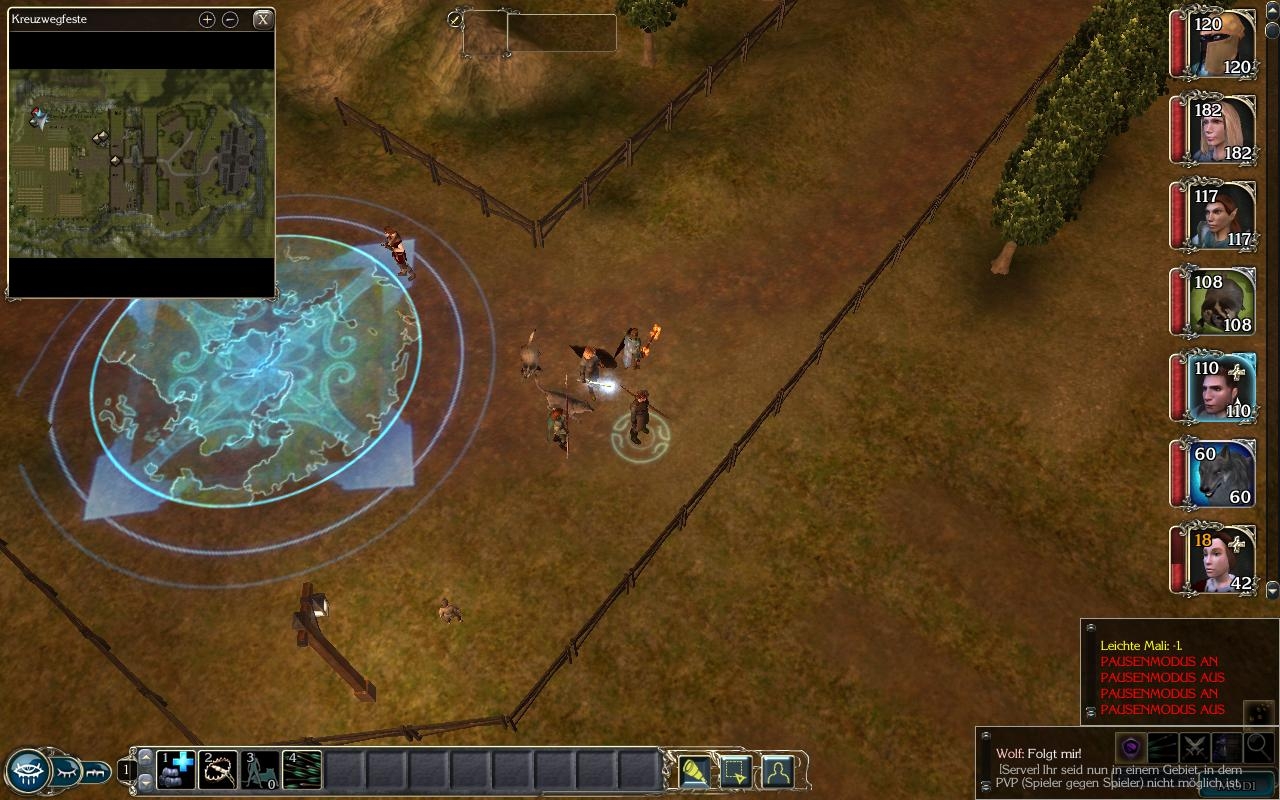
1. All portraits are smaller now.
2. The bar itself is longer- so you don't have to scroll anymore to see all of your party members- see picture.
3. If you choose to let the hit points be shown on the portraits you will see the numbers correctly (I made the font size smaller than in the original file so you can still see the portraits under it)

Testet on resolutions of 1280x800 and 1680x1050

-----------------------------------------------------------------
You will need two things:

1.the file "partybar.xml" from below

2.a file from XUI called "stylesheet.xml".
You can download complete XUI from: Link

Note:
XUI is only avaivable as complete installer where you can choose which components should be installed. You will have to install it (for getting the file "stylesheet.xml").

-----------------------------------------------------------------
Installation:

1. Put the file (from below) "partybar.xml" into "...\My Documents\ Neverwinter Nights 2\ ui\ default"
2. Install XUI and make sure the "stylesheet.xml" file lies in the "...\My Documents\ Neverwinter Nights 2\ ui\ custom\ XUI" folder (all other files can be deleted if you don't want to use them)
3. Delete "partybar.xml" from "...\My Documents\ Neverwinter Nights 2\ ui\ custom\ XUI" folder to guarantee that the right file will be used.
4.Start the game

-----------------------------------------------------------------

Differences between partybar from XUI and mine:

Dimension of the portraits are the same, but XUI doesn't support showing Hitpoints on the charakters and the longer bar.Also doesn't XUI show a greyed cross when a character dies-which I think is irritating if you don't see at first sight if a character is still fighting or knocked out.


I hope you enjoy it ;)

If you have problems- just post it and I'll see what can be done about it.


Files

NameTypeSizeDownloads
partybar.xmlpartybar.xml
Submitted: 10-31-2009 / Last Updated: 10-31-2009
xml9.39Kb510
smaller and longer partybar.xml file
SCORE OUT OF 10
N/A
Cast Your Vote!
Voting FAQ

PORTFOLIO
Add this entry to your portfolio so you can track it
Manage your existing portfolios or create a new one.
SCREENS

with changed partybar


with original partybar- portraits much bigger, scrolling needed


You Must Be Logged In to Participate.
Comments (0):

You must be Logged In to post comments in this section.

10 - A Masterpiece, Genuinely Groundbreaking
9 - Outstanding, a Must Have
8 - Excellent, Recommended to Anyone
7 - Very Good, Deserves a Look
6 - Good, Qualified Recommendation
5 - Fair, Solid yet Unremarkable
4 - Some Merit, Requires Improvements
3 - Poor Execution, Potential Unrealized
2 - Very Little Appeal
1 - Not Recommended to Anyone

 
Most recent posts on the MMO General Boards
Analyst: Star Wars: The Old Republic Could...Analyst: Star Wars: The Old Republic Could Sell 3M: more numbers
- last reply by Acao on Aug 15, 2011 06:15 PM
which class will your first character be
- last reply by Blisteringballs on Aug 15, 2011 05:50 PM
New Community Content!
- posted by Vault_News on Aug 15, 2011 05:00 PM
New Community Content!
- posted by Vault_News on Aug 15, 2011 04:00 PM
NWN Idea Database Update
- posted by Vault_News on Aug 15, 2011 03:46 PM
Missing Votes for NWN2 Hall of Fame
- posted by Vault_News on Aug 15, 2011 03:40 PM
Missing Votes for NWN Hall of Fame
- posted by Vault_News on Aug 15, 2011 03:39 PM
Random Questions and game altering suggest...Random Questions and game altering suggestions!!!
- last reply by ArkadyTepes on Aug 15, 2011 03:22 PM
State of the game?
- last reply by LyricOpera on Aug 15, 2011 01:37 PM
Yesterday streaming, now demanding downloa...Yesterday streaming, now demanding download :(
- last reply by Sinane-tk on Aug 15, 2011 10:23 AM


IGN Entertainment
By continuing past this page, and by your continued use of this site, you agree to be bound by and abide by the User Agreement.
Copyright 1996-2011, IGN Entertainment, Inc. | Support | Privacy Policy | User Agreement | RSS Feeds
IGN’s enterprise databases running Oracle, SQL and MySQL are professionally monitored and managed by Pythian Remote DBA.


NWN2 Hall of Fame

HOF NWN2 Plug-Ins


View all Hall of Fame entries


Neverwinter Nights 2

TOP NWN2 Modules

NEW Modules

NEW Reviews

NEW INTL. Modules

TOP Hakpaks

TOP Gameworlds

TOP Tutorials

TOP Prefab:Areas

TOP Blueprints

TOP Plugins

TOP UI

TOP Other

TOP Visual Effects

TOP Scripts

TOP Tools

TOP Movies

TOP Models

TOP Characters


Hall of Fame

HOF NWN Modules


View all Hall of Fame entries


TOP NWN Modules

NEW NWN Modules

NEW Reviews

TOP Intl. Modules

TOP NWN Hakpaks

TOP NWN Gameworlds

TOP NWN Models

TOP NWN Portraits

TOP NWN Scripts

TOP NWN Prefabs

TOP NWN Other

TOP NWN Movies

TOP Sounds

TOP NWN Textures

TOP NWN Creatures

TOP NWN Characters