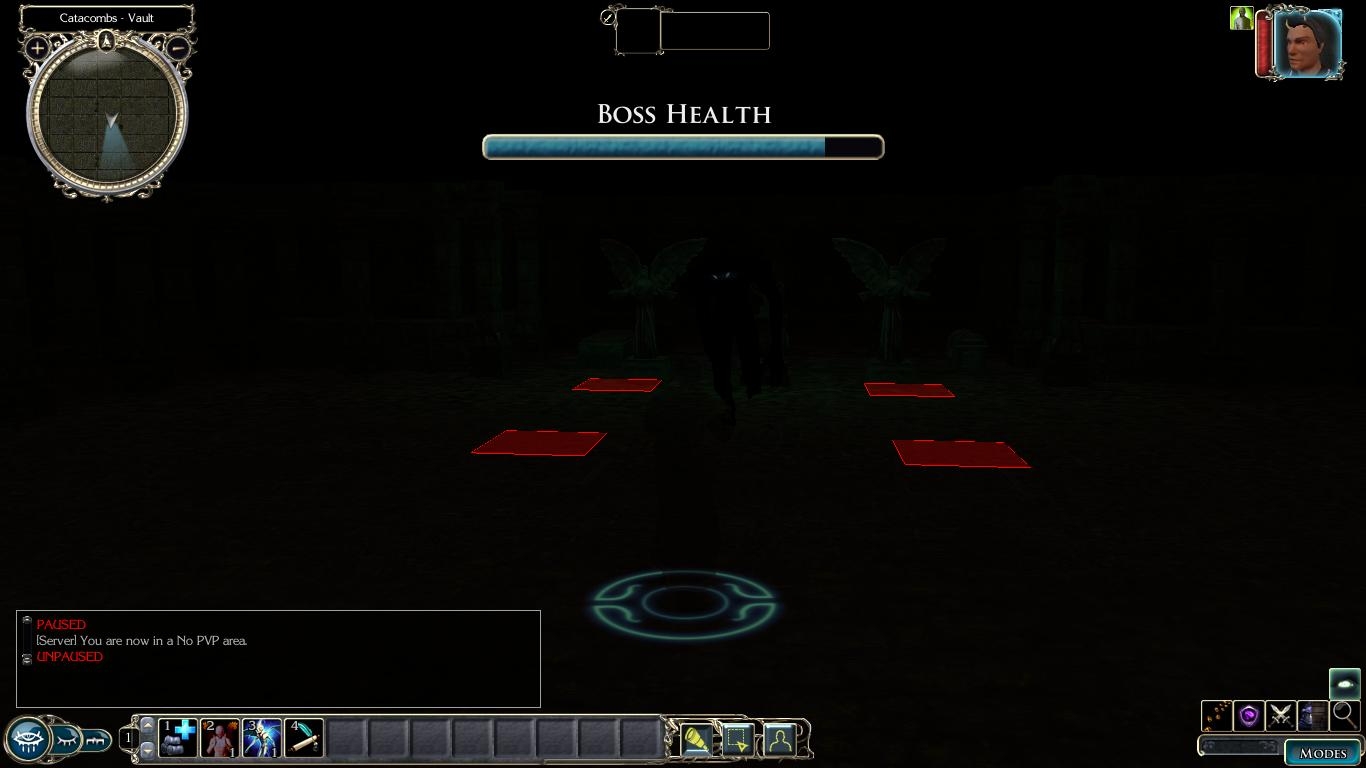
A giant health bar builders can use for "boss" foes in their modules. This consists of a simple UI object (and two textures for it), and a .erf which contains both an update script to run the timer, and a simple include file allowing you to set up and remove the healthbar easily.
The "health bar" can actually also be used to track the value of a floating point variable, so you can use it for a whole host of other things as well. You can also set the title text to whatever you like and even specify your own textures, if you want to improve on my sadly lacking digital art skills. All of this can be done easily by changing the inputs to the scripting command in the include file.
Use of the healthbar will require some basic scripting knowledge, though the include file, "INC_GUI_BOSSBAR", contains notes explaining it in more detail. You can also make modifications to the XML file itself quite easily to change the font, size, etc.
As always, you can use this however you want and modify it as much as you like to suit your needs if you so wish.
...Actually, GetNearestObjectByTag would be better if the trigger is in the same area as the creature. And yes, you'd need the object in the OpenBossBar function (by default oBoss) to be the same, so I think something more like this would work:
Sorry, it's been a while since I did any scripting or anything for NWN2, but I'll see if I can point you in the right direction.
Firstly, it sounds like you're not finding your lizardfolk properly. You need to use something like this:
object oLizzie = GetObjectByTag("");
Using the creature's tag, not name. _________________________ In production: The Dragon Dynasty All my other stuff
Hi! I like the idea of this feature very much, though i have very little scripting knowledge. Could someone tell me how can i run the script to make it actually work?
For example if my boss is called Lizzie (lizardman :D) and id like to show her health bar after entering trigger placed on ground. I tried command "OpenBossBar(oBoss,"bossbar.xml");" (from script "showbossbar") in Trigger's option "onEnter" with string variable set: "oBoss = Lizzie"
But this all things doesnt work. :/ I have .tga and .xml files from this package everywhere, in override folders, game folder, etc.
Can someone tell me what am i doing wrong?
Ah, you need to use the name of the actual GUI screen, which defaults to "SCREEN_BOSS". You can use the constant GUI_BOSSBAR_SCREEN_NAME if you prefer (with hindsight I should have had it default to that). This is a value set in the XML file, not the script, so it will only change if you edit that (for example, if you want to make more than one bar, perhaps different sized ones, then you might make a copy of the XML file which would have a different screen name). _________________________ In production: The Dragon Dynasty All my other stuff
First, put the UI object and the textures in your campaign folder (if you are making a campaign, which is recommended) or in your override folder otherwise. Then, import the ERF containing the scripts into your module. This will let you use the include file in your scripts to make use of the timer (put #include "INC_GUI_BOSSBAR" at the top of your script), though some knowledge of scripting will probably be required. If you open the INC_GUI_BOSSBAR script in the toolset, I put some comments at the top explaining how the system works, if I remember. _________________________ In production: The Dragon Dynasty All my other stuff
Yeah, I'm afraid my texturing skills aren't as good as they could be, which is why I made it possible for you to use your own. That way people needn't be stuck with my blown-up XP bar... :-) _________________________ In production: The Dragon Dynasty All my other stuff
Posted by Derek_H at 2010-04-27 17:39:22 Voted 10.00 on 04/27/10
After playing around with it...
Yes, yes you can make it red.
Once again, thanks for making this UI. :P
-Chaos Wielder
Posted by Derek_H at 2010-04-27 13:42:25 Voted 10.00 on 04/27/10
You know...
I've always loved you. :)
Would it be possible to have the bar be red instead of blue?
This doesn't require you to have a boss any stronger or different than any other creature, it just allows you to display their health prominently. Admittedly, that lends itself to the "boss culture" a bit, but many games already have foes who can clearly be defined as bosses anyway. Furthermore, as mentioned, you can use this to display a variable so you could, instead, track pretty much anything (like the strength of a force field, or the amount of energy some sort of generator has gathered before it releases a wave of destruction, etc). _________________________ In production: The Dragon Dynasty All my other stuff
Oh noes!
Not ridiculously bloated Boss hitpoints in a DnD game. Not ridiculous bosses following different rulesets (or none at all) in the first place!
Then again... I suppose having options is not a bad thing. Won't be voting though.
Sure, any feedback would be much appreciated. I had ideas to expand this a bit so any requests, let me know and I'll see what I can do (no promises, but I'll certainly think about it). _________________________ In production: The Dragon Dynasty All my other stuff
10 - A Masterpiece, Genuinely Groundbreaking 9 - Outstanding, a Must Have 8 - Excellent, Recommended to Anyone 7 - Very Good, Deserves a Look 6 - Good, Qualified Recommendation 5 - Fair, Solid yet Unremarkable 4 - Some Merit, Requires Improvements 3 - Poor Execution, Potential Unrealized 2 - Very Little Appeal 1 - Not Recommended to Anyone






 Site
Site









 at 2012-09-22 12:05:23


