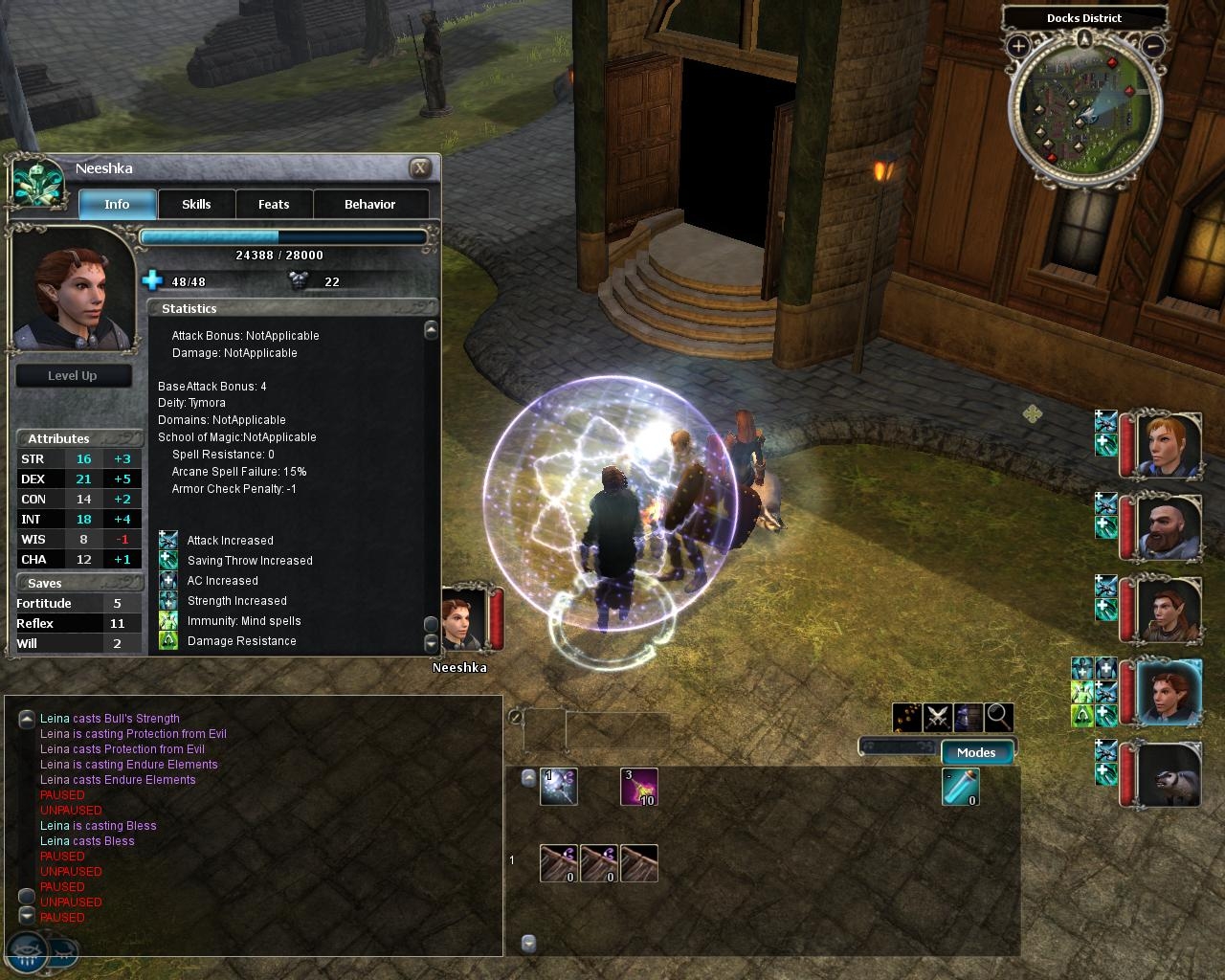
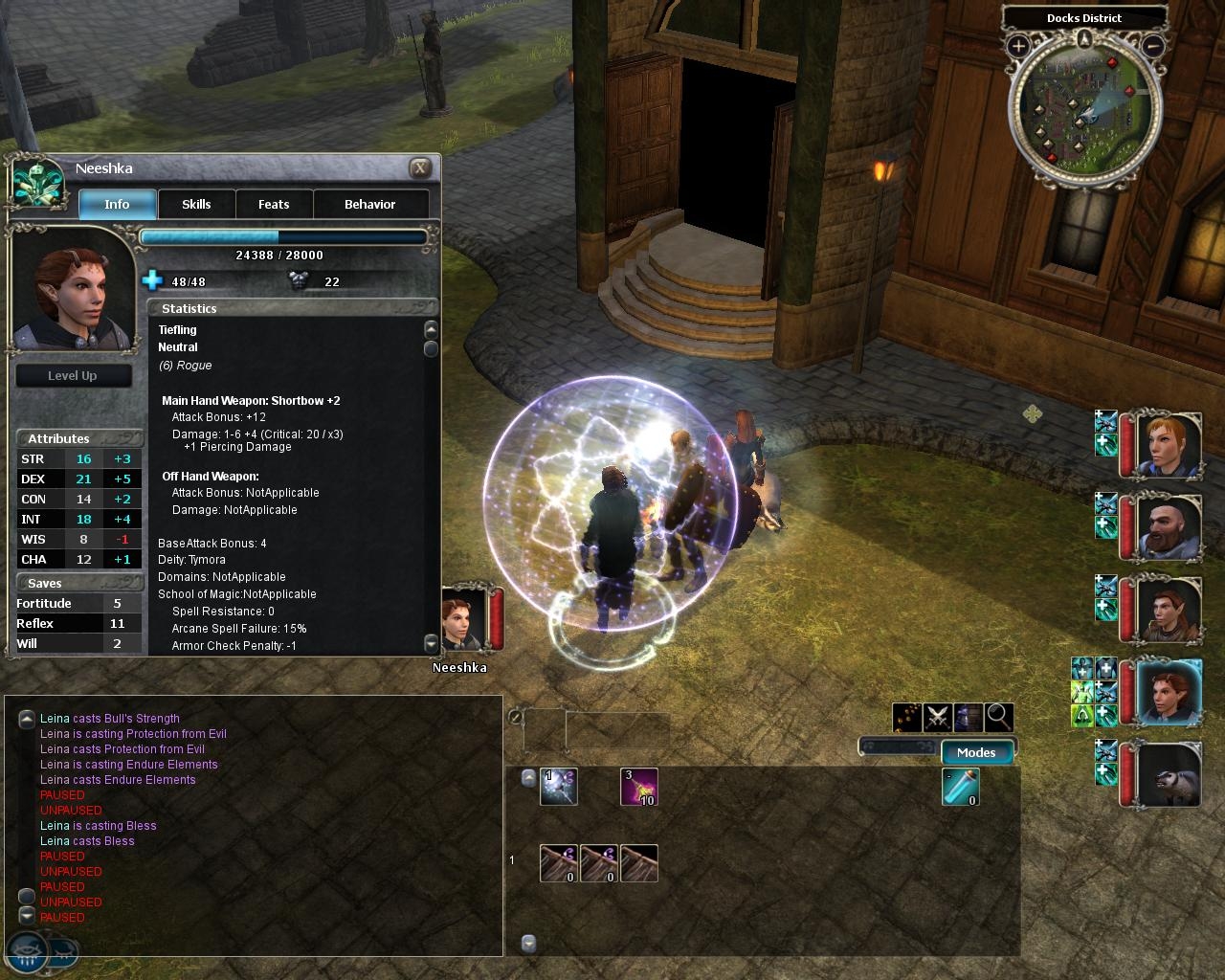
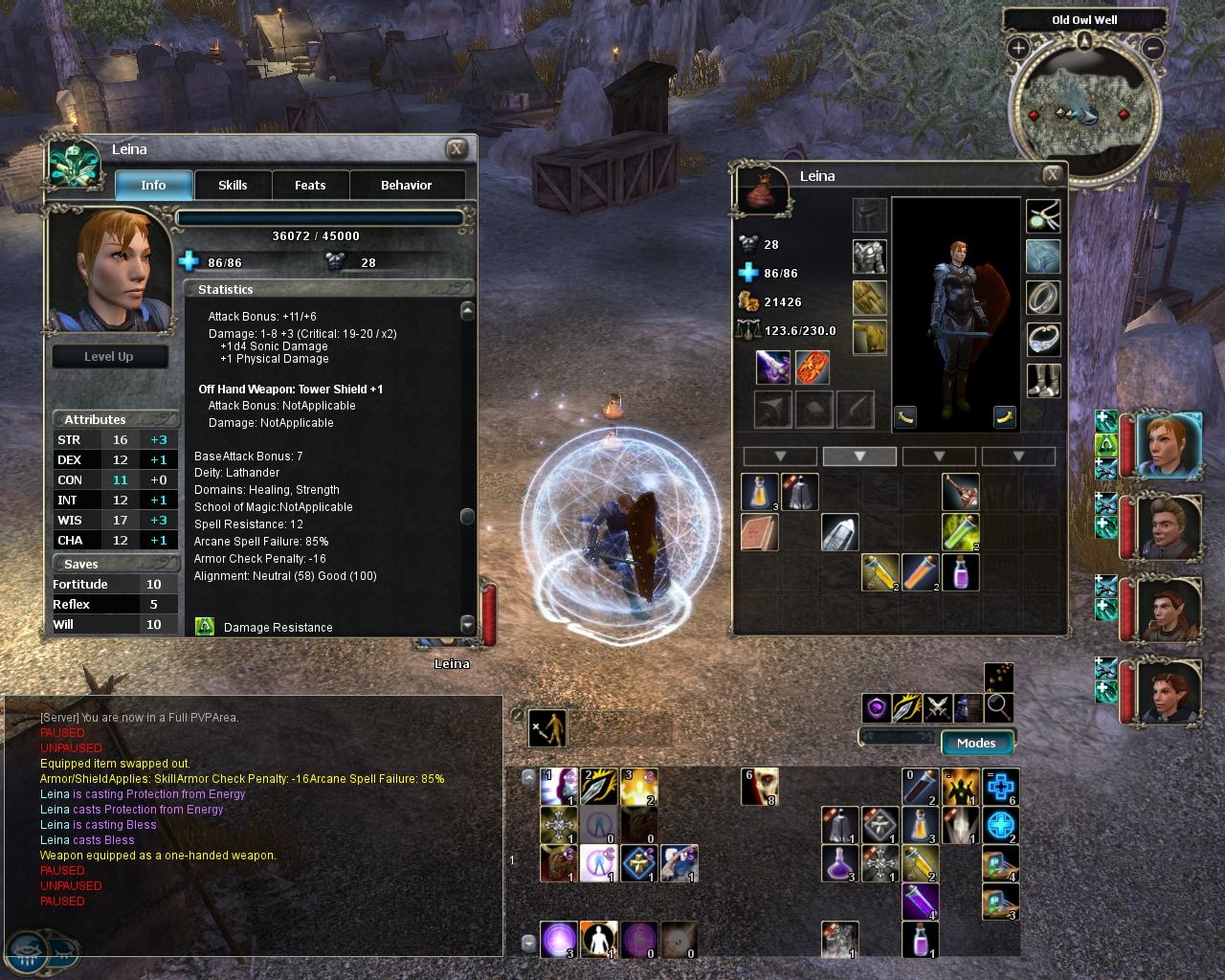
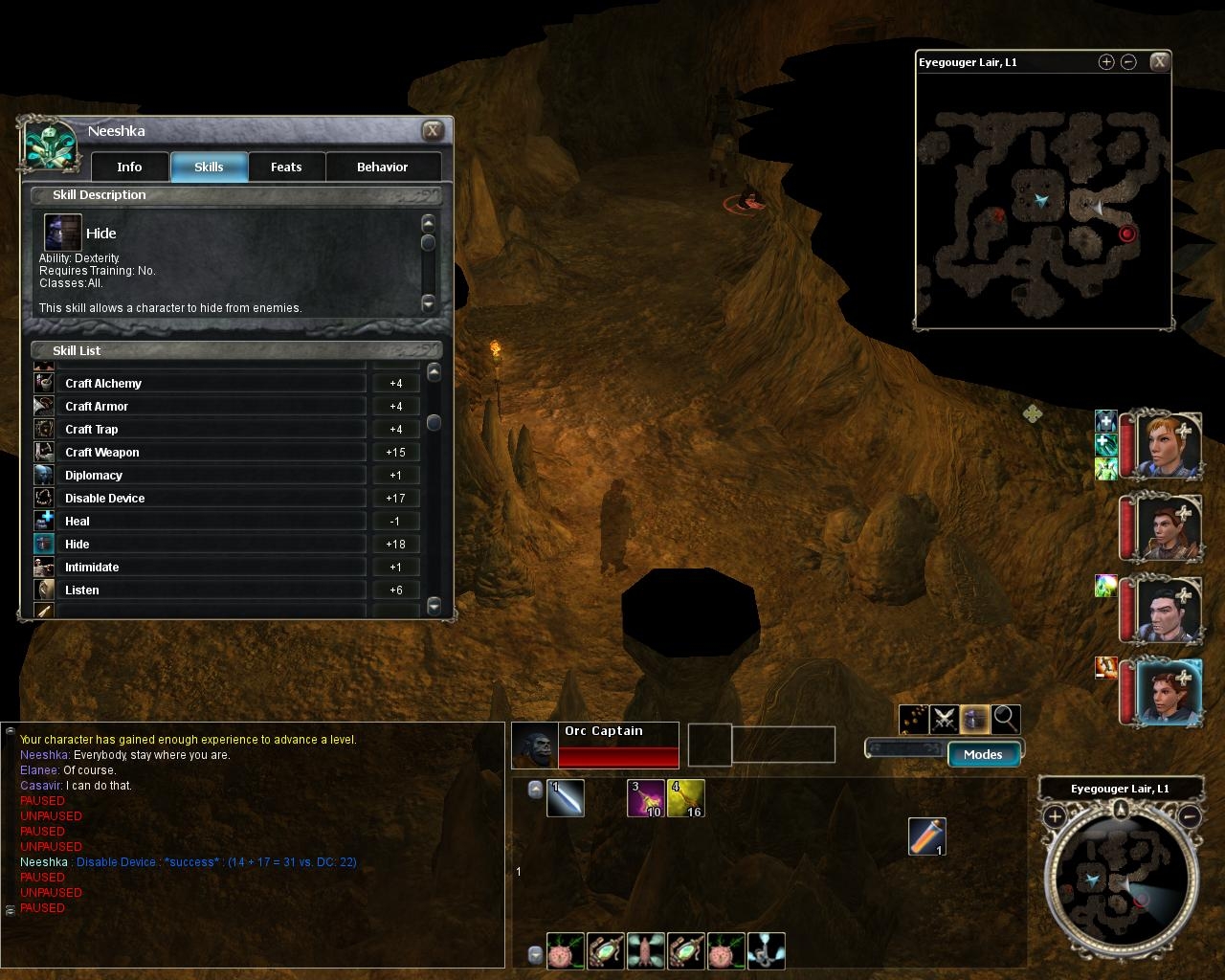
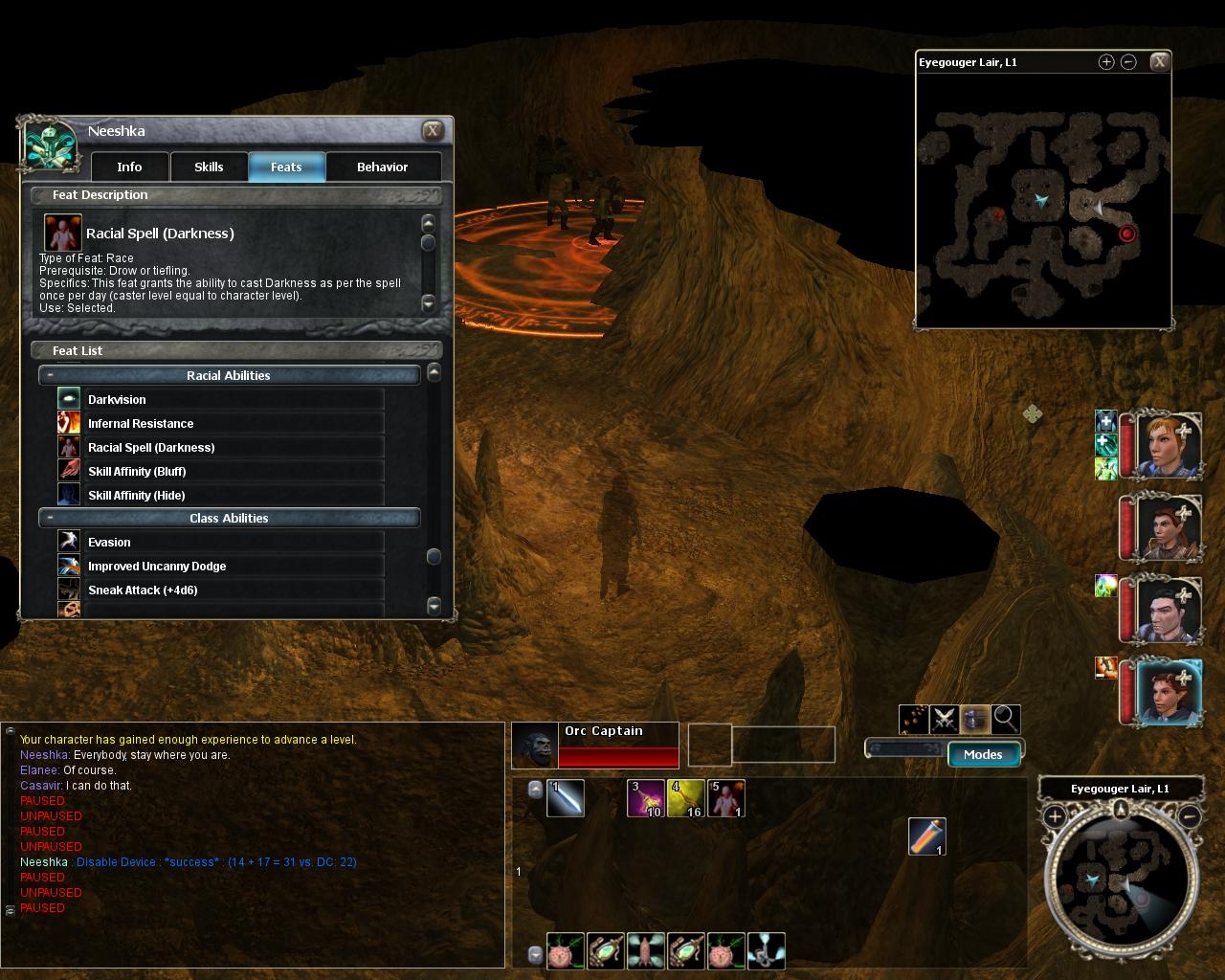
The character statistics in the default UI (race, class, mainhand/offhand, etc.) take up a whole lot of unnecessary space. This mod removes the icons and reduces the spacing of the text, making it more similar to the stats pane in NWN1. Feats and skills listings occupy roughly half the original space and retain their icons.
This also changes the font used in the stats, skills, and feats panes to the one used by the Chat Box (which, in my case, is 12 pt Arial). It DOES NOT alter the font of anything else in the character screen.
UPDATE Nov 25: Missed a 1.03 compatibility issue, sorry X_x Fixed attack/damage text not updating properly when switching weapons.
UPDATE Nov 24: Fixed Effects not appearing under 1.03. Compacted the Skills and Feats panes. Enabled showing a skill's description by clicking the text (rather than just the icon).
UPDATE Nov 16: Added a separate version "charstats_alignment.zip", which adds numerical alignment values into stats pane ala NWN1, via script. SP only; MP requires server/module to have script
Posted by Alzikar at 2008-06-05 18:27:36 Voted 7.00 on 06/05/08
The feats page omits some categories in the listing. Specifically, the General feats (Dodge, Two-weapon fighting, et.al) do not show. Perhaps others, I only created a new rogue and started a new game to test this addon, so I didn't test it with any other classes.
This can be fixed by searching the character.xml for the following line:
This is very nice, but some feats don't show (General Feats for certain, could be more). Is it a general bug that can be fixed, or is it just on my side?
Posted by AnthroPlayer at 2007-02-27 20:10:21 Voted 8.25 on 02/27/07
This is good, and useful.
Can you make it so that all icons are around, but are at a different size?
Even this size doesn't seem to be perfect, but I'm not asking for perfection, just near it. _________________________ @===============================================@
Vinchenzo made a post here.
Plz check out my entries. I'm currently making a few simple modules, designing 3 special characters, and hope to someday be good this stuff.
This is Vinchenzo, finishing his post with the following advice:
Don't use Latin improperly (Lupis means grey, Rufus is red, Canid is dog, so on.) Furries annoy me with their improper usage of such. And I'm a furry!!! Ugh...
Don't vote for Beta things unless told they are finished, unless posted specifically by the author.
Don't abuse the vote and post function, don't vote for your own/friends stuff just to get a high vote. Don't flame vote either just to be an ass.
There is a voting system for how the points are used, even I forget, but we should follow it (and tattoo it to our forehead, lol)
@===============================================@
Posted by Andarian at 2007-01-15 08:15:57 Voted 3.00 on 01/13/07
sheykh: I checked the source, and the code in gus_getalignment.nss does NOT put the actual numeric alignment values on the panel. It gets the values but then translates them into a word description based on the range in which they fall. The update described on the description does NOT do what it advertises.
Also: please don't cheapen the NWN2 voting standards by promiscuously voting "10" for things. There are new voting standards for NWN 2 content, described at the bottom of this page. The NWN 1 voting system was ruined by this kind of vote inflation, and the community is trying to make a fresh start with a more objective set of standards for NWN2. Thank you. _________________________ Sanctum of the Archmage Writing Projects Website and Blog Academy for Modding Excellence
Posted by sheykh at 2007-01-15 07:29:28 Voted 9.00 on 01/15/07
Hmmmm.... I can't see the alignment.
2. Extract gui_getalignment.NCS to NWN2's "Override" directory.
That "My Documents\Neverwinter Nights 2\Override" or "\Program Files\Atari\Neverwinter Nights 2\Override"? They both seem to be not working.... =[ _________________________ H20 Cooled E6600~P5N32-SLI SE Deluxe~8800GTS~2GB DDR2~Enermax 600W
Posted by sheykh at 2007-01-15 07:16:18 Voted 9.00 on 01/15/07
I would give a 10, but... The behavior pane. When you minimize a row, the + doesn't change to a - for me... Anal, I know, but I still love the UI mod!! ^^ _________________________ H20 Cooled E6600~P5N32-SLI SE Deluxe~8800GTS~2GB DDR2~Enermax 600W
Posted by Andarian at 2007-01-13 13:03:57 Voted 3.00 on 01/13/07
FreakyOne: Even if the UI were working, a "10" vote means that what you're voting on is a "Masterpiece" of "Truly Groundbreaking" work. Do you really think that, or did you just not read the "NWN Voting Standards" (listed at the bottom of the page)? _________________________ Sanctum of the Archmage Writing Projects Website and Blog Academy for Modding Excellence
Posted by Andarian at 2007-01-13 12:59:19 Voted 3.00 on 01/13/07
Posted by The Ridge at 2006-12-14 07:45:07 Voted 9.50 on 11/15/06
Hey Cyric, not sure why this is happening but I'm not getting the alignment display anymore. Now I haven't been playing much the last couple weeks and as far as I can tell the only thing changed has been the upgrade to 1.03 final.
Your files are installed in the appropriate locations and I even redownloaded your latest version thinking mine was an older one. Also I have tried making brand new characters and even tried loading the campaign from scratch, nada on alignment.... *shrugs*
Also, if you get around to enhancing this package, I would like to see the icons (scaled down of course) for race, class and diety. I find I miss these from the original Obs version.
-R _________________________ NWN2 Voting Standards
10 - A Masterpiece, Genuinely Groundbreaking
9 - Outstanding, a Must Have
8 - Excellent, Recommended to Anyone
7 - Very Good, Deserves a Look
6 - Good, Qualified Recommendation
5 - Fair, Solid yet Unremarkable
4 - Some Merit, Requires Improvements
3 - Poor Execution, Potential Unrealized
2 - Very Little Appeal
1 - Not Recommended to Anyone
Posted by FreakyOne at 2006-12-13 19:59:23 Voted 10.00 on 12/13/06
This is an awesome improvement to the character screen. Especially the alignment addition. I love not having to guess.
Ok so is it finally really truly fixed for the beta patch? If it is I'd give this a 10, but the last version I dled was still bugged...
Posted by SunryzeR at 2006-11-23 04:37:24 Voted 9.25 on 11/19/06
"I've updated the ZIP to include the src, a simple change to line 21 should do what you're looking for."
Thanks, I'll have a play :) _________________________ Author:
Neverwinter Nights 2: Uncensored Character Names UI Mod
Place your votes for modules and tools that you like (not just mine!) - make the author happy! :)
Posted by GreenDragon5000 at 2006-11-21 18:46:25 Voted 7.00 on 11/21/06
I like the concept and it has been well implemented on the front page. It would be nice to see it carried through to the rest of the character sheet. The alignment display is great! _________________________ Charlie's UI | Charlie's Item Modifier | Charlie's Starter Scripts
Posted by bloodsong at 2006-11-19 19:04:06 Voted 8.75 on 11/19/06
wow, that is SO much more readable! thank you!
Posted by SunryzeR at 2006-11-19 17:03:13 Voted 9.25 on 11/19/06
Very good - particularly the addition of alignment scores (never has such a small issue bugged me so much before!)
I'm playing around with the layout on the alignments because, at the moment, you have the alignment name (ie, "Chaotic Good") at the top and the alignment score (ie, "Chaotic (4) Good (92)") tucked away at the bottom. I've moved your custom alignment up to the top and removed the NWN2 default one but it would be nice to get it to show a merged version (ie, "Chaotic Good (4/92)"). Any chance of such a script? Alternatively, if you could post the source for it I can take a look myself - I have some Java code from my Character Manager that works out the alignment title that would probably be easy to port across if there's nothing appropriate already. _________________________ Author:
Neverwinter Nights 2: Uncensored Character Names UI Mod
I like this one alot! And also your overall UI looks awesome! (this is a omgomgomgiloveyouthx4theui-post)
Posted by The Ridge at 2006-11-15 15:35:56 Voted 9.50 on 11/15/06
Thanks for adding the alignment feature!
Nicely done!
I also like that last screen shot with the other modified interfaces. Do you have any plans on releasing these as well?
-R _________________________ NWN2 Voting Standards
10 - A Masterpiece, Genuinely Groundbreaking
9 - Outstanding, a Must Have
8 - Excellent, Recommended to Anyone
7 - Very Good, Deserves a Look
6 - Good, Qualified Recommendation
5 - Fair, Solid yet Unremarkable
4 - Some Merit, Requires Improvements
3 - Poor Execution, Potential Unrealized
2 - Very Little Appeal
1 - Not Recommended to Anyone
Regarding alignment values, I believe that requires a script workaround, and I have zero NWN scripting experience. Nevertheless I am working on a solution :)
Posted by The Ridge at 2006-11-15 03:25:26 Voted 9.50 on 11/15/06
Great looking GUI change!
Anything that makes the interface more like the original game is fine by me. :)
Cyric, any chance you can find a way to add Alignment Values to this sheet (0-100 chaotic / good), like we had on the old NWN character screen. I am not the only one wanting this feature back.
Btw, really like the transparent hotbar on your screen shots. Any chance of releasing this?
Will vote once I see install this and have a closer look.
-R _________________________ NWN2 Voting Standards
10 - A Masterpiece, Genuinely Groundbreaking
9 - Outstanding, a Must Have
8 - Excellent, Recommended to Anyone
7 - Very Good, Deserves a Look
6 - Good, Qualified Recommendation
5 - Fair, Solid yet Unremarkable
4 - Some Merit, Requires Improvements
3 - Poor Execution, Potential Unrealized
2 - Very Little Appeal
1 - Not Recommended to Anyone
10 - A Masterpiece, Genuinely Groundbreaking 9 - Outstanding, a Must Have 8 - Excellent, Recommended to Anyone 7 - Very Good, Deserves a Look 6 - Good, Qualified Recommendation 5 - Fair, Solid yet Unremarkable 4 - Some Merit, Requires Improvements 3 - Poor Execution, Potential Unrealized 2 - Very Little Appeal 1 - Not Recommended to Anyone






 Site
Site









 at 2008-06-05 18:27:36
 at 2006-11-23 04:37:24


