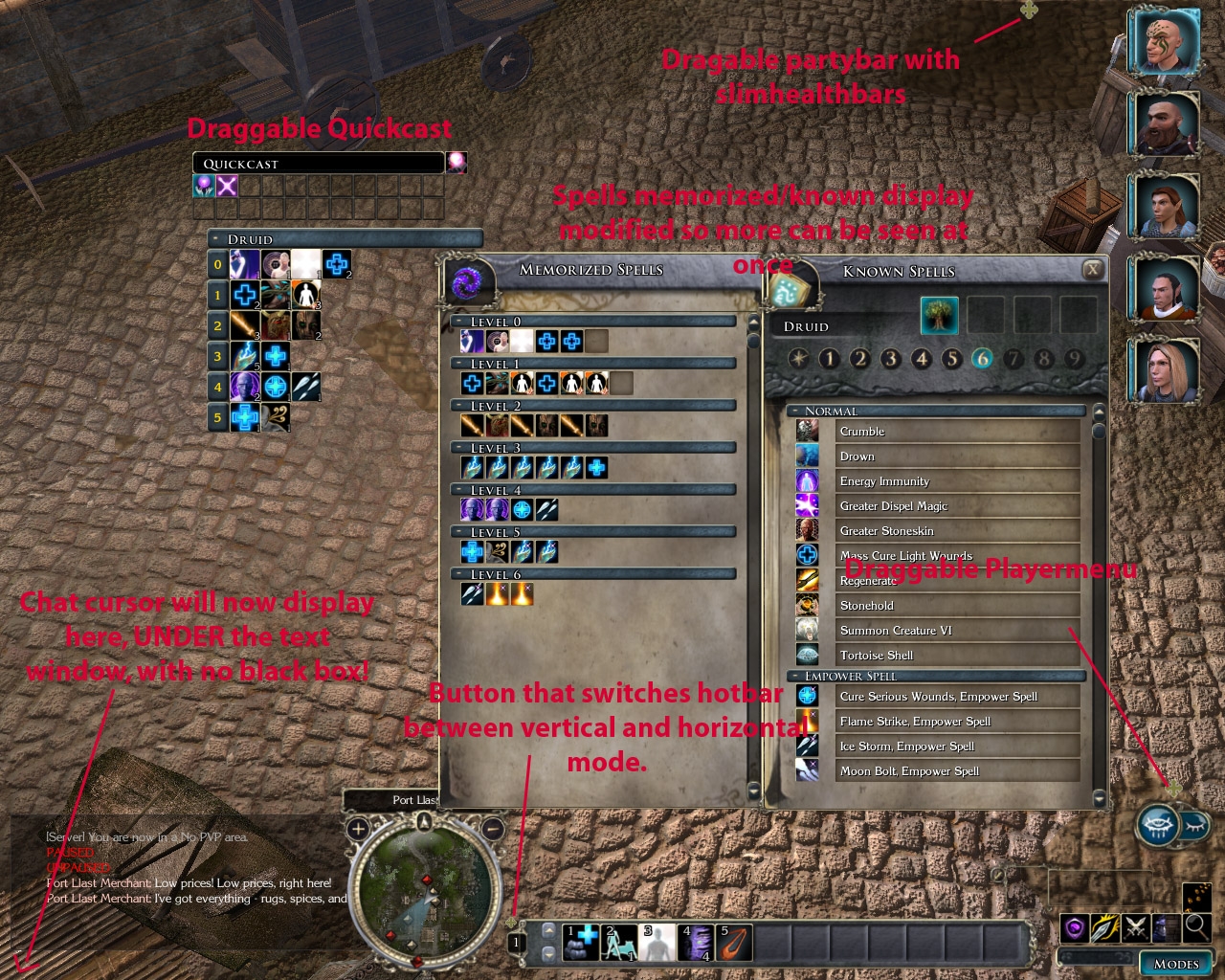
DISCLAIMER: I have been informed there are some issues with this UI mod and the 1.03 patch (aside from the normal issues it has :P)
This is a compilation of UI mods made by Slate or myself.
It includes slimhealthbars (which are draggable), an improved chat window, improved hotbar, improved spells known/memorized windows, a draggable playermenu, and a draggable quickcast bar.
Unzip into one of the following 2 directories. The ini file must go into the C:\Program Files\Atari\Neverwinter Nights 2\UI\default directory.
1) MyDocuments\NWN2\UI\Default
or
2) C:\Program Files\Atari\Neverwinter Nights 2\UI\default (if it is on the default installation path)
Backup any files before overwriting them.
Much credits and thanks to Slate. His vault profile is here: http://nwvault.ign.com/View.php?view=User.Profile&id=6701
When I say "this should really have been included in the game from launch", don't take it as any less than praise ;-) It's a great mod. A suggestion: The changes made to the sizes of the spellbook and memorized spells windows are great, especially for someone like me, who plays the game at 1600x1024. Would it be possible to do the same with the character pane (only extending the window in this case, not changing the size of the information), the quest journal and the item information window? Thanks for a great and absolutely essential mod. _________________________ 'Don't judge a book by its contents'
Posted by ibjodaddy at 2006-11-1902:44:13
The reason for the dragging area being large is because of the room it needs to leave for buffs to display.
Posted by uthar_le_preux at on11/19/06
great indeed...works perfectly.. the draggable party bar has somehow a bit too large dragging area ;)
Posted by ibjodaddy at 2006-11-1821:32:11
Ok. There is a problem with the chat bars at 800x600 only displaying 1-2 lines of text. The 4-5 @1280x1024 that I'm seeing can be easily fixed to display all the text. Making it work for all resolutions is another issue, but I'll figure something out. I'm a bit curious as to why the verticle bar isn't working for you. Is anyone else having this problem?
Posted by ithildur at on11/21/06
Oh, and vertical bar still isn't working. I've modified this heavily, using horizontal 2 row hotbar, got rid of the vertical bar, adjusted the chat boxes heavily, and haven't found a good reason to move the party bar, quckspell, etc. All in all some good stuff in here but the overall package just wasn't very useful to me because I ended up geryrigging my own from various people's custom settings. thanks
Posted by ithildur at on11/21/06
I've tried everything between 800 600 to 1280 1140(?). The problem is that you can only see about four lines of text... and that's not good for people who play on any kind of a RP oriented server. Trust me, people type more than four lines at a time... unless someone's RPing a mute PC.
Posted by Misentry at 2006-11-1808:36:09
Btw, I would recommend installing this and all other addons directly into override folder. That way you still have defaults left when you just delete files from override
Posted by ibjodaddy at 2006-11-1803:12:35
ithildur, on my machine currently I'm able to see 3 lines of text in single player and 4 in multiplayer. What resolution are you running at?
Posted by ibjodaddy at 2006-11-1803:05:54
Did relocating the .ini fix the problem with the vertical hotbar? I don't have much opportunity to do testing with the multiplayer chat boxes, but I'll look into more in detail. What I'm working on right now involves being able to change the alignment of the hotbar (vertical or horizontal) as well as the number of rows/columns, and the transparency of it. It's nowhere close to release worthy at the moment. I decided to release what I had (thought) I finished now. The Vault didn't seem to display the installation instructions I set in the form. I also thought it was the override file
10 - A Masterpiece, Genuinely Groundbreaking 9 - Outstanding, a Must Have 8 - Excellent, Recommended to Anyone 7 - Very Good, Deserves a Look 6 - Good, Qualified Recommendation 5 - Fair, Solid yet Unremarkable 4 - Some Merit, Requires Improvements 3 - Poor Execution, Potential Unrealized 2 - Very Little Appeal 1 - Not Recommended to Anyone






 Site
Site