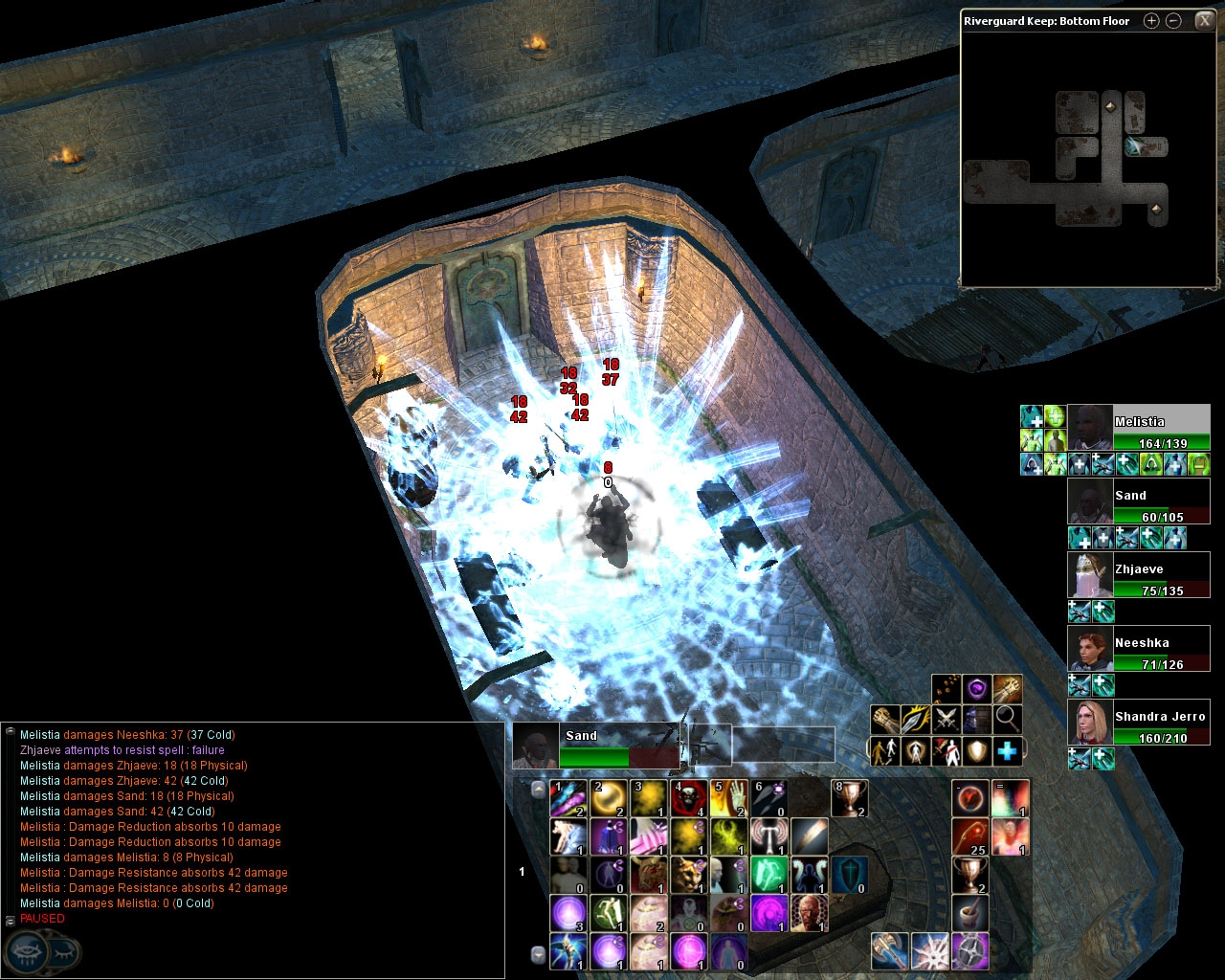
This mod moves the HP bars in the Party Frame to the right of the portrait and orients them horizontally. Names and current/max HPs of all party members are also shown. Draggable/nondraggable versions included. (see screenshot)
The font used for both the Names and HPs is the same as the target frame font.
Update Oct 22 07 - fixed party bar being undraggable
Update Oct 11 07 - fixed crash issue with custom portraits in MotB
Update May 20 07 - small update for 1.05/1.06b
Update Dec 10 06 - death icon fixed
Known Issues
- Draggable version has a large blank area that cannot be clicked through, similar to other draggable partyframe mods.
- Very long names may not appear properly or at all.
- If you find any others, please let me know.
Excellent item. Delivers what's promised, and does it well. The displayed HP in numerals is definitely the most useful part.
Posted by Kharzon2 at on10/21/07
Aweseome. Pretty fast fix, lol. Was just stoppin by to check on a fluke that you might have posted about a bug or something. Just checked it and works fab. Thank you very much. Extremely nice (all yer UI pieces) Uppin mine to a 10.
Posted by cyricc at 2007-10-2111:53:00
D'oh, just figured it out. Draggable no longer works with capturemouseevents disabled. I've uploaded the fixed version.
Posted by cyricc at 2007-10-2111:38:52
"In the zip file, there's supposed to be 2 party xml's, party_drag and party_nodrag. I only see a partybar.xml and a party nodrag xml. I assume the partybar.xml is the draggable version (as it says draggable=true in the xml). My problem is this: Can't drag it. It stays in the upper right corner and no matter where or how far away from the portrait I click, can't drag it. Where's the point that you can drag it at? Outside of that, I give it a 9. Def awesome to have." Hm, I think Obsidian might have nullified the draggable flag in MotB or 1.10. In any case I just tested it and draggable is certainly not working anymore (I didn't use the draggable myself so I never noticed). So unless someone happens to know how to fix this (in which case, tell me please :P), for now the only way to reposition the partyframe is by editing the "[partybar]" entries in "Documents\NWN2\ui\default\guisettings.ini" with Notepad.
Posted by Kharzon2 at on10/21/07
In the zip file, there's supposed to be 2 party xml's, party_drag and party_nodrag. I only see a partybar.xml and a party nodrag xml. I assume the partybar.xml is the draggable version (as it says draggable=true in the xml). My problem is this: Can't drag it. It stays in the upper right corner and no matter where or how far away from the portrait I click, can't drag it. Where's the point that you can drag it at? Outside of that, I give it a 9. Def awesome to have.
Posted by Thaldryn at on09/15/07
This is extremely useful. It both conserves space and allows me to see the numeric hitpoint totals of my party, rather than a mysterious obscuring percentage bar like the default. It's great.
Posted by Ruaha at on08/15/07
Excellent work. Very useful.
Posted by Aristobulous at 2007-06-1313:52:56
I am running nwn2 1.06 and this UI tweak doesn't seem to work. I've put the folder into MyDocs\NWN2\overrides. Is there something else I need to do?
Posted by Adamos at on01/20/07
I was able to use the file prior to 1.04 Beta. Is there any way to use the partybar any your transparent hotbars with 1.04 Beta? This is one of the better additions, if I could only use it.
Posted by Oldtimer at on01/03/07
Much cleaner-looking and less obtrusive than the default party frames. Have combined this with EpikurCicero's Cleaned UI and Shoujo's Semi-Transparent UI for the ultimate 'clean' interface. Thanks.
10 - A Masterpiece, Genuinely Groundbreaking 9 - Outstanding, a Must Have 8 - Excellent, Recommended to Anyone 7 - Very Good, Deserves a Look 6 - Good, Qualified Recommendation 5 - Fair, Solid yet Unremarkable 4 - Some Merit, Requires Improvements 3 - Poor Execution, Potential Unrealized 2 - Very Little Appeal 1 - Not Recommended to Anyone






 Site
Site