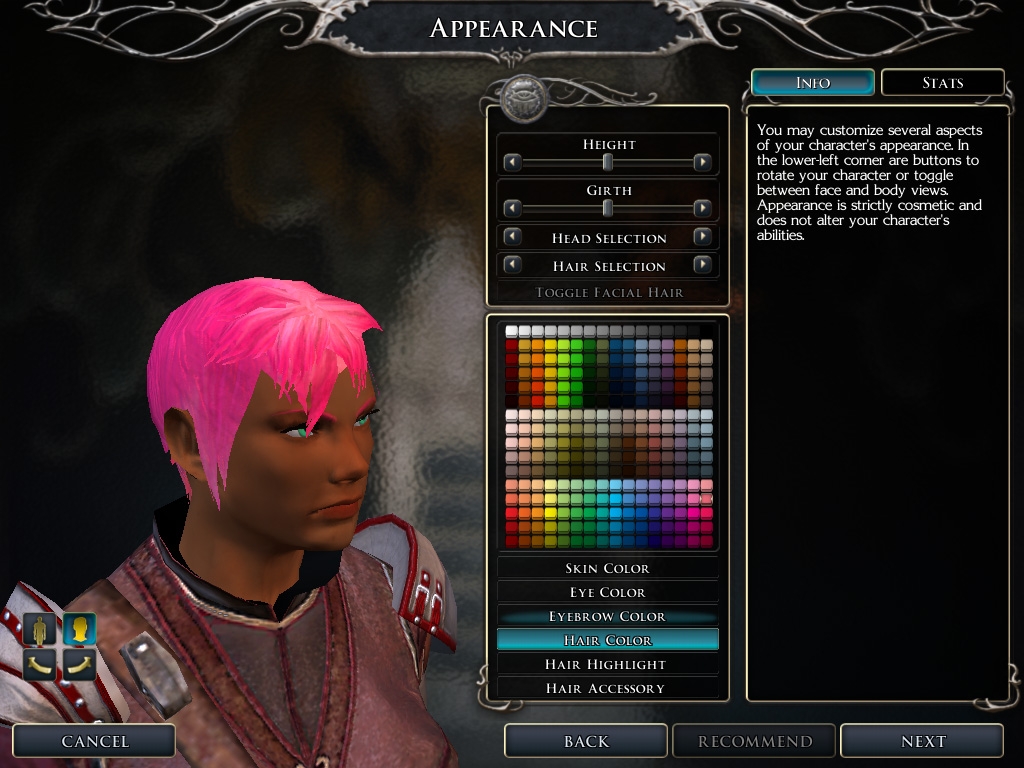
United Colors replaces the limited 18-slot palettes in the character creation screen with a universal 256-slot palette.
Installation * Delete any previous version of United Colors.
* Extract the downloaded folder "united_colors" and put it, along with all its content, into your override folder, located in My Documents\Neverwinter Nights 2\override.
* The game engine will automatically load objects in the override folder instead of the original standard resources.
Content United Colors overrides several standard resources.
* chargen_appearance.xml - the modified appearance selection screen
* color_**.2da - the expanded color palettes for all 23 races
And United Colors adds a new resource.
* color_united.tga - background image used in the selection screen
To uninstall, just remove the "united_colors" folder and all its content from your override folder. Generally, it's also good idea, but not absolute necessity, to empty your override folder prior to patching. You can always put the files back in after the updater completes its routine. (What I do is rename the override folder to something else, and then change it back after patching.)
How This Works The way colors on characters work is simple. The player selects the desired colors, and the hex values of these colors are stored in the generated characters' profiles permanently. There is no reference to any 2da or color source beyond the character creation screen. Which is why the colors "stick" even after you uninstall United Colors.
United Colors does not modify your characters in any way. It does not run any external script either. All it does is expose more color options in the character creation screen. Your characters will remain legitimate for all other modules and campaigns you play, including multiplayer ones.
Which means you can use any color you want.
With United Colors installed, you may notice a very short pause when the character creation appearance selection screen loads. This lag occurs because the engine is trying to read 1536 entries off the reference 2da at the same time. This is perfectly safe and harmless, and will not affect anything anywhere else. This is probably why the standard palettes come in such limited colors in the first place - to reduce read amount and lag. I have some ideas on how this issue can be circumvented, but it would compromise a great deal of interface intuitivity and convenience, and I've decided that it's simply not worth it. So, just live with the lag, if you notice it at all. ^_^
Frequently Asked Questions Q. I want to keep the original palettes for some races. Is this possible?
A. Yes. Simply delete the 2da's of those races from the united_colors folder. The engine will then load the original 2da's and the original colors. For example, to keep the drow color choices to the original palettes, just delete color_drow.2da from the united_colors folder. Many of the colors in United Colors are sampled directly from the original palettes though, so it's unlikely you will miss the originals.
Q. The color I want isn't among the 256! What do I do?
A. You can add more slots, but I'd strongly advise against that. You can easily replace one of the 256 colors with a color of your own. First, get the hex value of the color you want. Open up the 2da you want to modify. And replace the color you don't want with your own custom color. If you aren't sure which color you want to replace, use the second or third row to replace one of the grey shades. :)
Alternatively, there's a program written specifically for use alongside United Colors that allows editing of the color selection via a graphic user interface. It's written by community member Girruuth, and you can get it at PC Color Palette Editor
Q. Does this work in multiplayer/PW sessions? Do my peers/server need to install this package on their end?
A. The modified color palettes will only appear on the client with the package installed, but color information on your character will appear correctly for all other players even if they do not have United Colors installed. So, yes this works in multiplayer/PW sessions. And no, your peers/server do not need to install United Colors if they do not want to.
Q. I like this package! Can I distribute it elsewhere?
A. Yes, as long as proper credit is given, you are free to modify and distribute this package. In return, please notify me with an email, and vote.
VERSION HISTORY * Version 1.43 - updated for Storm of Zehir by charlievale.
* Version 1.39 - updated for MotB & new races. Maintenance taken on by charlievale. Future version numbers will correspond with the release of Charlie's UI which includes United Colors.
* April 17, 2007 - updated interface to include patch 1.05's height and girth sliders
* January 13, 2007 - added link to Girruuth's program; moved all files into a single folder for a tidier install
* December 19, 2006 - first release
Huh, I didn't vote on this before? Well, Obsidian sincerely should have done this right off. It's lovely and perfect for playing on a PW. Thankee! _________________________ The Obsidian Shore Link
Posted by Bernissus at on02/27/09
Excellent!
Posted by chickennone at on02/13/09
Suggested to all the players of our PW . Thank you Great fun !
Posted by Necroscope84 at on02/03/09
I'm the 100th voter, yay :) Great Mod
Posted by Necroscope84 at on02/03/09
Nice, pink hair yay!
Posted by Luonnotar at on01/27/09
A must have! _________________________ ::RAWR::
Posted by SunWatcher at on01/12/09
Great! I have been using United Colors ever since it was released. Unfortunately... The swatches are limited! So, gaoneng, let me suggest: How about a hue, saturation, and lightness slider to be able to pick the very custom color? I bet not everyone considers it necessary but I just had that idea. _________________________ Trust is for the foolish... And the dead.
Thanks XiNAVRO. ;) And I also hope gaoneng updates soon. This is a great addition. 10 from also. ;-)
Posted by MokahTGS at on11/18/08
As expected this does not work currently with SoZ. _________________________ Mokah - The Grumpy Strumpet || Dear Strumpet Letters || Jabberwocky Development Blog || Vertex I - The State of the Union ||
10 - A Masterpiece, Genuinely Groundbreaking 9 - Outstanding, a Must Have 8 - Excellent, Recommended to Anyone 7 - Very Good, Deserves a Look 6 - Good, Qualified Recommendation 5 - Fair, Solid yet Unremarkable 4 - Some Merit, Requires Improvements 3 - Poor Execution, Potential Unrealized 2 - Very Little Appeal 1 - Not Recommended to Anyone






 Site
Site