________
Features
¯¯¯¯¯¯¯¯
� Quickly and easily create text macros.
� Rearrage the macros in your list with only a few clicks.
� Create as many text macros as you like. There is a default limit of 30 macros per TextMacro Tool, but you may have multiple tools in your inventory.
� Trade your text macros with other players or DMs by swapping text macro tools.
� See the text for each macro in your list by hovering your mouse over any item in the list. The text is displayed as a tooltip message.
� Minimize the UI to a condensed version to see more of the game.
� A spam filter limits usage to once per second.
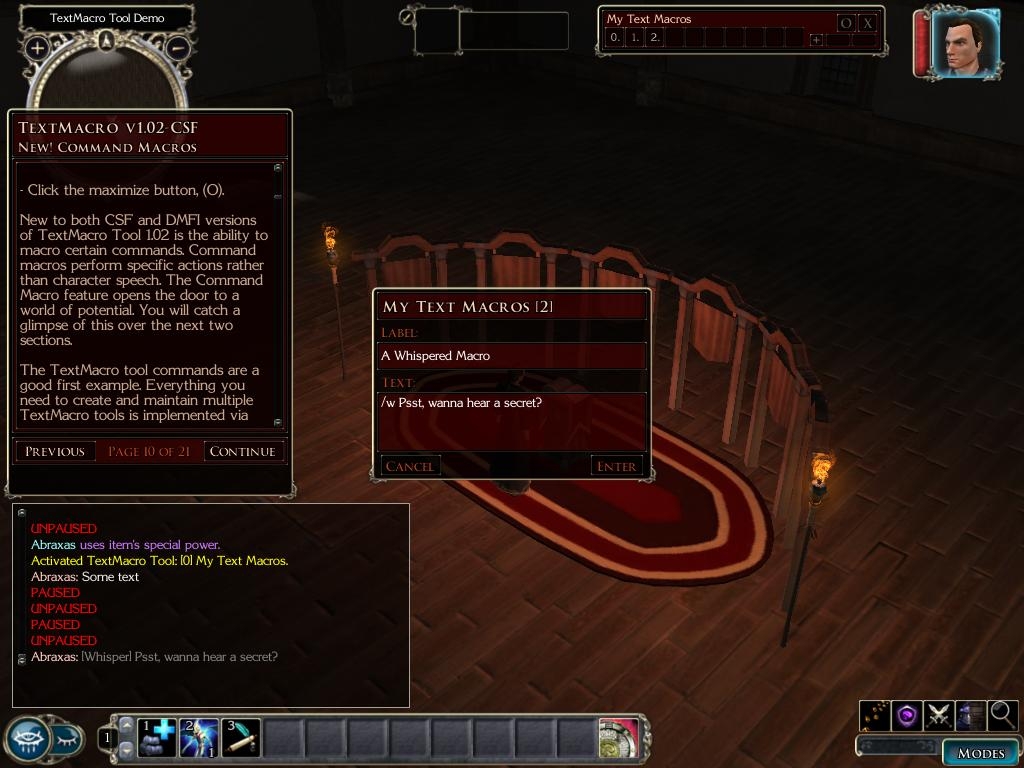
� Use "/l", "/w", "/s", or "/d" to speak at different talk volumes.
� NEW! Command macros allow you to set macros that perform specific actions rather than speech.
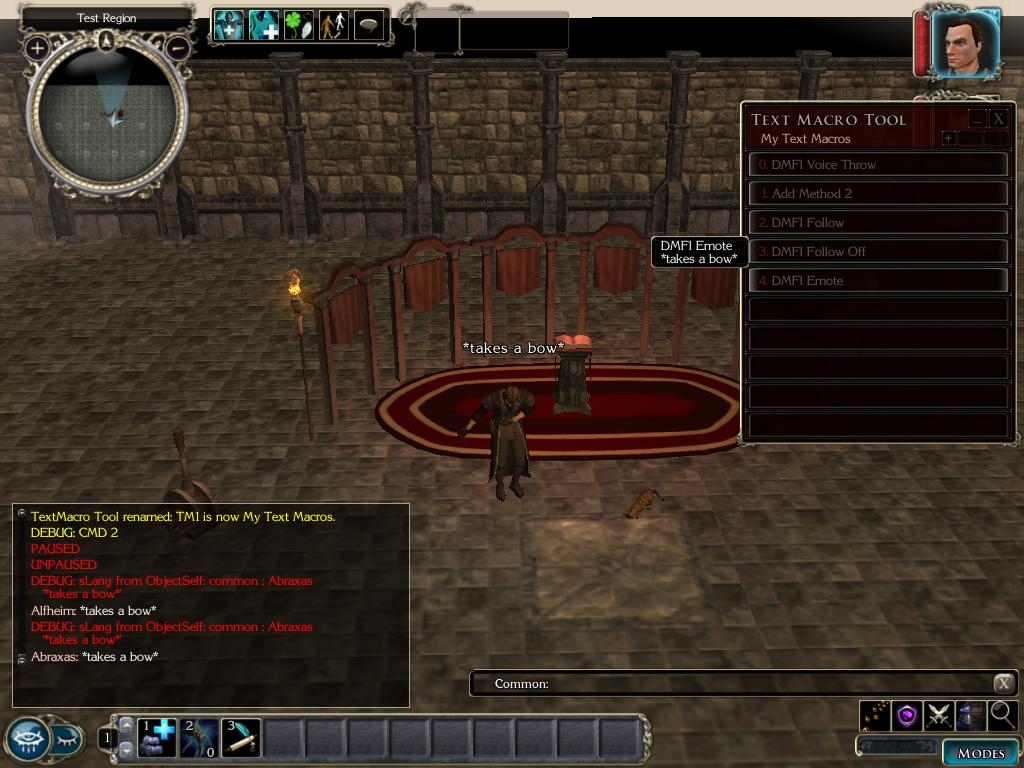
� NEW! DMFI integration allows you to create command macros for any DMFI command (v1.02-DMFI only).
� NEW! You can now use the DMFI voice throw feature to make other creatures speak your macros (v1.02-DMFI only).
� NEW! DMFI in-line emotes are now recognized and executed (v1.02-DMFI only).
Also new to v1.02
� Visual Enhancements.
� A more intuitive method for editing macros.
� Several new configuration options.
� The Spam Shield, a far more efficient spam filtering system.
� Better support for multiple tools.
� A comprehensive tutorial.
v1.02 Changes
� The name of the active tool now appears in the UI.
� Macros can now be added and edited from the minimized UI.
� Macro tooltips now reveal the label as well as the text.
� Labels are now limited to 40 characters.
� Text can now span up to 5 lines or 255 characters, whichever comes first.
� A configurable limit to the number of text macro tools allowed in a player's possession (default is 5).
� Major changes to the server scripts, too many to list.
Posted by Necroscope84 at 2010-08-26 17:36:19 Voted 10.00 on 08/26/10
Great Work!!!
Posted by Tharial at 2008-12-12 09:06:28 Voted 9.75 on 12/12/08
Hello
Very good job, something I feeled allways was needed! Hope you update it again :-) _________________________ - Cheese for everyone! - Sheogorath
Posted by Abraxas77 at 2008-05-02 23:26:20 Voted 10.00 on 03/02/07
Due to mention of new GUI Listbox functionality for the 1.13 patch, I'll be delaying my updates for the 1.13 patch. _________________________ Lead Script Design The World of Palladium II DMFI GUI Guru
Posted by Abraxas77 at 2008-04-16 18:48:26 Voted 10.00 on 03/02/07
Okay, I just confirmed it's working with DMFI 1.10 as well as with OEI patch 1.12.1295 _________________________ Lead Script Design The World of Palladium II DMFI GUI Guru
Posted by Abraxas77 at 2008-04-16 08:28:41 Voted 10.00 on 03/02/07
No, but I'm pretty sure it should work. And if not, I'm working on a new update as we speak. So, keep an out for v1.03 in the comming weeks.
I'll be making several performance updates as well creating a stand-alone version and a nwnx version. _________________________ Lead Script Design The World of Palladium II DMFI GUI Guru
Has anyone tried this with a recent patch and recent DMFI? _________________________ NWN Campaigns - the NWN/NWN2 Campaign Database Naeldor Weekly Campaign
Posted by Deider at 2007-07-09 05:29:13 Voted 10.00
This is a great tool! It is really coming in handy for us.
Deider - Head DM, The Known Lands
knownlands.com
Posted by brockfanning at 2007-06-05 12:51:26 Voted 10.00 on 06/05/07
What a great tool, and much needed! We use this in our PW, the Known Lands, and our players LOVE it. Thank you for making this! :D
Posted by Abraxas77 at 2007-05-28 08:20:27 Voted 10.00 on 03/02/07
Nevyn,
I'm glad to hear your enjoying the TextMacro UI. The text macro shares the language setting with the DMFI language tool. To speak a macro in another language, click the DMFI language button and select a language.
-------
On another note:
With the release of 1.06 beta I hope to resume work on this project. I have a number of improvements in mind for the next release.
Posted by nevyn at 2007-04-22 19:58:28 Voted 9.50 on 04/22/07
A fantastic addition
I have looked through the guide adn could not find where to specify what DMFI language the Text Macxro should be spoken in. Currently it chooses the second language Celestial not Common.
Posted by demetrious at 2007-03-03 13:17:27 Voted 9.75 on 03/03/07
One of the best, most innovative UIs created for NWN2.
Posted by Abraxas77 at 2007-03-02 18:19:21 Voted 10.00 on 03/02/07
Posted by Abraxas77 at 2007-02-24 09:11:05 Voted 10.00 on 03/02/07
Another news update:
I have version 1.02 working now. I just need to update my documentation and package everything for release. Unfortunately, something's come up which requires my attention out of town. So I'll have to postpone these lasts bit a couple more days. Look for the update early next week (Monday or Tuesday at the very latest). _________________________ Lead Script Design The World of Palladium II DMFI GUI Guru
Posted by Abraxas77 at 2007-02-14 08:50:03 Voted 10.00 on 03/02/07
... a couple news updates:
______________________________________
- I discovered a workaround for the quote issue. To properly assign text containing multiple single or double quotations ("...", '...'), enclose the entire text in double quotation marks. IE:
"Sing it with me, "I'm a lil' teapot....""
will store the following text:
Sing it with me, "I'm a lil' teapot...."
________________________________________
- I'm nearly finished with the next update. Included with it will be a **DMFI version (which doesn't require CSF), more visual enhancements, major script changes for improved performance and flexibility, additional support for the multiple tool feature, a more intuitive UI for adding/editing text macros, and a few other misc. improvements as well.
** The DMFI version allows you to store any DMFI command as a text macro. Basically, anything you can enter in the DMFI text input (language tool) you can save to a text macro. This includes: .commands, voice throws, etc.
I only have a few loose ends to tie off before I it's ready, so be on the lookout for an update either this weekend or the next. _________________________ Lead Script Design The World of Palladium II DMFI GUI Guru
Posted by Abraxas77 at 2007-01-27 02:59:17 Voted 10.00 on 03/02/07
Version 1.01-CSF
- added support for talk volumes
- fixed minimize issue
- adjusted background transparency to improve readability in bright areas. _________________________ Lead Script Design The World of Palladium II DMFI GUI Guru
Posted by Abraxas77 at 2007-01-26 05:59:30 Voted 10.00 on 03/02/07
Thanks for the compliments ... and thanks Demetrious for posting the CSF link ;) _________________________ Lead Script Design The World of Palladium II DMFI GUI Guru
Great work!!!!!!!! _________________________ The Ancient NWN Spanish Community Link
Academy for Modding Excellence Link
The Everfire Forge, a weapon for your hero Link
You must be Logged In to post comments in this section.
10 - A Masterpiece, Genuinely Groundbreaking 9 - Outstanding, a Must Have 8 - Excellent, Recommended to Anyone 7 - Very Good, Deserves a Look 6 - Good, Qualified Recommendation 5 - Fair, Solid yet Unremarkable 4 - Some Merit, Requires Improvements 3 - Poor Execution, Potential Unrealized 2 - Very Little Appeal 1 - Not Recommended to Anyone






 Site
Site









 at 2010-08-26 17:36:19
 at 2007-06-05 12:51:26


