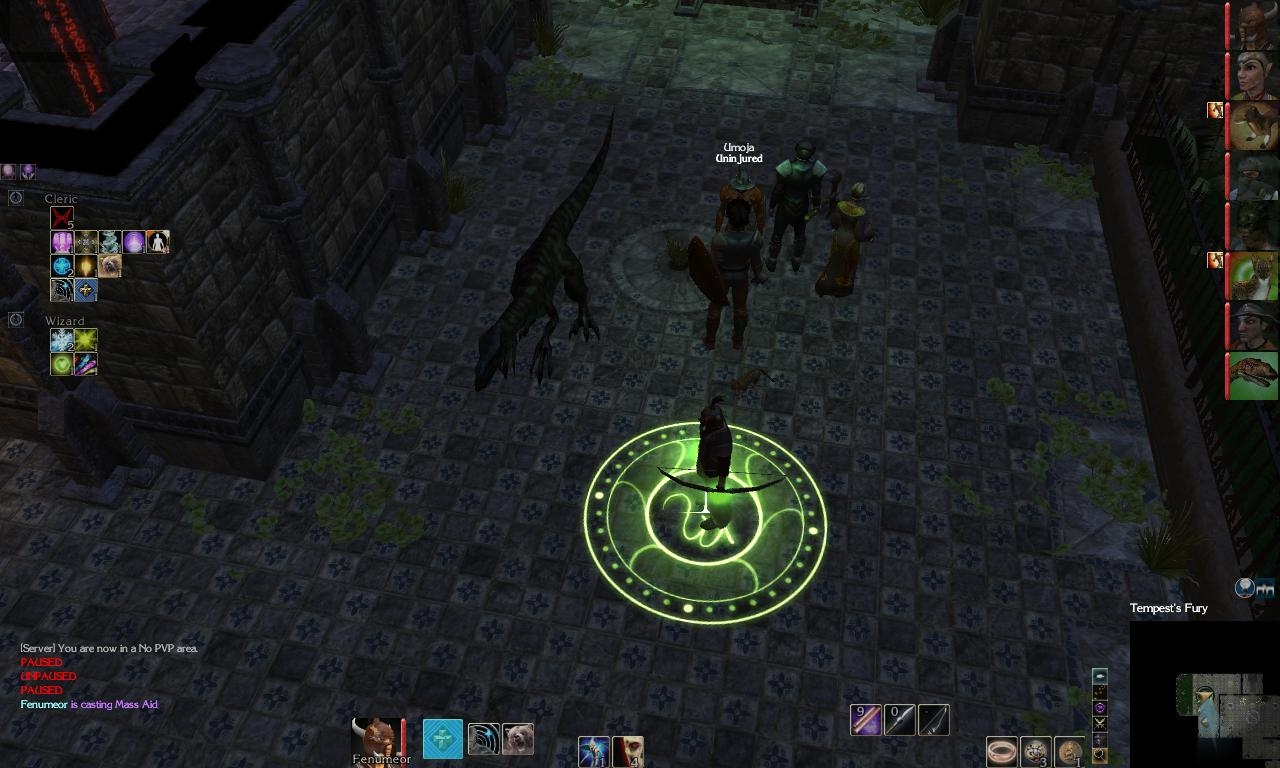
A very lite and clean in-game UI.
Only useful information showed, no borders and the stuff... (This does not include toggled screens like inventory or stats)
And most things are transparent.
I made it just for myself, so
it maybe pretty raw and uncomfortable for others. :)
You can zoom in/out the map by left/right clicking on it.
If someone has any questions/proposals - post them in comments I'll be around :)
CHANGELOG:
Updated for MoB:
The new version is little less transparent, and the map is round (not square) since the old tweak doesn't work.
Fixes (in LiteUI_MotB):
-fixed the blocking of keyboard when you clicked on a transparent text (this is a NWN bug not mine), I just added transparent backgrounds to such text now.
-most things can now be moved, just grab them little above/below/side
-modebar shows bard's bar as well
-the map is square again, thanks to "Square Minimap" mod.
Updated for Soz:
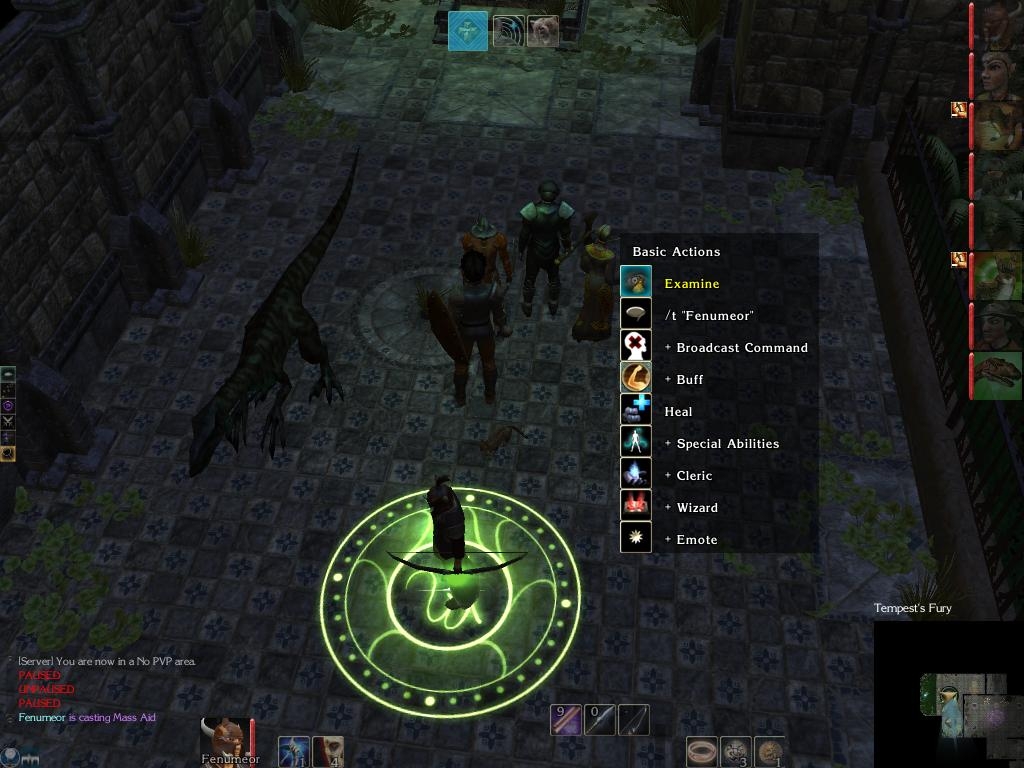
-added modified version of "player menu"(NWN Eye at the corner):
it has a day/night indicator, which if pressed brings up a playermenu popup. And AI on/of button.
If you can't see the tooltips - move the chat panel a little higher.
-made sure no new functions are missed
-some minor changes
-removed contextmenu.xml, now i just replace the backgrounds.
Updates:
-Made all hotbars liter - you can see a small transparent black strip - grab it to move the bars, or just look at it to know where they are
(make shure you are in a sunny area before you try to position them :) )
-increased the party bar by about 4 slots to see more faces without scrolling
This is the latest version compatible with SoZ and MotB expansions.
It does not override context menu, it replaces the background images instead to give it a liter look. So it is compatible with any context menu changes as well (for example Tony_K' AI).
Includes the container window with large LOOT ALL button which is pressed on mouseover.
Hi.
Thanks for the info.
It's strange as I can see resource names fine (or maybe I'm missing something? :) ). But there really were some suspicious differences in my file vs default, so I changed mine.
try the fontfamily.xml in the downloads list, and tell me if it fixes the problem for you.
Posted by E.C.Patterson at 2008-12-21 12:15:33 Voted 9.50 on 12/08/08
Hi Fenumeor! I just wanted to point out that there are some settings in your fontfamily.xml that cause problems with SoZ's trading interface (e.g. invisible text for resource labels). I'm not quite sure what is wrong. Hope you can fix it. _________________________ E.C.Patterson Gaming Parents Studios
@ E.C.Patterson
Made those bars liter.
Well, it can be uncomfortable to position them for the first time (they are quite invisible :)
But when you do it and know where they are - it's pretty easy to fill them with spells.
Posted by E.C.Patterson at 2008-12-08 17:15:03 Voted 9.50 on 12/08/08
Hey Fenumeor! Glad to see you're still around. Thank you very much for taking my request. This looks and works great so far. Those player menu elements are so tiny... they're perfect! I'll pop back in if any other improvements come to mind. Wait, there's one: can you give the same translucent treatment to the additional hotbars, like the vertical ones?
By the way, I really like the Loot All button too. It had become a pain having to click on that button all the time.
Thank you so much again for making those improvements.
@ E.C.Patterson
You're welcome.
I think I did what you wanted :)
Tell me if everything is ok...
Posted by E.C.Patterson at 2008-10-29 13:49:07 Voted 9.50 on 12/08/08
This is my UI of choice. I really like how unobstrusive it is.
Fenumeor, would it be possible for you to make a version that includes a LiteUI version of TonyK' AI UI modifications (e.g. creature/item right click menu)? Also include a lite version of the "NWN Eye" menu: I actually use it, especially for the Puppet Set button and the clock.
Thanks for making and sharing this! _________________________ E.C.Patterson Gaming Parents Studios
@Alzikar
Good idea. But I could not make the UIButton_Input_LootAll() function work anywhere else except for the "Loot All" button itself. And even if it would work it would kinda make inventory containers unusable, because they would close right after you open them.
Well I made a container window with much larger loot all button, which responds to mose over. So now you just click on "loot bag" on the ground and if your mose is at the rigth position the window closes and the loot is looted :), and even if not at right position - it saves you a click anyway. Sometimes this causes the bags to remain on the ground, but they don't shine anymore, so you can distinguish them from new ones...
Some time needed to get used to not clicking the button, but after that the process is much faster.
I uploded the container.zip as separate file.
Posted by Alzikar at 2008-06-26 15:02:07 Voted 7.00 on 06/26/08
@ Fenemeor
You're welcome. :-) I must say I'm enjoying your container.xml modification immensely playing through the MotB campaign.
Seemingly every enemy possesses some sort of loot (usually essences). While annoying to loot e v e r y s i n g l e mob all of the time, your perfectly positioned large loot button makes this process much more agreeable than the default UI and other UI mods here.
As a wish list:
What I wouldn't give for a remake of Bauldur's Gate/ BGII's "Get All" command where you could automatically loot all bodies within 5m or so of your character... MotB sorely needs this function.
That said, is there anyway possible you could find a way to incorporate an "auto-loot" ability within your mod?
This could work like as such: click on a body and the container window opens (as normal); however, all of the container's contents are automatically removed from the container to the player's inventory, if auto-loot is enabled. I know that World of Warcraft has this option and it greatly speeds up corpse looting.
Thanks for reporting the movement bug.
I could not figure out why my character stops responding to keys from time to time :)
Fixed it now.
Posted by Alzikar at 2008-06-06 17:47:11 Voted 7.00 on 06/26/08
With v1.12 of MotB and in 1024x768, this UI mod has a few glitches:
1.
If you click anywhere on any of the redone components, your character becomes unmovable with the WASD keys. This is easy to do because...
2.
All of the new components are nigh invisible and so I spent a great deal of time trying to find where everything was, i.e.: The border for the chatwindow, the hotbuttons so I could drag icons to it, so on and so forth.
3.
Other annoying features: the mode bar is missing half of its commands, as it's set too far down on the screen. The minimap isn't drag-able.
Negatives aside, this UI does have some saving graces: Namely, if you edit the *.xml files, searching for "alpha" and edit the values to something reasonable, say 0.9, the partybar is quite usable as a component in a custom UI. Its small and tucks nicely into the upper right corner of the screen with no fuss.
Also, I like the loot screen, (container.xml) as it has a large, easy to click loot button which is centered on the screen after you open a chest. This is convienent because that's where my mouse pointer is most of the time I open a chest and it cuts down on unecessary mouse movements, which reduces wrist strain and pain.
5.5 because of the severe movement impairment bug, un-dragable chat box, un-dragable minimap, cut-off mode bar and extremely difficult to see any useful information when needed.
Posted by Hexidous at 2008-02-19 11:59:47 Voted 9.00 on 02/19/08
Well done. This is really helpful. A definite grab for anyone who plays in lower resolutions or anyone looking to maximize on screen content without sacrifice to functionality. _________________________ Societies monomania of sanity is a plethra of madness in the mind of the miserable, but a manifested magnificence in the eyes of the mad.
Posted by Donnerschlag at 2007-08-06 20:50:49 Voted 10.00 on 08/06/07
I definately like this.It makes the game so much more visually appealing to me.Domo Arigato! _________________________ It's not the years,honey,it's the mileage.
Posted by _six_six_six_ at 2007-08-04 16:09:15 Voted 9.00 on 08/04/07
10 - A Masterpiece, Genuinely Groundbreaking 9 - Outstanding, a Must Have 8 - Excellent, Recommended to Anyone 7 - Very Good, Deserves a Look 6 - Good, Qualified Recommendation 5 - Fair, Solid yet Unremarkable 4 - Some Merit, Requires Improvements 3 - Poor Execution, Potential Unrealized 2 - Very Little Appeal 1 - Not Recommended to Anyone






 Site
Site










 at 2008-12-22 09:53:26


