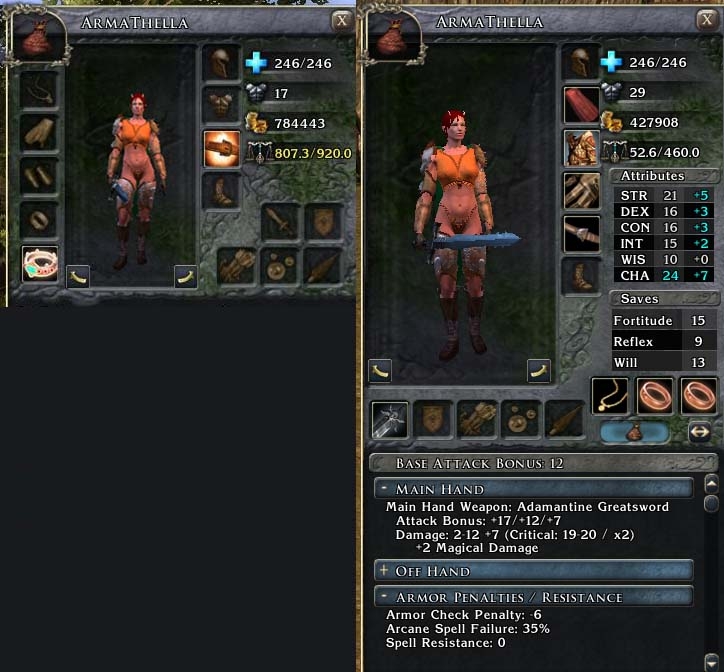
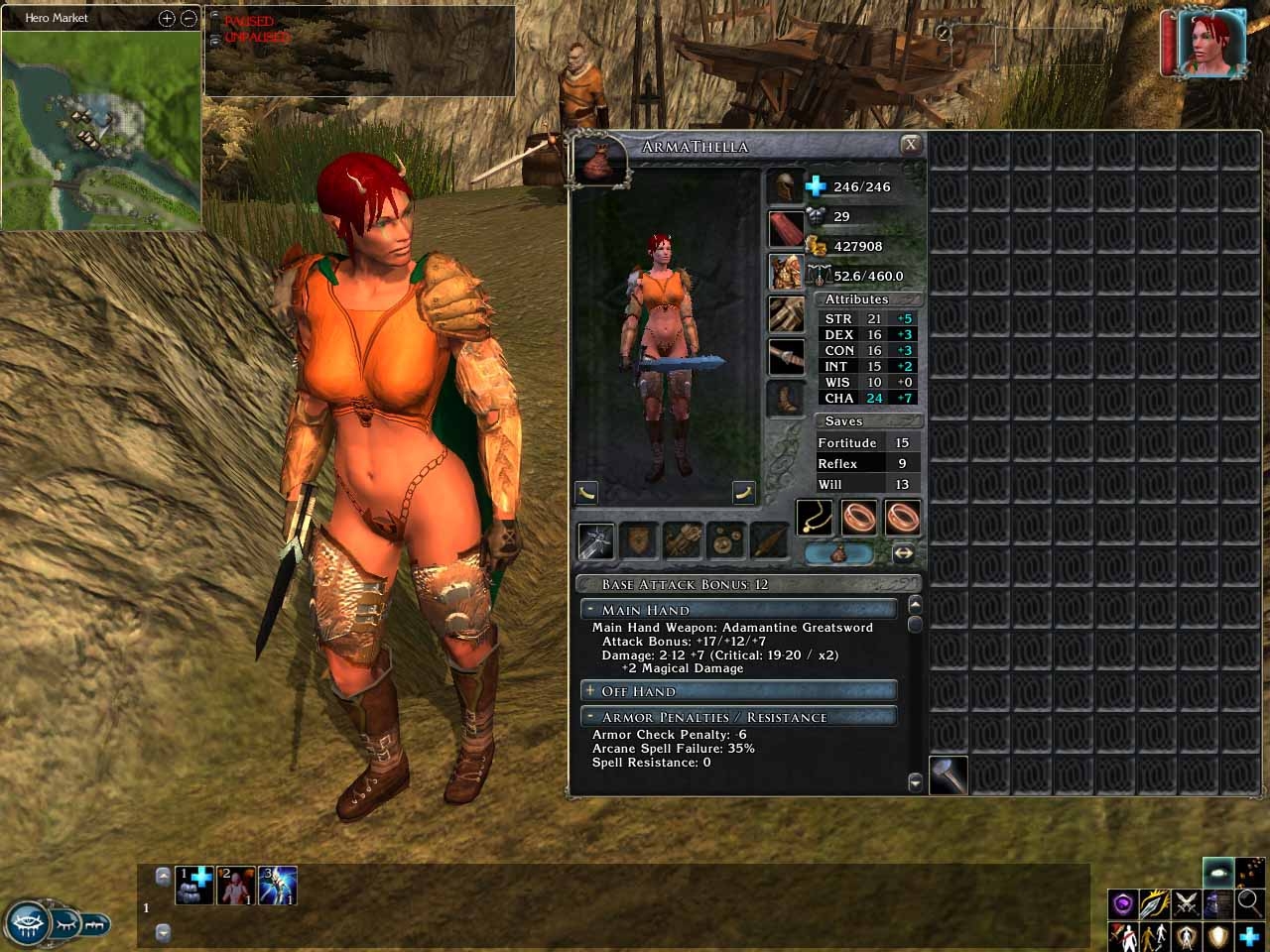
This a complete overhaul of the default inventory.
What is New? Everything!
Larger 3D Character Window
Repositioning of the Armor, Weapon, and Jewelry slots.
One Big Bag Inventory that shows your entire inventory in a single window!
Additionally many quick reference Statistics:
Character Attributes
Saving Throws
Attack Bonuses
Weapon Damage
Spell Resistance
Armor Penalties
All that without the need to scroll through the character window to check your buffs & bonuses!
Bug Note: I am new to scripting so I just don't have the knowledge base to debug everything. I have found no other bugs and everything is working great for me. Feel free to post a comment here if you find a bug or just have an Idea. If I see the comment, can fix the bug, or like the idea I will re-release a updated version.
Updates: v1.00 SoZ
Quick dirty fix for SoZ
Updates: v1.00
Bug Fix: Dynamic Updating is now working!
Organization of the statistics menu.
Minor tweaks to the layout.
Updates: v.99a
Fixed a bug where the first four boxes in the last line of the inventory could not be used.
Updates: v.99
Original Release.
News Update: 10-26-2007
I now have MotB. I have tested my inventory in game and all seems to be working. However in regards to the "Sexy OC" armor you see in my screenshots. That addon breaks in MotB. I have created an Addon to fix it. Look here: Link
News Update: 10-28-2007
Sliders creator of "SlimGUI" has made an adaptation of my Big Bag layout for use in his UI mod. Check it out here: Link
An New England Patriots fan? Then our New England Patriots shop can help you make your dream come true. Here you can find New England Patriots jerseys you want with all kinds of styles and colors. It's easy to get, just click your mouse. Here you can choose many types of Patriots jerseys, such as authentic jerseys, premier jerseys, and replica jerseys, they are all of high quality. They are made of high-quality polyester two-way stretch pique fabric and has solid mesh inserts for ventilation. You can also see many jerseys of hot players such as Tom Brady, Wes Welker and so on; you can choose what you like best from them. They are all free shipping and not tax.
Posted by zootie at 2011-10-04 21:47:18 Voted 9.00 on 10/04/11
And it's back like a recurring nightmare. Dangit. I even deleted the entire Sort button section and it's still there and working :( Oh well, one home run will do I guess :)
Posted by zootie at 2011-10-04 21:39:26 Voted 9.00 on 10/04/11
Ok this is a GREAT mod. Thank you so much for taking the time to make it! Inventory and equipping your char for the best results is waaaaayyy easier now.
I am also very glad to see how easily it can be modified, especially removing that dratted Sort button :) One section commented out, and it's gone like a bad dream. So that's two home runs for this mod in my book.
Posted by Ninnetyer at 2010-10-31 13:46:41 Voted 10.00 on 10/31/10
Good work work for me last patch with last expansion too :)
But I have some questions can I ask here ?
Posted by eleazzaar at 2009-04-14 21:01:37 Voted 8.50 on 04/14/09
yeah, i really wanted the weapons + armor stats to be right there, instead of constantly opening up the character panel with comparing weapons.
Posted by RyanJ at 2009-02-03 06:07:07 Voted 10.00 on 02/03/09
WOW I love this mod! This is how the inventory window should have been set up in the first place. I can't think of a reason NOT to use this. Awesome.
Posted by Scarab Monkey at 2009-01-05 16:28:59 Voted 9.00 on 01/05/09
Nice
Posted by fire&ice at 2008-12-29 06:18:07 Voted 8.75 on 07/20/08
modron - I've got a version of this inventory in my Big Fonts UI mod (link below), with a trading button. It's not perfect but it mostly works.
Just take the inventoryscreen.xml and texture file from the SoZ beta zip file on my big fonts page.
With the release of Storm of Zehir though, there is now the need for a trading goods button! An update would be highly welcome, as I can't use because of that the mod at the moment.
Posted by swapoer at 2008-11-13 07:18:46 Voted 9.00 on 11/13/08
I like it.It save a lot of time of me from arranging the inventory.
Posted by fire&ice at 2008-07-20 01:23:01 Voted 8.75 on 07/20/08
Zelgrath have you tried installing my inventory into Charlie's UI yourself? I do not use "Charlie's UI". However I downloaded it and looked at the zip's contents. It may be as simple as replacing Charlie's "inventoryscreen.xml" with mine. His "inventoryscreen.xml" is located inside a subfolder named "charlie-ui_xml". After that place my "inv_top_bg_bb.tga" into his "charlie-ui_tga" folder. I have NOT tested this but you could give it a try. :)
Posted by Zelgrath at 2007-11-09 17:52:49 Voted 9.00 on 11/11/07
Is there a version of this that works with Charlie's UI? I'm away from my nwn2 system for the weekend. Charlie has everything I want in a UI except liting the important info on the inventory sheet. You should talk to him/her about combinini these.
Posted by Ransom at 2007-10-23 16:30:58 Voted 9.00 on 10/23/07
Outstanding, a must have. I began using this when I installed MoTB because the custom UI's I had been using hadn't been updated yet. Now I will not go back ... having all my inventory on one page, along with the important character stats, is soooo much easier than any multipage inventory I've seen yet. Good job.
To Malakh. I Would not consider Character Influence as an important statistic in the inventory. I also don't have MOTB (yet) so I can't add that feature. I probably would not add it anyway because, all the attributes listed in my mod are there specifically because they can be effected by Weapons, Armor, Jewelry Ect. I purposefully left out a lot of the character sheet because it simply does not apply. It would be cluttering everything up and defeat the purpose of the mod. "Quick Reference" However I do see your point. You want quick reference to companion's influence. That is very understandable. However, Stop and ask yourself... "What does Companion's Influence have to do with Inventory?" Thanks for your post. It is good to hear that the mod works in MOTB. :)
Posted by Malakh at 2007-10-19 05:43:17 Voted 7.00 on 10/19/07
Good effort, but you have a big gaping hole for MoTB which is that you can't see your companion's influence, which is a part of the character sheet.
Posted by fragaldo at 2007-10-07 09:11:42 Voted 10.00 on 10/07/07
as Terame, this ui desserve a 10
in addtion of the excellent 1.10 patch,
your ui is a must have since the normal inventory quite suck to my taste
To Sherincal420. I am using the Sexy OC + Crafting Hammer Addon Packs. (Actually well over a dozen packs)... The exact armor is the "Wyvem Full Plate" To be honest I think Sexy OC is a good mod except... I wanted a female clothing pack that would change the look of the OC appropriately. The OC is to conservative for my taste. Unfortunately Sexy OC goes a little too far. Too much focus on Boobs, Buttocks, and Nudity. I also think it only works really good with party members and not with NPCs. However it is quite good. I recommend you check it out here at the Vault.
hey what outfit is your character wearing? is that a hak pack or an override? _________________________ The darkness and howling wind before you is frightening. Dare ye continue into the darkness?....
Wauthan "Almost get the feeling that you're starting a complete overhaul of the entire interface."
Actually I had no plans for a complete overhaul. Sorry. I have found almost everything I want already as a download.
Just look at the screenshot I posted. Almost nothing is standard.
There were many Inventory mods already available. Unfortunately none did exactly what I wanted and they broke in 1.10.
As for elemental and damage resistance I wanted that as well.
I am looking into it but No Promises.
Posted by Wauthan at 2007-10-05 04:32:26 Voted 8.00 on 10/05/07
A brilliant modification to the default UI. Almost get the feeling that you're starting a complete overhaul of the entire interface.
Is it possible to add information on the PCs elemental and damage resistance as well?
Thanks for the comment Adcycn.
It was indeed a bug. The box for the now invisible extra 3 bags was overlapping into the storage area. That unfortunately was forcing you to click the Invisible Box and not the Storage.
It has now been fixed in the new release v.99a above.
Sorry for the inconvenience.
Posted by adcycn at 2007-10-04 00:07:05 Voted 9.00 on 10/04/07
it's what i want~~
but i met a problem
four box on the left of the last line of the big bag can't be used~~
can't drag things in or out~~
is this because my low display Resolution(maybe1024*768) or just a bug?
Posted by adcycn at 2007-10-04 00:06:54 Voted 9.00 on 10/04/07
it's what i want~~
but i met a problem
four box on the left of the last line of the big bag can't be used~~
can't drag things in or out~~
is this because my low display Resolution(maybe1024*768) or just a bug?
You must be Logged In to post comments in this section.
10 - A Masterpiece, Genuinely Groundbreaking 9 - Outstanding, a Must Have 8 - Excellent, Recommended to Anyone 7 - Very Good, Deserves a Look 6 - Good, Qualified Recommendation 5 - Fair, Solid yet Unremarkable 4 - Some Merit, Requires Improvements 3 - Poor Execution, Potential Unrealized 2 - Very Little Appeal 1 - Not Recommended to Anyone






 Site
Site










 at 2008-12-29 06:18:07
 at 2007-10-23 16:30:58


