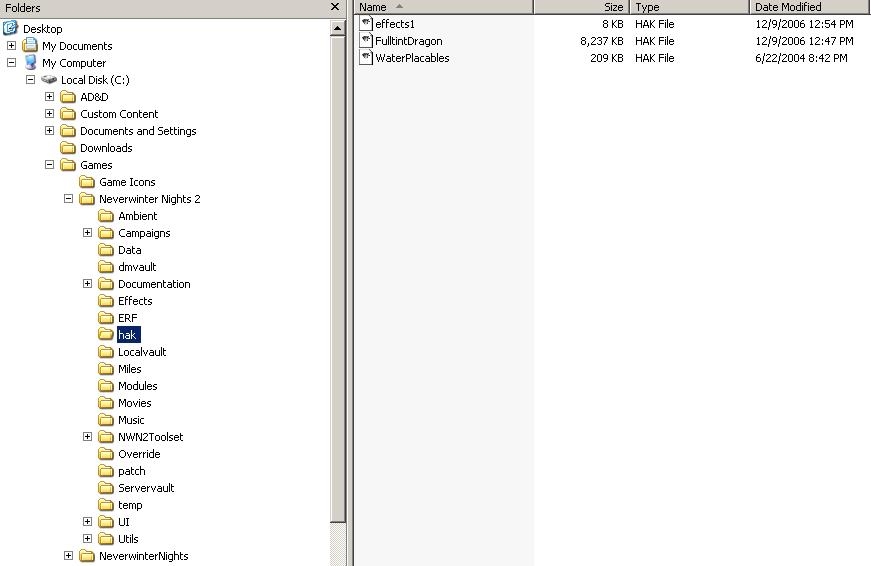
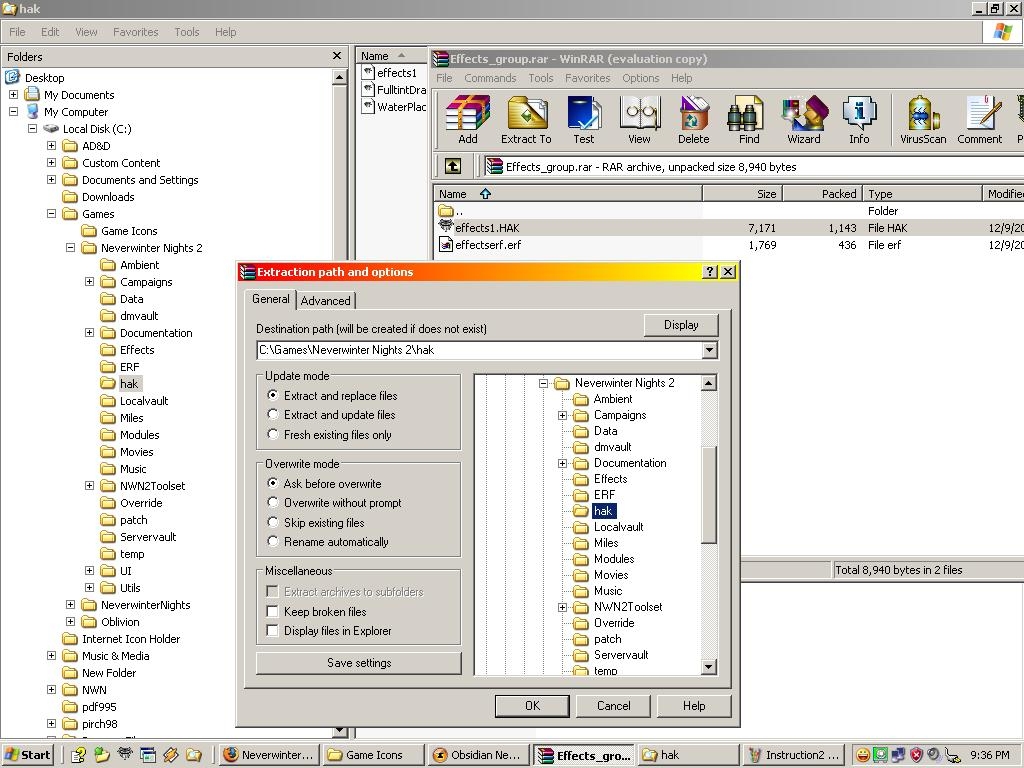
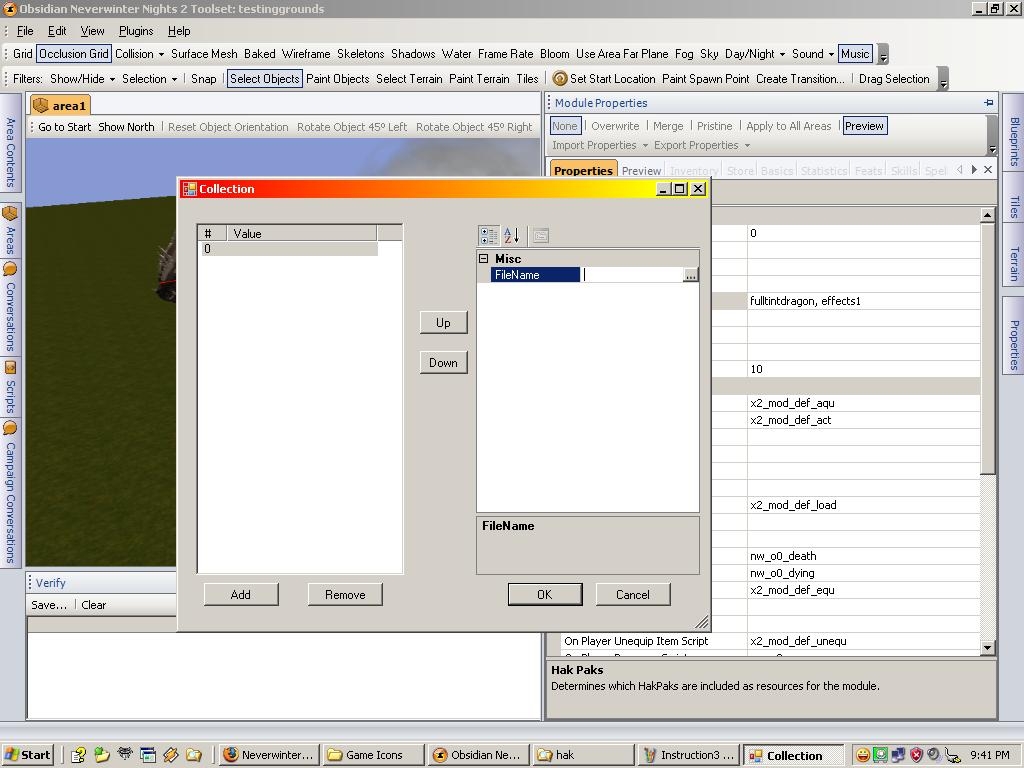
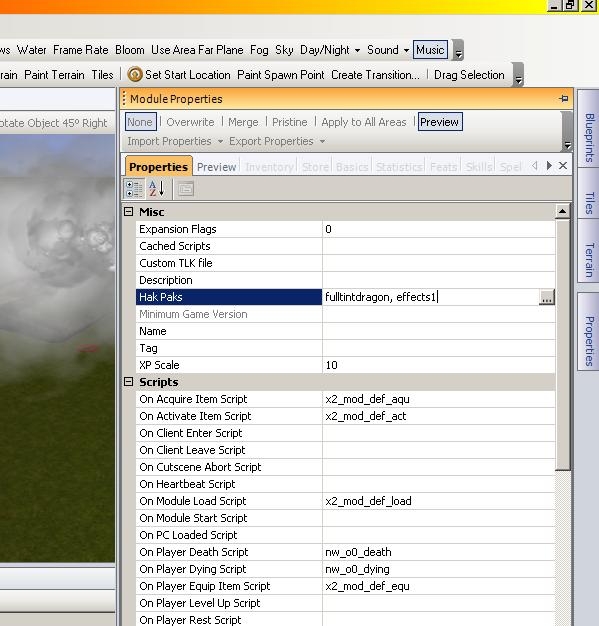
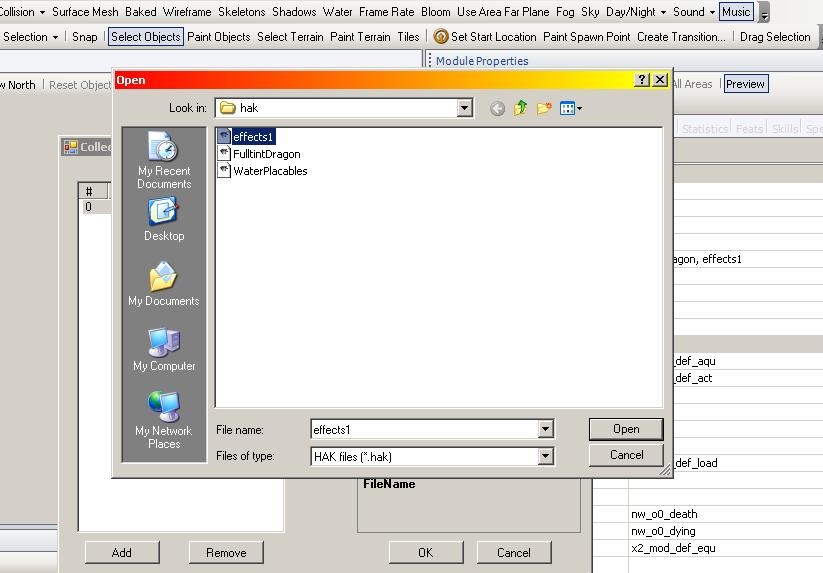
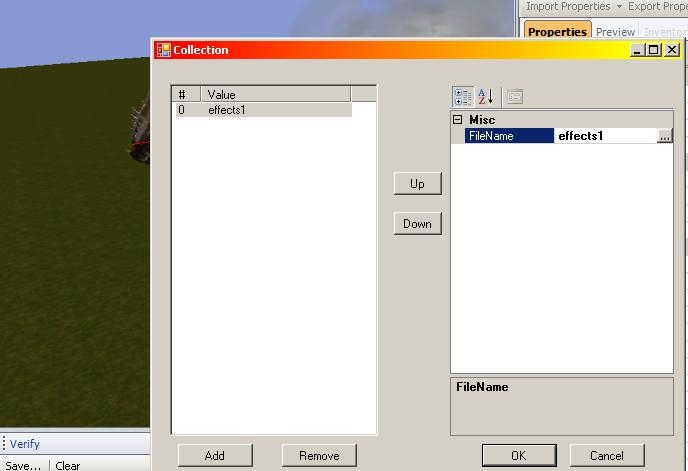
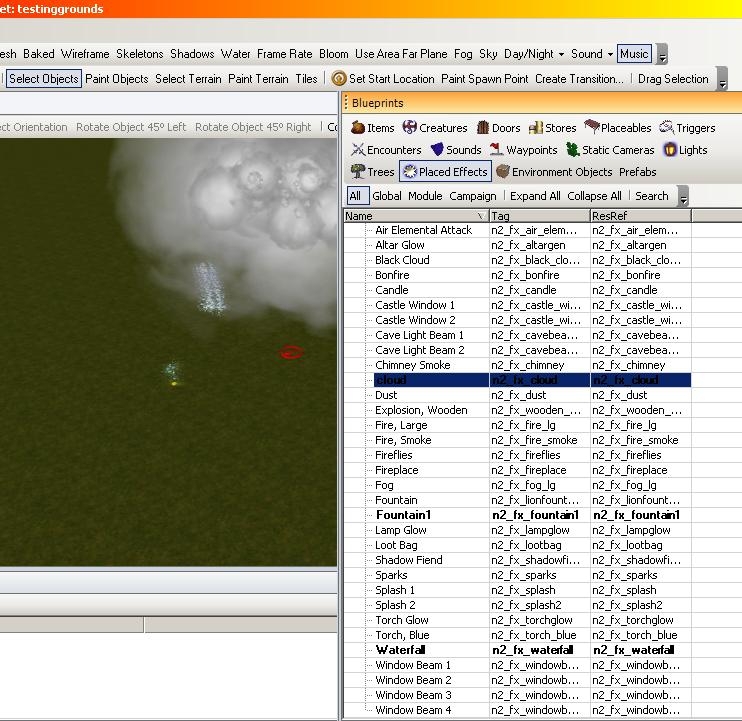
Here are the files for a waterfall, Cloud and fountain. Download and open with winrar or similar program, there should be two files effects1.HAK and effectserf.erf export/place the effects1.HAK file into your Neverwinter Nights 2\hak folder. You do not need to open the Hak file and extra the files in it. Extract the effectserf.erf file where you want (suggest you make a Neverwinter Nights 2\erf folder if you do not have one and place it there) Start up the module you going to use and go to module properties Hak paks click a
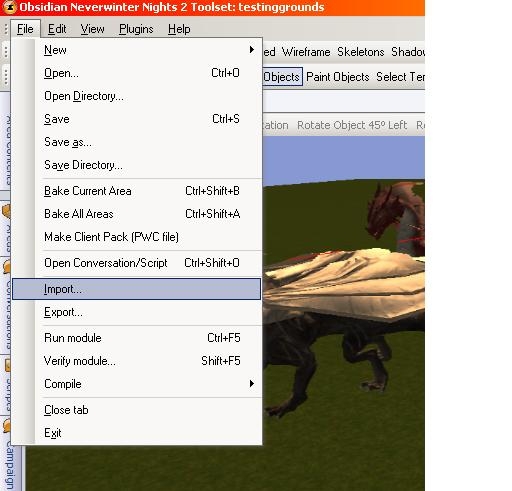
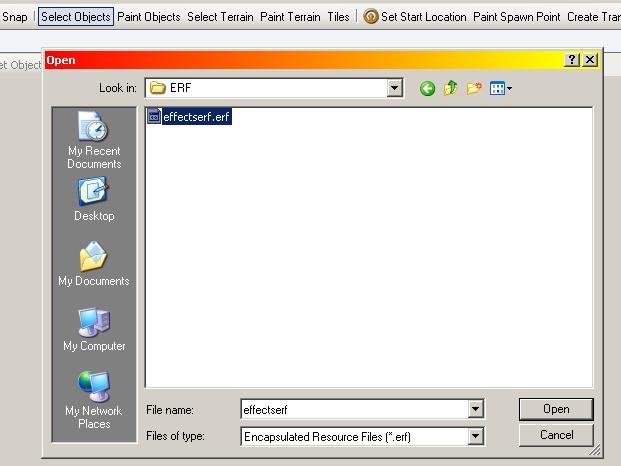
drop menu and click add click file name box(gray box with little dots on it. Go to you Neverwinter Nights 2\hak and select effects1.HAK so see it on the left.(ignore message that popup) Now go to file import go to where the effectserf.erf file was extracted, this will import placeholder of the effecs under placed effects. You may have to reload you module. Remove any files that were in Placed in the NWN2_VFX(if you download these before they were move to hakpak system)as they will cause patching issue (one of the reasons moving to hakpaks). Question/comments welcome :)
There were no problems with my three VFX files people were just installing them wrong, that why I updated how to get them into your module. I test them again just to make sure :) Try it with the new instructions and tell if it does not work.
Ok I updated the pictures to show you instructions, hope this help clear up the process of getting the content into you module.
GnokIrongut- Hope this helps if you still having troubles let me know. :)
Exact same set of circumstances as EC Patterson above. The effect is not showing. I included the hakpak. I then opened the hack and took the 6 files and embedded them in NWN2_VFX. No dice. I've copied quite a few effects with no problem. The copy blueprint, properties screen is pretty straightforward. Really don't know whats up here.
Did you put the hakpak file into you hak folder? That .hak folder holdes the effects that why you not seeing them pop that in and load up the module and they should be there.
1) Opened my module
2) Imported the erf
3) Saved module and exited toolset
4) Restarted toolset, opened module again: effect blueprints appear
5) Placed the cloud, fountain and waterfall effects in module (effects do not appear in area preview, although effects helpers do).
6) Saved, ran module
7) Nothing.
Siomir-- Sorry to hear that I wanted to put a erf up, but found out effect cannot be exported and ob. still does not have it own hak utility to make this into a hak so we still stuck with putting them in overide or NWN2_VFX zip type file under data. I going to put together a more detailed instructions on getting them in game for you guys and hope that help. It should be up this weekend, sorry not sooner but work and christmas shopping is getting in the way. :)
well, i can not get the effects to work even how hard i try, but they work on creatures though, but not anything else....they do not appear ingame either =/ _________________________ Personal Glory above all in battle, death before dishonor!
Too rotate the placed effect hold down ctrl and turn it with the arrow keys on the keyboard. :) This along the Z axis I heard there might be a later patch that allow rotation on all axises and I think some guy made file on the vault that allowed for rotation of placable on all axies, but do not know if it works for placed effects.
Posted by Lanessar at 2006-11-25 05:58:25 Voted 9.00 on 11/25/06
Superb. The only thing I could have asked for is a few waterfall variations in facing, as VFX do not rotate. _________________________ Lan's Placeable Groups v1.5
sorry for the delay, got playing NWN2 and having fun :). Well I think I know what happening with the people having the effect not showing up after selecting them, make sure you have them set to overwrite along the top of the properties. If they not in the drop down then might of put them in the wrong folder. I found out the toolset does not support exporting placed effects, they need to give us a folder to place them into also. Hope that helps. Yes if you make a module with these effects the players will need them also. Along with this the old NWN1 hak utility does not support these files so we need one of though for NWN2 so we can put these into a hakpak for you guys.
Patcha-- sorry you having troubles, I doubt that having the italian version is causing it, only can think you might have them in the wrong folder. Have you tried out visual effects on the vault with troubles. I look through everything again and maybe put up better instructions. :)
I followed instruction, but after adding them to VFX file, them doesn't apper in Effect List (I've got Italian version, may be a problem?).
When you'll pubbly the .erf?
Another question... after using finished the module with this fx, we have to distibute some other files? _________________________ by Patcha -> my vaultages <-
Well the game suppose to be availiable today, so I be making a erf and finding out if anything changed on where we place files etc.. So give me a few to get everything straightened out. :)
Posted by DMStephen at 2006-10-29 01:18:00 Voted 10.00 on 10/26/06
I thought that after adding the files to the NWN2_VFX.zip they have to appear in the placed effects menu. (The dark black lines on the Instruction2) I tried making copies, but the effects won't appear, I only get a small yellow thingy when I use it. So if it's not too much trouble could you make that erf for me? I really would like to use it.
I have trouble adding the visual effects to my toolset. I add the files to the NWN2_VFX.zip file, but then in the toolset they don't appear at the placed effects. When I create a new effect I can see the added effects, but when using them nothing happens. Any idea what's wrong, I followed the instructions as shown on the screenshots.
DMS
Sorry that happening, are you going back to you copied version of another effect and using that when you placing them down? See in instruction 2 you making copies and adding the new effect in three I renamed the copies to the new effects the new copies are dark black so make sure you click though when you place them. Hope this helps, if not I could make a erf of them for you. :)
Posted by DMStephen at 2006-10-26 05:07:22 Voted 10.00 on 10/26/06
I have trouble adding the visual effects to my toolset. I add the files to the NWN2_VFX.zip file, but then in the toolset they don't appear at the placed effects. When I create a new effect I can see the added effects, but when using them nothing happens. Any idea what's wrong, I followed the instructions as shown on the screenshots.
Thank you for the vote.
I glad you found other uses for it. My idea was to get out some examples so people could make differant versions of them for there own use and get use to working with these files and the visual effect editor. :)
Posted by puychaudko at 2006-10-15 09:53:14 Voted 9.50 on 10/15/06
I used the cloud effect, tinged it green slowed it down a bit, then placed it underneatha graveyard - very spooky effect - many thanks
Thanks I took my time on the cloud to make it look real. I going to do more effects(surprise ones hehe), but if there are others effects that you guys need let me know.
Posted by TolenHaznael at 2006-10-08 12:58:29 Voted 9.75 on 10/08/06
They all look good, especially the cloud.
You must be Logged In to post comments in this section.
10 - A Masterpiece, Genuinely Groundbreaking 9 - Outstanding, a Must Have 8 - Excellent, Recommended to Anyone 7 - Very Good, Deserves a Look 6 - Good, Qualified Recommendation 5 - Fair, Solid yet Unremarkable 4 - Some Merit, Requires Improvements 3 - Poor Execution, Potential Unrealized 2 - Very Little Appeal 1 - Not Recommended to Anyone






 Site
Site









 at 2008-04-24 14:24:47
 at 2006-11-25 05:58:25


