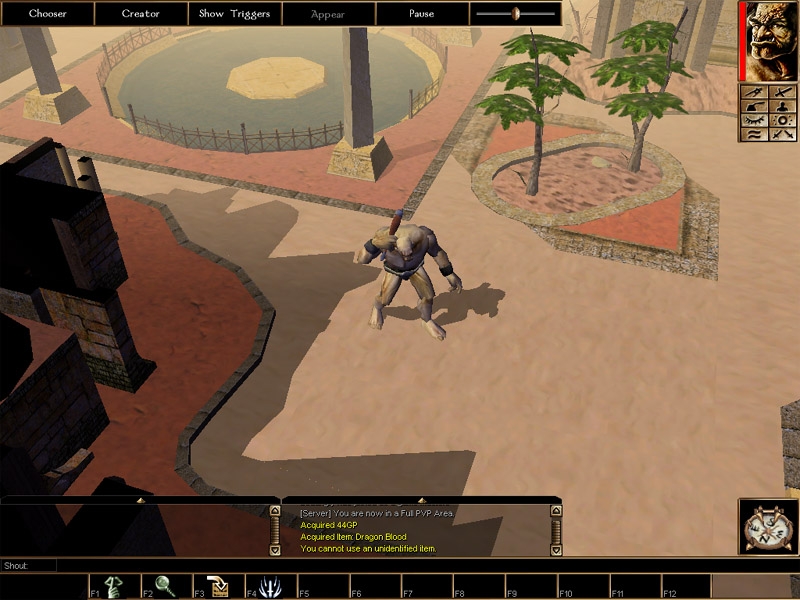
A reskin of the city tileset, I present to you, the Desert City. Also a reskin of the rural to match my city. Unzip into your NWN\ folder and it will place the ITP's into your override directory, and the hak into your hak directory.
UPDATE v 2.0 Converted all textures to DDS, it is a WORLD of difference. Also, I reskinned all the buildings and the stones around streams, etc. They now look much more appropriate for a desert setting. The rooves are also now all tile, again this looks much more appropriate to a desert setting. I reskinned the trees in an attempt to look like palm trees. I think they came out pretty good. Al-Qadim and the realm of Zakhara, NWN is coming for you! UPDATED combined with a new rural desert reskin, to match my city.
When I first created these tilesets, if ITP files were in the actual .hak file, then saved games using the hak would be corrupt, hence the need to put ITP files in override. I do not think this issue exists anymore, until I re-release the hak with the ITP files in the actual .hak, you can either keep the ITP files in override, or add them to the hak.
Posted by MokahTGS at 2003-02-1209:59:00
Why are you telling people to put files in the override folder? If you edit the Hak pak and put the ITP files IN the hak pak and resave it it will work just fine. You don't need to touch the override folder.
Posted by Snakefeather at 2003-02-1110:41:00
But I HAVE put the .itp files into my override directory. The tilesets still aren't appearing.
Posted by Rodney at 2003-02-1103:54:00
Folks, here's the deal: To BUILD with these tilesets, you need to have the appropriate .ITP files in your "override" directory. To PLAY with this tilesets, you do NOT need to do anything to the override directory, just make sure the .HAK file is in your "hak" directory. I've been using these tilesets a lot on the Hidden Tradition server, as part of the Outremer Hakpak, and they are really great. Rodney
Posted by snakefeather at 2003-02-0917:11:00
Yep, same problem. I've d/l'd these tilesets in a bunch of different hakpacks and the tiles just aren't there. Very frustrated. Please help!
Posted by Steven at 2003-01-2422:51:00
I can't get it to work. I put the hak in my hak folder and the other files in override then open the toolset, make a module, select desdesc as the hakpak - then when I go to create a new area, the desert option isnt there, just the standard BW ones. Please help because I really want to make a desert mod.
Posted by saphrine at 2003-01-2422:46:00
Hi, I am trying to add this to a hak that I already have, but I am having some problems. I can make the Desert Areas (plain city) but I can't place any terrain on it. It is not that it is showing up white but that I can't lay terrain at all. If anyone had this problem and knows how to fix I would be grateful for the tip.
Posted by Avorleth at 2003-01-0812:37:00
I really like this Hak Pak. Very well done. I am using it in the second Shards of Power module (SP2). Now, to understand how much I like it, the original script (based on an unpublished novel of mine) called for the starting/main city to be a normal port city, then for some grassy area between the city and the desert, and then outdoor desert areas (followed by other stuff underground). So I only intended to use the outdoor desert tileset. However, the Desert City was so wonderful that I just could not help myself. I went in and re-designed the (hand drawn, then scanned) campaign map to extend the desert all the way to the see, and turned the port city into a desert-port-city (like one would find in Arabia, for example). It takes a lot for me to make enormous alterations to the fabric of my own world like this, but I made the change because of how excellent this hak pak is. Keep up the good work! Av
Posted by DustinAsche at 2003-01-0801:30:00
Gorgeous! Bravo! Goodjob!
Posted by Bedlamson at 2003-01-0215:12:00
Scratch that. I just learned that some video cards can't display DDS files properly, and I just changed computers and video cards. So far the only solution I've found on the Bioware boards is to convert all of the DDS files in the hak to TGA files.






 Site
Site