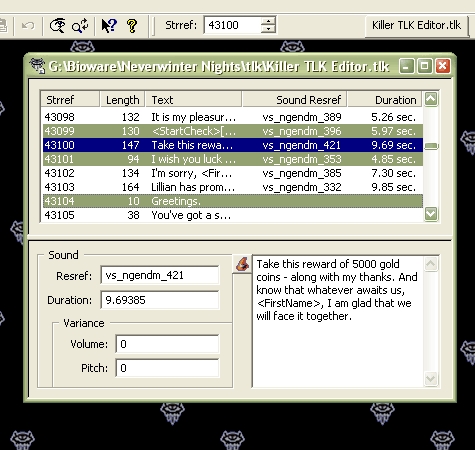
ScreenshotsI looked around for a TLK Table editor awhile back and found the pickins a bit slim. Found one or two that worked ok but they were...well let's just say they weren't greatly robust. I'm sure the custom content guru's have really nice ones but I couldn't find them so I made one myself and here it is.
It's a breeze to install and use but you must be running Windows to use it. I'm pretty sure it requires Windows XP but if you have Windows 98 or later you can give it a go and it just might be ok (no way for me to test sorry). Unzip the contents of the zip file you downloaded and double-click on either the Setup.exe or Killer_TLK_Editor_v3.0.<b></b>msi to start the installer that will guide you thru the installation process.
See the built-in help system after you install Killer TLK Editor (click the Help Topics... option on the Help Menu) for instuctions on how to use it.
Please don't use this product to mess up your dialog.tlk and/or CEP.tlk files and then come complaining to me when your game won't run. Those files should never ever be edited -- you should make copies of them under a different name and edit the copies instead.
Version 2.0 adds new Import/Export TLK Table merging functions. Some new filter options for the search and replace features. Tile options for the window menu to make positioning and sizing multiple open editor views easier. And a couple of performance increases so the program will run smoother and load/save TLK Tables a bit faster.
Version 3.0 adds a new TLK Table Repair feature to help you fix and load those stubborn semi-valid tables, a new Token Wizard to assist in adding the special conversation tokens recognized by the NWN game engine into your string entries, a new display mode to assist with the conversion of strref numbers for custom tlk table use, and a few bug fixes.
Version 1.0 & 2.0 users should uninstall their old version before installing version 3.0. This can be done thru the Windows Control Panel -- Add/Remove Programs icon. You are also urged to review the following help system topics which were expanded or added to cover all the new features:
General Overview
Edit an Existing TLK Table
TLK Table Repair Concepts
Using the Import and Export commands to merge TLK Tables
Repair TLK Table Dialog
Special Note: Version 3.0 was changed without creating a version 3.1 to add in a new Custom Color feature to the Color Block options accessed thru the wizard hat button. It was such a small change I didn't deem it necessary to make a whole new version and have to update all the help files and references to the version number everywhere in the program. If you have the v3.0 without this feature, uninstall it from Windows Control Panel-Add/Remove Programs icon, then download and install v3.0 again to get this new feature.
This zip contains Killer TLK Editor v3.0 and the setup installer. Unzip the contents to your hard drive then double-click on either setup.exe or Killer_TLK_Editor_v3.0.msi to start the setup program that guides you through the installation process.
Once installed, start up Killer TLK Editor and look at the built-in help system for instructions on how to use it -- just click the Help Topics... option on the Help Menu. There will also be a shortcut to the help program installed on your Start-->Programs menu under Axe Murderer's Killer Company.
Version 1.0 & 2.0 users need to uninstall the old version before installing this one. You can do that from Windows Control Panel -- Add/Remove Programs icon.
Special Note: Version 3.0 was changed without creating a version 3.1 to add in a new Custom Color feature to the Color Block options accessed thru the wizard hat button. It was such a small change I didn't deem it necessary to make a whole new version and have to update all the help files and references to the version number everywhere in the program. If you have the v3.0 without this feature, uninstall it from Windows Control Panel-Add/Remove Programs icon, then download and install v3.0 again to get this new feature.
Any chance of a version that will run on Vista 64? _________________________ Sanctum of the Archmage Writing Projects Website and Blog Academy for Modding Excellence
Posted by Stridor at on05/16/09
Axe like most of your stuff this is awsome thanks for all the hard work. _________________________ Trouble? Oh wait a sec! Yeah got it right here in my back pocket! Want some? (WEG)
Posted by invisig0th at on05/13/09
The best tool to use for editing TLKs. Invaluable for builders. Highly recommended! Thanks, Axe! _________________________ - Invisig0th
Posted by Yukiakari at on03/29/09
Great! A wonderful and simple utility for editing .tlk-files. This is just what I was looking for. Thank you! _________________________ "A Hippie's Tale", a colouful little module: Link
Posted by Axe_Murderer at 2009-02-2300:13:13
Thanks to you and everybody else for all the compliments. I'm not concerned about votes in the least and I certainly don't expect any but I do appreciate them none the less if you feel so inclined. I'm just happy people have found this thing useful. So no need to feel guilty about not voting...
Posted by Big_Shoe at on02/22/09
Doh! I can't believe I've been using this program happily for years, but forgot to vote for it until now. Axe, please forgive my stupidity, and thanks again for this superb utility. _________________________ Realms Of Destiny PW
Posted by int19h at on10/18/08
This is the best TLK editor to date, period. Fast, convenient, and haven't crashed once on me. Strongly recommended. _________________________ [Advanced 2DA editor with TLK support]
Posted by Saduj at on07/19/08
Very nice to have for 169 :) _________________________ Carcerian/Saduj's Submissions: (169 Portrait/Soundset Unlocker) (12 NWN Fonts) (30 NWN Fonts) (Auto-Emotes) (Custom Dragon Disciples) (Dynamic Wildshape) (Keyring) (NPC Schedules) (Sacred Shields) (Spawning Undead) (Shayans Subrace Engine for 169)
Posted by OmegaDM at on07/13/08
Went to update my tlk file after getting v1.69, and *poof*, the old editor I was using couldn't open the new tlk from cep. This saved me ALOT of hair pulling stress. Great work! _________________________ Omega Forge on the vault






 Site
Site