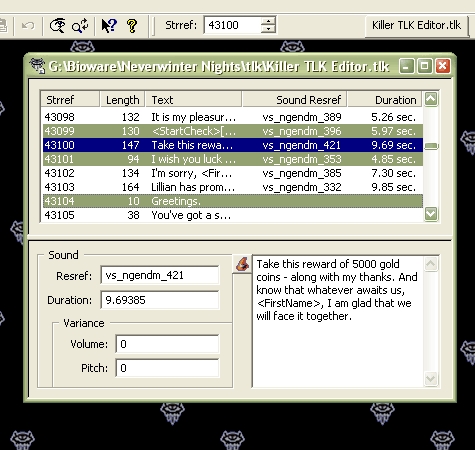
ScreenshotsI looked around for a TLK Table editor awhile back and found the pickins a bit slim. Found one or two that worked ok but they were...well let's just say they weren't greatly robust. I'm sure the custom content guru's have really nice ones but I couldn't find them so I made one myself and here it is.
It's a breeze to install and use but you must be running Windows to use it. I'm pretty sure it requires Windows XP but if you have Windows 98 or later you can give it a go and it just might be ok (no way for me to test sorry). Unzip the contents of the zip file you downloaded and double-click on either the Setup.exe or Killer_TLK_Editor_v3.0.<b></b>msi to start the installer that will guide you thru the installation process.
See the built-in help system after you install Killer TLK Editor (click the Help Topics... option on the Help Menu) for instuctions on how to use it.
Please don't use this product to mess up your dialog.tlk and/or CEP.tlk files and then come complaining to me when your game won't run. Those files should never ever be edited -- you should make copies of them under a different name and edit the copies instead.
Version 2.0 adds new Import/Export TLK Table merging functions. Some new filter options for the search and replace features. Tile options for the window menu to make positioning and sizing multiple open editor views easier. And a couple of performance increases so the program will run smoother and load/save TLK Tables a bit faster.
Version 3.0 adds a new TLK Table Repair feature to help you fix and load those stubborn semi-valid tables, a new Token Wizard to assist in adding the special conversation tokens recognized by the NWN game engine into your string entries, a new display mode to assist with the conversion of strref numbers for custom tlk table use, and a few bug fixes.
Version 1.0 & 2.0 users should uninstall their old version before installing version 3.0. This can be done thru the Windows Control Panel -- Add/Remove Programs icon. You are also urged to review the following help system topics which were expanded or added to cover all the new features:
General Overview
Edit an Existing TLK Table
TLK Table Repair Concepts
Using the Import and Export commands to merge TLK Tables
Repair TLK Table Dialog
Special Note: Version 3.0 was changed without creating a version 3.1 to add in a new Custom Color feature to the Color Block options accessed thru the wizard hat button. It was such a small change I didn't deem it necessary to make a whole new version and have to update all the help files and references to the version number everywhere in the program. If you have the v3.0 without this feature, uninstall it from Windows Control Panel-Add/Remove Programs icon, then download and install v3.0 again to get this new feature.
This zip contains Killer TLK Editor v3.0 and the setup installer. Unzip the contents to your hard drive then double-click on either setup.exe or Killer_TLK_Editor_v3.0.msi to start the setup program that guides you through the installation process.
Once installed, start up Killer TLK Editor and look at the built-in help system for instructions on how to use it -- just click the Help Topics... option on the Help Menu. There will also be a shortcut to the help program installed on your Start-->Programs menu under Axe Murderer's Killer Company.
Version 1.0 & 2.0 users need to uninstall the old version before installing this one. You can do that from Windows Control Panel -- Add/Remove Programs icon.
Special Note: Version 3.0 was changed without creating a version 3.1 to add in a new Custom Color feature to the Color Block options accessed thru the wizard hat button. It was such a small change I didn't deem it necessary to make a whole new version and have to update all the help files and references to the version number everywhere in the program. If you have the v3.0 without this feature, uninstall it from Windows Control Panel-Add/Remove Programs icon, then download and install v3.0 again to get this new feature.
Well i have some suggestions. 1) If I save TLK, save button should be disabled in order to I know, that TLK was saved sucesfully. 2) If i pres CTRL+A and i have activated text window, instead of Save As table it should mark all text in that window. _________________________ [Boost System] [Door System] [Devastating Critical Immunity] [HIPS remake] [Circle Kick Mode] [1.69 Full 2da Source]
Posted by ShaDoOoW at on07/05/08
Brilliant. There is not need to convert tlk to xml anymore. _________________________ [Boost System] [Door System] [Devastating Critical Immunity] [HIPS remake] [Circle Kick Mode] [1.69 Full 2da Source]
Posted by fed at on06/09/08
l337 _________________________ =O
Posted by Pstemarie at on06/01/08
Can't believe I never voted for this before! Excellant job Axe! _________________________ -- Pstemarie - Project Q Team Artist
Posted by Catoptromancer at on05/26/08
If you're a noob and not even sure what a Tlk is, but think you might need to make your own.. then DL this! Thanks Axe, this is top-notch, and I don't know what i'd do without it.. Ten for you!
Posted by AlizarinCrimson at on04/15/08
This is just an awesome editor! Great work Axe (as usual). _________________________ - AlizarinCrimson
Posted by flamecrow at on03/31/08
An all around very useful and well made program. It's simple to use and even simpler to install. For as far as I have seen, this is the best tlk editor around.
Posted by Sir_Elric at on02/29/08
Very nice. _________________________ City of Melnibone ausnwn.dyndns.org:5121
Posted by DM at on02/18/08
Great program, simple to use, well documented, nice installer. _________________________ Heatstroke
Posted by The at on01/07/08
You would not believe how much time this has saved me compared to the other tlk editors out there. Fast loading, easy to use, fast saving... Nice job Axe Murderer! _________________________ World of Aenea (Hall of Fame PW and the origin of all my works) Vault Entries: The Complete List (50+ entries, including 17 Hall of Fame awards) Self-Promotional Honesty: If you have opinions on stuff I've made, or if you use any of it (as a player or builder), I like comments/votes/feedback...so do other content makers and builders. Keep us motivated. :) ---------------------------- Neverwinter Nights Community Site: The Unofficial Homepage for NWN ----------------------------






 Site
Site