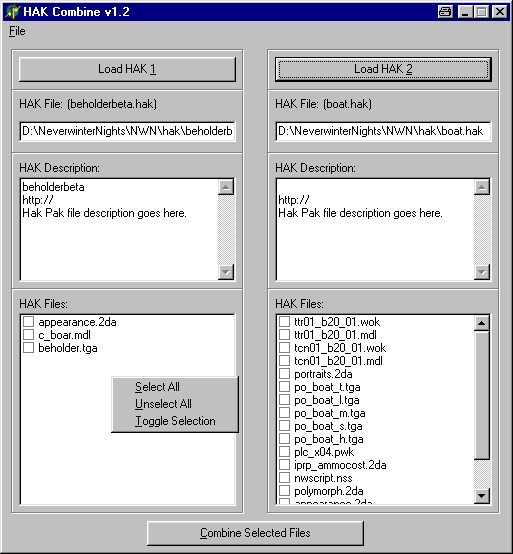
This utility gives users an easy-to-use interface for combining HAK files. It also provides functionality for editing HAK files individually, allowing users to add/remove files contained within them. UPDATE 1.3: In this version I re-evaluated some of the code used to combine the HAK files. The result is that you should now be able to combine larger files. Keep in mind that some files will still be too large to store in memory and may crash the program. I also added some buttons for manipulating the lists, as well as the ability to drag HAK files directly onto the main page.
Can I combine the product of one combine with another hakpak, essentially making it a combine of 3,4,5+ hakpaks?
Posted by Rothos at 2002-10-2507:02:00
Oncerain, Unfortunately, you will have to manually edit duplicate files, like the appearance.2da. I don't know how to do this myself, but I'm sure you can find out how on the Bioware forums. If you use my utility, you can combine all files except for the appearance.2da. Then, manually edit the appearance.2da and inject the finished file using the HAK Doctor portion of my utility. -Rothos
Posted by Oncerain at 2002-10-2410:43:00
Can you tell me hpw to get around the two items with the same name problem e.g appearance.2da
Posted by Grumblepunk at 2002-10-2002:53:00
Azurecrusader wrote: "I have to make one little complaint (which has been made before) though: A select all or the ability to highlight sections and select that section would be a life saver." All you need to do is right click in the window with the file listing and there is: Select All Unselect All Toggle Selection Easy as pie. :D This little program has made my life so much easier. Well done and thank you!
Posted by Azurecrusader at 2002-10-1223:14:00
Sorry, I'm stupid, just saw the last sentence of the description. *Ducks to avoid stones* :)
Posted by Azurecrusader at 2002-10-1223:08:00
Great tool. I have to make one little complaint (which has been made before) though: A select all or the ability to highlight sections and select that section would be a life saver. 100's of selections can take forever, and give you real wrist strain. I'm not trying to sound like a know-it-all, but if (on the really off chance) you wrote this in VB or C++ it is pretty easy to set up the selection boxes to support multiple selections at a time. Anyway, thanks for the cool tool!
Posted by Sistinus at 2002-09-0421:30:00
If the message your getting when you try to play is something to the effect of hakpak not found, it's because the filename is too long. If you shorten the name it should work.
Posted by Shade at 2002-08-2211:06:00
I tried your file and it worked. But when I combine haks it still doesn't work. The comdined haks I download from here work but not when I do it myself.
Posted by Shade at 2002-08-2116:28:00
I was combining the the master sword hak and hyrule sheild hak.
Posted by Klawz at 2002-08-1913:40:00
I also have the problem listed below. When i tried to combine the drow11in1 hak and the winged pc's hak.






 Site
Site