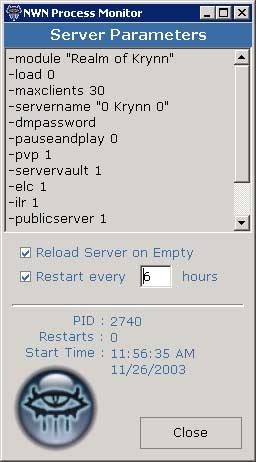
** NEW ** This small utility constantly monitors your NWN server program(s) and reloads your modules using zero to one percent of your CPU. Nwmonitor.exe polls the windows processes looking for your server. Should the program fail to locate your server, the server program is restarted with all of the parameters you pass. This program was designed to be a replacement for the cmd prompt software, nwman and will work in conjunction with FireDaemon or stand-alone. Requires .NET runtime support.
I have only one problem using this. For some reason the server name never gets set even though its in the nwnplayer file. Any ideas on why or how to fix please email me at [email protected]
Posted by 777GOLDY ( 70.254.xxx.xxx ) at 2006-03-22 14:02:18
This is an excellent prg! does anyone have any ideas on how to get this to work with a color server program? (one that adds color into name tags)
Posted by fazz ( 84.68.xxx.xxx ) at 2006-01-29 08:41:42
i have used this program for hosting one module before and it has worked fine. But now that hosting a new module i am having problems. It seems no matter what i do it restarts the server on the old module. Is there anybody that can tell me why its doing this because it doesnt seem to be written in any ini file which module to load each time.
Okay... I'm trying to make this thing work, but not having any success. Do you have any documentaion for it? Whenever I start the program, it pulls up NWServer regardless of if I have it running or not and then locks up. Without any documentation I have no idea what I'm doing wrong.
I'm sure it's a great program because everyone seems to like it, and it's exactly what I need.
I sure hope you are still supporting it.
Thanks.
DB. _________________________ Do not meddle in the affairs of dragons.
You are crunchy and taste good with ketchup.
Posted by Tomkin ( 68.203.xxx.xxx ) at 2004-08-02 20:30:00
Oops! Last sentence should read:
If you have a non-standard setup with your primary drive designated as drive E: rather than C:, just change the default installation path from C:\NeverwinterNights\NWN\ to reflect that -when- offered the opportunity in the install process.
Posted by Tomkin ( 68.203.xxx.xxx ) at 2004-08-02 20:29:00
Sorry, Pezz, but I don't follow. The installer is a standard Microsoft wrapper and requires no additional products to run it save for the standard MSI package distributed with any version of Windows after the initial incarnation of WindowsXP (either Home, or Professional).
If you have a non-standard setup with your primary drive designated as drive E: rather than C:, just change the default installation path from C:\NeverwinterNights\NWN\ to reflect that which offered the opportunity in the install process.
Hope that helps,
T
Posted by Mirria at 2004-07-06 18:51:07 Voted 10.00 on 07/06/04
what is your os? nonwindows?
Giantkin Servers: Realms Of Peril ip: giantkin.servemp3.com:5121
Growing past 400 areas, Bindstones in use!
UOA (Ultimate Online Action) Beta testing done on:
giantkin.servemp3.com:5122 (uo based) _________________________ GK
Posted by Pezz ( 68.49.xxx.xxx ) at 2004-06-28 11:56:00
Well your wrong again...
I have just finished reinstalling my os again and did a complete format... And to say my harddrive is now E:\ and its not the original of the C:\ so you might want to rethink that answer there b/c i know alot of computers that just run under C:\.... and mainly it can run under any letter...
~Pezz
first time i have ever heard of a computer running without a c: in any circumstance. the author assumed that since 999,999 computers has C: he wouldnt worrry bout that 1....Giantkin Servers: Realms Of Peril ip: giantkin.servemp3.com:5121
Growing past 400 areas, Bindstones in use!
UOA (Ultimate Online Action) Beta testing done on:
giantkin.servemp3.com:5122 (uo based) _________________________ GK
Posted by Pezz ( 68.49.xxx.xxx ) at 2004-06-23 23:29:00
Ha yea no help thanks to none of you had to use partition magic and make a partition of my harddrive to the letter C:\ since your self install is so retarded (No offense) it just that it kept saying No C:\ drive found. Then shut down..... After making my new partition it found it and then gave me the option to change directory when in the begining need the drive C:\............. i mean seriously that is pretty silly.
~Pezz
Posted by Pezz ( 68.49.xxx.xxx ) at 2004-06-16 20:32:00
WOW I just downloaded it and it seems my drive should be named as C:\ and currently my harddrive is F:\ and its my only drive so how or if you can tell me how to fix it i be glad :D or sad :( ... TY
Posted by Pezz ( 68.49.xxx.xxx ) at 2004-06-16 20:32:00
WOW I just downloaded it and it seems my drive should be named as C:\ and currently my harddrive is F:\ and its my only drive so how or if you can tell me how to fix it i be glad :D or sad :( ... TY
Posted by FF ( 81.80.xxx.xxx ) at 2004-05-11 07:08:00
Hello,
I'm not using Tomkin's monitoring tool (as I provide another one with the same features), but can confirm that it's not needed at all to use GameSpy protocol in order to be able to monitor properly a NWN server. I've removed Gamespy checks from my own tools since december 2003, and it kept my PW server alive since that date (about 4 reboot per day x 5 months = around 1500 reboots during that period).
FastFrench
Posted by FF ( 81.80.xxx.xxx ) at 2004-05-11 07:08:00
Hello,
I'm not using Tomkin's monitoring tool (as I provide another one with the same features), but can confirm that it's not needed at all to use GameSpy protocol in order to be able to monitor properly a NWN server. I've removed Gamespy checks from my own tools since december 2003, and it kept my PW server alive since that date (about 4 reboot per day x 5 months = around 1500 reboots during that period).
FastFrench
Posted by Tomkin ( ..xxx.xxx ) at 2004-04-15 14:27:00
Anon, thanks for the comments. In so far as I know you are still unable to query the gamespy protocol for NWN. Unless they released the new specs, ever since SoU this feature has been unavailable.
However, while the monitor program should be monitoring the thread of the server, it also looks at the cpu usage of the process. If the server crashes (or hangs), and the process is still running without using 100% CPU load then you have a very sticky situation on your hands there! How long can this combination of events go on? As I say, if the process is "hung" @ 100% cpu then the monitor will reset the server after 40 seconds or so (default lock timer).
Posted by Anonymous ( ..xxx.xxx ) at 2004-03-25 06:36:00
First of all, this is a great piece of software and your hard work is appreciated. What I would like to know is, can you add a gamespy pinger like the one NWN2X has?
Sometimes the server crashes, but the process still is running. So your program thinks everything is ok. If you could add a way to poll the server by trying to actually make a connection, then you would really have an all around complete program for nwserver monitoring.
Thanks again.
Posted by Infinitia ( ..xxx.xxx ) at 2004-02-26 11:39:00
Hi guys .........problem sorted now.
Tomkin this is an excellent piece of software and is now running fine!
If you have a mod and you arent running this then you are losing out!
Just some small notes for anyone who is not entirely computer literate (like me)!
1. Download the new verssion of The Process monitor......1.62.
2. Intall the program.....if you dont have netware intalled it will prompt, download and install this too.
3.Look in the NWN file for the "save log" folder and read the readme text there.
4.My server took 3 mins 19 secs to load and was having problems with the Process Monitor reloading it halway thru the load on a perpetual loop. I set the TIMEOUT function to 400 and the HUNGLOOP to 400.
This seems to have sorted it and the server now loads in 1min 34 seconds.
Thanks for the Excellent program Tomkim :)
Izzy,
Pool of Tears.
Posted by Infinitia ( ..xxx.xxx ) at 2004-02-26 11:39:00
Hi guys .........problem sorted now.
Tomkin this is an excellent piece of software and is now running fine!
If you have a mod and you arent running this then you are losing out!
Just some small notes for anyone who is not entirely computer literate (like me)!
1. Download the new verssion of The Process monitor......1.62.
2. Intall the program.....if you dont have netware intalled it will prompt, download and install this too.
3.Look in the NWN file for the "save log" folder and read the readme text there.
4.My server took 3 mins 19 secs to load and was having problems with the Process Monitor reloading it halway thru the load on a perpetual loop. I set the TIMEOUT function to 400 and the HUNGLOOP to 400.
This seems to have sorted it and the server now loads in 1min 34 seconds.
Thanks for the Excellent program Tomkim :)
Izzy,
Pool of Tears.
Posted by Tomkin ( ..xxx.xxx ) at 2004-02-25 13:36:00
sounds like you may need to adjust the "hung" property. are you still having this problem after the 1.62 update? load times seem to have been dramatically reduced.
Posted by Infinitia ( ..xxx.xxx ) at 2004-02-25 09:00:00
I tried to use your process monitor however........even using the timeout function set to 300 secs the monitor still tries to reload my server halfway thru load at about 1 min 30 secs.
My module takes about 3 mins to load .....whats wrong?
Izzy,
Pool of Tears.
Posted by Tomkin ( ..xxx.xxx ) at 2004-02-24 13:47:00
Okay, all changes are now in place and stability is -vastly- improved. Program now checks for two additional entries in your INI files (as outlined in the README.TXT file - installed in your "SAVELOG" directory), one entry determines the time to "pause" while waiting for the server to load (default now ramped up to 30 seconds), the other is a timeout period where the monitor presumes the server has "hung" at 100% cpu cycle. The 3.08 revision would occasionally check the process at the same time as a 100% cpu peak and think the server was hung.
Thanks for all the positive feedback guys. One final note, I used a different install builder this time so you will have to uninstall your old program before installing this one.
T
Posted by mikdrad ( ..xxx.xxx ) at 2004-02-21 19:23:00
I have the same problem as listed below... the server loads, and in mid-load of the module, the NWN Process Manager restarts. From what you said below, it's because after 10 sec the manager doesnt detect a running game, and assumes it's locked up... you also mentioned an update, which fixed this problem.
I downloaded the most recent version, but the problem exists... have you fixed it? Can I get the update?
just as input. heh
Giantkin Servers: Realms Of Peril ip: giantkin.servemp3.com:5121
Growing past 300 areas, Bindstones in use! _________________________ GK
Posted by Anonymous ( ..xxx.xxx ) at 2004-01-28 13:01:00
Chalk me up as another one who would like to see a user set timeout option. Keep up the good work Tomkin.
Posted by Tomkin ( ..xxx.xxx ) at 2004-01-28 12:03:00
hmm.. I will take a look into that. certainly it won't be hard, I just don't have a lot of time on my hands at the moment. two whole minutes? ouch!
minor updates to listing: website url & filename (thanks for the catch!)
Posted by Tomkin ( ..xxx.xxx ) at 2004-01-28 06:39:00
The problem which you are seeing is a result of the upgrade to HotU. Pre-hotu these problems did not exist. This update still looks to make sure the program loaded, but waits up to 30 seconds before polling the process to ensure stability. Various other, very minor, updates also in this version.
T
Posted by Anonymous ( ..xxx.xxx ) at 2004-01-27 09:28:00
This looks like a great program, except that when it attempts to load the server, after about 10 seconds the server shuts down and then nwmonitor starts it again. This continues in an endless loop. It seems nwmontior thinks the server is locked up and then kills and restarts it. Maybe some kind of timing issue. Is there anyway to get around this?
Posted by Tomkin ( ..xxx.xxx ) at 2003-11-26 10:05:00
3.0.07 - Nov 26, 2003
- Complete program overhaul using Microsofts new .NET
system. New compiler provides a more robust feature
set, allowing NWMonitor to do things previously
unavailabe.
- NWMonitor is now capable of full thread examination.
This new functionality allows the program to monitor
processes on a much deeper level functionally. This
allows for greater reliability in closing your
servers down when needed, and making sure they come
back up again.
- Added ability to detect "hung" processes, and
processes that use 100% cpu resources. These processes
are determined to be "bad" and the program will first
attempt to close, then to "kill" the rogue process.
- Better logging, especially in "hung" states, and
for multiple server executions. Program now attempts
to maintain backups of ALL log files, not just files
from logs.0.
- Multiple server executions should now be more reliable.
- Still using only 0% - 1% CPU!






 Site
Site









 at 2006-08-01 20:20:06


