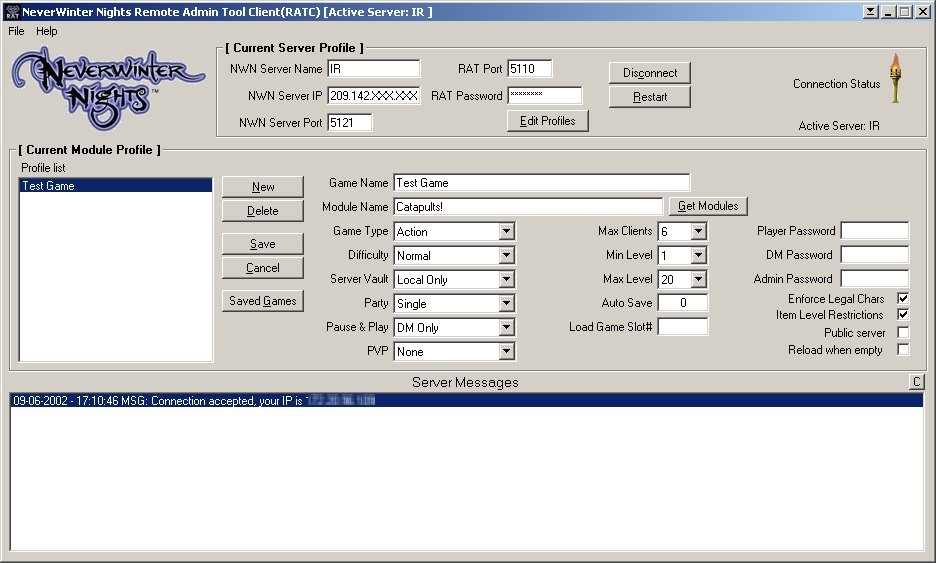
RAT is designed to allow remote administration of your NWN Server. It has many features such as: Restarting your server if it crashes. Lets your remote admins restart your server with any command line settings, easily. Uses a database to keep track of all of the servers you admin as well as the modules on each of them. Save Game features. You can now remotely backup your saved games and reload them. Custom naming, etc... Complete logging of what commands are sent to the RAT server as well as password protection for security. Many other features, give it a shot.
Hi, Great idea and useful tool! However I've encountered a limitation with the Get Modules function. It seems that an error occurs when the total number of characters for the names of all the modules exceeds around the 500 mark. I hope this is helpful information for future fixes. :) The way that I've gotten around this is to make sure I only have a few modules in my NWN/modules directory. Thanks for a wonderful tool, Sunny
Posted by Nekrotal at 2003-02-1311:19:00
I've gotten RAT to work mostly. My only problem is that when I go to get modules on the client side, all I see for local mods are files on my desktop, and nothing shows up in the remote mods section. Is there a way to change the targeted directories here?
Posted by Trekkan at 2002-09-0918:10:00
I'd like to make it control a Linux based server, however I have no experience in programming for Linux. If someone is truely interested, I wouldn't mind providing them with the information to code the server portion for Linux. I myself however can't do it.
Posted by Aidden at 2002-09-0917:22:00
I understand the application is windows based, but if you could make this control a Linux based server, thousands of remote linux server operators would /swoon :)
Posted by Trekkan at 2002-09-0813:59:00
etropic, Thanks for helping to explain things! I hope you guys like the program. If you have any suggestions, I am open to hearing them! I don't even personally use this program as I have direct access to the server, but I wrote it for the DMs on my server. So their feedback is what really created this program. Any feedback from you guys will only help to improve the program. I really enjoy coding so this has been a blast. RAT has only been in development for about a week so... there is a lot of room to grow I think. Critisizms are welcome, just try to keep them constructive. ;) Trekkan
Posted by etropic at 2002-09-0810:12:00
its windows.... MSI is a microsoft installer app.. :) TO NGAMA, or anyone else as well... test it out with IP 127.0.0.1 on both client and server and use smething like port 10. this way you can run the server and client from the same machine to test it. After you get it working that way, it might make more sense to you :) thanks to Trekkan for his dev time :)
Posted by elandys at 2002-09-0810:01:00
1) Is it Linux or Windows? 2) I don't recognize the extension msi; is that a compression type?
Posted by etropic at 2002-09-0809:47:00
to: NGAMA they look exactly the same... there are two parts... the SERVER and the CLIENT. you need to install this on the machine where your nwn server is running AND on the machine that you want to access from. run the SERVER part of RAT on the nwn server machine and give it options that RAT will use to get to the net. There is no IP, cause if its your server, you should know the IP. The part of RAT does nothing but LISTEN for incomming connections, from the other part of RAT. Use the CLIENT RAT to connect to the settings you made on your SERVER RAT and it will allow to you to connect to your server machine remotly. This is simply a glorifiyed NWN terminal service. If you can connect to your server remotely, there is no need for it. It is for people who cannot set up a remote connection, to make it easy on them.... Again, run SERVER RAT on SERVER MACHINE and CLIENT RAT on the machine that you are at to get to server. clear as mud :)






 Site
Site