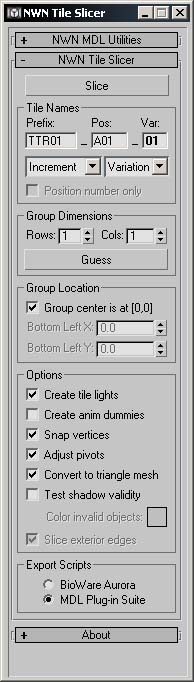
The NWN Tile Slicer is a utility for Discreet's 3ds max and gmax. It is designed to assist in the process of creating multi-tile groups for NWN tilesets. Specifically, it automates the process of converting a large model in 3ds max into a set of NWN tile models, ready for use in the game.
This is a compilation of the old system into a single score. There were 11 that made this score of 9.64 then rounded to 10.
Posted by Labelle rouge ( ..xxx.xxx ) at 2003-11-11 13:19:00
Very powerfull tool ! Thanx and bravo. I have some problems with the created tileset default lights. They don't work in the game. The tiles is in the dark.
Do you know if there is a solution (yes i'm sure, I have selected ALL my objects in max)? :)
Posted by gnomad ( ..xxx.xxx ) at 2003-08-03 13:00:00
this tool is simply incredible. Thank you. with this and the gmax texporter, what used to take for flippin ever (actually, I never had the patience to truely finish a tile) now takes seconds. Won't be too long before people start creating giant features rather than a tiled system. I play NWN for the exploration (not the hack and slash or the RP) this tool will breath infinite new life into the game (whole new worlds to explore) thank you again.
Posted by roboius ( ..xxx.xxx ) at 2003-08-03 10:59:00
I just uploaded version 0.10. I fixed the Reset Transforms utility so it no longer flips the normals on mirrored objects, and did some more work on the tile mirror utility. Enjoy!
Posted by roboius ( ..xxx.xxx ) at 2003-07-31 02:39:00
You can slice the entire model (regular objects and walkmeshes) all at once, if you were having problems doing that you should let me know. Have you seen the tutorial on my website? It takes you through the whole process.
Posted by Decclan Macmanus ( ..xxx.xxx ) at 2003-07-30 23:11:00
Testing report: A+
First initial tests were poor until I realized I was trying to slice the models and the walkmesh at the same time...hehe. Was getting a runtime error.
Second test: Works great although I didn't create the tile light on this test because I've noticed Gmax cause errors before with tile lights on some models. I will test that next time. Great Job!!
I tested it on a 2x2 ruins temple model I've been working on. It sliced it wonderfully. Haven't finished exporting into the 4 seperate .mdl files and 4 .woks yet. And then I will need to change some .itp files to put it in the toolset and game. So haven't seen the true finished product yet. So far it seems everything is working great. Thanks a million Roboius!!
Posted by Decclan Macmanus ( ..xxx.xxx ) at 2003-07-30 22:19:00
Yippee!!
Posted by roboius ( ..xxx.xxx ) at 2003-07-29 23:27:00
I just uploaded version 0.9, which adds preliminary support for Wayland's scripts and GMax. Can all you GMax users give it a try and let me know how you go?
Posted by Decclan Macmanus ( ..xxx.xxx ) at 2003-07-23 21:10:00
Hi Roboius...I hate to be a pain about this especially since you are doing this for free and I think it is wonderful that you are. Do you happen to know when you might be releasing a version of this cool plug-in that works with Wayland's scripts for Gmax? I've been building bigger models to use in my new module waiting to use the Tile slicer on them. I'll keep watching this page for it. Thanks!!
Posted by roboius ( ..xxx.xxx ) at 2003-07-20 16:25:00
"At least version 1.1b2" means "version 1.1b2 or newer". As 1.1b2 is the most recent version, that's the one you need at the moment.
Posted by Whalebones ( ..xxx.xxx ) at 2003-07-20 07:50:00
as you said "at least version 1.1b2", where can we found the up-to-date version of the MDL plug-in suite ?
(the 1.1b2 is the last on scooter site )
Posted by Decclan Macmanus ( ..xxx.xxx ) at 2003-07-10 22:28:00
I keep checking back here to see if Roboius has posted a Gmax capable version (sigh...) Someday soon my dream will come true...hehe.
Posted by roboius ( ..xxx.xxx ) at 2003-07-08 02:20:00
IMPORTANT NOTE: If you are using the MDL Plug-in Suite, you MUST upgrade to (at least) version 1.1b2. The Tile Slicer depends on changes that went in after the 1.0 release, and is thus not compatible with 1.0.
Posted by roboius ( ..xxx.xxx ) at 2003-07-06 23:59:00
Updated to version 0.8, hopefully the Reset Transforms functionality isn't broken any more. There seems to be an issue when objects don't have a parent node. I can reproduce the same problems using the Reset Transforms utility, so at least my script matches that utility now as far as I can determine.
Posted by roboius ( ..xxx.xxx ) at 2003-07-06 17:48:00
Looks like the Reset Transforms example script that comes with max is buggy, and leads to flipped normals in some cases. Investigating this now.
Posted by roboius ( ..xxx.xxx ) at 2003-07-05 15:16:00
Updated to version 0.7a, worked around some UI placement bugs in 3ds max 5.0.
Posted by Bamf ( ..xxx.xxx ) at 2003-07-04 12:59:00
I would like to echo the request that has been
made for GMAX support.
Many of us consider NWN a hobby, and are unable to
justify the expense that a full version of 3DSMAX
represents.
Thanks for your efforts.
Posted by Decclan Macmanusq ( ..xxx.xxx ) at 2003-07-01 20:37:00
Glad to hear it!! Thanks again for such great work!! I'll keep an eye out for it.
Posted by roboius ( ..xxx.xxx ) at 2003-07-01 15:05:00
I will have some spare time over the long weekend, and will try and get the gmax support and the tutorial finished off then. Don't worry, I haven't forgotten about you :-)
Posted by Decclan Macmanus ( ..xxx.xxx ) at 2003-07-01 02:16:00
Nice Work. It does run in Gmax startup but of course you can't slice the tile yet because it only supports Bioware's Export scripts and MDL-plug in.
Any word on when you guys might be able to update this program to be usable with Wayland's Gmax export script? I hope soon since I already created a 2x2 model for my module because I knew this program was coming out. I just didn't know it wasn't gonna be for Gmax yet. Keep up the good work and don't forget about us Gmax users. Modeling is just a hobby so I won't be spending the money for 3DS Max. I can get it illegally but I really don't want to and I don't trust cracked versions. Thanks!
Posted by roboius ( ..xxx.xxx ) at 2003-06-29 10:56:00
The scripts folder is in your 3ds max installation directory. There is a startup folder in that directory, scripts in there will be run automatically when you start the app.
Posted by ozzy ( ..xxx.xxx ) at 2003-06-29 07:15:00
Sry.I know i'm so stupid.But can you tell me where the i find these folder or i must doawnload some other things before i can take in this folder?
Posted by roboius ( ..xxx.xxx ) at 2003-06-28 18:57:00
Typo in link, fixed now.
Posted by Morphing Star ( ..xxx.xxx ) at 2003-06-28 16:07:00
The link refers me to your site, then I click on the download at your site, and its not working and I REALLY REALLY want this :) Thanks for the great work!
Posted by roboius ( ..xxx.xxx ) at 2003-06-28 15:17:00
Okay, version 0.6 is up, tile ordering is now correct. If you are using the MDL Plug-in Suite, you'll have to make sure you don't rotate the models around the Z axis on export.
Posted by roboius ( ..xxx.xxx ) at 2003-06-28 14:17:00
Okay, I've just found a problem with the tile ordering, I've been using scooter's plugin which rotates tiles by 180 degrees by default. I'm fixing this now, and will post an updated copy shortly.
Posted by roboius ( ..xxx.xxx ) at 2003-06-28 11:38:00
I am also working on a tutorial that will take you through the process step by step. If you're having trouble, you might want to wait for me to finish that off. You can access the tutorial from the Tile Slicer homepage.
Posted by roboius ( ..xxx.xxx ) at 2003-06-28 11:32:00
To use this script, simply place it in the startup scripts folder of your 3ds max installation, or select "MAXScript -> Run Script" on the menu from inside max.






 Site
Site









 at 2004-04-14 11:38:10
 at 2004-03-21 13:43:37
 at 2004-02-20 10:32:06


