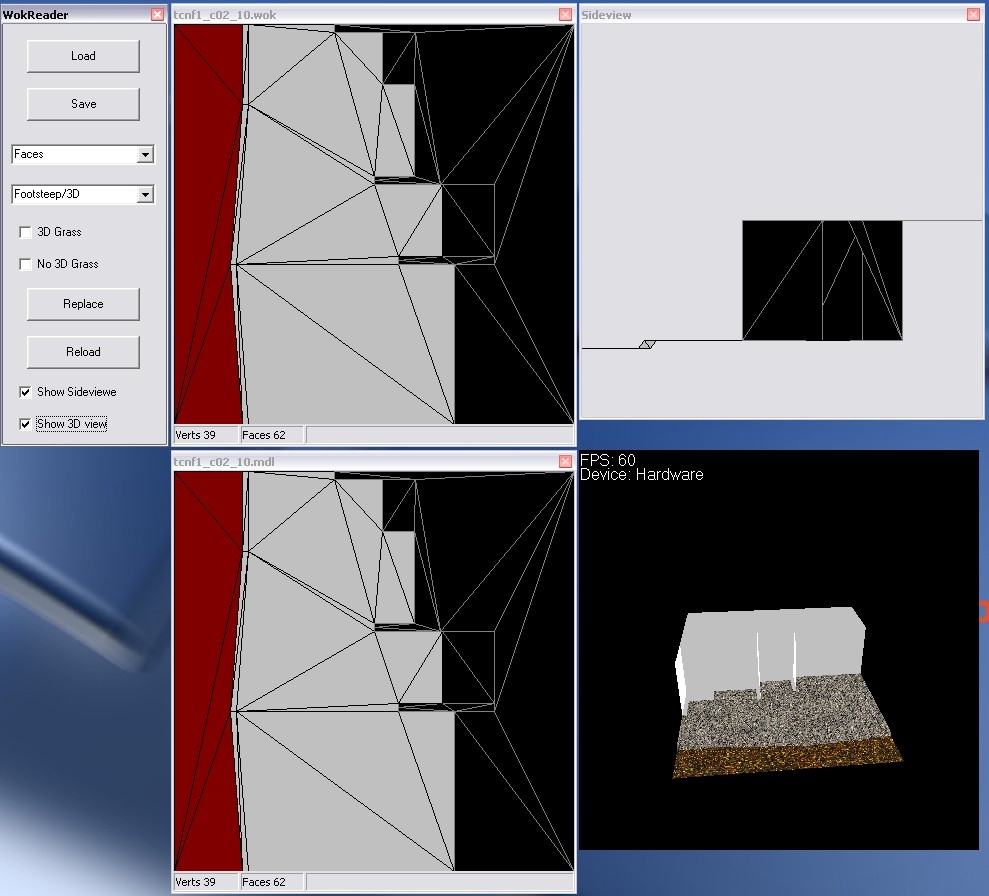
This little tool can open Tileset walkmesh (.wok) and Placeable walkmesh (.pwk) and edit the footstep sound and 3D effects. Let me know if I should work some more with it, to enable changing of the Points of the faces or something else. Version 7 this one works again but it is not posible to add, remove or change points (verts), it is only posible to change 3D anim. (in mdl file) and sounds (in wok file). I have added a 3D view of the walkmesh model and a 2D side view. Im stil working on the add, remove and change thing... but it will take some time.. Updaded to suport snow, sand is the same as dirt... Updaded to suport mouse drag.. the grafic is blinking.. Updated to loade model into 3D window.. Fixed bug in Replace function....
This is a compilation of the old system into a single score. There were 4 that made this score of 8.75 then rounded to 9.
Posted by Sass at 2003-08-0404:37:00
Thank, it is always great to get feedback.. - I will try to make it possible to hold the left mouse button down over a surface (not walkable) and then drag the mouse round and change all the polys it is dragged over, is this useable? - I dont know about the crash, it would be very useful if you could find out more about it.. - I have planed to make the 3D panel load a "ghost" of the model (transparent gray) to se the whole picture, this takes a lot of time to get right, so maybe some day..
Posted by Lost at 2003-08-0400:58:00
This thing is cool Suggestions: Make it so that you can "drag the mouse and select" in the editor. I want to be able to hold down my mouse button and paint a bunch of polys "no walk" for example. Sometimes it crashes on me. I think this has to do with pressing "n" for no walk and clicking an area at the same time. I don't guess there is a way that you could make this program load a tile model and paint it with textures with the walkmesh showing over the model? As an example, I'd load a tile and it'd show where walk/no walk was specified.. And then I'd paint textures over the walkmesh (grass over walkable, rock texture over not walkable, etc).. I guess that's what 3dmax is for.. 'cept this thing is a lot easier to use :p Good job. ^__^
Posted by Sass at 2003-08-0201:43:00
Yes, I will do that. Just have to finde out what snow and sand index is...
Posted by Yavel at 2003-08-0111:51:00
Looks like a great tool. Any plans to update it for SOU? There doesn't seem to be a replacement option for snow or desert sounds.
Posted by Sass at 2003-05-2106:17:00
CID-78: Your right. It dos not work. I have hade some problems with my NWN, but it is up and running now. I have found some major errors in the tool sorry. The problem is that the .mdl and .wok files not always has the same walk mesh, when the tool opens the files, it only looks at the .wok file. When the files is saved the .mdl file walk mesh section is over written, this is not acceptable. Im working on a new release, where this is fixed. Sorry for the trouble and falls hopes.
Posted by CID-78 at 2003-05-1801:45:00
This thing doesn't work. I can't open any .wok at all i get a error each time. i tried both bioware and hakcontent. it just spit me a error with a integer in it. i am running on windows XP
Posted by Sass at 2003-04-2810:10:00
I have some problems with the tuturial, and to use any custom hakpaks in the toolset, it crashes every time. I have to get this working befor working more on the tuturial.
Posted by Sass at 2003-04-2504:09:00
jules: can you send me the .mdl and .wok file. Then I can make a tuturial on how to use the program to change walkmesh. I will upload the tuturial on how to use this tool after the weekend. It would be nice to know what you guys out there would like me to put into this tuturial.
Posted by jules at 2003-04-2503:33:00
I'm really sorry to do this... but can someone run through how to use this tool for me. I'm trying to change the size of the walkmesh on a coffin i downloaded as part of a Hak ( very possibly from Vampire, the Masquerade). The Walkmesh file opens up ok- Firstly- is it possible to open the coffin MDL. file so I can compare directly when I've got the mesh size correct? secondly- how do I actually change the size of a rectangular mesh?... I can add extra corners or pull it into various wierd shapes, but basic rectsangles are defeating me.... sorry to hassle you guys, but this coffin looks fantastic in a set piece in my latest mod- if only PCs didn't walk halfway into it!






 Site
Site