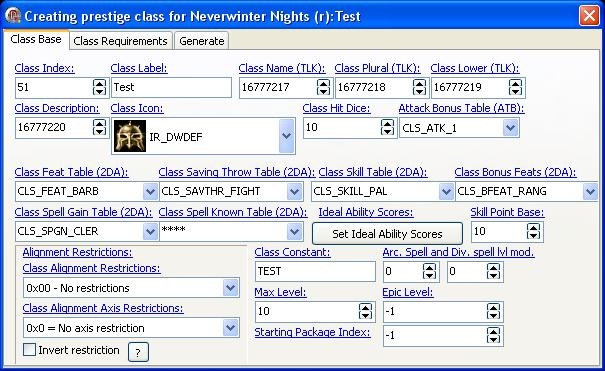
Very simple PrC editor.
Allows you to create new prestige class PC.
* Prestige classes require SoU or HotU
* If you have created custom saving throw, skills, feats, spell gain or spell known tables, just write those filenames to corresponding fields.
[Version: 1.2]
Completely rewritten. Padding fixed and updated for 1.61. Added 'online' help dialog.
[Version: 1.2.1]
Added one missing requirement type (CLASSOR) and support for Windows XP themes.
[Version: 1.3.0]
Beta 1: Rewritten. Preliminary support for Neverwinter Nights 2.
Includes Bonus Feat 2DA and Class Skills 2DA creators.
[Version: 1.3.0, RC1 B33]
Added support for NWN2 (1.0.3).
Added Class Skills 2DA creator for NWN2.
Fixed bugs.
[Version: 1.3.0, RC2 B66]
Added missing NWN2 feats, skills, etc.
---
Notify me for any bugs, feature requests, etc.
Thanks.
Does this application work on all windows versions? ZW. _________________________ Retired from module building.
Posted by ZeornWarlock at 2005-09-0120:24:40
Forgot to ask it's compatible with 1.66? _________________________ Retired from module building.
Posted by ZeornWarlock at 2005-09-0120:24:10
Does this application work on all windows versions? ZW. _________________________ Retired from module building.
Posted by Lord_Talonblaze at 2005-06-0809:57:57
Great work! Finnaly... Some one who understands what we need.
Posted by the_barbarian at 2005-06-0116:47:58
cant download
Posted by Ville_Alasaari at 2004-10-0510:00:00
I noticed (from received email), that I have missed one requirement type from this program and documentation. I'll fix this when I have more free time. --- "Quod scripsi, scripsi", Minkä kirjoitin, sen kirjoitin.
Posted by Ville_Alasaari at 2004-06-2509:01:00
1) First create your prestige class(es) and save 2da files to some folder. Then by using Bioware's nwhak program add those 2das to hakpak. Save hakpak (For example: "prc2da.hak"). In Toolset, open your module and go to Module Properties->Custom Content and add that hakpak to module. Make sure that hakpaks are in this order: cep1patch cep2da cepanatomy cepbaseitem cepcreature cepplace cepportrait ceptexture YOUR HAKPAK(S) HERE ("prc2da.hak") Click OK and let toolset build your module. 2) Hakpak which contains prestige class 2das ("prc2da.hak"). 3) Perhaps none... But if you encounter problems then try copy those 2das. Hope this helps.
Posted by Ville_Alasaari at 2004-06-2509:01:00
1) First create your prestige class(es) and save 2da files to some folder. Then by using Bioware's nwhak program add those 2das to hakpak. Save hakpak (For example: "prc2da.hak"). In Toolset, open your module and go to Module Properties->Custom Content and add that hakpak to module. Make sure that hakpaks are in this order: cep1patch cep2da cepanatomy cepbaseitem cepcreature cepplace cepportrait ceptexture YOUR HAKPAK(S) HERE ("prc2da.hak") Click OK and let toolset build your module. 2) Hakpak which contains prestige class 2das ("prc2da.hak"). 3) Perhaps none... But if you encounter problems then try copy those 2das. Hope this helps.
Posted by Etilicia at 2004-06-2101:07:00
Hey, I'm quite interested in this program, but have a few questions that aren't covered in the documentation. 1. If I'm using CEP, what do I need to do? 2. After complete what do players need to dload to make the classes work? 3. What files (if any) do I need in my servers dir to make it work. Help is appreciated. Cheers
Posted by Ville_Alasaari at 2004-05-1603:41:00
Lingering: Yes, just set the Class Index value over 210 (for PRC Pack v2.0 and CEP 1). You may need copy that 210. line from PrC Editor generated classes.2da and append it to PRC pack's classes.2da. Also add cls_pres_***.2da to it. (Only if you get any bad strrefs or other errors.) 24.8.xxx.x: I have finished how to add custom feats (passive feats only, at the moment). I try upload it to vault today.






 Site
Site