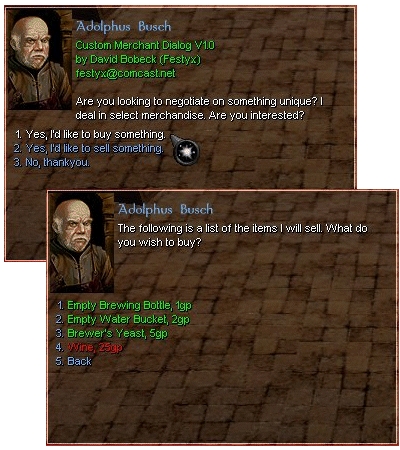
Craftable Merchant Dialogs V4.7 Includes MerchantMaker V4.4, an application for generating merchant code! Take control of merchant pricing... CMD lets the builder define buy and sell pricing. CMD now supports PERSISTENT PLAYER CONTROLLED VENDORS! Hire, move, stock and price. Great for player driven economies. Note: Due to exploits and TMI problems, CMD V4.7 requires the 1.62 patch for proper functionality.
Could someone who has this working post a step by step? I've followed the (spotty) instructions to the last letter, but the merchants still list nothing to buy or sell.
I've got the items he'll buy in my inventory, I've got plenty of gold to buy things, but I still get no lists for buy/sell. Help please? :) I'm dying here...
Posted by nwngeek212 at 2006-12-20 12:29:19 Voted 10.00 on 12/20/06
nvm, i got it to work
Posted by nwngeek212 at 2006-12-20 12:18:40 Voted 10.00 on 12/20/06
That would be great if you could find out what's causing it. I've got some midterms to deal with, but I'll start fiddling with the script once those are done.
I'm having the same issue with this and CNR as well.. Not 100% sure what to do next... I'll toy around and see if i can find a fix/work out a fix. If so, I'll post and upload the a patch _________________________ -=[Pavella]=-
Admin - Krystofer
Lead Design - Krystofer
Custom Content - The NWN Community! (Thanks for all your hard work over the years!)
Story - Krystofer, Emerex
Secondary Design - Emerex
Endless Testing - BookHound, grr|chick, Hart
Is this still being supported? If so, could someone please address the Unrecognized Token issue. I've recently installed this and it all seems to be set up properly. Unfortunately no items show up under Buy/Sell and there are Unrecognized Tokens throughout the conversations.
Posted by nwngeek212 at 2006-06-30 05:28:24 Voted 10.00 on 12/20/06
There are no directions on how to use this. I'm stuck. After I create the merchant script. Where do I put it?
Posted by MasterP at 2005-11-03 08:55:11 Voted 9.00 on 11/03/05
quite good but it REALLY REALLY needs documentations
and maybe some prefabs for CNR Merchants with all items allready
Posted by THNihilist ( 69.209.xxx.xxx ) at 2005-08-11 21:54:20
Stupid double posting.
I just wanted to clarify, I can't even get the including demo merchants to work correctly (without the TOKEN errors). So in my mind I'm ruling out MM as the source of the problem.
Posted by THNihilist ( 69.209.xxx.xxx ) at 2005-08-11 21:51:19
Has anyone had luck getting this system to run in 1.66? It sounds really cool, and I want to use it in my PW, but when I install it (even into an otherwise empty module) exactly according to the instructions, all I get is a messed up dialogue with lots of UNRECOGNIZED TOKEN errors.
I've played around with it quite a bit, but can't for the life of me figure out what's wrong. So frustrating... :(
Posted by THNihilist ( 69.209.xxx.xxx ) at 2005-08-11 21:17:52
Has anyone had luck getting this system to run in 1.66? It sounds really cool, and I want to use it in my PW, but when I install it (even into an otherwise empty module) exactly according to the instructions, all I get is a messed up dialogue with lots of UNRECOGNIZED TOKEN errors.
I've played around with it quite a bit, but can't for the life of me figure out what's wrong. So frustrating... :(
Ok, irregardless of what i do, I cannot get the merchant to show her inventory. I have been using your MerchantMaker utility. I've followed your instructions verbatim. And still she wont show her inventory. And if I log in as a PC, she wont allow me to Hire her. Only as a DM does this conversation come up.
Her tag is MerchantTag1, same as the merchanttag1 script.
I've created the unique script the defines what npcs are merchants as well. Please tell me what gives?
I've tried everything from making her inventory infinite. to giving her an inventory .. nothing works.
Well, I must say, these scripts are awesome.. however.. the documentation is awful! Outdated/non-existant and confusing as +blocked+. I've been working with them for 3 days now and still have yet to successfuly get PC vendors auto spawing when they are not already. I've dug deep enough to find out that the spawn location is a waypoint "CPV_MerchantTag" but guess what, it don't work either! lol Props on the scripts, slaps on the documentation. :)
Well, I must say, these scripts are awesome.. however.. the documentation is awful! Outdated/non-existant and confusing as +blocked+. I've been working with them for 3 days now and still have yet to successfuly get PC vendors auto spawing when they are not already. I've dug deep enough to find out that the spawn location is a waypoint "CPV_MerchantTag" but guess what, it don't work either! lol Props on the scripts, slaps on the documentation. :)
Cheers!
Posted by AdamBarrett ( 70.64.xxx.xxx ) at 2004-11-25 20:04:00
Thanks Mithheru,
These directions are great, I managed to figured those out too, but what I was really intending to ask about was the "Player Control" aspect of all this. Lookihg at cnr_c_merchant2 conversation it implies PCs should be able to "control" a NPC vendor in game, set it's prices and change it's location and inventory selection, all ingame
.
It is these features that desperately need documentation, there being none about it AFAIK.
Posted by Mithheru ( 69.29.xxx.xxx ) at 2004-11-24 10:17:00
Yes. This is a wonderful set of scripts. But it really needs some documentation. I figured it out after a couple of days.
I'll try to explain here:
- Use MerchantMaker to make your merchant(s). Add items and menus to the merchant here. Use Palette-Read Module to load custom items from a module
- Edit merchant will let you change his greeting and buy/sell lines. You can also whether the merchant is a vendor or not here.
- Once you're done Select Code-Preview-user_merch_init. Copy the contents of this script into your module and name it user_merch_init.
- Go to the NPC you want to be a CMD merchant and give it the same tag name as in user_merch_init. This is MerchantTag1 by default. You can have more than 1 merchant in the script; just select New Merchant.
- Change the NPC's conversation to cnr_c_merchant.
- You should have a working merchant.
Hope this helps. If there is no documentation anywhere to be found I may do my best to write some.
Posted by AdamBarrett ( 70.64.xxx.xxx ) at 2004-11-24 08:23:00
Hire, move, stock and price... How?
Is there anywhere I can go to find directions on how to do anything other than the basic buy/sell aspects of these merchants?
Posted by AdamB ( 70.64.xxx.xxx ) at 2004-11-24 07:28:00
Draugr, I had the same problem but then I read all the comments on this page and found out there is a script called readme_merchant in the erf., open the script and there is the directions.
Posted by Del'tanon ( 202.89.xxx.xxx ) at 2004-10-23 08:01:00
Hmm, I've tried d/ling this file several times and the zip doesnt seem to contain MerchantMaker... Anyone know what's wrong?
Posted by Tempest ( 213.93.xxx.xxx ) at 2004-10-03 06:36:00
@ Warner
those scripts are created automaticly after building the mod (after clicking "build" in the toolset). so you can just ignore the "missing resources" message.
Posted by Questioner ( 69.135.xxx.xxx ) at 2004-09-13 18:00:00
I got a minor bug, I think?
Generating the merchant "Rogan" using MerchantMaker, I am getting the following:
I want the "Rogan" to buy at 10, sell at 14, start with 3, max out at 6. Yet there is that last field of 1?
When it was copied from MerchantMaker-generated file Rogan.nss, it was:
CnrMerchantAddPersistentItem(sMenu_Rogan_0, "Bar of Iron", "ecs_mat_iron_bar", 10, 14, 0, 0, 1);
And I manually edited in the 3, and 6, later.
In the docs examples, and in the sample stores in cnr_merch_init, the last 5 int fields consist of only 4...
//void CnrMerchantAddPersistentItem(string sMerchantTag,
// string sItemDesc,
// string sItemTag,
// int nBuyPrice,
// int nSellPrice,
// int nInitialOnHandQty,
// int nMaxOnHandQty);
So wondering, is this a new field in the upgrade? if so, to what purpose? Or could Merchant /maker be generating wierd code?
Thanks for any response, I am trying to slowly figure out the process here. The sample merchants were very helpful, in seeing how the relevant data fields should be laid out.
The messages below are pretty old but just in case it helps someone...
The readme is in the scripts, so to get it, just create a new module and import the included erf file. Now just open the readme_merchant script and voila.
Posted by Timdalos ( 216.196.xxx.xxx ) at 2004-06-23 17:28:00
Seriously... does ANYONE know any place I can find ANY docs for this? The only thing included in THIS version is an errata list... please, if you have ANY kind of docs available, let me know?
Posted by Etarnon ( 69.135.xxx.xxx ) at 2004-06-08 09:36:00
This is one nice piece of work. I have worked with it for about a year. Thanks for writing it. Makes setting my ATS item prices so much more in line with what I want to do.
Etarnon
Loremaster "Land of Etarnon" [beta] (Roleplay)
Posted by Timdalos ( 216.196.xxx.xxx ) at 2004-06-02 21:15:00
Hrm... Docs... Docs would be very good. I see references to them, but... I certainly see nothing but two bare bones errata lists in the download... how does one USE this?
Posted by Bane_Moonglum at 2004-05-27 17:21:00 Voted 10.00
Go into settings and set the system for HoTu if that doesn't work set it for HotU + patch.
Hope that helpsThe World Of Nailaeon -- the mists call... Link






 Site
Site









 at 2008-01-30 13:52:35


