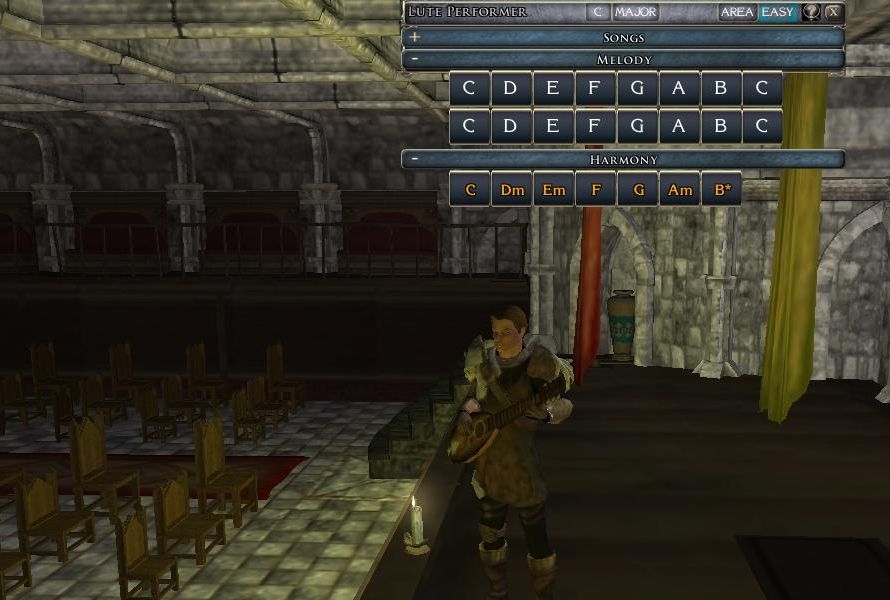
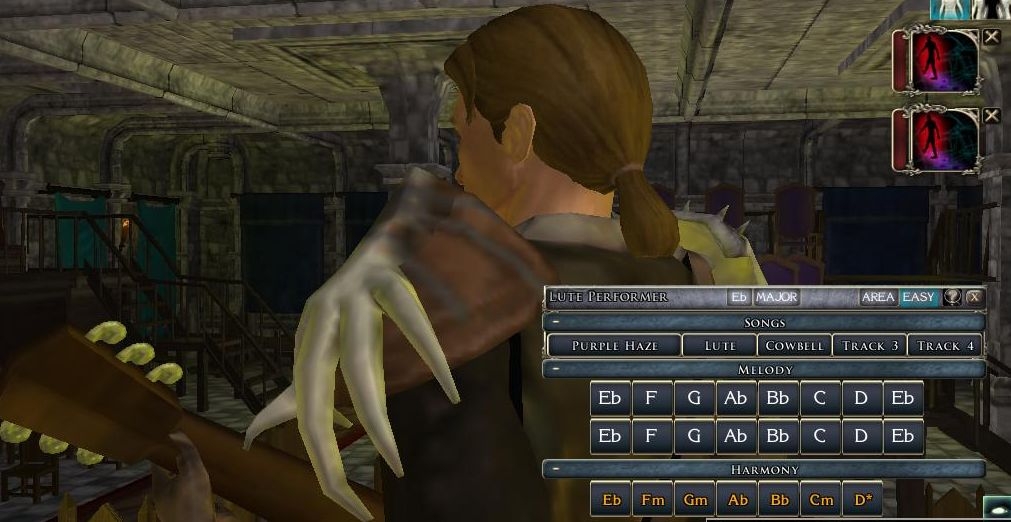
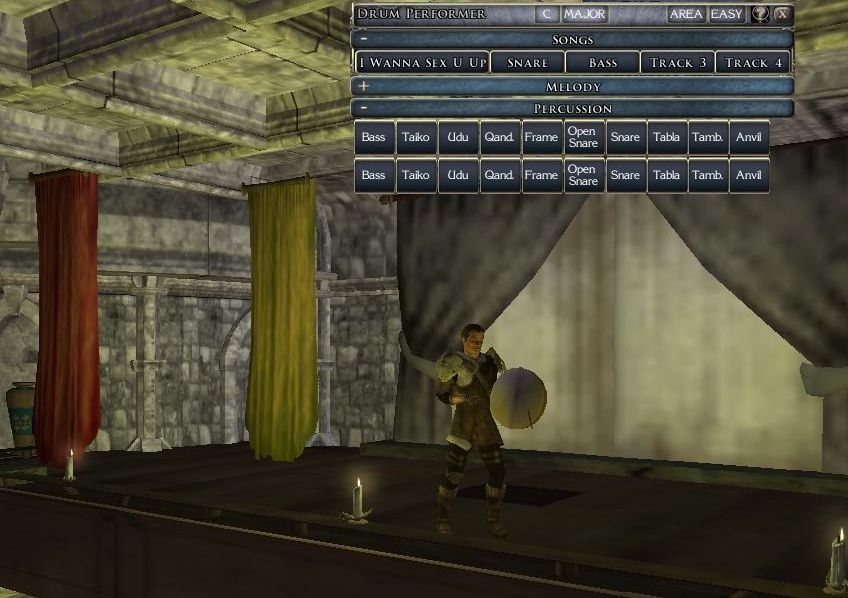
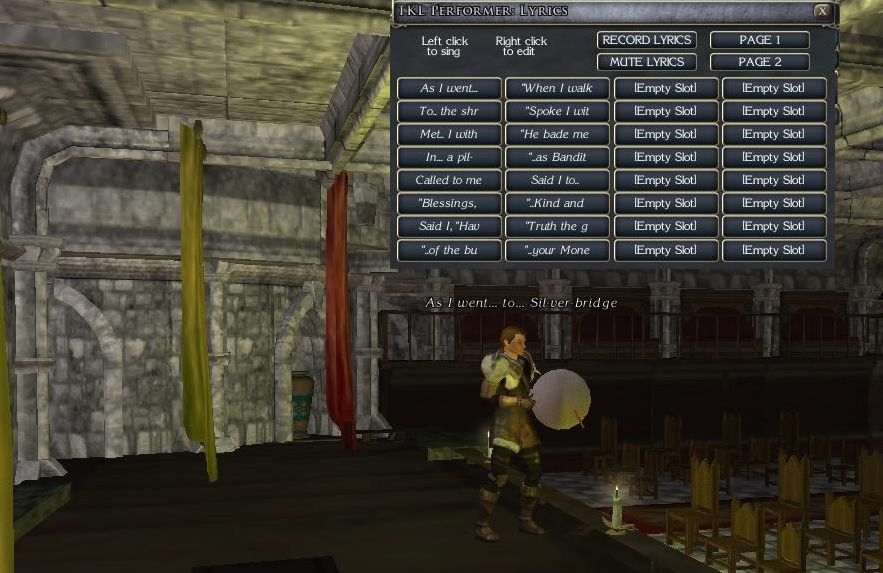
This is a system for NWN2 that turns the Lute, Drum, and Flute into versatile performance tools, controlled through a custom GUI. It is purely a roleplay-aid and/or outlet for musical creativity. Here is a summary of what you can do with TKL Performer:
-Play: The Lute has 2 full octaves of plucked notes, in 'normal' and 'muted', plus 36 chords (12 major, 12 minor, 12 diminished), in 'normal' and 'rolled'. The Drum has 1 full octave of pitched percussion, plus two variations each of cow bell, taiko, triangle, guiro, frame drum, open snare, closed snare, tabla, tambourine, and anvil; in 'normal' and 'loud'. The Flute has 2 full octaves of notes, in 'normal' and 'short'.
-Sing: Prepare lyrics for 'click-to-sing' performances.
-Save: Save/Load your own complete songs, with up to 4 tracks of music, plus lyrics.
-Record: Record music and/or lyrics in real-time. (*Requires NWNX4 with 'Timer' plugin)
-Write: Produce tracks using a 'text-to-music' system.
-Tweak: Edit pitch, timing, variation, delete notes, change the speed and key of your song, and copy/move/split/merge/quantize tracks.
-Publish: Distribute your songs in-game, as musical scores for other performers to learn from, or as lyric-sheets for audience sing-a-longs.
-Perform: Playback your completed song, with music and lyrics, for all the nearby PCs to enjoy!
There is a Help document with FAQ available in-game. Questions, feedback, and bug reports are welcome!
NEW IN VERSION 2
-Improvisation: An easy way to instantly create a full song in one of 10 styles, with any 4-track instrumentation. The Improvise button is found in the main song menu.
-Write sequences now support repeats and beat division, and can be of unlimited length. Percussion 'variation' numbers (1 or 2) are now optional. Details can be found in the in-game help.
-Lyric tracks can now be entered using the same 'Write' system as music tracks.
-Blueprint Scores: Songs can now be created using Write sequences in the Toolset, as item blueprints. Details can be found in the included 'blueprint_scores_readme.txt' file.
-NPC Performers: An included conversation allows NPCs to perform, using improvisation, blueprint scores, and any song saved by a DM. NPCs can also transcribe a score of any song they play.
-Embellish Chords: New button in the Edit window allows PCs to quickly add notes to existing chords.
-Adjust pitch by scale tone: In addition to adjusting pitches by half-step, you can now adjust them by scale-tone.
-Adjust timing by beats: In addition to adjusting timing by seconds, you can now adjust them by beats.
-Duplicate Notes: New button in the Edit window allows PCs to quickly make a copy of the current note.
-Copy screen reworked: 'Copy From' and 'Paste To' are now called 'Start Point' and 'Time Change', which can now accept negative values, and can be adjusted by beats, in addition to seconds.
-Bass drum, udu, qandahar changed to cowbell, triangle, and guiro. All drums have been amplified.
-Score are now weightless.
-DMs can 'throw' lyrics to any (currently selected) NPC, and DMs can change the original composer of a song when they rename it.
-Maximum simultaneous sounds increased to 15 (in prioritygroups.2da)
-Demo module included
USING TKL PERFORMER IN LOCAL MODULES - OVERRIDE VERSION
To use TKL Performer locally, you can download the Override version. Unzip the file in your MyDocuments/NeverwinterNights2/override directory. While you are playing any module locally, equipping a flute, lute, or drum, will launch TKL Performer.
INSTALLING TKL PERFORMER IN YOUR MODULE
NOTE: If you are upgrading from version 1, you may want to rename your 'tkl_performer_settings' script before importing the new version, so you can copy any custom changes to the new version of that script.
1. Choose the correct .erf file for your server:
-If you are running NWNX4 with the 'Timer' plugin, import 'tkl_performer_WeRunNWNX4.erf'
-If you are NOT running NWNX4 with the 'Timer' plugin, import 'tkl_performer_WeDoNotRunNWNX4.erf' (this contains a dummy version of 'nwnx_timer' to allow scripts to compile)
2. Place the NPC bard in any taverns/inns, if you would like.
3. Download the 'tkl_performer.hak' file and associate it with your module in Module Properties. Distribute it to all your players.
4. Optional (highly recommended): Download and distribute the prioritygroups.2da file for players to put in their Override directories. (This dramatically improves the sound of TKL Performer, but sadly it doesn't work from hak files and must be put into the Override directory. Thankfully it is a pretty obscure 2da file so it's unlikely anyone else uses it.)
5. Configure your preferences in the 'tkl_performer_settings' script, if desired. Afterwards, make sure to 'Compile All Scripts In Module'.
IMPORTANT NOTE FOR DMs
In TKL Performer v2, all DMs share the same list of saved songs. This allows all DM-saved songs to be accessed by the NPC performers, but it has the drawback that DMs do not get their own list of saved songs. So it is very important, if you have any songs saved with your DM avatar, that you transcribe them to scores BEFORE installing this update, and don't forget to export your character. ONCE THIS UPDATE IS INSTALLED, DMs WILL NOT BE ABLE TO ACCESS THEIR PREVIOUSLY SAVED SONGS, EXCEPT THROUGH INVENTORY SCORES OR INSTRUMENTS.
BUGS
Version 2 was only lightly play-tested, so please let me know if you find any bugs or issues.
CREDITS
Thanks to Tygermoon, El Yimbo, Nevyn, and the players of The Known Lands PW, for their playtesting, feedback, and ideas! Thanks to Papillon and nwnx.org for providing NWNX4 and the timer plugin! Finally, thanks to East West Quantum Leap for the flute and drum samples!
Version 2 is close! We will be play-testing it on The Known Lands for the next couple of weeks, and then I will post it here. Now is the time to make any other requests for features! Here are the changes/additions going in so far: Included in download: The download will include a demo module, 5 item-blueprints of completed ready-to-play songs (see 'Blueprint Scores' below), and an NPC bard capable of playing music (see 'NPC Performers' below) Improvisation: A new option on the Song menu, this allows you to create music from scratch with the click of a button. On the Improvisation screen, you'll see 10 styles to choose from. You can also choose instruments for up to 4 tracks. For example, you might choose to improvise with 2 lutes and 2 flutes in the style of 'Racethian Nocturne', or you might choose to improvise with 1 lute, 1 chords, 1 drums, and 1 flute, in the style of 'Mormite Drum Dance'. After you click 'Improvise', the song is created. If you want to hear it, you can play it as you would any other song. You can also save it, edit the notes, change the key, change the tempo, mute tracks, add lyrics, etc, just as you can with any other song. The styles are customizable by modifying the tkl_performer_settings script. Write: There are several improvements to the Write system for inputting notes. -There is no longer a limit on the number of characters you can write. -With percussion, you can leave out the 1 or 2, and it will randomly choose 1 or 2. (ie, instead of pA1 or pA2, you can just write pA) -The system now supports repeats. Enclose your repeated sections in |: and :| like in the following example: |: C1 D1 E1 F1 G1 A1 B1 C2 :| (this would play the sequence twice) -Also, to do multiple repeats, add x#| to the end, where # is the number of repeats, like in the following example: |: C1 D1 E1 F1 G1 A1 B1 C2 :|x10| (this would play the sequence 10 times) -Beat divisions: If you follow a note or rest with .x (where x is a single digit) the beat-length will be divided by that digit: CM CM Dm.2 Dm.2 (this would play two full-beat C majors, and then two 1/2-beat D minors) C1 C1 D1.2 -.4 E1.4 (this would play two full-beat C's, a 1/2-beat D, a 1/4-beat rest, and a 1/4-beat E) -Bug-fix: Diminished chords are now allowed in Write. -Bug-fix: Now correctly sets the length of the song after Writing. Lyric Write: Lyrics can now be 'Written' just as notes can. After you click on 'Record Lyrics' you'll see a new screen that allows you to either record lyrics manually, or 'Write' them. First you choose a 'Seconds Per Lyric' value (usually 3 or 4) and then you input a Write sequence, using these rules: -Each lyric consists of L + a number, corresponding to the lyric number, such as L1 L2 L3 etc. -To save typing, you can input lyrics sequentially like so: L1^L8 (this is the same as typing L1 L2 L3 L4 L5 L6 L7 L8) -This system also supports repeats and beat divisons, as detailed above. -You can use rest symbols, - or >, just as in normal Write sequences. -For reference, the lyric slots will now also display lyric numbers. Blueprint Scores: A new way to input songs: in the toolset. To create a Blueprint Score, you make a copy of the tkl_performer_score item, and set the BLUEPRINT_SCORE variable to 1. Then you fill in certain values. -Choose a SECONDS_PER_BEAT value to determine the speed of the notes in the song. -For each of the four tracks, you can choose the instrument, and then input a 'Write' sequence, just as you would in-game. -Choose a SECONDS_PER_LYRIC value to determine the speed of the lyrics in the song. -Input a 'Write Lyrics' sequence, just as you would in-game (see above) -Fill in any lyric texts for LYRIC1 through LYRIC64. -Fill in the name of the original composer (or leave it as 'Anonymous') -Optional: Set a 'speed variance' value for when NPCs perform this score (see below). This causes NPCs to randomly perform the song with a certain variance of speed, ranging from 0 to the value set. (eg, if set at 20, NPCs will perform the score 0-20% faster; if set at -10, NPCs will perform the score 0-10% slower) NPC Performers: The system now supports NPC performers, and includes a general conversation that allows several functions. 1. The NPC improvises a song based on any of the above-mentioned styles, in a random key and tempo, which specific instrumentation. 2. The NPC plays a "server song" which is any song that has been saved by a DM, in a random key and tempo. 3. The NPC plays a "blueprint score" which is a TKL Performer Score created in the toolset and placed in the NPC's inventory, in a random key and tempo. 4. The NPC randomly picks 1, 2, or 3 (if applicable). 5. The NPC produces a 'score' of the last song played, and gives it to the PC (for 100 gp). Edit Screen: There are several new features in the Edit Screen. -Embellish Chord: If the current note is a chord, you will see the Embellish button. On the Embellish screen, you'll be able to listen to the chord with various melody notes, including: 6, m7, M7, 1, b9, 9, #9 (m3), M3, #11, P5, b13, and 13. If you confirm, that melody note will be created and placed in the song at the same moment as the chord. Note: The embellishment is still a separate 'note', and will show up individually in the Edit Screen. -Duplicate: This button creates a duplicate of the current note. -Display current beat length: The Edit Screen now displays the current length of a 'beat' in this track. -Edit Time by beats: If this track displays a current 'beat length', then you have the option to edit timing by beats, instead of by seconds. -Edit Pitch by scale tone: You can transpose notes up and down by scale tone, instead of by half-steps. -Bug-fix: High notes when in different keys no longer show up as 'Unrecognized' Copy Screen: There are a few changes to the Copy Screen: -'Copy From' and 'Paste To' are now called 'Start Point' and 'Time Change'. -'Time Change' now accepts negative values. -'Time Change' and 'Start Point' can be set with beats instead of seconds, if the track has a Metronome (beat-length) setting. -Copying notes from one track to another also overwrites any Metronome settings. -Bug-fix: Copying notes to the same track with 'Delete Source Notes' checked now works. Record Screen: One small change: You can now set the Metronome (ie, beat length) on a track by clicking 'Apply' on the Record Screen. Drums: In the interests of variety, two of the three "bassy" drums (bass and udu) and the qandahar have been removed, to allow room for triangle, guiro, and cow bell. -Taiko has been made louder -Bass is now Cow Bell -Udu is now Triangle -Qandahar is now Guiro Miscellaneous: -Scores should be mostly weightless now. -Increased the maximum simultaneous notes (Scripted_PlaySound, MaxPlaying) setting in priority_groups.2da to 15.
Posted by GandorMythos at on01/28/09
Being a musician myself, I find this tool to be an amazing add on for any PW, especially for those who do not know too much about music. This tool makes it easy for people to contribute musically with their characters, even when their own personal musical experience is lacking. Good work! _________________________ Remnants.
Posted by brockfanning at 2009-01-2309:39:39
I'm actually working up a new update, to incorporate a lot of the suggestions made here. I'll try to include a system for importing songs by erf as well. Should hopefully be more goodies for non-musicians: an 'Improvise' button. :)
Posted by Urlord at on01/14/09
This is an awesome hak! Well done. The only thing keeping me from giving it a 10.0 is the fact that it doesn't appear that you can get NPCs to play the scores. Also, since I don't have a musical bone in my body, but I want to offer this to bard PCs, does anyone have an erf of pre-written scores or can you post them here for is to use? _________________________ Peace, Jim AKA Urlord Visit the Persistent World of Nymri
Posted by Arvirago at on02/11/09
I'm translating it to Spanish, in case someone is interested. Once it's done and working I'll vote, but I must say it looks like a really nice job. _________________________ Reino de Aldor
Posted by kemo at on12/08/08
Simply fantastic. I'm especially happy that there is an in-game help system. _________________________ KEMO Auctions | KEMO Beds and Tables | KEMO Bio | KEMO Custom Animations | KEMO Custom Chairs | KEMO Experience Award System | KEMO Jukebox | KEMO PC Scry | KEMO Storage System Kingdom of Haven admin
Posted by el at on12/01/08
This thing is freakin' amazing! If you've ever wondered whether it is possible to play blues on a lute, well...yes. Yes, it is.
Posted by rodkinnison at on11/30/08
I play in the world where this was developed, and it is incredibly enhancing to have bards who can actually perform their music. I added "use magic device" to one PC just so I could play with this tool, and had a great time doing it.
Posted by crashume at on11/30/08
We were in a party, and the bard performs her tasks, to an original tune. NEver wished I had a musical bone before.
Posted by Penumbra2 at on11/30/08
And for us non musical types, its fun just being in the audience.
10 - A Masterpiece, Genuinely Groundbreaking 9 - Outstanding, a Must Have 8 - Excellent, Recommended to Anyone 7 - Very Good, Deserves a Look 6 - Good, Qualified Recommendation 5 - Fair, Solid yet Unremarkable 4 - Some Merit, Requires Improvements 3 - Poor Execution, Potential Unrealized 2 - Very Little Appeal 1 - Not Recommended to Anyone






 Site
Site