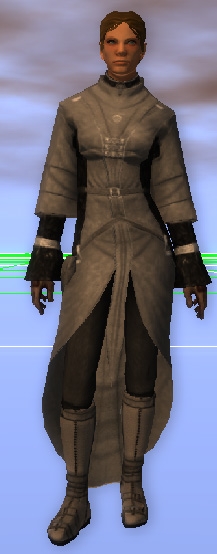
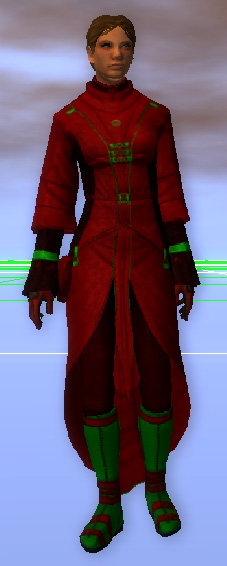
2DA made separate. I made a clothing category so that it didn't conflict with existing custom armors.
Installation is simple, put the 2da in either overrides or another hak (I kept it separate to allow people to merge it easily) and then add the hak to your module. Armor appearances are under "GodBeastX" category in the drop down.
Version 2 - Added male Red Wizard Tints
Version 1 - Initial Release
Posted by Arvirago at 2011-06-22 07:18:20 Voted 8.00 on 06/22/11
Excellent _________________________ Reino de Aldor
Posted by Dragonsbane777 at 2011-04-05 10:51:38 Voted 10.00 on 04/05/11
Nice! Why they didn't make it this way is beyond me, but nice job!! _________________________ Talernon3 - Age of Dragons Link
Talernon Team Submissions: Link
3C Music Compilation: Link
Posted by kamal at 2010-11-09 17:01:04 Voted 10.00 on 11/09/10
Should have been this way by default. _________________________ Shadow Thief: Crimmor and Path of Evil blog Link
Posted by Shargast at 2010-11-03 08:22:12 Voted 9.75 on 11/03/10
Interesting work and well worth looking at.
Cheers
Shargast _________________________ Realms of Shargast V1-V5ab, LOTR V15, The Undeath Clave & Faithful of Aerth
Posted by darthsabe at 2010-01-14 08:47:52 Voted 9.00 on 01/14/10
Posted by leaper06 at 2009-11-10 05:54:05 Voted 8.00 on 11/10/09
Fixed.
Posted by leaper06 at 2009-11-10 03:29:39 Voted 8.00 on 11/10/09
Perhaps someone can help me. I've put the 2DA in my MyDocs NWN2 Override folder and I've placed the HAK file in my MyDocs NWN2 Hak folder. When I load the toolset, I don't see a GodBeastX category in the list of items. I've also tried adding the HAK to a module, and I still don't see it when I load the toolset or module.
Thank you for any help.
Posted by the_exiled_muse at 2009-08-20 20:55:07 Voted 9.75 on 08/20/09
I've been wanting to find something like this for ... almost ever. I do wish there were more detailed instructions for those not well-versed in modding, but I was eventually able to figure it out.
Posted by Talus057 at 2009-08-10 13:58:49 Voted 10.00 on 08/10/09
got it to work. im just being a noob, don't mind me. ^.^ rating changed.
Posted by Talus057 at 2009-08-09 22:04:06 Voted 10.00 on 08/10/09
You won't like this answer, but the drow/elf model for some reason used a glow map that the other models don't have. And glow maps aren't tintable so those are stuck red. I could remove them, but I just left it the way Obsidian did the texturing.
I have loaded the hak and can change the tint, but I can't figure out how to just change the buttons like you did in the Drow picture? Under the "Armor Set" tab, I select the "GodBeast" as the "Main Type" and can then change the tint. What is the menu that controls just the button (I tried a lot of them without success).
Thanks
Posted by Simon05 at 2009-02-12 09:57:23 Voted 9.50 on 02/12/09
Very nice, very nice indeed. Any word on the male version?
Posted by cooperblack at 2008-08-17 07:11:53 Voted 10.00 on 02/22/09
This is awsome, i have waited for this (well the male robe actually but still) since MotB came out.
Posted by Arreimil at 2008-08-09 07:59:07 Voted 9.50 on 08/09/08
A rather stupid question here, but anyway, how can I make it accessible through Charlie's Item Appearance Changer? Or how can I use this in OC or as override(if possible at all)? I have very little knowledge about these things and I'm now very confused.
Maybe inappropriate to ask here, but I'm desperate now. Any help would be much, much appreciated. Thanks.
Posted by AtomAction at 2008-07-14 13:24:25 Voted 9.00 on 07/14/08
awesome! Would really love to see the male version too. Thanks!
Thanks GodBeastX for making this. I hope you'll make the male version soon. It would be perfect for one of my NPCs. Thanks. _________________________ E.C.Patterson Gaming Parents Studios
10 - A Masterpiece, Genuinely Groundbreaking 9 - Outstanding, a Must Have 8 - Excellent, Recommended to Anyone 7 - Very Good, Deserves a Look 6 - Good, Qualified Recommendation 5 - Fair, Solid yet Unremarkable 4 - Some Merit, Requires Improvements 3 - Poor Execution, Potential Unrealized 2 - Very Little Appeal 1 - Not Recommended to Anyone






 Site
Site











 at 2011-09-18 21:11:07
 at 2010-11-09 17:01:04


