--Contents:
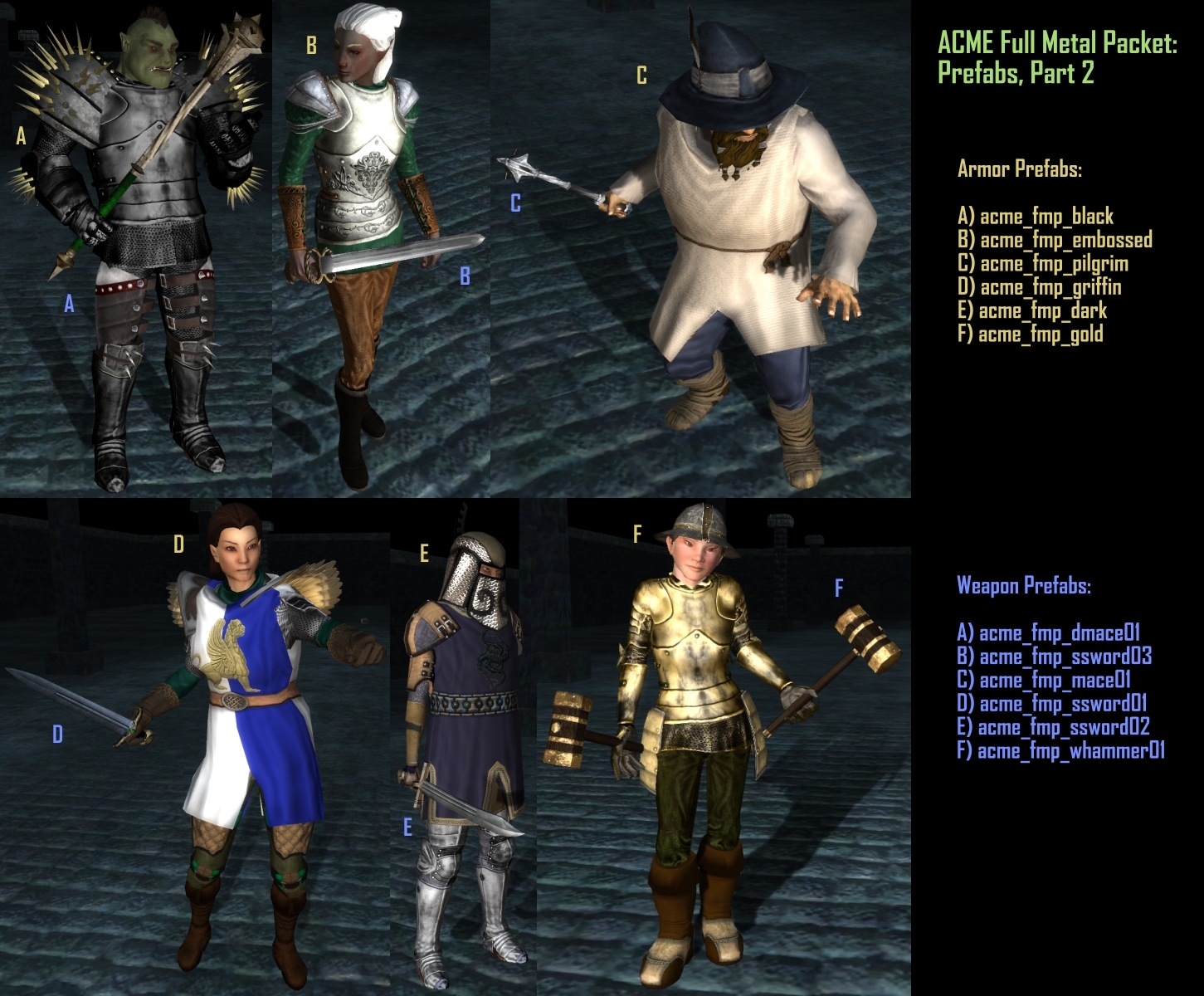
This package provides weapons and new armor parts for males and females of all races with styles roughly based around the European late gothic era (circa 1450's).
--How to use:
[override version]
Extract ACME_FMP_v10_Override.7z into your MyDocuments nwn2 override directory.
[hak version]
Extract ACME_FMP_v10_Hak.7z into your MyDocuments nwn2 hak directory.
[tabard texture assets]
Extract ACME_Tabard_Assets.7z into a working directory and use a 2D drawing program to make your own custom decals for the tabard models. Use MDB Cloner to assign your new textures to the models.
The 7z extractor can be downloaded from here: Link
--Modified 2da's included in package
Armorvisualdata.2da
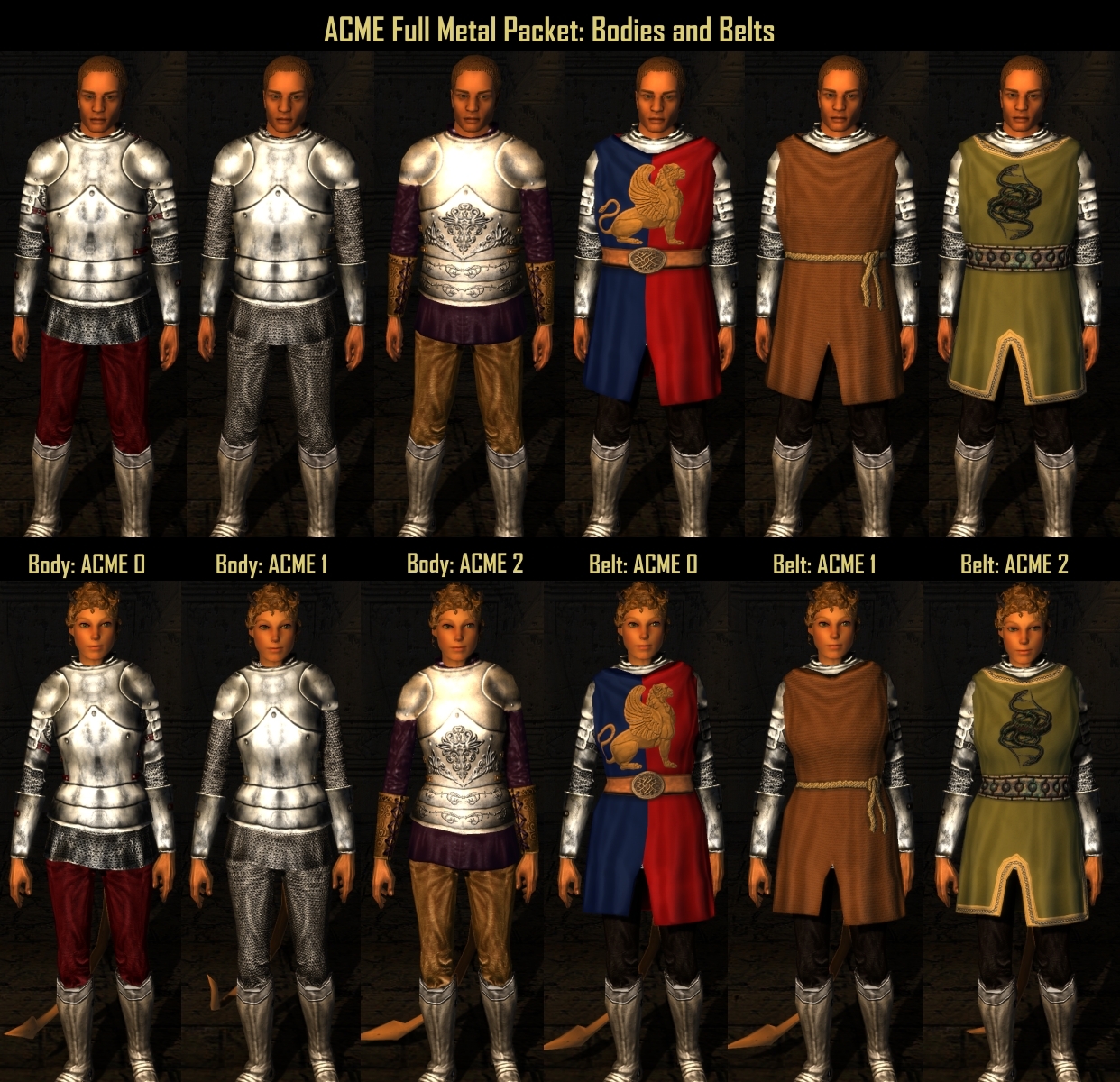
--Body Parts List (Toolset numbers listed): All body parts can be found under the ACME armor type at the end of the armor list.
[Torso]
ACME 0 - Plate upper body over leather leggings
ACME 1 - Plate breastplate over chain
ACME 2 - Fancy plate breastplate over cloth
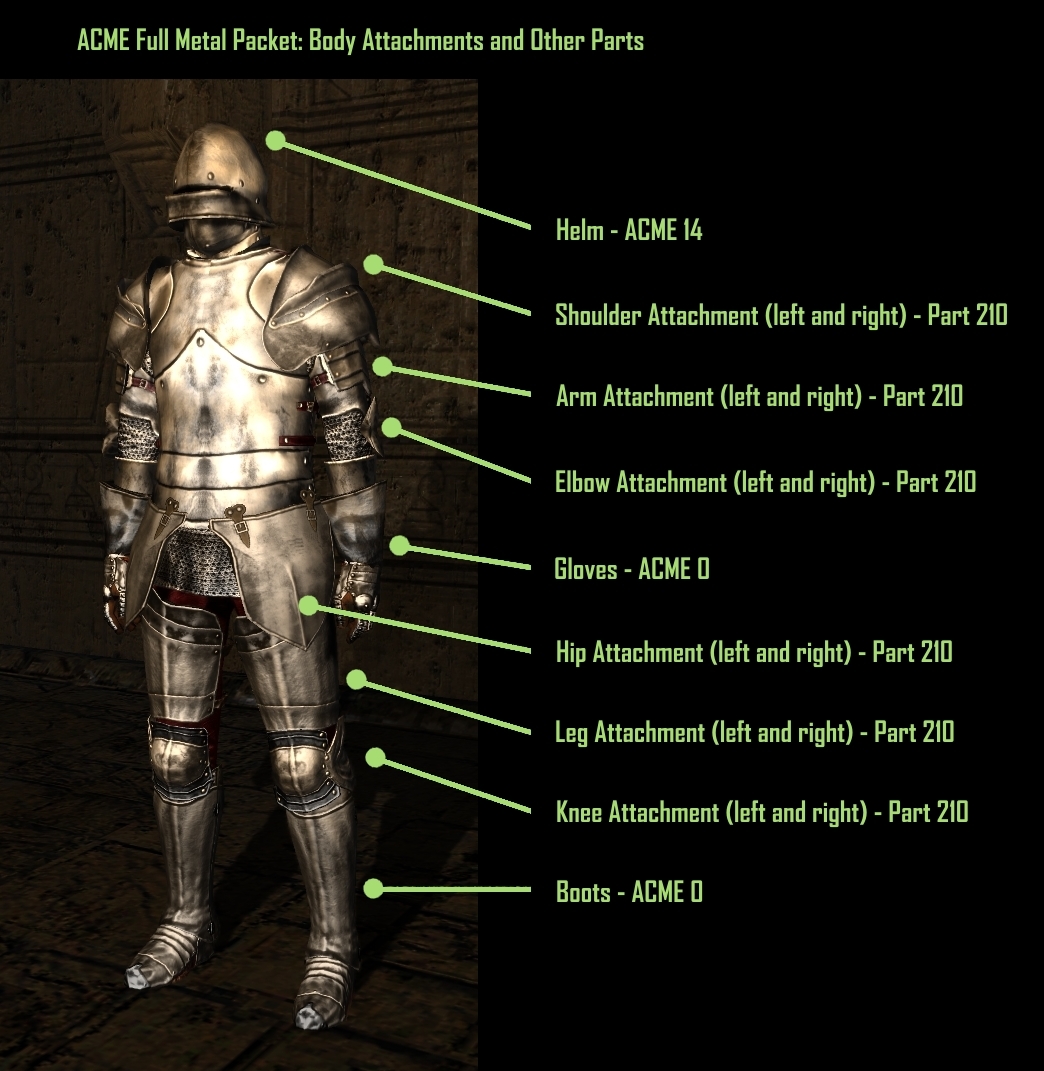
[Boots]
ACME 0 - Plate Sabatons
[Gloves]
ACME 0 - Long plate gauntlets
[Helm]
ACME 14 - Metal sallet
[Belt]
ACME 0 - 2 tone tabard with a winged lion decal
ACME 1 - Rough spun woolen tabard with a rope belt
ACME 2 - tabard with a metal link belt and twin serpent decal
[Attachments]
All attachments have mirrored left and right side parts.
Shoulder 210 - plate pauldron
Arm 210 - layered plates
Elbow 210 - butterfly plate joint
Hip 210 - plate skirt panel with leather attachments
Leg 210 - hinged plate with leather straps
Knee 210 - butterfly plate joint
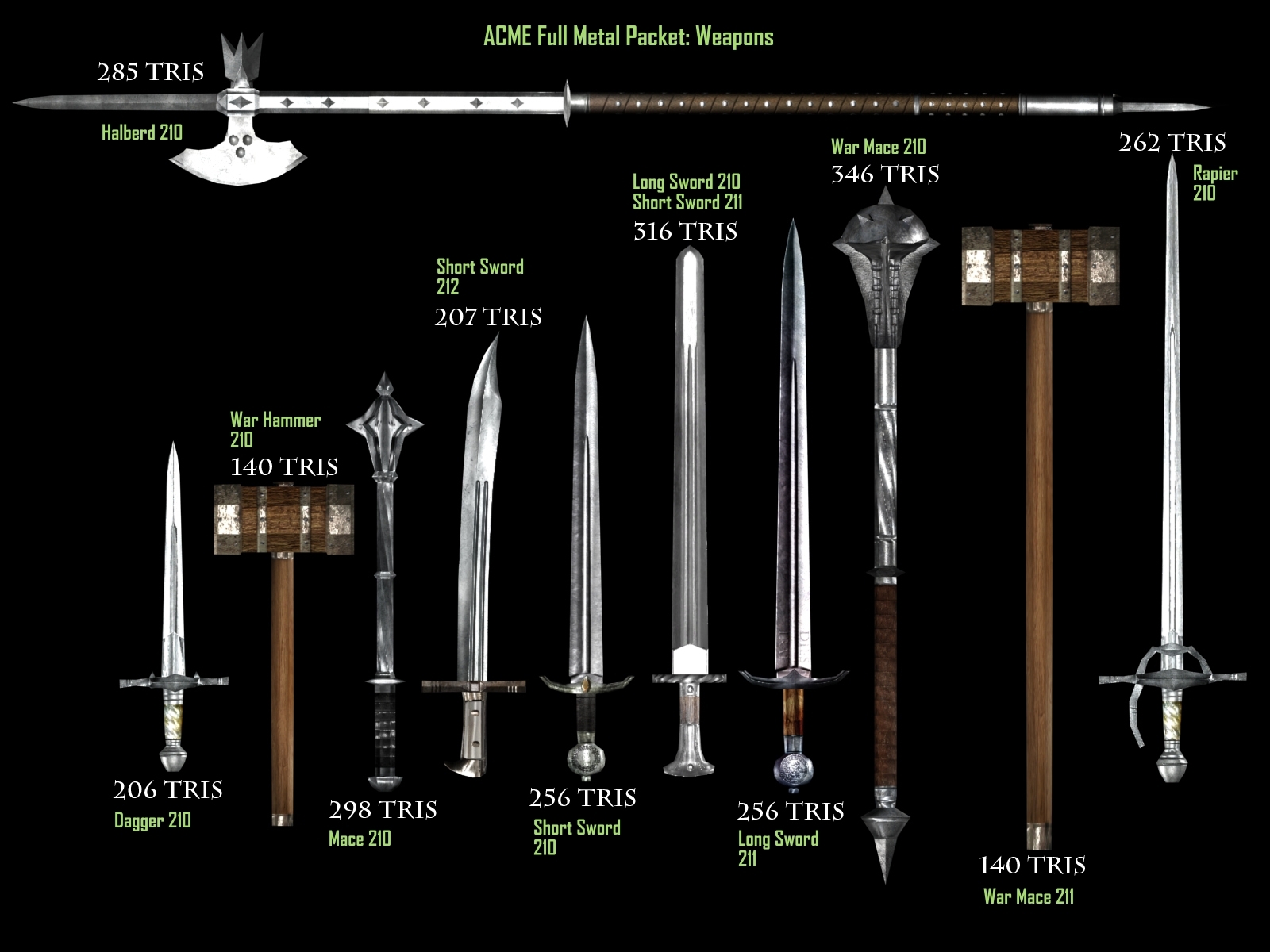
--Weapon Part Numbers: Weapons are broken into a,b,and c component parts matching the standards for the weapon type.
Dagger 210
Halberd 210
Longsword 210, 211
Mace 210
Rapier 210
Short Sword 210, 211, 212
Warhammer 210
War Mace 210, 211
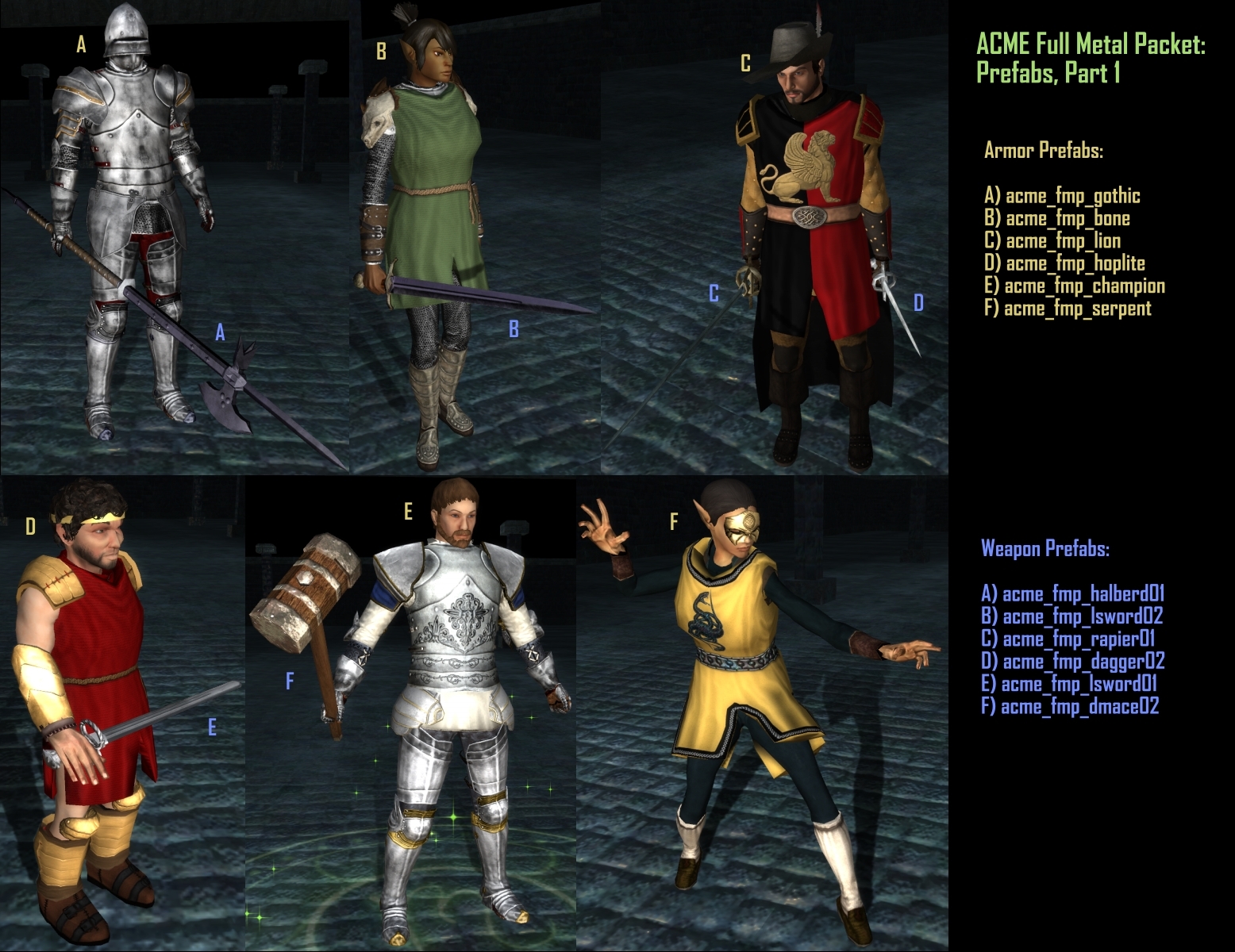
--Weapon Prefabs (override version only)
acme_fmp_dagger02 : Main Gauche
acme_fmp_dmace01 : Bronze War Mace
acme_fmp_dmace02 : Steel Capped Sledge
acme_fmp_halberd01 : Adamantine Poleaxe (adamantine)
acme_fmp_lsword01 : Long Katzbalger
acme_fmp_lsword02 : Dies Irae (adamantine)
acme_fmp_mace01 : Flanged Mace
acme_fmp_rapier01 : Silver Epee (alchemical silver)
acme_fmp_ssword01 : Gemmed Short Sword (cold iron)
acme_fmp_ssword02 : Kampf Messer
acme_fmp_ssword03 : Katzbalger
acme_fmp_whammer01 : The Crushinator (cold iron)
To add these armors to a game, open the console and type:
DebugMode 1
giveitem (filename of item)
DebugMode 0
For example, to add the armor for the full gothic suit:
DebugMode 1
giveitem acme_fmp_gothic
DebugMode 0
--Permissions:
Anyone is allowed to repackage and/or modify the meshes and textures in this package as long as credit is given for the original source and the user does not charge money for their derived product.
--Credits:
All body parts and weapons are originals created by the ACME team:
RunnerDuck - modeling, principal rigging, and race conversions
Escrimator - concept artwork, weapon models, modeling and textures
Barrel of Monkeys - modeling, textures, post production
HAK version: for builders that want to add the new parts to the module they are building. Note: the hak file contains armorvisualdata.2da inside it. Revision 9-27-2009: fixed the hak file to add armorvisualdata.2da.
Override version: for players that want to add parts to already built modules. Note: make sure there is only one copy of armorvisualdata.2da in your override directory.
I'm using the hak version so the prefabs aren't there...there's no ACME Full Metal Packet option. Does the hak file not work on its own then?
Posted by Aardvark at on08/19/09
Hmm, strange. If you load up the toolset and under Blueprints> Items> ACME Full Metal Packet> Armor you pick one set of prefab armor, e.g. Champion's Plate, and go to the Armor Set tab in the item properties window, what do you see on the torso where the armor ought to be?
Posted by Squire at 2009-09-1602:56:52
No, that didn't do it. I don't have any other armour haks anyway, and the override folders (both the one in My Documents and the NWN2 directory) are empty.
Posted by Aardvark at on08/19/09
Squire, it sounds as if you have a conflicting armorvisualdata.2da file in another hak your use, or in your override folder. Only ONE armorvisualdata.2da file can be in effect. Just temporarily rename your hak and override folders and create a new hak folder where you place the Full Metal hak. Then start up your toolset and see if you can get the armor to work. If it does, you have a conflict.
Posted by Squire at 2009-09-0603:04:01
I can't get the main armour sets to work...anything with an ACME code doesn't appear as a selectable option. All the arm and leg parts and the weapons (i.e. anything with 210 or 211) work just fine. I'm using the Hak version, is there anything else I need to do to get the Acme parts to appear on the list?
Posted by steelfiredragon at on08/20/09
also do you guys have a blog or website??
Posted by steelfiredragon at on08/20/09
dumb question, but could you guys do Princess Zelda's dress and add it to this??
Posted by Aardvark at on08/19/09
Ahh, thanks. Now it works beautifully:). With this pak and the Morion helmet I can get busy playing the Dark Waters 2 module and rule the seas with fear in appropriate gear. Great work! (And we need more late medieval/early modern armor pretty please!)
Posted by Barrel at 2009-08-1516:25:10
Aardvark: The 2da file is in the root directory of the archive, not inside the folder. Add it to the override directory of your game.
Posted by Balgin at 2009-08-1510:09:14
Are you putting it on npc's or is this a player character issue? NPC's need the correct armour proficiencies or they simply do not wear the armour once you load up the area in game and they appear to be wearing default clothes.
10 - A Masterpiece, Genuinely Groundbreaking 9 - Outstanding, a Must Have 8 - Excellent, Recommended to Anyone 7 - Very Good, Deserves a Look 6 - Good, Qualified Recommendation 5 - Fair, Solid yet Unremarkable 4 - Some Merit, Requires Improvements 3 - Poor Execution, Potential Unrealized 2 - Very Little Appeal 1 - Not Recommended to Anyone






 Site
Site