Posted by BlakOrkz at 2011-01-22 00:13:35 Voted 10.00 on 01/22/11
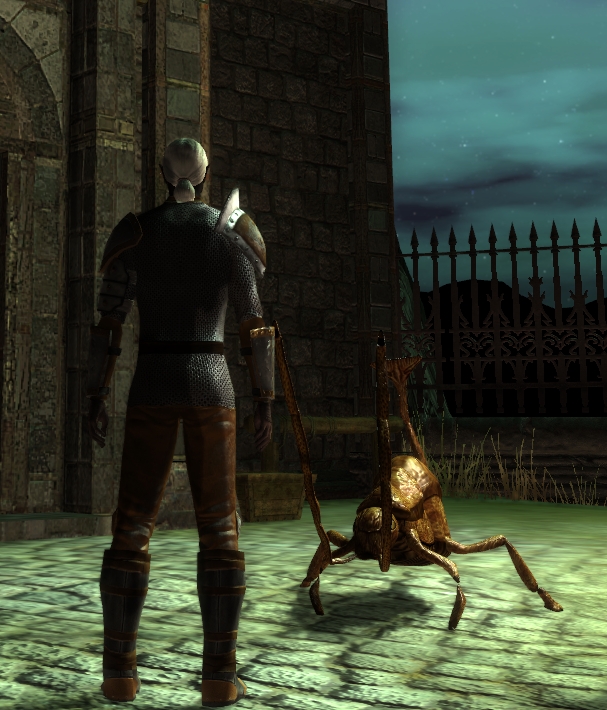
You should've seen my players' faces when this popped out at them.
Posted by PGB01 at 2010-01-12 07:54:52 Voted 10.00 on 01/12/10
Thank you.
Posted by Gonzo Gygax at 2009-10-18 04:18:23 Voted 9.00 on 10/18/09
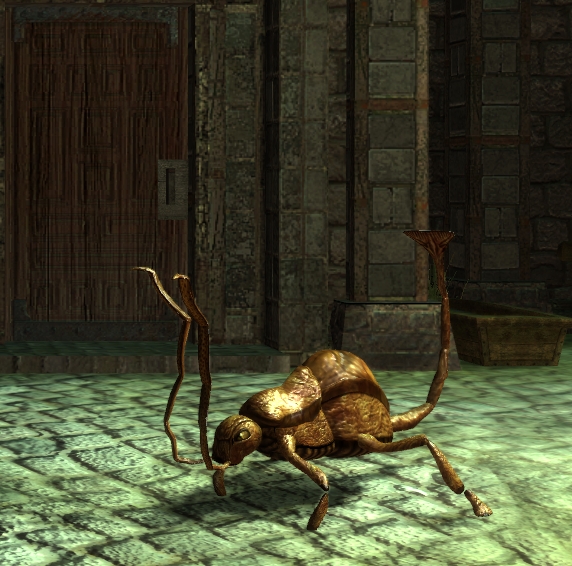
This is great, the antennae/feelers are well animated already, work like this should be rewarded with good (honest) votes. Excellent work Arpharazon! _________________________ Loudwater / KOW / Khalidine
Posted by Stormbow at 2009-06-08 06:08:50 Voted 10.00 on 06/08/09
Since the "how to" file associated with this awesome creature is a bit outdated, I figured I'd post a quickie guide to help others get this into their modules:
1. Download both files above, placing the .hak into My Documents>Neverwinter Nights 2>hak and the .erf into My Documents>Neverwinter Nights 2>erf (I had to manually create this erf folder).
2. In the Toolset, click on View > Module Properties and look for "Hak Paks" under "Misc". Click in that field, a button with ... appears. Click that button, a new window appears. Click "Add" on the bottom left, FileName appears on the right side of the window. Click in the field to the right of that label, the ... button appears again. Click that and browse to the .hak file you've saved in step 1, select the rustmonster.hak and click Open, then OK. PLEASE NOTE: If you can not find the .hak file, it's because this step starts you looking for the .hak file in the program's install directory, not the My Documents>Nwn2 directory. Be sure to go to the right location. ;-)
3. Now to import the monster. Click File > Import and navigate to the erf folder that you've saved the rustm.erf file in. Select the rustm.erf and click Open. The Toolset will do it's thing and add "Rust Monster" under the "Abbarations" creatures category.
4. Click Blueprints > Creatures > Abberations > Rust Monster and place the monster in your module where you'd like it. If the monster does not appear when you attempt to place it, you've messed up somewhere above. Go back and check your steps.
5. Bake, save, etc., test your module.
Pretty simple, eh?
Many, many, MANY thanks (and 10 points) to Arpharazon for posting this incredible creature, and to everyone else that's worked on it. It's a MUST HAVE for my first module ever!
Posted by kamal at 2009-05-24 16:11:22 Voted 9.75 on 05/24/09
Just missing a walk anim. _________________________ Shadow Thief: Crimmor and Path of Evil blog Link
Posted by Cyphre at 2009-05-18 04:13:15 Voted 10.00 on 05/18/09
The creature is missing the walk animation. It simply slide on the terrain, don't movineg the legs.
It's a bug or i have lost something ? _________________________ Reami Perduti - PW Italiano Full-GdR(www.reamiperduti.it)
The Dark Armory: Link
My other works on the Vault: Link
Posted by dmguild at 2008-05-25 00:21:21 Voted 10.00 on 05/22/08
The instructions on how to do this are nice, but they are written for someone with 3DSMAX knowledge. Is it possible to add on to the tutorial more detailed instructions (click here, type this, or even screen capture each step for those of us who do not understand exactly how to use the program. For example I made it to section 5 in the tutorial with a some trial by error, but when it tells you to say apply the normal map to the body or add collision balls, or set something to Collision Type in Expotron, I get lost. =)
I really want to work on getting some models in and have the necessary programs to do so, just not the know how. I'm sure there are others in the same situation as me....maybe.
This looks amazing! Its great to see new monsters being added to NwN 2 from the community.
I feel kind of foolish asking, but how do I place the Rust Monster in a module? I've placed the rust.hak file in My Documents/Neverwinter Nights 2/Hak folder, but I don't see a Rust Monster to add in the creatures tab...
Posted by dmguild at 2008-05-22 11:48:57 Voted 10.00 on 05/22/08
Posted by AnthroPlayer at 2008-05-22 00:41:00 Voted 10.00 on 05/22/08
An impressive addition to the monster compilation already within the game. _________________________ @===============================================@
Vinchenzo made a post here.
Plz check out my entries. I'm currently making a few simple modules, designing 3 special characters, and hope to someday be good this stuff.
This is Vinchenzo, finishing his post with the following advice:
Don't use Latin improperly (Lupis means grey, Rufus is red, Canid is dog, so on.) Furries annoy me with their improper usage of such. And I'm a furry!!! Ugh...
Don't vote for Beta things unless told they are finished, unless posted specifically by the author.
Don't abuse the vote and post function, don't vote for your own/friends stuff just to get a high vote. Don't flame vote either just to be an ass.
There is a voting system for how the points are used, even I forget, but we should follow it (and tattoo it to our forehead, lol)
@===============================================@
Posted by zach le bon at 2008-05-20 16:25:59 Voted 10.00 on 05/20/08
it is a wonderfull conversion ! _________________________ NWN2 trailer ( Link ) & Interior Prefabs ( Link )
Posted by Terremer at 2008-05-20 11:09:18 Voted 9.75 on 05/20/08
Great !
Just improve the movement animation and it will be a master piece. If you have some script(rust monster) to associate with this model, it will be appreciate to.
Thanks a lot.
Posted by MokahTGS at 2008-05-20 10:37:48 Voted 9.75 on 05/20/08
10 - A Masterpiece, Genuinely Groundbreaking 9 - Outstanding, a Must Have 8 - Excellent, Recommended to Anyone 7 - Very Good, Deserves a Look 6 - Good, Qualified Recommendation 5 - Fair, Solid yet Unremarkable 4 - Some Merit, Requires Improvements 3 - Poor Execution, Potential Unrealized 2 - Very Little Appeal 1 - Not Recommended to Anyone






 Site
Site









 at 2011-01-22 00:13:35
 at 2009-05-24 16:11:22
 at 2008-05-25 00:21:21


