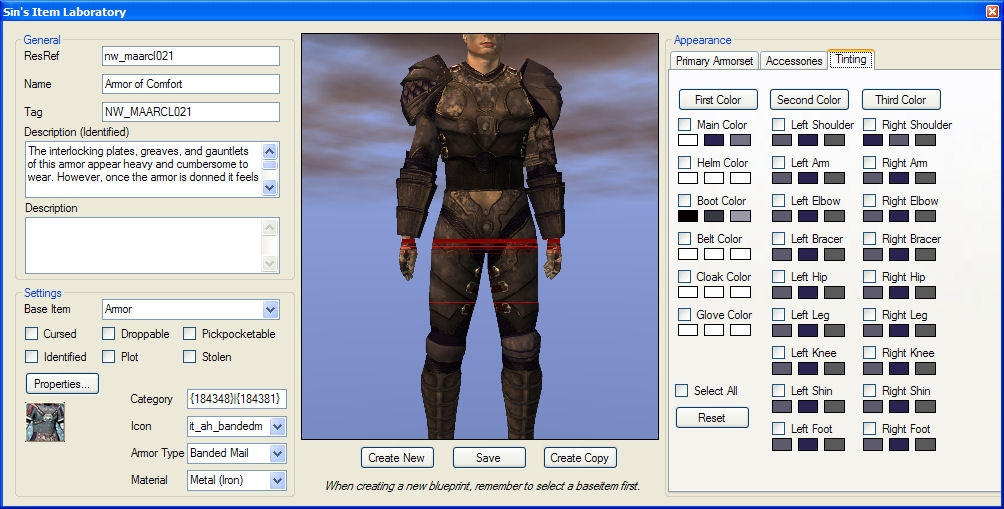
Save your tint choice for future use in the same session
Remember: Make sure the version you download is the right one, sometimes the servers aren't in sync and will give you an older version so check version number and filesize.
Until I find a proper way to automatically hook the camera movement to the active viewers, you'll need to activate the plugin from the Plugin menu for every area you open (if you need the camera movement, the rest is already loaded).
The tinting tool only keeps your tint preferences for the session, it doesn't save it to file (if that's useful to anyone, let me know).
The Item Laboratory should be complete now. The editor should be quite fast, I'm pretty pleased with it atleast. Tinting is finally a breeze to do.
Please report any bugs
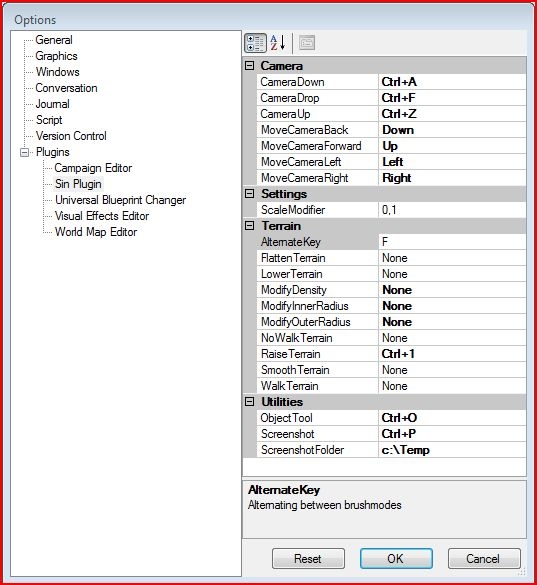
To enable the functions, remember to go into the plugin options and configure them (View -> Options)
Posted by Kheflin Truarc at 2011-09-21 07:22:47 Voted 10.00 on 09/21/11
I loved SinPlugin! However, my mod crashed recently and set the toolset back to factory settings. After resetting all of my preferences, including the "load all plugins" function, SinPlugin won't load, coming with the standard error message.
I tried deleting the .dll file and downloading it again, but I get the same error. Is there something I'm missing? I have MotB and SoZ installed--is that part of the problem? However, they were also there before and it loaded no problem.
I find it very difficult to work without this plugin at this point, so please send help if you can.
Posted by tooley1chris at 2011-02-18 13:00:07 Voted 10.00 on 02/18/11
Totally non-heinous! A must have for aspiring builders and pros alike.
Posted by BlakOrkz at 2011-01-22 00:24:29 Voted 10.00 on 01/22/11
10 Absolutely necessary.
Posted by indomidable at 2010-12-17 22:22:52 Voted 10.00 on 12/17/10
This is a must have for making UTI's and testing everything out...Although it'd be nice to add the newer races to it.
To install Plugins for Toolset just put the dll in your NWN2 -> NWN2Toolset -> Plugins folder then you run the Toolset click plugins select sins one and you should see an itemlab utility pop onto the toolbar.
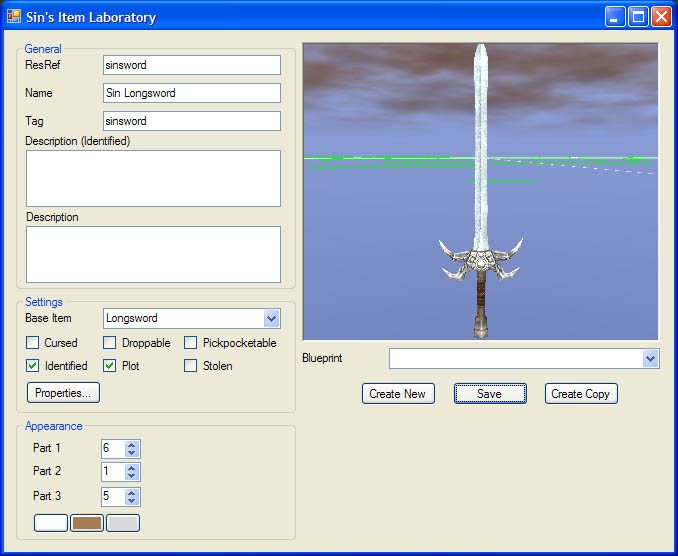
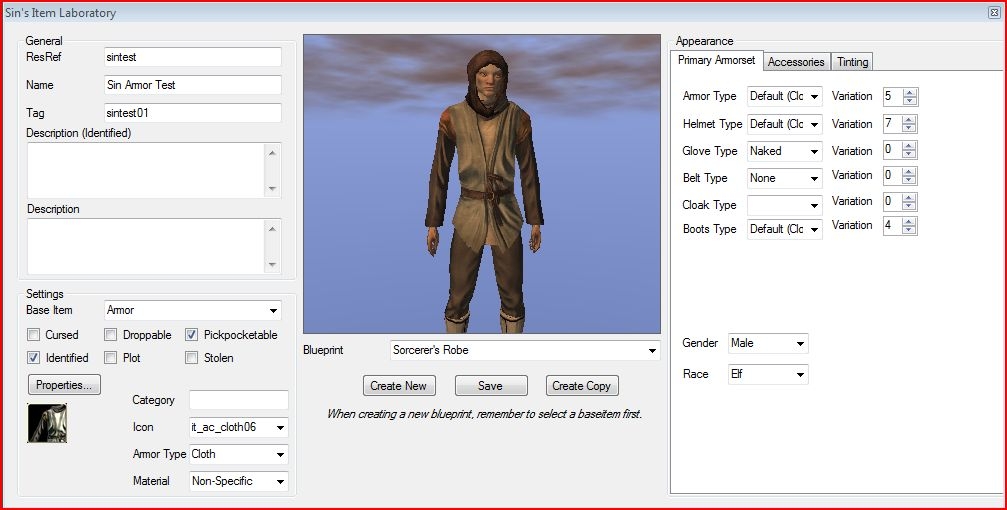
Simple explanation for usage of the Item Laboratory
Most things are simple if creating something new Select the Base Item First (says it in italics at bottom of screen) You then are able to rename everything about it.
Tips for Category
Let's say you want to make a tower shield and place it in the same place the game does. In Category you'd type Armor|Shields|Tower Shields
If your a Modder and want everything under your name you can still create levels of stuff example
Chimneyfish|Armor|Cloth (this would create two layers one an Armor the other a Cloth section allowing you to separate cloth, light, med, heavy while keeping them under your name.
Camera movements for the preview section
Zoom out cntrl + mouse scroll for zoom control and Axis/Tilt is alt and mouse movements
same as toolset.
Posted by Qrizz at 2010-05-11 23:48:23 Voted 10.00 on 05/11/10
great ! _________________________ Qrizz
Middle Earth Arnor PW Link
Posted by TheCapulet at 2009-10-31 13:47:58 Voted 10.00 on 10/31/09
Great Plugin. I do have a question though.
Is it possible to use the custom camera tools to enable standard wasd controls, but keep the center mouse wheel and button usability? It'd be perfect if I could control the zoom and pitch from the mouse, but the movement from the keyboard, but I cant seem to figure it out, if it's possible with your plugin. _________________________ -The Capulet
Former M'hael Wheel of Time: The Third Age
Posted by greencherry at 2009-09-07 14:01:53 Voted 10.00
Ty..
Posted by DancesWithShoggoths at 2009-09-06 01:05:19 Voted 10.00 on 08/05/09
Latest update seems to be working fine for me. Thank you :) _________________________ "Out here on the perimeter, there are no stars..."
Jim Morrison
Posted by greencherry at 2009-09-05 12:28:09 Voted 10.00
_________________________ Shadow Thief: Crimmor and Path of Evil blog Link
Posted by DancesWithShoggoths at 2009-08-28 06:05:16 Voted 10.00 on 08/05/09
Looks like hot-fix broke it. Would like to, hopefully, see an updated version of this essential plug-in soon. _________________________ "Out here on the perimeter, there are no stars..."
Hmm... either the vault hiccuped real bad, or the 1.23 hotfix broke version compatibility.
Posted by casadechrisso at 2009-08-06 16:32:51 Voted 10.00 on 08/05/09
I redownloaded a few times yesterday and got errors with that version, but today all is fine. Must be a vault hiccup. Thanks a lot. _________________________ Middleforest - An upcoming NWN2 PW Skins for all races
I just tested it in my toolset and it loads just fine, so I don't know why it won't for you. It could be the whole out of sync thing with the NWVault servers that has happened in the past, try redownloading it?
Posted by DancesWithShoggoths at 2009-08-05 20:39:02 Voted 10.00 on 08/05/09
Absolutely magnificent, must-have plugin for NWN2 Toolset!! *gush gush* Awesome!!! _________________________ "Out here on the perimeter, there are no stars..."
Jim Morrison
Posted by casadechrisso at 2009-08-05 19:41:46 Voted 10.00 on 08/05/09
Well, actually it still doesn't load, I get an error message when the toolset starts. Maybe this file isn't the 1.23 version? :-/ _________________________ Middleforest - An upcoming NWN2 PW Skins for all races
Posted by casadechrisso at 2009-08-05 09:25:23 Voted 10.00 on 08/05/09
Posted by plast at 2009-08-04 22:50:19 Voted 10.00 on 08/04/09
Simply stunning. Makes things 100% easier, a must.
Posted by casadechrisso at 2009-07-25 01:27:29 Voted 10.00 on 08/05/09
I promise I'll up my vote once I can have this lifesaver plugin back again in game version 1.23. Really hard to do anything in the toolset without it. _________________________ Middleforest - An upcoming NWN2 PW Skins for all races
Its not showing up for me at all. I have it set to load all plugins, and it is in the proper folder, but its not showing up on my plugin list.
Posted by TesseractSpace at 2009-03-16 16:59:17 Voted 10.00 on 03/16/09
Got the right one now, works great!
Posted by TesseractSpace at 2009-03-16 15:03:32 Voted 10.00 on 03/16/09
I keep getting the error about the ManagedElectron.dll being the wrong version. Also, though it says the DL is 151.5k, I'm only getting a 143k file. I've cleared my cache and cookies and I still seem to be getting the same file no matter what browser I use. I'm running NWN2 with MotB and SoZ on Windows Vista SP1.
Sothis B: So you can! I hadn't noticed the official one had been updated, my mistake! Thanks to all involved, this plugin makes the toolset infinitely more tolerable.
Trying the new unofficial plugin with the latest patch for nwn2 & motb, I too get the
could not load plugin C:\program files(x86)\atari\neverwinter nights 2\plugins\sinplugin.dll: System.IO.FileNotFoundException: Could not load file or assembly 'ManagedElectron, Version=1.0.840.0, Culture=neutral, publickeytoken=6bb96f3d82daa243' or one of it's dependancies...
10 - A Masterpiece, Genuinely Groundbreaking 9 - Outstanding, a Must Have 8 - Excellent, Recommended to Anyone 7 - Very Good, Deserves a Look 6 - Good, Qualified Recommendation 5 - Fair, Solid yet Unremarkable 4 - Some Merit, Requires Improvements 3 - Poor Execution, Potential Unrealized 2 - Very Little Appeal 1 - Not Recommended to Anyone






 Site
Site









 at 2011-09-21 07:22:47
 at 2009-08-31 15:00:23


