Yet Another Terrain Tool (YATT) is a plugin for the Neverwinter Nights 2
Toolset allowing importing of terrain information (including heightmaps,
colourmaps, texturemaps, etc) directly into the toolset. It does the importation
of height, colour and texture data directly through the TRN stream, meaning it's
reasonably nice and fast.
Please visit the YATT website for more information.
2008-08-14 - Sothis B has very kindly offered to rebuild releases of YATT for new versions of the toolset. So a verison for 1.13 should now be up on the sourceforge site. Thanks Sothis B!
Also see the new YATT Beginner guide, in English, French and Spanish:
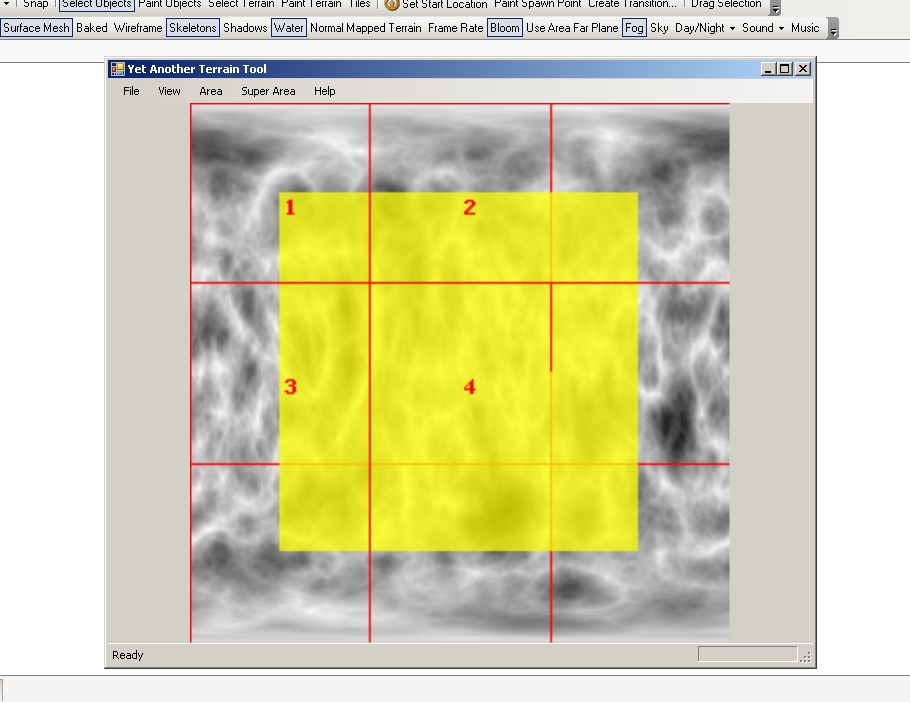
A heightmap with the super area grid displayed over it - when built, 4 areas will be built from the single image - with the walkable areas meeting at the edges. The yellow area denotes where the walkable portions of the imported area will be.
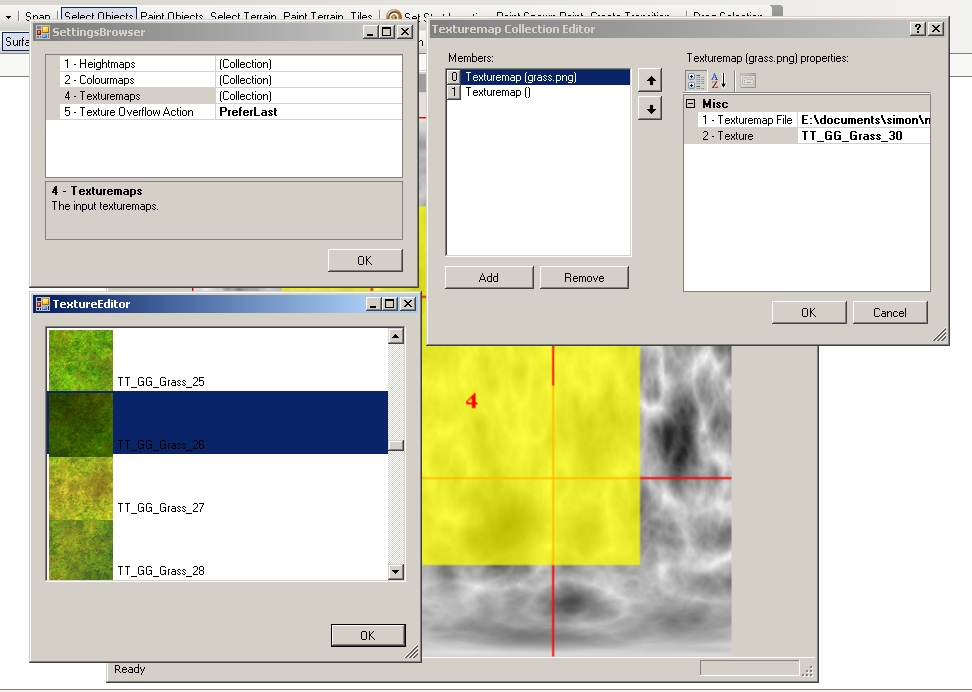
YATT allows multiple heightmaps, colourmaps and texturemaps to be defined as inputs for area or super area building.
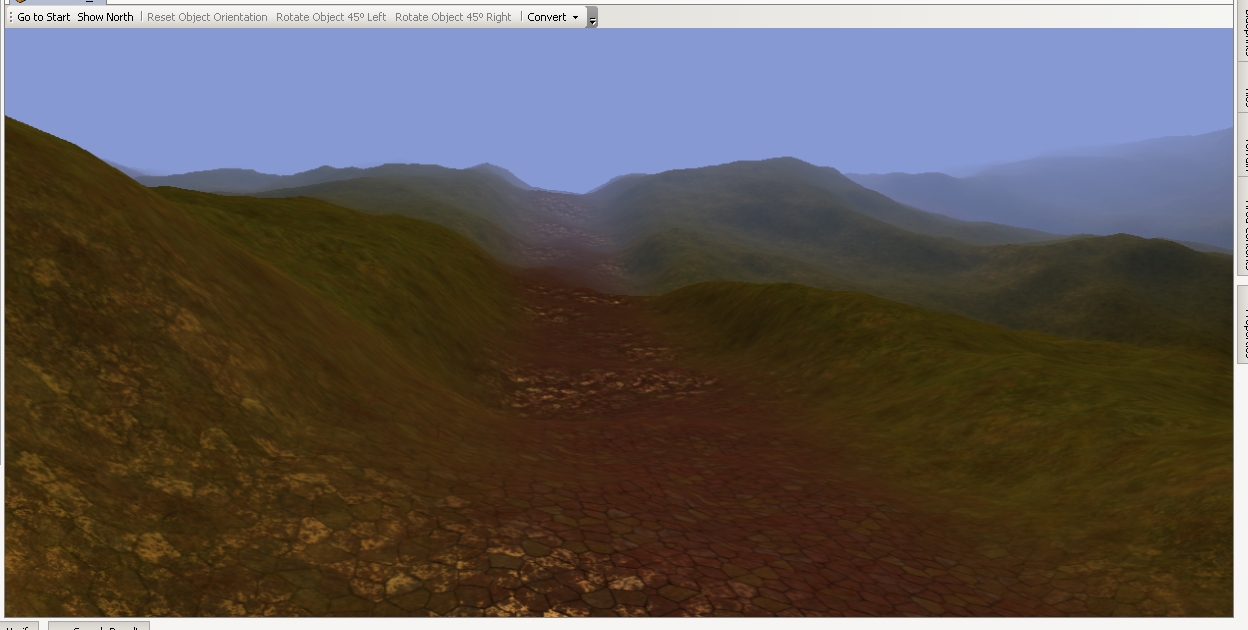
Sample output showing a heightmap with roads sunk into the terrain through an additional heigthmap and some basic texturing.
Posted by TD_M�phisto at 2010-09-04 08:53:11 Voted 10.00 on 01/20/09
I have a problem with colourmaps. Whenever I click "Add" in the "Colourmap Collection Editor" dialog, a message box with the text: "Exception has been thrown by the target of an invocation".
Other collection editors are working just fine.
Posted by erikbreau at 2010-06-24 20:38:44 Voted 9.75 on 06/24/10
I think this certainly is deserving of a high praise! Well done Simon! Excellent plugin. A user manual for noobs would be a great addition to this plugin.
Erik.
Posted by Qrizz at 2010-05-11 23:47:41 Voted 10.00 on 05/11/10
Must. _________________________ Qrizz
Middle Earth Arnor PW Link
Posted by lothyr at 2009-04-16 15:14:50 Voted 10.00 on 04/16/09
Great Plugin! Playing around with it right now!
Posted by TD_M�phisto at 2009-01-20 18:35:47 Voted 10.00 on 01/20/09
I have a problem with colourmaps. Whenever I click "Add" in the "Colourmap Collection Editor" dialog, a message box with the text: "Exception has been thrown by the target of an invocation".
I keep getting this error since january:
Out of memory.
at System.Drawing.Bitmap.Clone(Rectangle rect, PixelFormat format)
at SFX.YATT.LGC.Maps.HeightmapList.ApplyToTRN(TRN trn, Boolean scaleMaxBrightness, IProgressDisplayer progressDisplayer)
at SFX.YATT.LGC.Engine.AreaBuilder.Apply(NWN2GameArea area, Inputs inputs)
at SFX.YATT.LGC.Engine.AreaBuilder.Build(Inputs inputs)
at SFX.YATT.UI.MainForm.buildAreaToolStripMenuItem_Click(Object sender, EventArgs e)
It happens with 32x32 and with super areas. I have no areas open. I read the tutorial. My HF is 289 pixels square and my TX maps are 1536 pixels square for a 32x32 area. I could send the files to whoever would like them. _________________________ NTB's Hills and Valleys Vol. 00
Posted by Qrizz at 2008-08-18 12:31:39 Voted 10.00 on 05/11/10
whoa.. i've been waiting this one, my favorite tool _________________________ Qrizz
Middle Earth Arnor PW Link
*cough* Ehem... er... no. Feeling rather stupid. I didn't get the memo about the hotfix. I was thrown off by the fact my other plugins were working, but that's just b/c they were pre-hotfix versions. That took care of it, thanks for helping me out & sorry for the time wasting.
I have tried DL'ing the new version from SourceForge twice (version 0.9.10 modified on 8/13/08), overwriting the old version in the plugins folder, and my toolset still gives me an error and doesn't load it =(. Am I missing something?
Posted by Thangorn at 2008-08-17 06:41:23 Voted 10.00
nice one sothis.. I was just about to have a crack at this myself..
sidefx has added me to the project on Sourceforge, so I can build releases when a new NWN2 patch is released. You can now download a version of YATT for NWN2 1.13.1409.
I'm getting system errors, too. I've re-downloaded and re-installed. I double-checked to make sure the plug-in was in the correct folder. Any suggestions?
But I have to have an image to use the "INPUT" function. So I made a simple 289x289 all gray image and with the "0.5" setting, it makes it gray. Of note is the fact that I can make my image any color and it will ignore the actual color. But the "INPUT" function does lighten the black to a gray.
Now I am playing with the export function. I don't think it works. I select the area and click on "export ...". If it is a colormap, it is all white, if it is a heightmap it is all gray. But I can see a real colormap/heightmap in the "View" section so I know it exists.
What I would like to do is create an area with a heightmap, edit the area in the toolset to smooth out the wrinkles and then create a colormap based on this smoother area. then apply it. I assume that the Export Heightmap" function must export an updated heightmap and not the original one. Otherwise, you are just importing/exporting the same heightmap (if it is not changed in any way via YATT or the toolset.
Any help?
Posted by aadatepe at 2008-04-11 16:10:44 Voted 10.00
HeHe I'm trying to figure out how to use slope rules and what it actually does. A good manual on all the rule sets available along with formulas for particular terrains that explain what the rule sets do would be much appreciated so like a rule set that varied grass at higher elavation so you got more rock with different rock texture intensity but then as you go down in elavation you got more grass texture and less rock with varying intensity. Hm... Yatt rule set for dummies.
Q: I wonder if the rule set can contain a percentage function for texture application, so for each rule set that pertains to a certain texture that gets applied at certain slope, you can set the percentage of that texture that gets applied at a particular slope.
Q: Can yatt be made to extrapulate say a base slope rule from height maps based on certain terrain colors like in world map which is lot simpler to use then L3DT. So I guess what I'm trying to say is for noobs like me would it be possible for yatt to contain a predefined color selection for terrain like in world machine, a drop down box that would contain different terrain colors like emerald island, artic blast,...etc Then next extrapulate a base rule set from the heightmap you input , then next step noob like me just types in which dds textures that get applied to rule set along with percentages of texture. P.S I would pay for this function in yatt.
By using (0.7 - SLOPE) I can get YATT to darken any slope steeper than 0.7. But I would like to control the strength of the darkness. It is too black at 100% pressure and I would prefer something at about 20% pressure.
This is for four areas comprising a super area.
As a related request, the texture map is very simple to use simply because you choose the factor (height, slope etc.) and the actual texture. It would be great if you could do the same for colors (choose the color and the intensity).
Posted by StoneMonkey at 2008-04-07 18:44:00 Voted 10.00 on 04/02/08
Thanks aadatepe. I understand the whole "real life" thing so I can be patient. Just wanted to make sure it wasn't a problem on my end somehow.
Posted by aadatepe at 2008-04-04 06:38:49 Voted 10.00
Hey StoneMonkey the plugin has not been compiled yet for 1.12, I did email sidefx about update and he did reply back promptly stating that he would recompile when he got some time. So he must be busy with life which is understandable. I'm sure it will get updated soon.
Posted by StoneMonkey at 2008-04-02 16:46:44 Voted 10.00 on 04/02/08
Indeed a fantastic tool. I am a little confused on whether it is updated for 1.12.1295. It doesn't work for me since 1.12.1295 but from the dates of postings below maybe it is working for some. Can someone confirm if they are able to get this to work with the current patch? Anyway once again thanks for a great plugin.
10 - A Masterpiece, Genuinely Groundbreaking 9 - Outstanding, a Must Have 8 - Excellent, Recommended to Anyone 7 - Very Good, Deserves a Look 6 - Good, Qualified Recommendation 5 - Fair, Solid yet Unremarkable 4 - Some Merit, Requires Improvements 3 - Poor Execution, Potential Unrealized 2 - Very Little Appeal 1 - Not Recommended to Anyone






 Site
Site









 at 2011-03-26 09:20:10
 at 2008-08-18 10:32:34


