PowerBar adds over 20 powerful tools to the NWN2 toolset.
Cutscenes
- Create a new static camera from the toolset camera (WYSIWYG)
- Preview static camera angles defined in an area
- Create a cutsene script from toolset camera angle
Browsers
- Browse item icons and update item blueprints
- Browse sounds
- Browse voice sets and update creature blueprints
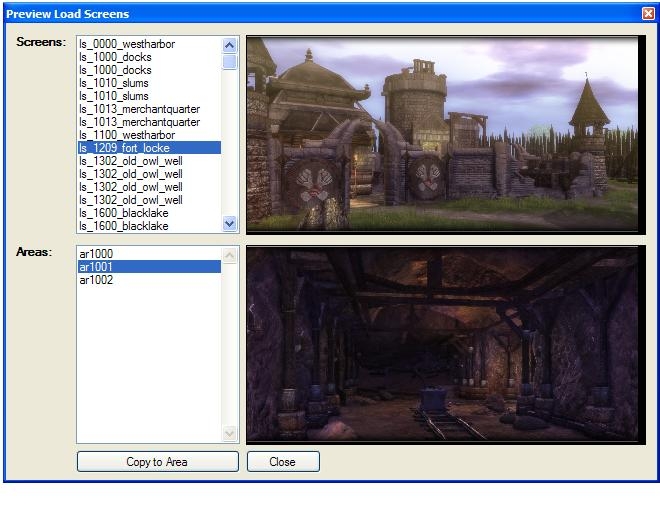
- Browse load screens and update areas
- Browse music and update areas
Objects
- Quickly tweak appearances: tint, scale, facing
- Easily add new variables to placed instances
- Display summary information about a placed instance
- Copy properties from one object to another (tint, variables, alignment)
- Play sounds attached to objects
- Cut the walkmesh around trees/placeables/environmentals
Blueprints
- Instantly create new blueprints from placed instances
- Edit NPC stats by package defaults
- Play sounds contained in blueprints
- Update all instances
Scripts
- Improved creation tools
- enter a name when a script is created
- create/delete campaign scripts
- customizable templates
- Improved search tools
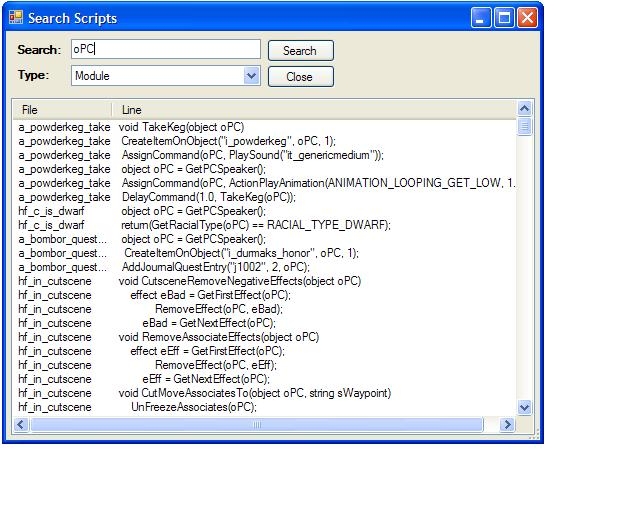
- summary of search results (like NWN1)
- search for scripts used in converstations
- search global scripts
- search campaign scripts
- Find include file dependencies and recompile
- compile all for campaign scripts
Script Editor Toolbar
- comment/uncomment blocks of code with a mouse click
- bookmarks for quick navigation in a file
- record and playback text macros
- open/new/save/delete buttons
Script Editor Properties
- hide line numbers
- show margin line
- mark modified lines on the fly
- fast autocomplete and API help
- double-click gets notes help
- syntax coloring in notes pane
Convos
- Improved creation tools
- enter a name when a convo is created
- Improved search tools
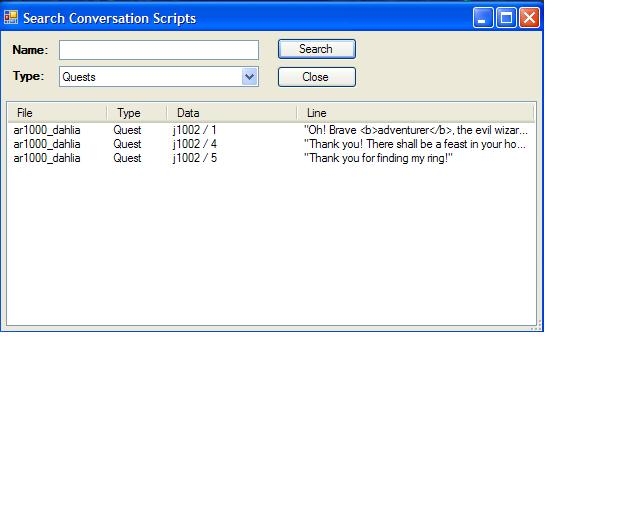
- search for quests in conversations
- Improved word count tools
- Voice Over query tools
- Refresh scripts automatically
Selection
- select all objects in an area by type or tag
- Select all objects in an area with inventory
- select all objects in an area marked plot
- select all objects in an area that are useable
Search
- search for instances by tag in the entire module
Verify
- verify your module or areas for common mistakes
Startup
- display list of recently opened files
Areas
- browse areas by name, tag, size
- adjust weather settings (rain)
- rotate interior areas 90 degrees
GUI
- quickly toggle between fullscreen and panel views
- hotkeys to open and create scripts
I have 1.23 of NWN2, and downloaded the appropriate version of the DLL here. Installed , but when I click on Plugins->PowerBar, I get a popup saying it's a codepoetz creation, but that's it. No new button bar anywhere. Help please?
Posted by shaughn at 2010-08-06 06:39:55 Voted 10.00 on 08/06/10
This is a great tool and a must for all builders. The features that it adds are essential. Thanks for putting this together!
Posted by Balron at 2010-05-20 21:24:54 Voted 1.00 on 05/20/10
Hate to be the bringer of bad news, but your Update Instances is still broken.. Example: I place a creature in "Area A" then decide to edit his blueprint. I use the 'Update Instances' option, click update annnndddd... well it says "Updated 0 instances in 'Area A'" I suppose it's not meant to update creature blueprints??? or well.. anything at all.
Posted by Qrizz at 2010-05-11 23:45:45 Voted 10.00 on 05/11/10
Must. _________________________ Qrizz
Middle Earth Arnor PW Link
Posted by batmanis64 at 2010-04-11 07:01:38 Voted 10.00 on 04/11/10
A great time-saver! Thanks!
Posted by batmanis64 at 2010-04-11 07:01:32 Voted 10.00 on 04/11/10
A great time-saver! Thanks!
Posted by Developer Silver at 2010-03-10 22:49:37 Voted 9.00 on 03/10/10
how can you change the directory for the browsing tab (sound, music, icons...)? Because i didn't install the game below "program files...", so it won't find the resources. I think it will be fixed if i just change searching directory of the plugin, but how to do it? I'm using notepad, but can't use it for dlls...
Still not working for me... seems it works for everyone else. Can't figure out why this is the one plugin compiled for the hotfix that doesn't work and just not for me! Weird.
Posted by Urlord at 2009-08-30 13:26:08 Voted 10.00 on 08/30/09
Excellent Plugin! I use it all the time. _________________________ Peace,
Not working with the 1.23 Hotfix for me. Have deleted it and downloaded it twice and it still errors on startup. I can get other plugins to work with the hotfix, just not Powerbar.
Posted by DancesWithShoggoths at 2009-08-28 06:01:26 Voted 10.00 on 08/12/09
Thank you! _________________________ "Out here on the perimeter, there are no stars..."
Jim Morrison
Posted by Saphhira at 2009-08-27 01:16:42 Voted 10.00
Hi ... I downloaded PowerBar.zip from the Vault just now and verified that PowerBar.zip contains the 1.23final version. So, if you're getting the wrong version, try downloading it again. Thanks!
Posted by _SkullCleaver_ at 2009-07-18 15:53:47 Voted 9.00 on 07/18/09
Loved it before I patched to 1.23 beta. Would still love it if I could still use it, I'm sure. ;)
Posted by Rythorn at 2009-07-17 18:26:24 Voted 10.00 on 07/17/09
10 - A Masterpiece, Genuinely Groundbreaking 9 - Outstanding, a Must Have 8 - Excellent, Recommended to Anyone 7 - Very Good, Deserves a Look 6 - Good, Qualified Recommendation 5 - Fair, Solid yet Unremarkable 4 - Some Merit, Requires Improvements 3 - Poor Execution, Potential Unrealized 2 - Very Little Appeal 1 - Not Recommended to Anyone






 Site
Site









 at 2011-06-18 12:34:12
 at 2009-08-25 13:55:50


