Well, it was fun but I no longer am able to keep this Plugin up. The source code is available for download. Enjoy!
-- UPDATED 3/16/2007 VERSION 3.34
Version 3.34
-- Updated for compatibility with NWN2 105 BETA Patch.
Version 3.33
-- Fixed exception on Item Properties screen when not using RDR Item Level Restrictions (For real this time)
Version 3.31
-- Fixed exception on Item Properties screen
Version 3.30
-- Compatible with NWN2 1.04 FULL patch with hotfix
-- Inlcudes BETA version of new RDR Store Editor. This editor will allow you to edit store instances (not blueprints yet). Just drag a store instance onto your map, select it, then launch the RDR Item Creation Wizard.
RDR Store Editor BETA
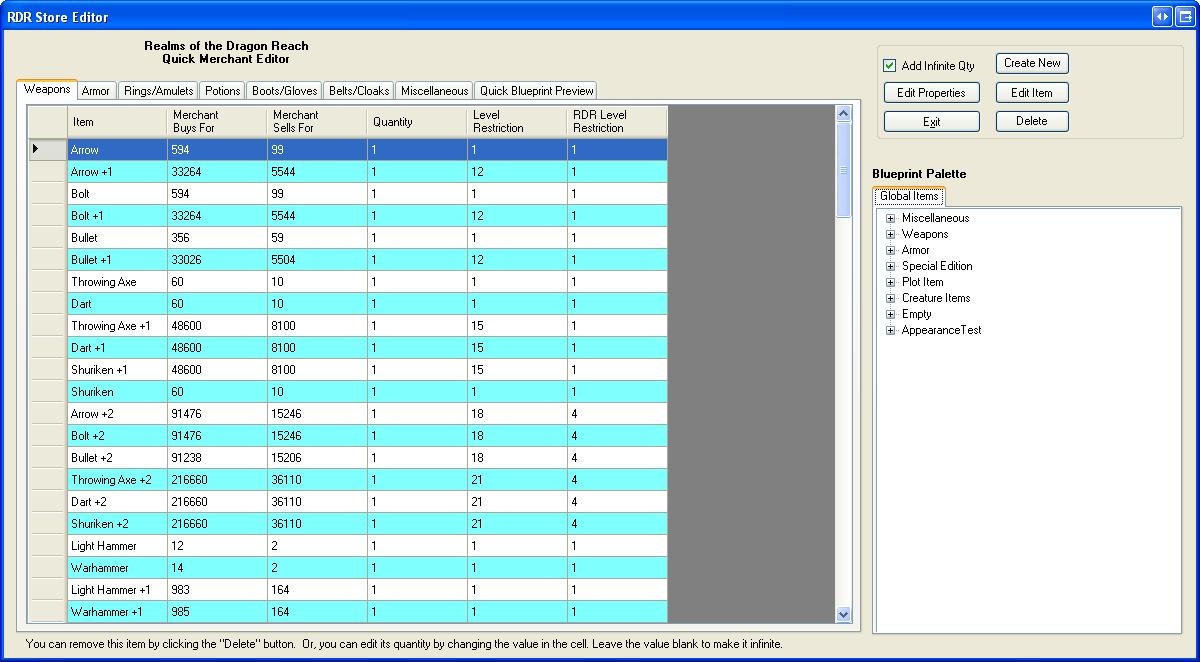
-- I'm still working on this, but it's solid enough to use. This is a quick store editor interface I had whipped up before some of the other more fleshed out inventory management plugins came out. This store interface is nice because it is fast and is easy to add and subtract items to. I modeled it after the NWN1 store editor interface.
With this editor, you can see the following data about your store items:
-- Item name
-- Buy and sell prices at this merchant
-- Level restrictions (RDR and default)
-- Quantity in the store (infinite or a limited number)
Also, this screen is integrated with the RDR Item Creation Wizard, allowing you to easily edit existing blueprints or create new items using my RDR Item Creation Wizard right from the store blueprint palette.
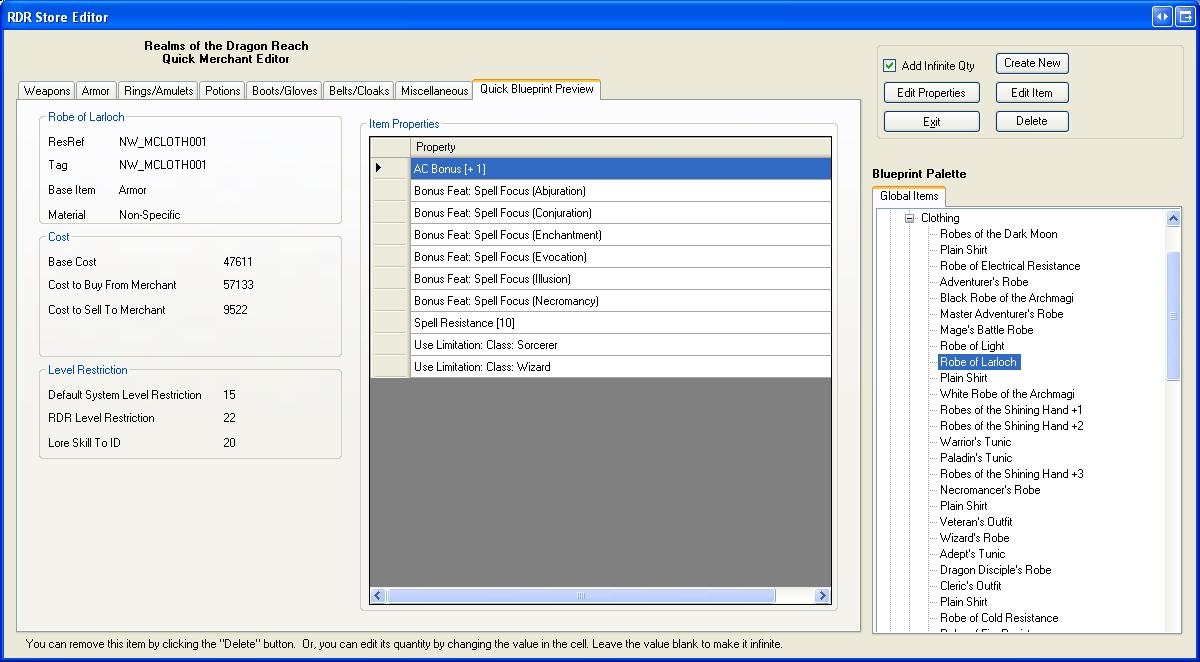
-- There is also a quick preview tab you can use to get a fast glimpse of an items properties and stats as you peruse the blueprints in the palette.
-- You can also launch the default toolset properties window for an item so you can edit any property on the fly.
All of these features lend to a fast store building experience and allow you to more easily balance the inventories of your store if you are buliding for a Persistent World.
This is a BETA versio in that I'm only about 90% done with it, and have a few more details to add.
Version 3.20
-- Compatible with NWN2 1.04 FULL patch
-- Fixed automatic filling in of ResRef and Tag when typing item name. Spaces and quote marks are omitted.
-- Fixed exception when a non-item blueprint was selected then the plugin was launched.
This latest version IS compatible with the 1.04 BETA patch.
Version 3.1
-- Plugin can now edit existing items. Simply select an item in the blueprint palette and launch the plugin. You cannot edit blueprints that come built-in with this plugin. Make a copy of it first then edit the copy instead.
-- Armor editor now uses models put in your override directory. Tested with Aleanne's female clothing packs.
-- Icon Selector greatly improved. Loads icons much faster and the interface is responsive as it loads icons. Displays more on the screen at a time now.
-- You can now edit the appearance of items like clubs that didn't have editable appearances before.
-- Some tweaks made to the RDR Item level restriction system were made.
-- Numerous small bug fixes.
Version 3.0
-- Item Properties Screen:
-- Armor Type (for game rules) can now be chosen on this screen.
-- Material type is now chosen from this interface.
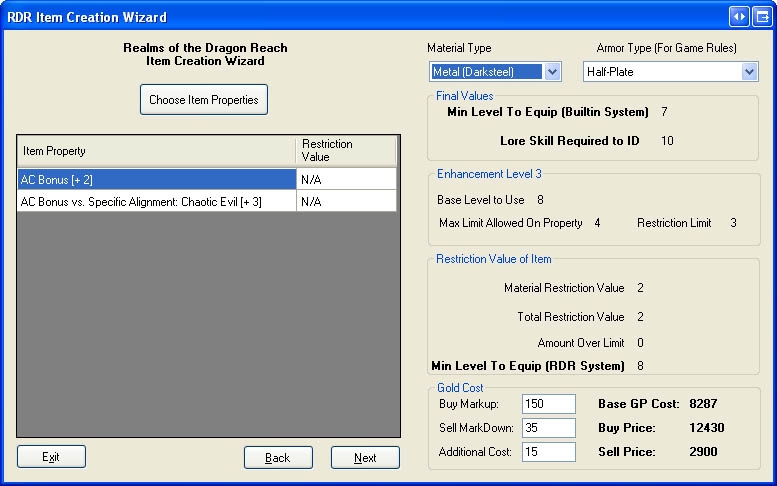
-- Gold cost is now displayed on this screen. All material and item properties are factored in.
-- You can now adjust the Base Cost of an item by adding to the Additional Cost field.
-- You can now see what the item will sell and buy for in stores with any buy/sell value you want.
-- The level restriction for the built-in system is now displayed.
-- The number of skill ranks required to ID the item is now displayed.
-- Armor Appearance updated!
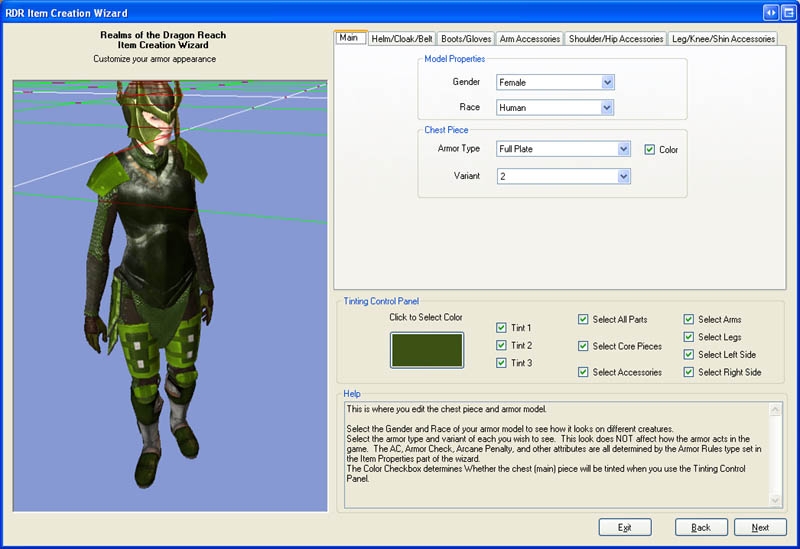
-- The armor appearance editor has been COMPLETELY replaced and is much faster, efficient, and easy to use.
-- Bugs fixed in the Item Export to Text feature.
-- Localized string settings now use the same language the toolset is using.
-- Condensed the DLL Files down. There are now only 2 DLL files you need.
This plugin allows for fast and easy creation of items. It functions very much like the NWN1 Item Creation wizard. It features a lot of item data being displayed during the creation process, the ability to export your item stats to a text file, a vastly-improved armor appearance editor, and an icon selector.
Installation
To install, extract the contents of this plugin to a directory. Copy the following files to the appropriate locations:
Full documentation on both the plugin and the RDR Item Level Restriction system are included in the Documentation folder.
NOTE ON LEVEL RESTRICTIONS:
This tool does NOT level restrict items. It only tells you at what level they will be restricted. The RDR System is still under development, but when finished will restrict items at the level the plugin reports. This system gives you MUCH more control over how items are restricted and is easily configurable via 2da files.
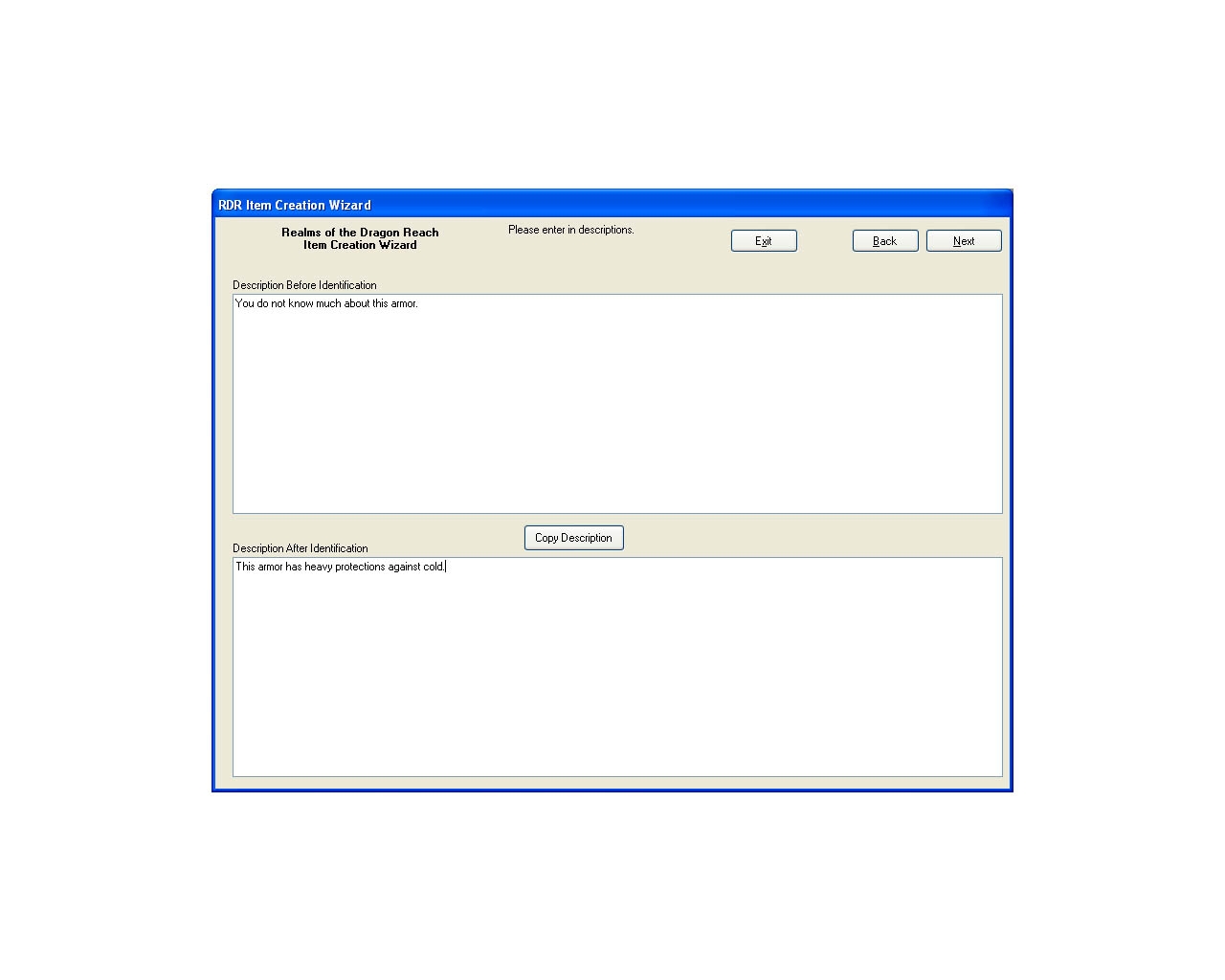
Enter your item's description here. Use the COPY button to copy the Before ID Description to the After ID Description for easy editing.
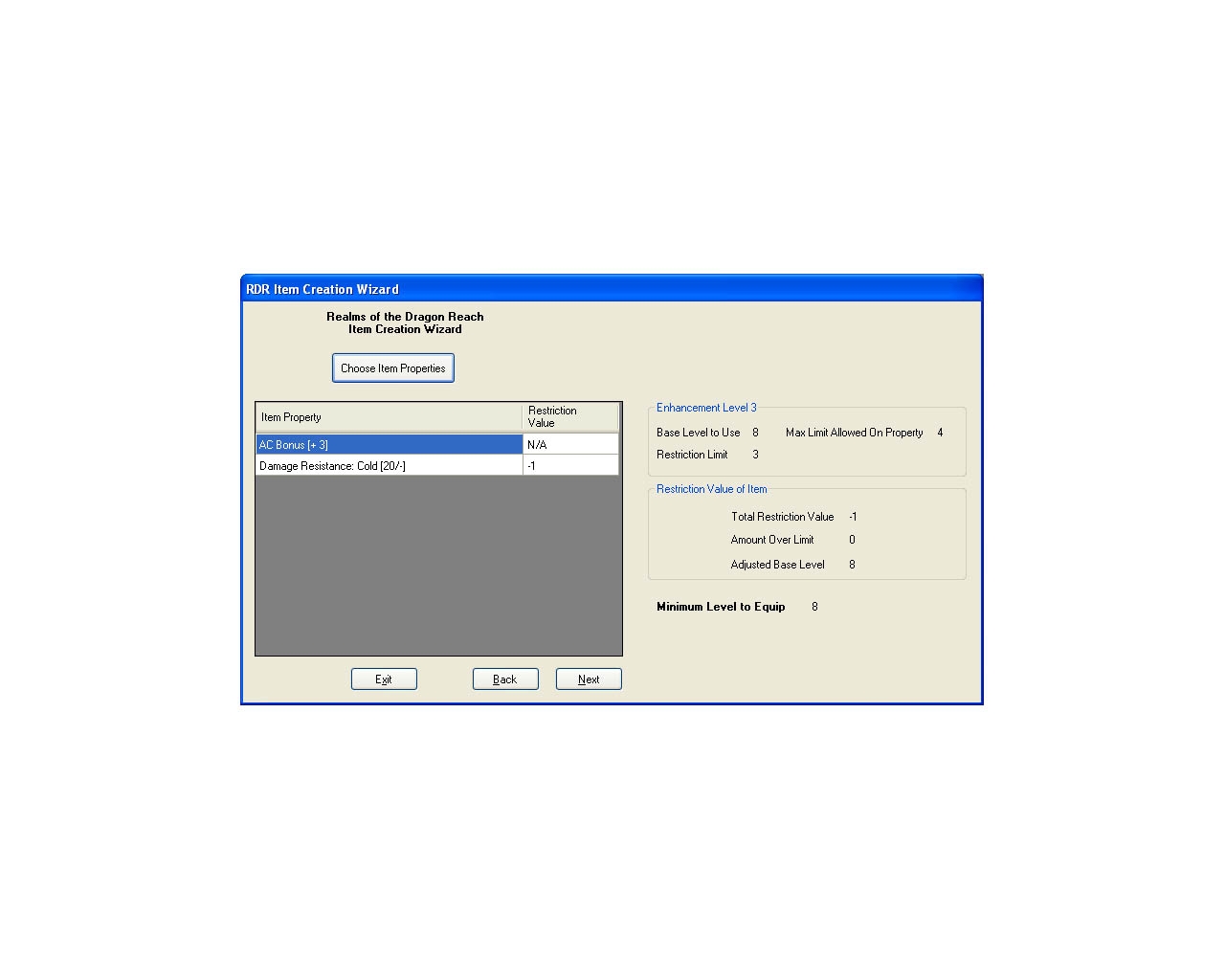
Set your item's properties here. You can see how it will be level restricted in the Optional RDR Item Level Restriction System.
You can now see a lot more item data in the Item Properties screen. This includes the Gold Cost, Builting Level restriction, Item material, and buy and sell prices.
Improved armor editor!! I think you will like this a lot better than the built-in one. It's faster, easier-to-use, and has improved tinting controls.
The BETA Store Editor is a fast and easy interface to use for editing store instances. At a glance, you can see the buy and sell costs of all your items, and the level restrictions they have.
You can get a quick preview of the blueprints in your module, including cost data, level restrictions and a list of what properties the item has. This will help you keep your stores properly balanced for player levels.
After I create an item, how can I get it into the game for my character to use? Also, I'm not very good at any of this really. What is a "TAG" and how do you make the "pipes"? I am wanting to make a bastard sword and studded leather armour. how should i label each part? resref, tag and resource so i can use the item in my current game. step by step for making and then bringing made item into the actual game would be most helpful.
Posted by aegnor81 at 2007-04-22 13:11:12 Voted 10.00 on 04/22/07
Freya - I'm very sorry to hear you wont keep the plugin going, it was one of the best things that ever came out of the custom community for NWN2, despite a few bugs.
So with this fairwell to the plugin I also submit my vote
10 - A Madterpiece, Genuinely Groundbreaking
I hope you'll be doing more stuff in the future. I'll be keeping an eye out for it!
CornbreadX, Analaya is right. I never got the chance to update to 1.05 full.
Thanks everyone for the support and I'm glad the plugin was useful to you.
THe source is available for download if you wish to still use the plugin.
Posted by lerathel at 2007-04-22 01:34:22 Voted 10.00 on 04/22/07
HI, im using your tool since start its exelent. is im not mistaken your item level restriction is not active so do you know a way for me to raise the global level restrict by 2 level ? with the default systeme, is it possible ? I just want the all the restriction to be 2 level higher. so a lvl 6 item would be lvl 8. thank you.
Yes, it should show up under the Plugins dropdown. I'd keep an eye out for errors as the toolset loads.
Just to let everyone know, I am going to be unable to keep maintaining this plugin. Other things have come up for me, and I am no longer playing NWN2.
However, I think it's pretty crappy to just drop the ball on a tool so many of you use, so within the next day or two I will be uploading a rar file with all of my source code. At that point, anyone may maintain it or edit it for their use as they please. My source code is written in VB.NET and is fairly neat and easy to follow, so for those of you who are not programming hacks like me and actually know what you are doing it should be a breeze. I only ask that you leave a credit to me in the plugin and do not rebrand the plugin as solely your own.
This has been fun but I have to move on. I'm glad so many of you enjoyed it!
Ok. I extracted all of the files to the correct locations and the plugin doesn't seem to work. The plugin should appear under the "Plugin" drop-down menu at the top of the toolset, right?
Posted by Ekcentric at 2007-03-19 21:10:56 Voted 9.50 on 03/19/07
Everything worked for me exactly as expected. Clear, easy to follow system. The documentation seemed a little bit sparse, but should be sufficient for the average toolset user -- and I admit to not reading it thoroughly, so it may be better than it seemed in a quick glance :).
If you don't see anything on the screen about "RDR ITem level Restriction" then you are looking at the right value. Can you give me an example of an item, what my plugin says it is, and what the game says it should be? This will help me track down the issue.
Posted by DM Entropy at 2007-03-17 01:10:13 Voted 10.00 on 03/16/07
Sorry Freya - I'm not exactly sure where to find the default item level restriction unless you are referring to the "min level to equip" in "final values. I have not seen a field in the item properties native to the toolset that has the item level. If there is something like that, I've made a huge oversight and would love to be pointed in the right direction.
Again thanks for the female model view....and thank you so much for your quick response.
Can you verify you are looking at the "Default" item level restriction numbers and NOT the RDR LEvel restriction figures? They will be completely different numbers and may easily be confused.
If you are confident this is not the case, can you post me a few examples of descrepancies so I can test for myself? There may still be an issue, as I'm following an old Bioware formula for determining Level restriction in the default system. I'm pretty sure it's right, but I'm not 100% positive.
Posted by DS Divine at 2007-03-16 15:35:34 Voted 10.00 on 03/16/07
This is superb!
I love to work with this.
Thank You.
Posted by DM Entropy at 2007-03-16 15:23:47 Voted 10.00 on 03/16/07
This deserves a 10 just for the fact that it includes female models. Though I am still having an issue with item levels with the most recent version installed. I look at the nwn1 toolset and items of the same properties as in the plug in are vastly different levels. Is there something still bugged here or are the calculations supposed to be very different from NWN1 to NWN2? _________________________ LotR: Heroes of the Third Age
Posted by Hohiro Kurita at 2007-03-01 14:26:39 Voted 9.50 on 03/01/07
Updated to the 1.33 version today to fix the item properties issues and had another issue pop up. Every time I opened the icon selector I got a fatal exception that ultimately required me to restart the toolset before I could do anything again (one of those annoying, ever-repeating ones that come back as soon as you hit 'Continue' until you use 'Quit' instead). Multiple restarts and always the same results.
As I read through the comments here, I checked my plugins folder and removed a shop wizard I had and started up the toolset again and the problem was gone. I believe it was Vordan's plugin.
Kudos on an excellent plugin though, use this one a ton in my building. Cuts down creation time immensely. _________________________ |<><><>The Tears of Ilmarid Campaign<><><>|
|<> Chapter 1 - Blood of the Fallen
|<> Chapter 2 - The Blood War
|<> Chapter 3 - Shadow And Light - Draft Revision 2
Go to view -> Options and somewhere in the Graphics options is the ability to turn shadows on or off. Turn them off and this should work.
Posted by cro0ked at 2007-02-18 19:34:12 Voted 10.00 on 02/18/07
I'm new to nwn2 toolset. Can anyone tell me why my items preview is not working? Really cool work this is, but it's abit useless if i can't see what im creating. The item is just plain black. :(
Posted by cro0ked at 2007-02-18 19:33:12 Voted 10.00 on 02/18/07
I'm new to nwn2 toolset. Can anyone tell me why my items preview is not working? Really cool work this is, but it's abit useless if i can't see what im creating. The item is just plain black. :(
Posted by puket at 2007-02-18 18:17:30 Voted 9.75 on 02/18/07
Heya Freya.....thanks a lot!
A plug-in from Freya every day, keeps the...........!
Posted by Lanessar at 2007-02-17 06:26:36 Voted 10.00 on 02/17/07
Superb work. This is genuinely groudbreaking compared with the base methods to set up a new item in a module for NWN2. _________________________ Lan's Placeable Groups v1.5
Posted by Jimbobslimbob at 2007-02-16 02:07:51 Voted 9.50
You are a legend Freya! Works great now! Thankyou.
I really dont' think the other plugins would have this effect. My code does not reference any of the other plugins' code at all.
Can one of you having the issue please email me the exact steps you are taking so I can reproduce the issue? I'm sure it's something that only comes up under some specific condition that I'm not seeing.
My email address is attached to my profile (click my name in any of these posts).
Once I can reproduce this, I'll squash the bug and republish for you. Sorry for the inconvenience!
Posted by Jimbobslimbob at 2007-02-13 05:38:13 Voted 9.50
I removed the only other plugin I had installed (the SIN item creation plugin) and still no luck. Same error. I'm stumped.
10 - A Masterpiece, Genuinely Groundbreaking 9 - Outstanding, a Must Have 8 - Excellent, Recommended to Anyone 7 - Very Good, Deserves a Look 6 - Good, Qualified Recommendation 5 - Fair, Solid yet Unremarkable 4 - Some Merit, Requires Improvements 3 - Poor Execution, Potential Unrealized 2 - Very Little Appeal 1 - Not Recommended to Anyone






 Site
Site










 at 2007-07-03 06:42:19
 at 2007-02-17 06:26:36


