Well, it was fun but I no longer am able to keep this Plugin up. The source code is available for download. Enjoy!
-- UPDATED 3/16/2007 VERSION 3.34
Version 3.34
-- Updated for compatibility with NWN2 105 BETA Patch.
Version 3.33
-- Fixed exception on Item Properties screen when not using RDR Item Level Restrictions (For real this time)
Version 3.31
-- Fixed exception on Item Properties screen
Version 3.30
-- Compatible with NWN2 1.04 FULL patch with hotfix
-- Inlcudes BETA version of new RDR Store Editor. This editor will allow you to edit store instances (not blueprints yet). Just drag a store instance onto your map, select it, then launch the RDR Item Creation Wizard.
RDR Store Editor BETA
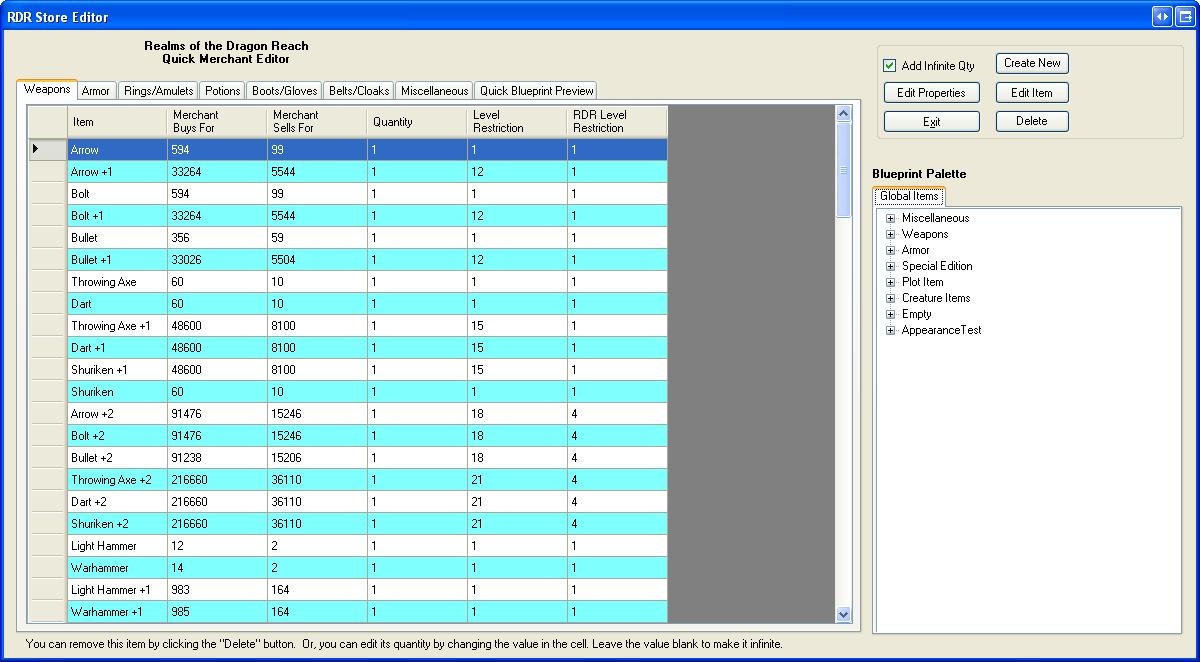
-- I'm still working on this, but it's solid enough to use. This is a quick store editor interface I had whipped up before some of the other more fleshed out inventory management plugins came out. This store interface is nice because it is fast and is easy to add and subtract items to. I modeled it after the NWN1 store editor interface.
With this editor, you can see the following data about your store items:
-- Item name
-- Buy and sell prices at this merchant
-- Level restrictions (RDR and default)
-- Quantity in the store (infinite or a limited number)
Also, this screen is integrated with the RDR Item Creation Wizard, allowing you to easily edit existing blueprints or create new items using my RDR Item Creation Wizard right from the store blueprint palette.
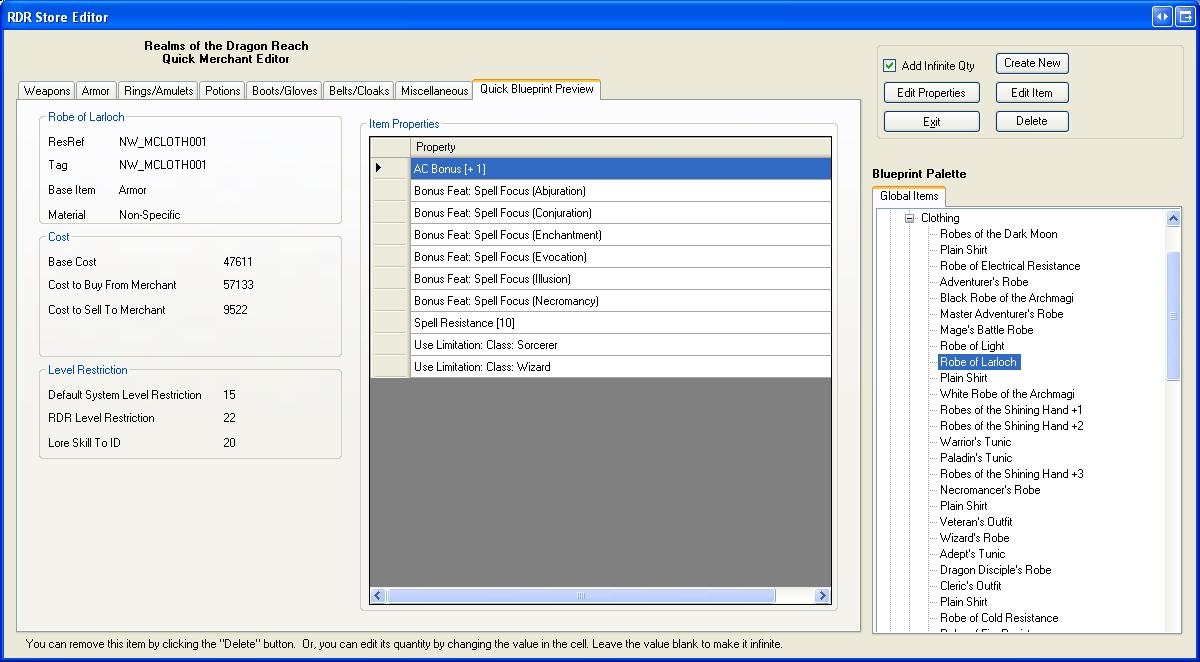
-- There is also a quick preview tab you can use to get a fast glimpse of an items properties and stats as you peruse the blueprints in the palette.
-- You can also launch the default toolset properties window for an item so you can edit any property on the fly.
All of these features lend to a fast store building experience and allow you to more easily balance the inventories of your store if you are buliding for a Persistent World.
This is a BETA versio in that I'm only about 90% done with it, and have a few more details to add.
Version 3.20
-- Compatible with NWN2 1.04 FULL patch
-- Fixed automatic filling in of ResRef and Tag when typing item name. Spaces and quote marks are omitted.
-- Fixed exception when a non-item blueprint was selected then the plugin was launched.
This latest version IS compatible with the 1.04 BETA patch.
Version 3.1
-- Plugin can now edit existing items. Simply select an item in the blueprint palette and launch the plugin. You cannot edit blueprints that come built-in with this plugin. Make a copy of it first then edit the copy instead.
-- Armor editor now uses models put in your override directory. Tested with Aleanne's female clothing packs.
-- Icon Selector greatly improved. Loads icons much faster and the interface is responsive as it loads icons. Displays more on the screen at a time now.
-- You can now edit the appearance of items like clubs that didn't have editable appearances before.
-- Some tweaks made to the RDR Item level restriction system were made.
-- Numerous small bug fixes.
Version 3.0
-- Item Properties Screen:
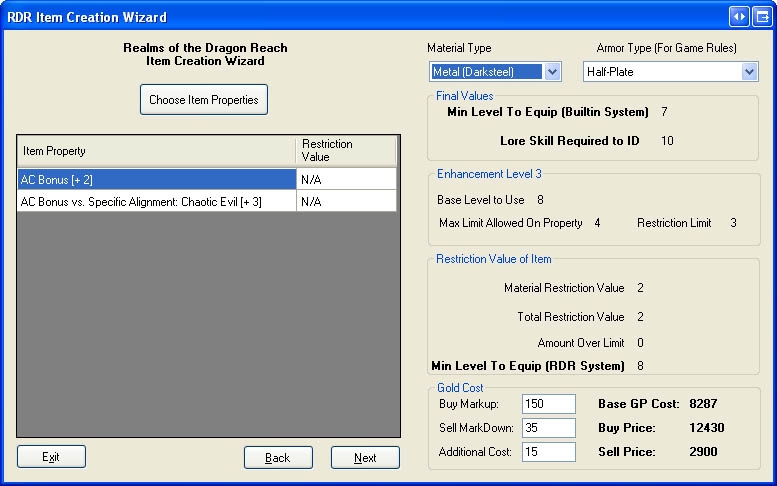
-- Armor Type (for game rules) can now be chosen on this screen.
-- Material type is now chosen from this interface.
-- Gold cost is now displayed on this screen. All material and item properties are factored in.
-- You can now adjust the Base Cost of an item by adding to the Additional Cost field.
-- You can now see what the item will sell and buy for in stores with any buy/sell value you want.
-- The level restriction for the built-in system is now displayed.
-- The number of skill ranks required to ID the item is now displayed.
-- Armor Appearance updated!
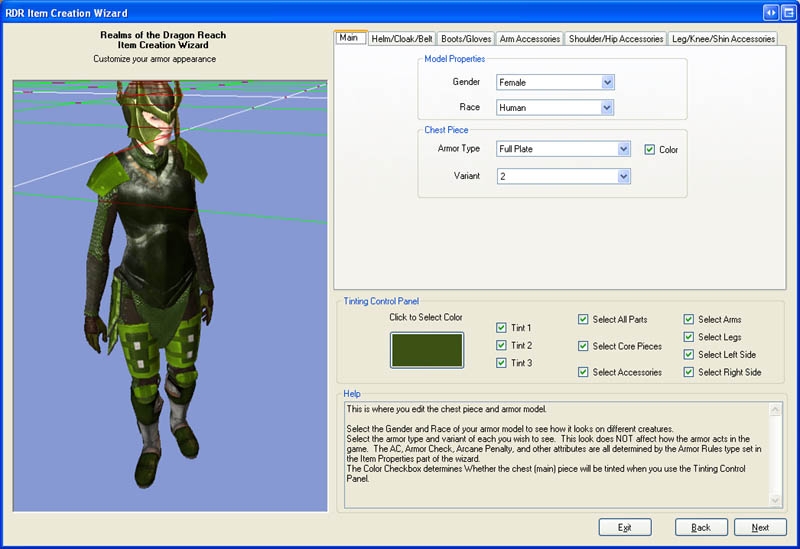
-- The armor appearance editor has been COMPLETELY replaced and is much faster, efficient, and easy to use.
-- Bugs fixed in the Item Export to Text feature.
-- Localized string settings now use the same language the toolset is using.
-- Condensed the DLL Files down. There are now only 2 DLL files you need.
This plugin allows for fast and easy creation of items. It functions very much like the NWN1 Item Creation wizard. It features a lot of item data being displayed during the creation process, the ability to export your item stats to a text file, a vastly-improved armor appearance editor, and an icon selector.
Installation
To install, extract the contents of this plugin to a directory. Copy the following files to the appropriate locations:
Full documentation on both the plugin and the RDR Item Level Restriction system are included in the Documentation folder.
NOTE ON LEVEL RESTRICTIONS:
This tool does NOT level restrict items. It only tells you at what level they will be restricted. The RDR System is still under development, but when finished will restrict items at the level the plugin reports. This system gives you MUCH more control over how items are restricted and is easily configurable via 2da files.
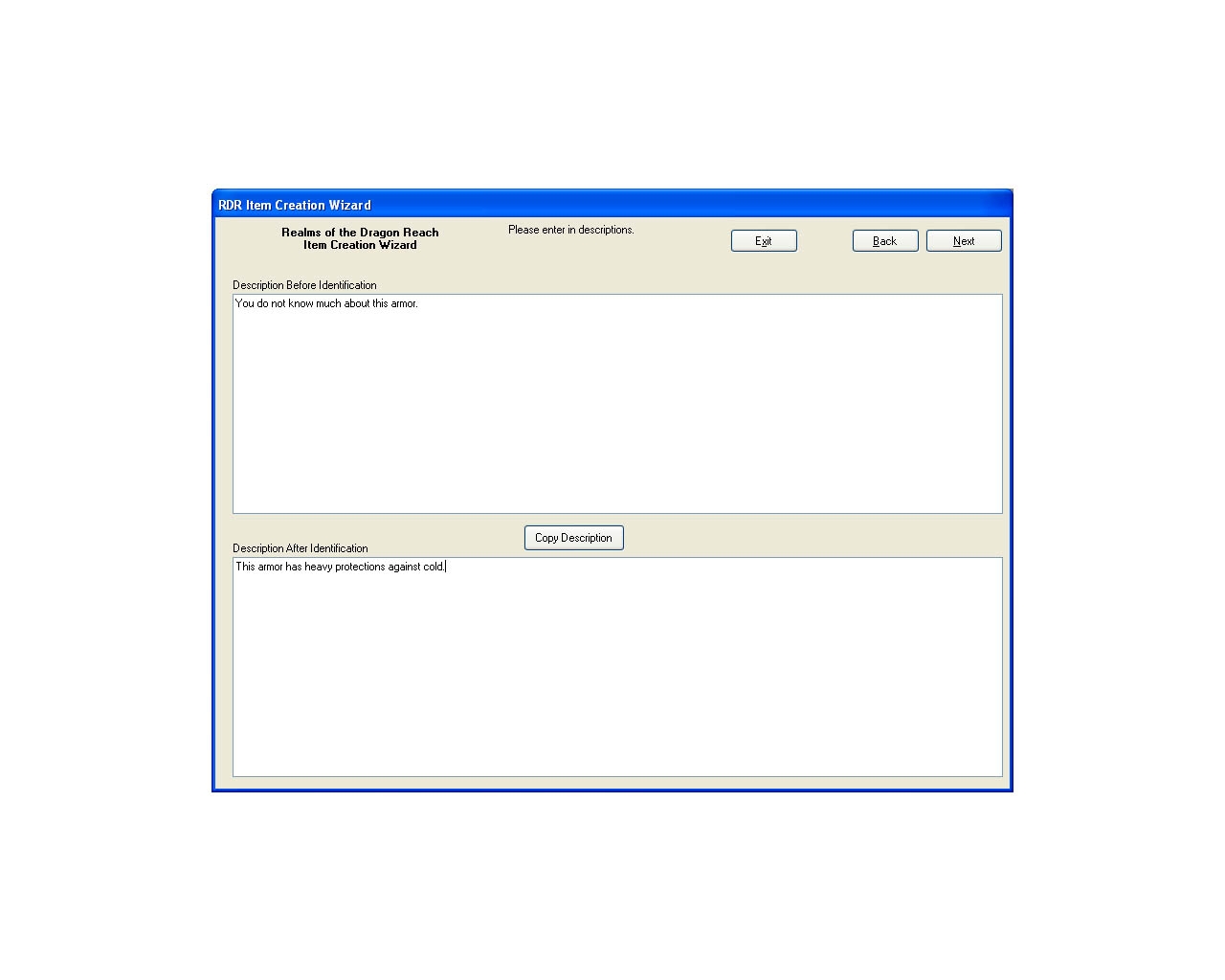
Enter your item's description here. Use the COPY button to copy the Before ID Description to the After ID Description for easy editing.
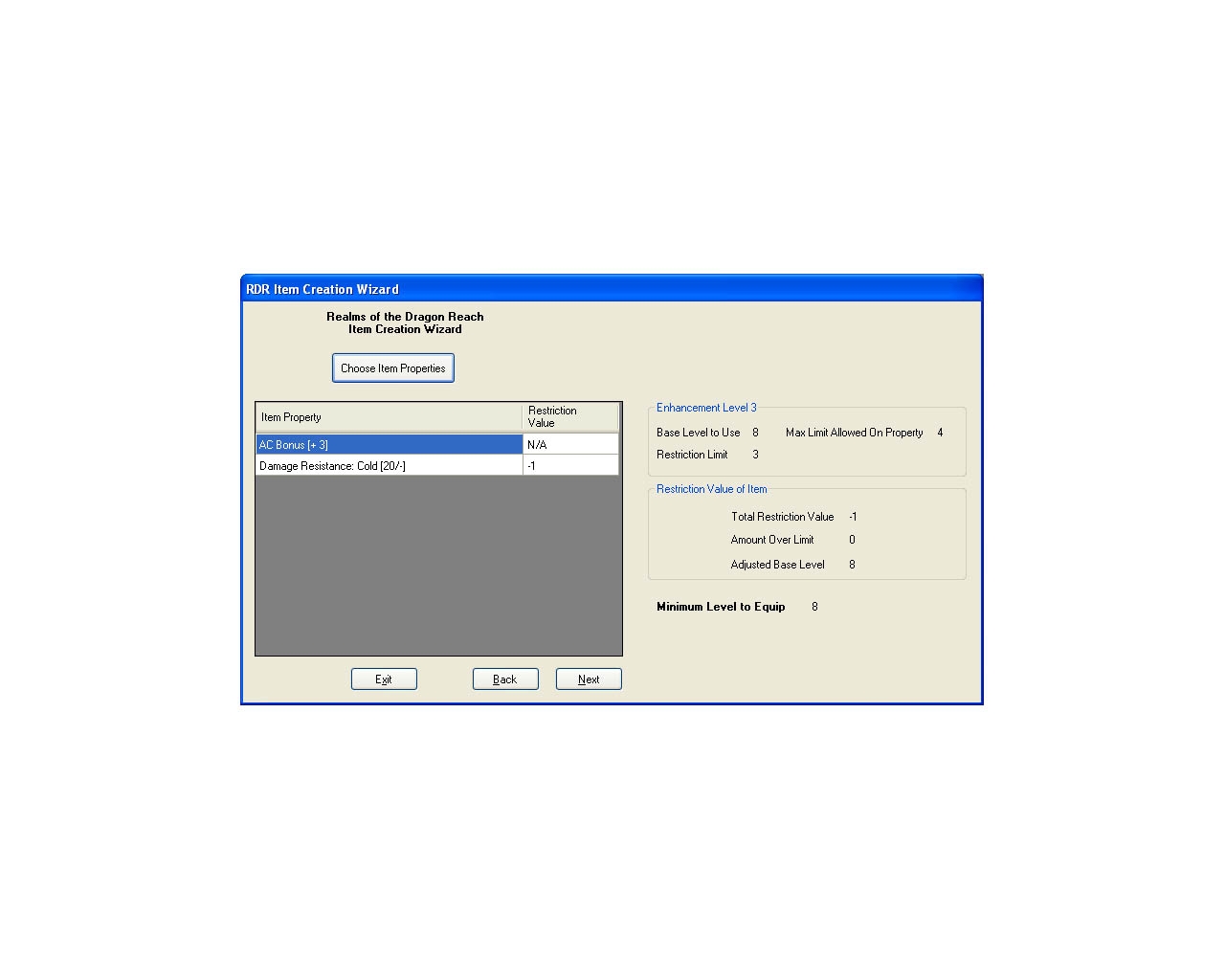
Set your item's properties here. You can see how it will be level restricted in the Optional RDR Item Level Restriction System.
You can now see a lot more item data in the Item Properties screen. This includes the Gold Cost, Builting Level restriction, Item material, and buy and sell prices.
Improved armor editor!! I think you will like this a lot better than the built-in one. It's faster, easier-to-use, and has improved tinting controls.
The BETA Store Editor is a fast and easy interface to use for editing store instances. At a glance, you can see the buy and sell costs of all your items, and the level restrictions they have.
You can get a quick preview of the blueprints in your module, including cost data, level restrictions and a list of what properties the item has. This will help you keep your stores properly balanced for player levels.
10 - A Masterpiece, Genuinely Groundbreaking 9 - Outstanding, a Must Have 8 - Excellent, Recommended to Anyone 7 - Very Good, Deserves a Look 6 - Good, Qualified Recommendation 5 - Fair, Solid yet Unremarkable 4 - Some Merit, Requires Improvements 3 - Poor Execution, Potential Unrealized 2 - Very Little Appeal 1 - Not Recommended to Anyone






 Site
Site