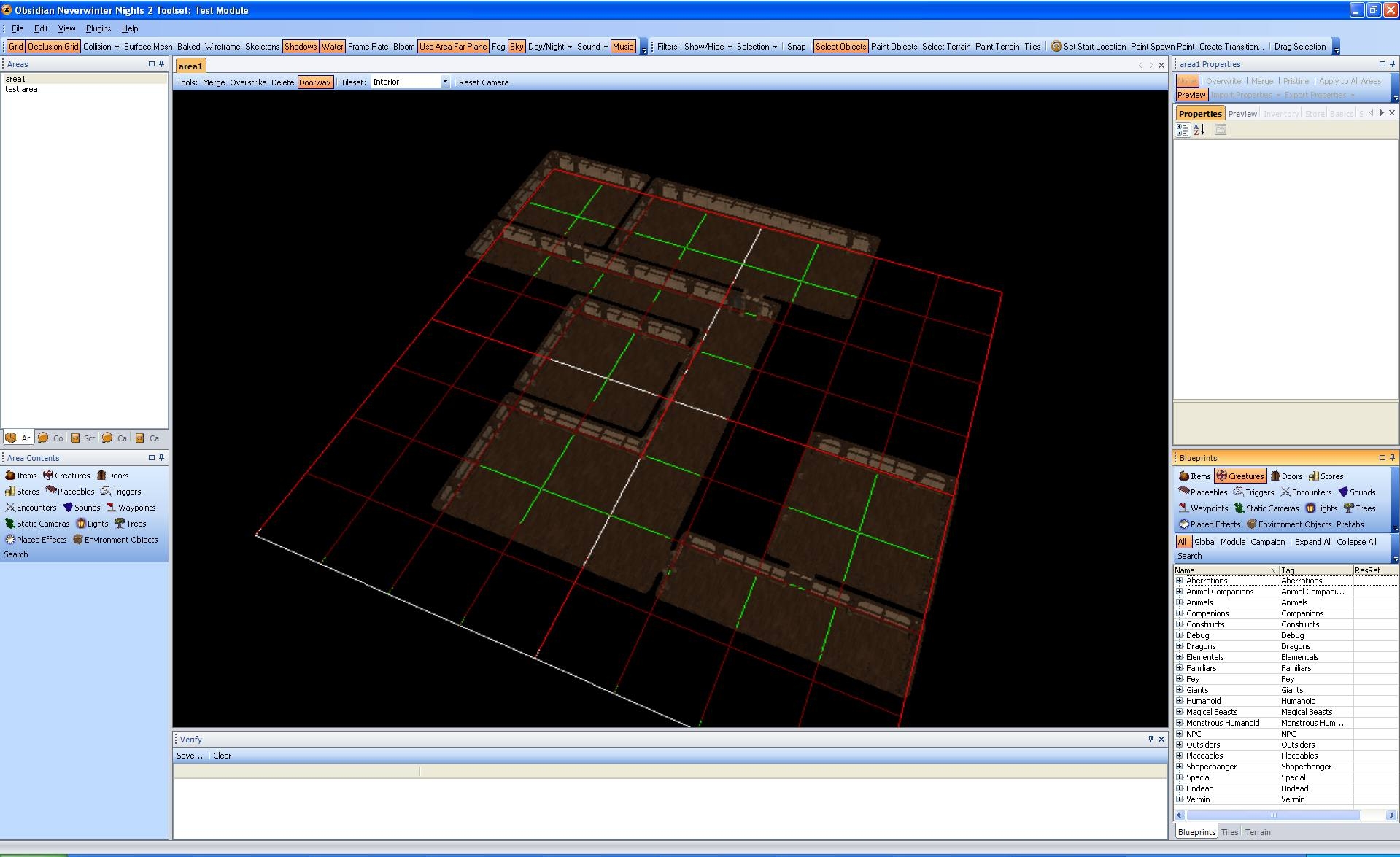
Updated for 1.05. This plugin adds some drawing tools to the existing 3D view of the toolset.
As requested by a lot of people here, I released the code of the plugin. All I ask is to give me credits for what I did.
TO USE IT, RIGHT CLICK AN AREA IN THE LIST AND CHOOSE "Open in MapEdit". This only works on interior areas and they must not be already opened. Keep in mind that this plugin does not do everything the original editor does yet, you can still open your area in the original editor.
To install the dll just place the it into the "Neverwinter Nights 2\NWN2Toolset\Plugins" directory. For the plugin to load you MUST go in the toolset View/Options/General/Security/AllowPlugins and set it to Load all plugins. If you had to change it you will need to restart for the toolset to reload plugins.
This is a pre-release version of my map edition tool. It is free for non commercial use. You can leave me comments on this page.
Tools:
- Select: Basic tile selection like it was done in the original interior editor. It allows you to use the property box to set tile tints and all other attributes. I'm still working on it to make it even better.
- Merge: Will merge the rectangle you are dragging with underlying map. Use it to draw new map or merge rooms together.
- Overstrike: Will draw a rectangle room over what is currently on the map. Use it to create inner rooms.
- Delete: Will remove anything in the area you are selecting. (1x1 rooms do not exist so they are also removed when they occur)
- Doorway: Drag over a wall to make a doorway
Tilesets: Select the tileset you want to draw with.
Reset Camera: Makes the camera look down at the center of the map.
Use right mouse click on tiles to select the next tile variation if any.
Known issues:
-------------
- Does not prompt for save when closing a window.
- Start location is not selectable (because its still incomplete)
- Show north does not work
- Renaming area break tab focus on open
- Shadow fortress tiles are not yet available
- Compared to previous plugin version, selection and tile drag is missing
Source code of the plug-in. This is still in development, there is some debug prints and a debug window inside the project. You can use all or part of this code in your projects as long as you give me credits for the part I did.
tzeraph: You are right, 3 out of 5 open floor tiles are stair like. Because the current tile variation selection is random, you will get 60% of them. I am trying to figure out a way to select tile variations while painting, but havent figured a good way to do it yet. Any suggestion?
Posted by tzeraph at on12/23/06
A perfect tool for beginners like me :) One thing tough is that there are some stairlike tiles that seem to pop up very close to each other. Would be good to be able to just use "plain" floor and wall tiles. But as said, a very good tool :D ME LIKE!
Posted by costaeurope at on12/23/06
I tryed it but the corners don't appear...
Posted by kaahen at 2006-12-2203:02:19
Thanks a lot, they released today the 1.03 for spanish language. Hope the 1.04 be for everyone. Great work!
Posted by SirLestat at 2006-12-1910:16:18
kaahen: Wow I didnt know they didnt make 1.03 for spanish. Too bad there is no easy way for me to downgrade and compile a 1.02 version for you ... The .exe code is enough to do all the map editing be does not contain anything about the NWN2 toolset. See it as a standalone product to edit maps. The .dll reuse the same code (embedded in the .dll itself) and have to code to connect it to the toolset. If you want to discuss about it more or about placeable support, email me to: fredvail@hotmail.com (I already get ton of spam in there and dont always check it. Make sure you put something I will notice in the title. I'll give you my main email then)
Posted by kaahen at 2006-12-1903:16:30
Ok, so I'll have to wait till they make the 1.03 patch for the spanish version (it's incredible but they didn't make it yet), but what I don't understand is why I have an .exe file, I supposed this would be enough to let it work. Will you add placeables or something further as well? I think you are doing a great work.
Posted by SirLestat at 2006-12-1813:43:57
kaahen: You will need to update your toolset and install the plug-in before you can apply it on an actual level. Just load your xml file from the plugin in the toolset and click apply to current level.
Posted by kaahen at 2006-12-1813:29:43
I can't install it since I run version 1.02, when I save the area I have a "xml" file, what do I have to do next?
Posted by SirLestat at 2006-12-1710:54:24
Girruth: Install the plugin version as described, load the toolset, start the mapedit plugin, load your map you saved and click apply to current area. (You need an interior area opened and active)
Posted by Girruuth at 2006-12-1710:51:19
Ok, so I created and saved a small map in the standalone MapEdit. Now, how do I get a map into the Toolset for my module? _________________________ If you like the United Colors mod, check out this extension for it! Link
10 - A Masterpiece, Genuinely Groundbreaking 9 - Outstanding, a Must Have 8 - Excellent, Recommended to Anyone 7 - Very Good, Deserves a Look 6 - Good, Qualified Recommendation 5 - Fair, Solid yet Unremarkable 4 - Some Merit, Requires Improvements 3 - Poor Execution, Potential Unrealized 2 - Very Little Appeal 1 - Not Recommended to Anyone






 Site
Site