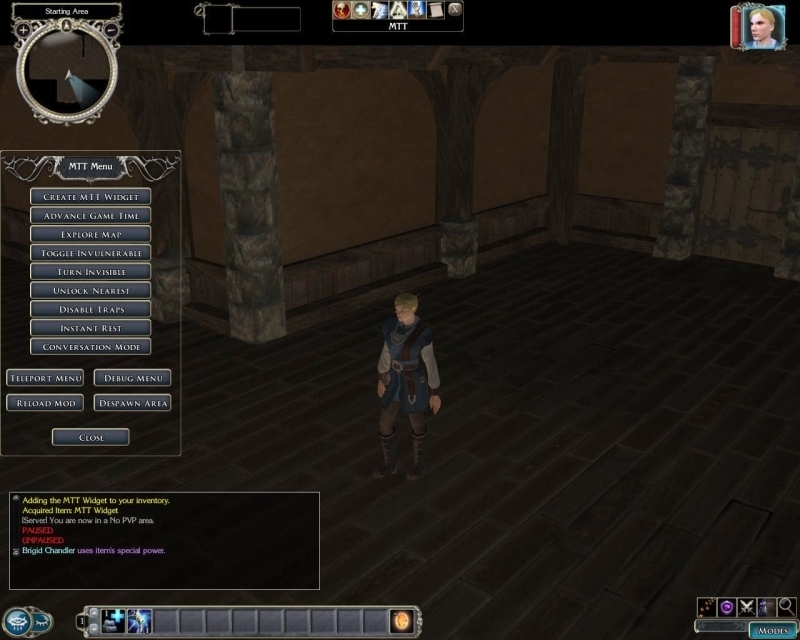
MTT v2.01 - A GUI driven Module Testing Toolkit for builders and test players. MTT is designed to assist NWN2 developers with their module testing. Test players have controlled access to functions that improve the efficiency of module testing and reduce the time it takes to repetitively test modules, scripts and in-game systems. MTT uses a widget in combination with a UI menu to provide an easy to use package. MTT is simple to incorporate into existing modules, does not overwrite NWN2 files and comes with an installer/uninstaller.
Features include
Controlled access to MTT functions � control what functions your module�s test characters and DMs can access.
Module Reload � for restarting the module quickly. This is a real time saver for repetitive testing.
Teleport Options � instantly jump to selected areas of your module. Several options are available like preconfigured waypoints, enter the tag of a waypoint or the previous module reload location, plus others.
Flexible Debug Options � send debug information to a log file, as shouts, PC messages and/or DM channel.
Increased Movement Rate � twice normal running speed gets you places quickly.
Immortal/Invulnerable � make the PC immortal/invulnerable. Sometimes death is just too inconvenient.
Explore Map � display the unexplored areas of the map.
Cutscene Invisible � good for taking screenshots.
Unlock & Disable Traps, Doors & Chests � it can also give DC information.
Insta-Kill Enemies � if you don�t want to fight.
Despawn Area � removes all NPCs/Monsters from the current area.
Identify Items � make sure your treasure tables are giving out the right gear.
Advance Game Time � test time dependant functions quickly. eg resting.
Instant Rest � restores hit points, spells and removes negative effects.
Instant Heal � restore hit points.
Resurrect � Bring life back to fallen comrades. It even works on your own dead PC.
Alternative Conversation Driven Menus � Whilst the MTT is primarily UI driven, most functions are available via an alternative conversation driven menu.
Module Reload Widget.
Combat animation widget.
For the module builder who is serious about testing and QA, the Module Testing Toolkit can save hours by reducing the grind of repeat testing, making it easier to navigate quickly to locations within your mod, and providing an easy to distribute tool to your test players.
If you use the MTT to test or QA your module please take the time to show your appreciation by posting a vote.
A big thanks to Better Than Life for his UI tutorial, Rich Taylor for his Blog, Grinning Fool for his NWN2 UI Reference, Abraxas77 for his updates to the UI Reference and Lance Botelle for his XML & GUI tutorial.
Usage Notice:
1. Permission is granted for the MTT to be incorporated into any NWN2 module or PW.
2. Please do not re-package or distribute MTT functions, scripts or XML as part of any compilation for public release.
v201d Update: Modified the MTT installer and the installation instructions. The v201c installer was was a little unpredictable with the update of ingamegui.ini
v201e Update: Modified the code so MTT no longer uses ingamegui.ini This keeps MTT independent of other UI packages that may write to ingamegui.ini
v2.01f Update: Added mouse over function descriptions to the the MTT Mini-Menu.
v2.01g Update: The options include file now has the MTT version number appended to the file name. Added "one click" module reload option. See include script "inc_mtt_options201x". Thanks to smorpheus for the suggestion.
v2.01h Update: Added area names to the Teleport UI buttons. Thanks to brisid for the suggestion. Added mouse-over tooltip descriptions to some of the Teleport options. Restricted UI functions are now disabled (greyed out)in the GUI. Added a Module reload widget that shortcuts the module reload process and avoids the MTT Main Menu. Added an animation widget that I have been using to test 3D models and animations.
I strongly recommend you use the MTT Installer (MTT_Setup201h.exe). But I've made this rar available if you feel you need to install the MTT manually and you know what you are doing.
@DotFreelance. Interesting comment and thanks for trying the MTT. Sorry to hear about your module. Yours is the only report of corruption I have heard of. MTT V2.01 has been released for two years now and has many regular users, some of them are respected mod builders and community members. In any case, I'd be interested to hear from mod builders if they encounter a similar problem.
Meanwhile, if module builders are concerned about corruption I recommend they make regular backups as part of their work flow.
Ubernerd, I was hoping to get more details from you on your teleport suggestion. There are a couple of things that are unclear to me and it would be easier to discuss your idea via email or PM.
Cheers - BTH _________________________ Barry The Hatchet Custom Content
[ BTH Vault Submissions] [ BTH Gallery] [ BTH Blog]
Posted by ubernerd at 2009-07-24 10:28:07 Voted 10.00 on 07/21/09
I don't need clarification. I want to see results, immediately. J/K
Serious though, for the sake of your mental health, it's best not to waste time clarifying things to me.
Ubernerd, thanks for the suggestion. Please contact me via the email link in my NWVault profile or PM on the NWN2 Bioware forums. I'd like to clarify a few things. Cheers, BTH _________________________ Barry The Hatchet Custom Content
[ BTH Vault Submissions] [ BTH Gallery] [ BTH Blog]
Posted by ubernerd at 2009-07-21 01:59:37 Voted 10.00 on 07/21/09
I'm glad someone is making a tool like this in NWN2.
I have a suggestion: can the teleport options expanded to include a list of areas similar to the chooser menu in NWN1? As it is now, when I want to go somewhere I have to check up the area tags from the toolset.
Thanks for the comments. I don't have any MTT updates in the pipeline, so if anyone has a feature they would like to see included, please leave a suggestion. _________________________ Barry The Hatchet Custom Content
[ BTH Vault Submissions] [ BTH Gallery] [ BTH Blog]
Posted by Cladius at 2009-07-12 05:53:56 Voted 9.50 on 07/12/09
Made a world of difference in bug squashing runs through my mod, fantastic.
Posted by Venture at 2009-05-16 09:12:31 Voted 9.50 on 05/16/09
Makes testing modules MUCH easier. Thanks for this. _________________________ NWN Campaigns - the NWN/NWN2 Campaign Database Naeldor Weekly Campaign
Posted by Tongue at 2009-05-05 04:17:25 Voted 10.00 on 05/05/09
Thank you, BTH.
Posted by Falx01 at 2009-04-12 04:16:36 Voted 9.75 on 04/12/09
Indispensable.
Make mods? Use this, else do it the hard way.
Posted by ratgutz at 2009-04-12 04:12:29 Voted 10.00 on 04/12/09
This is definately a must have tool for all builders. _________________________ Link
Following the suggestion from brisid, I've made some changes to the Teleport GUI and added the names of the areas to the Preset Waypoint gui buttons as well as the Stored Location and Last Module Reload location buttons. This should help testers identify the destination area of each teleport option. Because the labels on these buttons are now dynamic I've also added a tooltip description of what the button does. The tooltip is activated by hovering the mouse over the GUI button. I've only added tooltips to the Teleport menu and then only to those options that I felt could do with some clarification.
Also, any MTT Main Menu, Teleport and Debug menu functions that are not active are now disabled in the GUI. Their buttons are greyed out and cannot be selected. This includes functions that are disabled for the Player Character in the inc_mtt_options201x file and any teleport waypoints that have not been defined.
I have only done superficial updates to the documentation, so feel free to point out anything that needs a better explanation. :)
In addition to the GUI changes, v2.01h includes two widgets in the form of rings. I've been using these widgets to help me test my custom models. Module builders may find a use for them, particularly the Beta Tester ring.
The Ring of the Beta Tester is primarily a module reload widget. It shortcuts the module reload process and avoids the MTT Main Menu. (Thanks to Smorpheus for the suggestion - apologies it took so long for me to upload the complete solution) The Ring of the Beta Tester also has some feats to enable the Player Character to equip shields, all armour and weapons, Strength +6, Lore +50.
The Ring of the Dancing Warrior is used to activate combat animations on a Player Character. It's been useful to me as a 3D model testing tool and I've included it on the off-chance that someone else finds it useful. I've used it to test how weapons, shields and armour react to combat animations. The Ring of the Dancing Warrior also has some feats on it such as Improved Two Weapon Fighting, Monkey Grip and other weapon feats.
Many thanks to those that have voted for the MTT. These days I'm more into custom modeling for NWN2 and so I don't use the NWN2 Toolset much for building. The MTT is a little distraction away from modeling that I'm happy to put time into so long as it is getting support from the modding community.
Feel free to add your suggestions for improvements.
Thanks for the suggestion brisid. The number of preset waypoints are currently limited to the number of buttons available on the Teleport UI. To expand on the number of preset waypoints I'd have to create an additional UI specifically for preset waypoints.
There is a teleport function that provides a text entry box and allows the player to enter the tag name of a waypoint. So you can jump to any waypoint in your module.
I like the idea of adding a waypoint name or description to the UI. I'll have a look into that.
Thank you to all that have voted and left encouraging comments.
Posted by StormSeer at 2008-10-18 17:37:51 Voted 9.50 on 10/18/08
Useful and innovative, just what we have come to expect from Barry the Hatchet _________________________ AussieNWN - Dark Ages (now deceased) Link
Admin, Dev, DM
Posted by Indira Lightfoot at 2008-09-07 06:55:04 Voted 10.00 on 09/07/08
A solid ten from me! I got a tip from me forum and after I've installed this beauty game testing feels like half as hard as before! Great work Barry! :) _________________________ From someone who is starting to feel like an Ent among saplings when playing computer-based D&D games...
Posted by Rasvar at 2008-08-30 08:19:08 Voted 9.50 on 08/30/08
MTT Version 2.01g adds a "one-click" option to the Reload Module function. Thanks to smorpheus for the suggestion. By default, MTT will ask for confirmation when the Reload Module button is clicked. Refer to the updated readme file for instructions if you want to disable the OK/Cancel Reload Module confirmation.
Additionally, the option include script has been renamed with the MTT version number appended to avoid conflicts with previous versions of MTT.
For Existing MTT users who want to upgrade-
If you have MTT version 2.01f you can download and run MTT_Setup201g.exe and import MTT_v201g.erf into your modules and overwrite all MTT resources.
If you have MTT v2.01e or earlier it is recommended to use the uninstaller before running MTT_Setup201g.exe See the MTT Readme.html file for details on the MTT uninstaller.
I'd like to thank the people who have used this tool and taken the time to vote and leave comments. It's great to see some "published" module developers are finding the MTT useful. Spread the word about MTT to your mod builder friends :)
If you have an idea for a feature you would like to see in the MTT please let me know.
10 - A Masterpiece, Genuinely Groundbreaking 9 - Outstanding, a Must Have 8 - Excellent, Recommended to Anyone 7 - Very Good, Deserves a Look 6 - Good, Qualified Recommendation 5 - Fair, Solid yet Unremarkable 4 - Some Merit, Requires Improvements 3 - Poor Execution, Potential Unrealized 2 - Very Little Appeal 1 - Not Recommended to Anyone






 Site
Site









 at 2012-04-09 23:04:40
 at 2011-01-31 16:08:19


