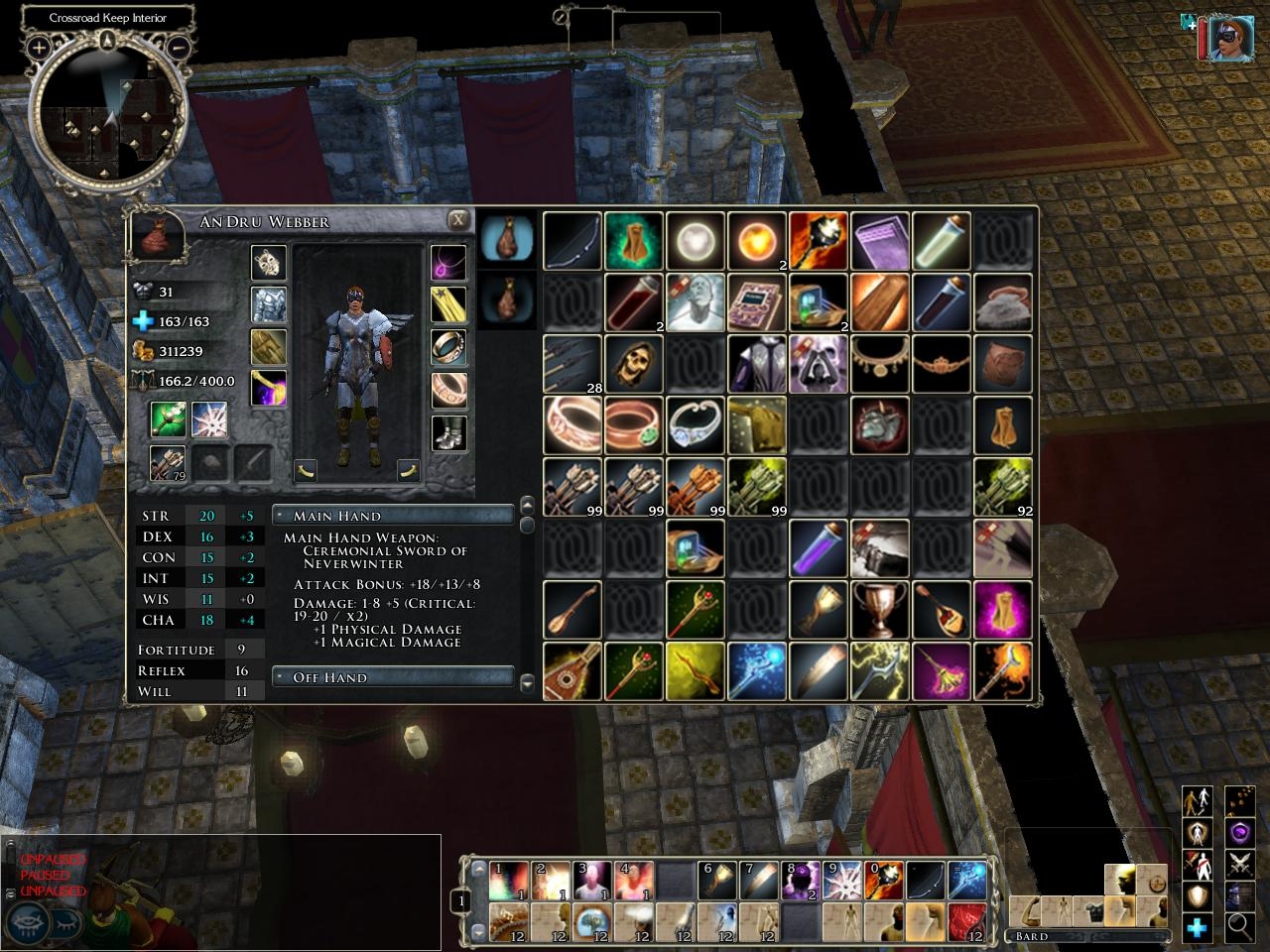
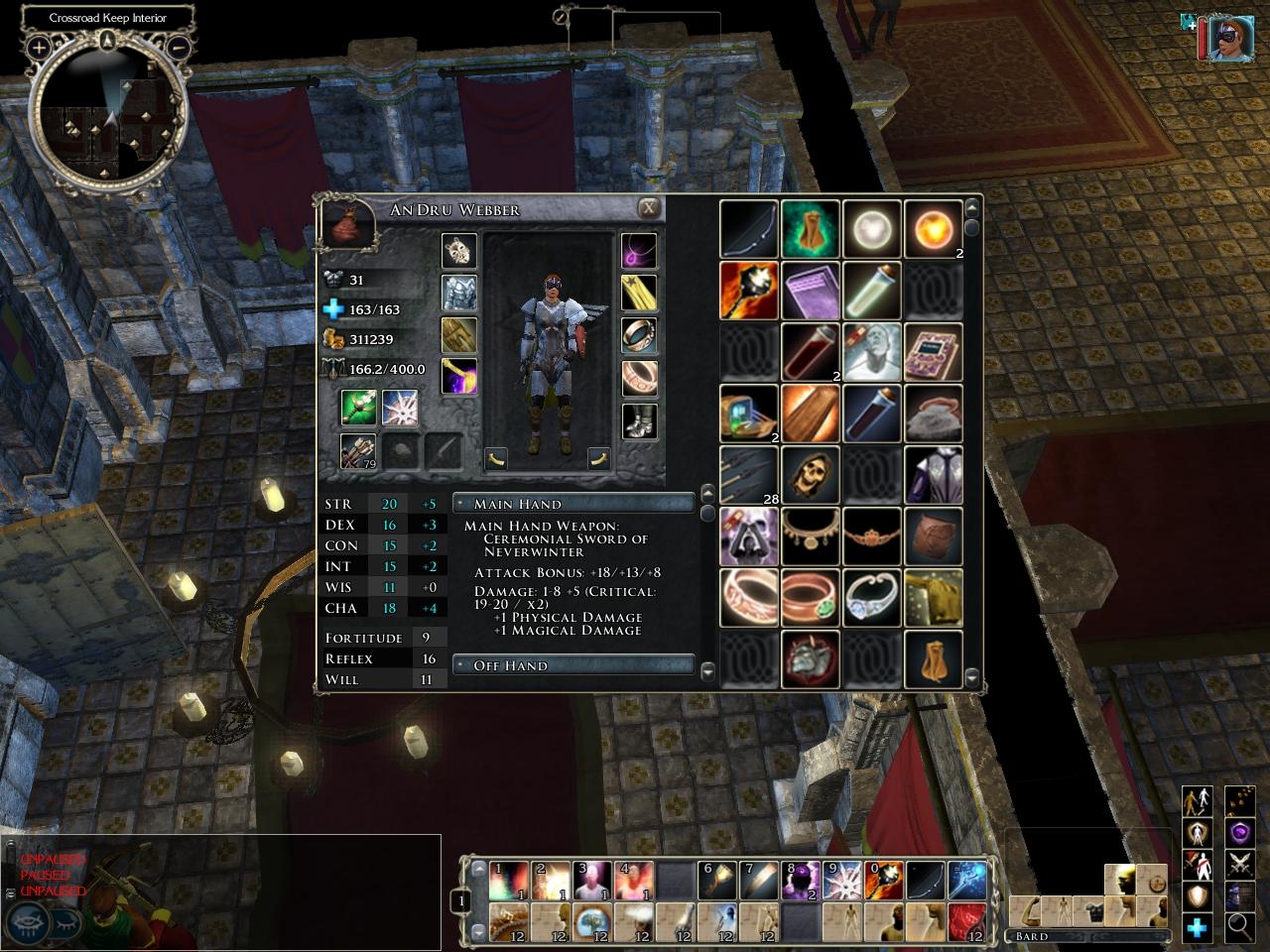
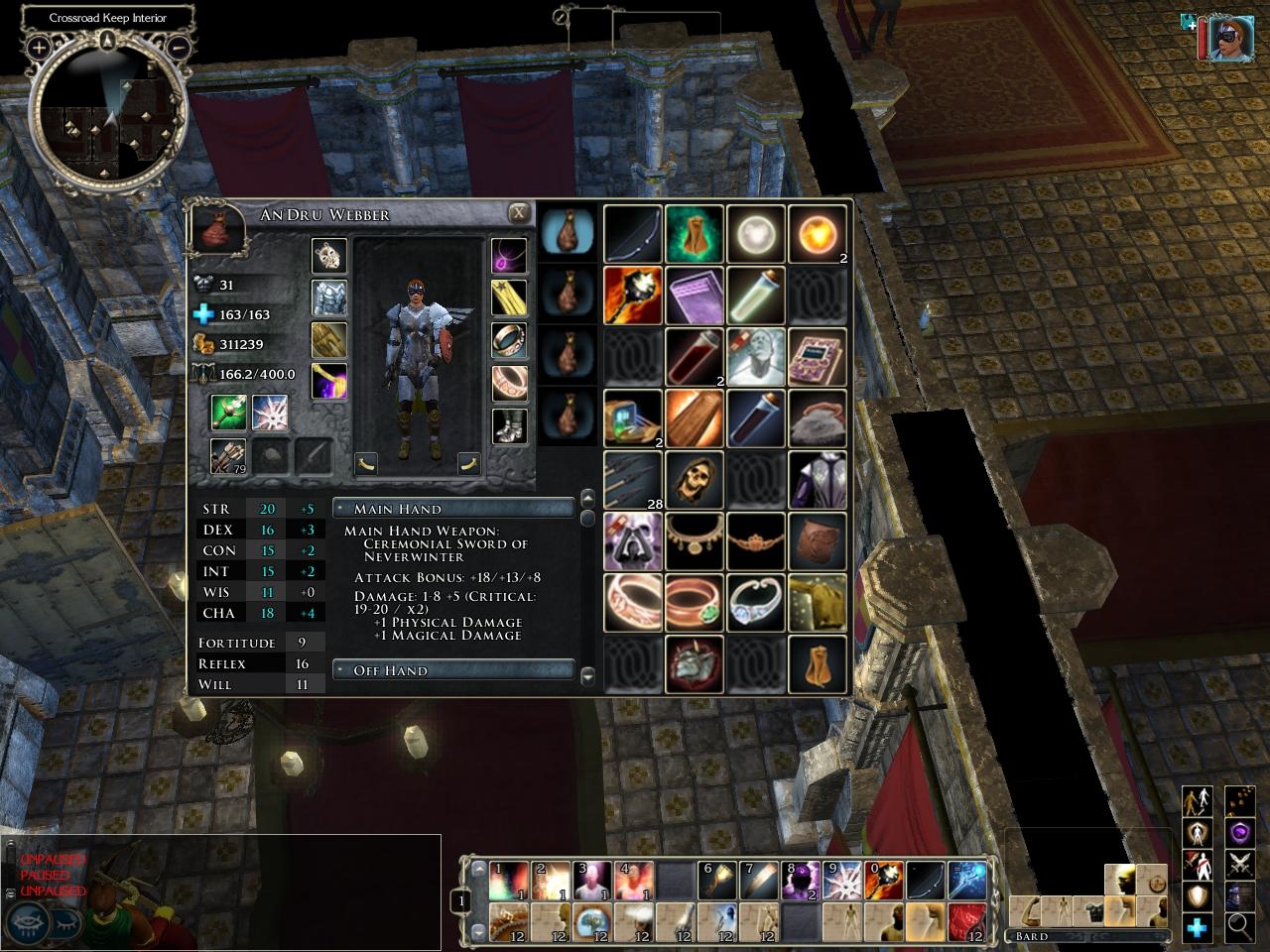
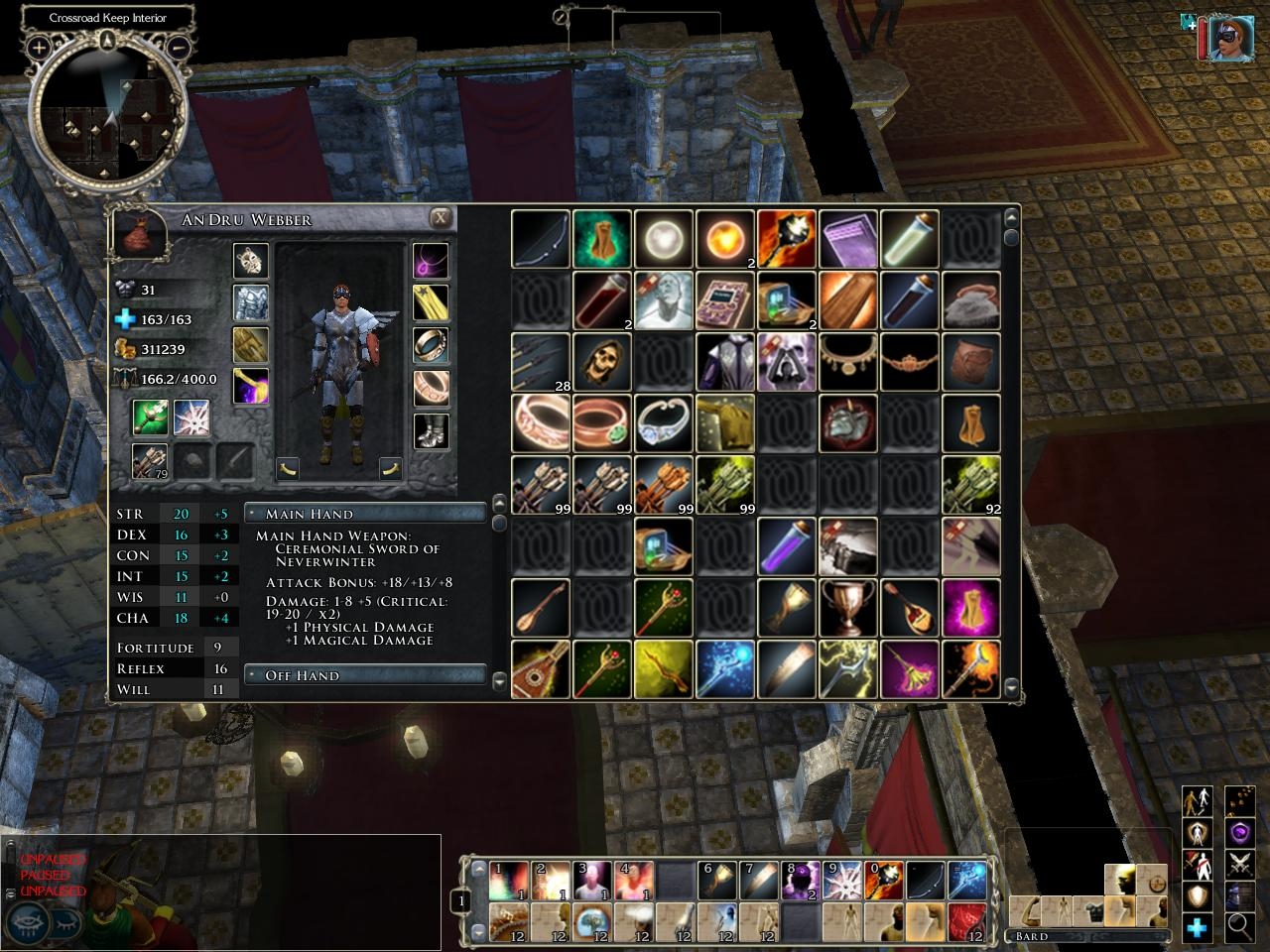
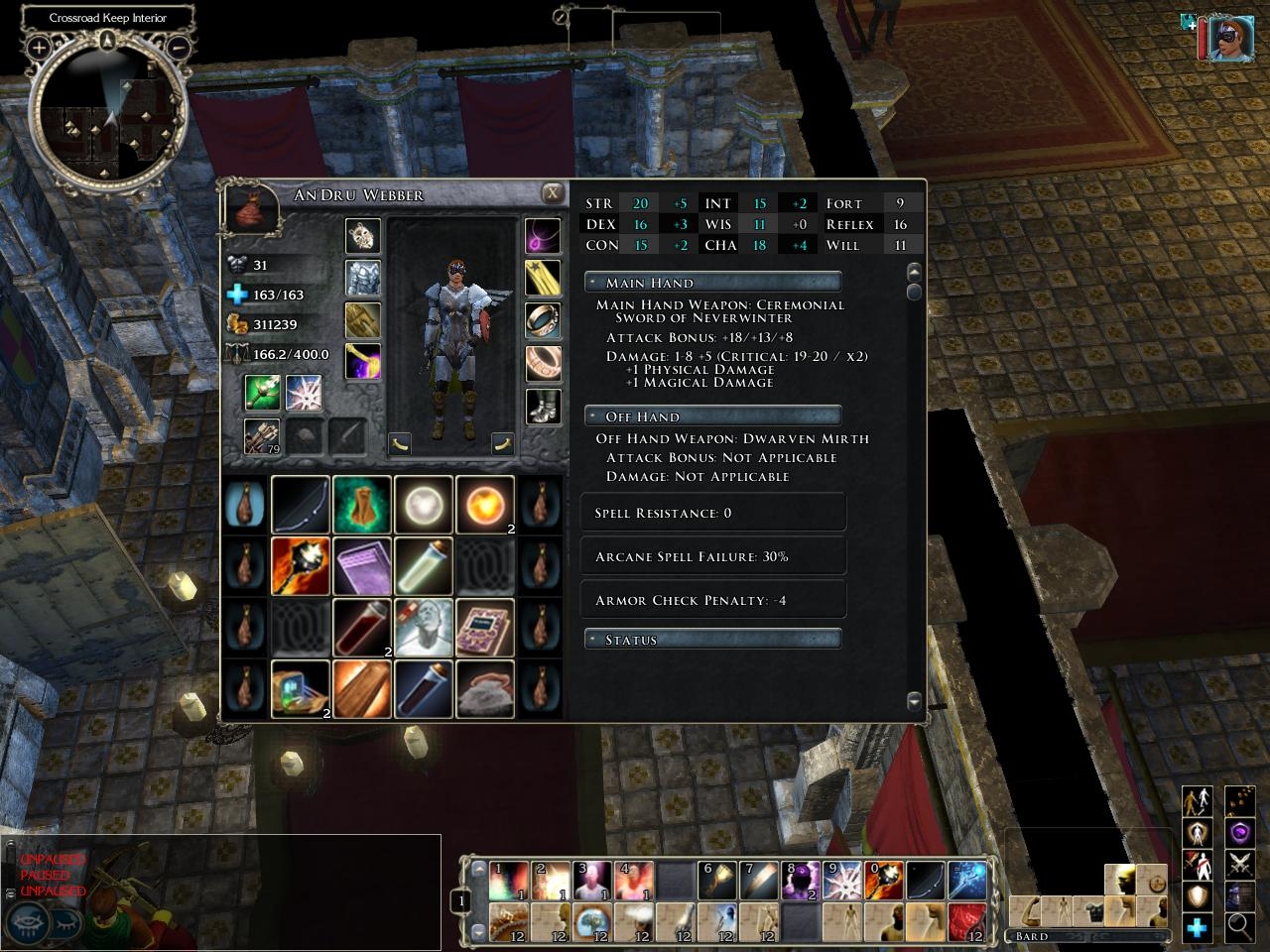
This makes the inventory icons 50% bigger in each direction, so you don't have to squint.
Below the paper doll is an excerpt of the information available from the Character screen. This way, you can immediately see the effect on your statistics of equipping or unequipping an item.
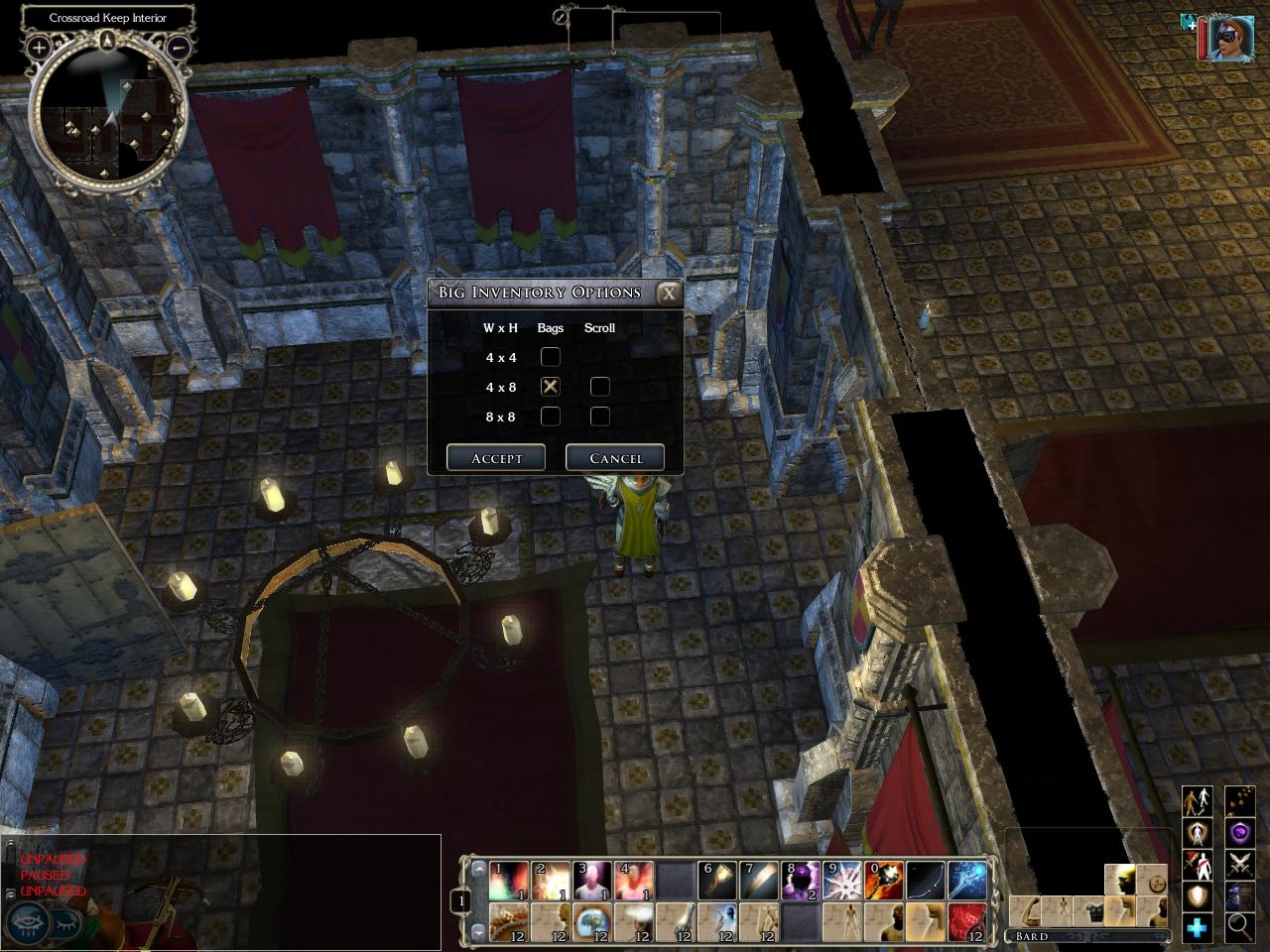
Version 1.03 update: There are now five versions of the screen available, including a new 4x4x8 one. They are now all bundled into a single download, and you can now switch between them in-game, a la xUI.
Version 1.041 update: Fixed problem in which Inventory screen would disappear if you switched characters while browsing a merchant's wares.
Version 1.05 update: Made compatible with NWN2 1.04. XML files moved into custom directory.
Version 1.06 update: Made compatible with NWN2 1.10. Added inventory sort button. Fixed minor bug in noscripts version.
A new atlas file for patch 1.10. If you are using the resized and resampled inventory icons, then unzip this into My Documents\Neverwinter Nights 2\ui\default\images.
Optional - Resized and resampled inventory icons. Unzip this into your My Documents\Neverwinter Nights 2\ui\default directory. May slightly increase loading times.
Too bad I can't get this towork. I click on the inventory options button in the options menu and it just returns to the game. No big inventory changes.
Ideas anyone?
Posted by Lore of Old at 2009-03-08 06:19:36 Voted 8.50 on 03/08/09
This is a life saver for the vision-challenged people. Excellent stuff!
Posted by cybmole at 2008-10-24 03:33:53 Voted 9.50 on 10/24/08
FIXED IT, for MofB expansion!
did what you said in an earlier post - found the ingameguix1.ini file by searching program files ...NWN2 , then copied it to where you said here
1. Make a copy of ingameguix1.ini into My Documents\NeverwinterNights 2\ui\default. Then add the following lines under the [MandatoryGUI] section:
SCREEN_INVENTORY_4X8X4=inventoryscreen_4x8x4.xml
SCREEN_INVENTORY_4X8XSCROLL=inventoryscreen_4xscroll.xml
SCREEN_INVENTORY_8X8X2=inventoryscreen_8x8x2.xml
SCREEN_INVENTORY_8X8XSCROLL=inventoryscreen_8xscroll.xml
SCREEN_INVENTORY_4X4X8=inventoryscreen_4x4x8.xml
SCREEN_SETUPINV=setup_inv.xml
SCREEN_INV_OPEN_UPD=invopen_updates.xml
SCREEN_INV_CLOSE_UPD1=invclose_updates1.xml
SCREEN_INV_CLOSE_UPD2=invclose_updates2.xml
I have only played for a few seconds, just to prove it works, but in theory you could now add this to the main zip
Posted by cybmole at 2008-10-24 01:40:16 Voted 9.50 on 10/24/08
readign earlier posts suggests that the reason I can't get this to work is because I also have MofB installed. Will there be a future update or some simple insturctions to get beyond this. Also, I'm not sure that I have fully uninstalled it. Stupidly I did not record what was originally in my docs...UI/default but there are currently 2 ini files there: guisettings and ingamegui. What should I do with those please
Posted by cybmole at 2008-10-24 01:12:23 Voted 9.50 on 10/24/08
dont know what I've done wrong but when I insall big inventory I lose the invetory completely i.e. the I key does nothing and hte inventory option button on option screen also does nothing. I have read the read me & added/ removed the files several times but no joy. I can get the game back to normal by deleting UI/custom . I am trying the sdimplest possible install i.e. download the zip and unzip to to my docs - nwn2 with winzip so that it chooses where to put everything.
any suggestions . game version is latest 1.13...
Posted by clubok at 2008-05-24 20:57:36 Voted 10.00
Greychili: I haven't played NWN2 for a while, and am embarrassed to admit that I haven't even upgraded to 1.12. Still, I'm pretty sure I know why this is messing up the custom portrait system - it's because of the override of ingamegui.ini.
Try following the instructions from my 11/04 comment, but with the ingamegui.ini file instead. You'll end up with a new version of that file that will replace the one packaged with this mod.
_________________________ Big Inventory Icons and Character Info Link
Readable Books Link
Less Obtrusive Spell Buffs Link
Posted by greychili at 2008-05-12 14:48:10 Voted 9.75 on 05/12/08
hi, your mod is great have used from the first time i ever loaded nwn2. i dont have motb but have patched nwn2 up to 1.12. readded this mod and it works fine but something about it is stopping the ingame custom portrait options from working, do u have any idea what would be? would never think of playing without this mod but want the ability of custom portraits aswell instead of those ugly 3d portraits.
Posted by Shargast at 2008-01-27 08:59:30 Voted 9.75 on 01/27/08
Fantastic UI! Well done!
Best
Shargast _________________________ Realms of Shargast V1-V5ab, LOTR V15, The Undeath Clave & Faithful of Aerth
Posted by clubok at 2007-11-04 19:19:43 Voted 10.00
TiaMaster: There are two things to try. Since I don't have MoTB, I can't do the experiments myself. I would really appreciate the feedback if you could let me know how these work out.
1. Make a copy of ingameguix1.ini into My Documents\NeverwinterNights 2\ui\default. Then add the following lines under the [MandatoryGUI] section:
SCREEN_INVENTORY_4X8X4=inventoryscreen_4x8x4.xml
SCREEN_INVENTORY_4X8XSCROLL=inventoryscreen_4xscroll.xml
SCREEN_INVENTORY_8X8X2=inventoryscreen_8x8x2.xml
SCREEN_INVENTORY_8X8XSCROLL=inventoryscreen_8xscroll.xml
SCREEN_INVENTORY_4X4X8=inventoryscreen_4x4x8.xml
SCREEN_SETUPINV=setup_inv.xml
SCREEN_INV_OPEN_UPD=invopen_updates.xml
SCREEN_INV_CLOSE_UPD1=invclose_updates1.xml
SCREEN_INV_CLOSE_UPD2=invclose_updates2.xml
2. Try the noscripts version, according to the instructions in the readme file.
I think that one or both of these approaches should work.
If the first one works, then let me know where I can get a copy of that ini file, and I'll add the lines myself and include it in the zip file. _________________________ Big Inventory Icons and Character Info Link
Readable Books Link
Less Obtrusive Spell Buffs Link
I have updated NWN2 w/MotB to its latest build, and installed Big Inv just like I did before one time when it was working. This time, there is no option to configure Big Inv inthe options menu, AND my inventory will not come up at all -ever.
Posted by clubok at 2007-10-17 18:50:22 Voted 10.00
Protamar: That's the way to uninstall this, along with any other custom UI mods. But did you try version 1.061? _________________________ Big Inventory Icons and Character Info Link
Readable Books Link
Less Obtrusive Spell Buffs Link
I read a posting on the Bioware forums, and it said to delete everything in the "ui" directory totally, then it will work. I tried it and it did. I'm now playing happily!
Unfortunately, won't be using this mod for a while.
Posted by clubok at 2007-10-16 20:02:19 Voted 10.00
OK - I just uploaded version 1.061. Please try that and let me know if you still have problems. _________________________ Big Inventory Icons and Character Info Link
Readable Books Link
Less Obtrusive Spell Buffs Link
Posted by clubok at 2007-10-16 18:38:59 Voted 10.00
I see the problem. I didn't put the zip file together correctly. I'll repost it shortly. _________________________ Big Inventory Icons and Character Info Link
Readable Books Link
Less Obtrusive Spell Buffs Link
Posted by clubok at 2007-10-16 15:57:19 Voted 10.00
Protamar and katiecubed: Unfortunately, I don't have MoTB yet, which may make troubleshooting more difficult. Please try using the noscripts version, and let me know if that helps. _________________________ Big Inventory Icons and Character Info Link
Readable Books Link
Less Obtrusive Spell Buffs Link
I really enjoyed using your ui before buying MoTB. However, now I have started playing the expansion and nothing happens when I press the "Inventory" button. I had to uninstall xGui to get the expansion to work, so I suppose it's somewhere between that and yours. Can you tell me what to do? Or how to completely uninstall yours?
I really want to play, but need some inventory! I updated to your latest version, but still nothing happens.
Posted by clubok at 2007-10-11 20:37:09 Voted 10.00
OK, I've just posted the new version that works with patch 1.10. It also includes the Inventory Sort button, except in the 4x4x8 version. Apart from the difficulty in finding space for the button on that screen, I figure that anybody who wants that many bags is a micromanager who wouldn't use the sort button anyway.
Also, the noscripts version will now correctly show all stat updates when you equip and unequip items. _________________________ Big Inventory Icons and Character Info Link
Readable Books Link
Less Obtrusive Spell Buffs Link
Posted by clubok at 2007-10-11 17:52:56 Voted 10.00
Please be aware: Patch 1.10 seems to have broken this mod. Not completely, but bad enough so you wouldn't want to use it. I am working to fix it, and I'm about 40% done with that. Expect a new version shortly. _________________________ Big Inventory Icons and Character Info Link
Readable Books Link
Less Obtrusive Spell Buffs Link
Posted by yodasmith00 at 2007-10-07 07:33:47 Voted 10.00 on 10/07/07
Excellent.
Posted by [email protected] at 2007-09-25 08:44:15 Voted 9.50 on 09/25/07
I've been using this for my gaming since it was first released.
Posted by Ragnorak at 2007-05-21 18:13:18 Voted 9.00 on 05/21/07
Very cool and useful mod. You can tell a lot of thought and detail went into it. Having an options menu and several different versions of the inventory screen to choose from is really a nice extra touch.
Posted by clubok at 2007-05-09 19:57:27 Voted 10.00
Tichondrius,
Take a closer look at the Readme file; I believe that both your issues are addressed there. In particular:
- Make sure that you don't have another UI installed that overrides optionsmenu.xml. Since you say that you have installed other custom UIs, this is likely the reason you can't get the XUI-style menu.
- When playing in multiplayer, you either need to get your server admin to install the scripts on the server, or you need to install the noscripts version.
When using the noscripts version, you won't be able to use the XUI-style menu; that relies on scripts. The noscripts version also has a minor bug, described in the readme file. I may be able to fix that bug sometime in the coming months; Obsidian has announced an upcoming UI improvement that will allow me to do the necessary callbacks without resorting to scripts. It was originally announced for patch 1.06, but they've since split up that patch, so it might be in a later one.
I appreciate that you perceive what seem to be bugs to you. What you may not realize is that you are encountering the structural limitations of the architecture provided by Obsidian. In particular, many of the fancier things you can do with the UI require scripts, but the use of scripts is controlled by the server. So any UI that relies upon scripts may have issues when running in multiplayer, unless your server admin is cooperative. That's why I provided a noscripts version.
Another limitation of the architecture is that there is only one definition of the options menu. So if multiple UIs try to add items to that menu, only one will win. It would have been nice if global UI elements like that could have been built in a more modular way. As it is, anybody who wants to use multiple UI mods that add options to the menu must manually merge the customizations to that file. _________________________ Big Inventory Icons and Character Info Link
Readable Books Link
Less Obtrusive Spell Buffs Link
Posted by Tichondrius at 2007-05-07 08:36:54 Voted 4.00 on 05/07/07
Hi, I'm having trouble using this.. No "xUI like" menu appeared to switch between inventory styles so I'm stuck with 4x8x4 but ok I can play with that..
The bigger problem is that when I go online and play on PW server I can't open my inventory at all!! "I" doesn't work nor does the eye popup menu..
So sorry about the low rating, but it is what it is >> It has potential but requires bugfixing/improvements.
BTW It's not the first time I install custom UI so I'm sure I'm doing it right.. ;)
Posted by clubok at 2007-03-23 18:47:38 Voted 10.00
YorgosD and AnthroPlayer: Even with the more explicit voting standards for NWN2, the meaning of an 8 vs. a 9.5 is still very subjective. I'm grateful for both your votes, as well as your kind remarks.
Caos81: I'm glad to know that somebody enjoyed the Readme. But Wolf tells me he hasn't received your donation yet. Thanks for your vote as well! _________________________ Big Inventory Icons and Character Info Link
Readable Books Link
Less Obtrusive Spell Buffs Link
Posted by Caos81 at 2007-03-01 14:37:14 Voted 9.25 on 03/01/07
The UI are great on their own but I also had a hell lot of fun reading the README.txt (ya someone still read them).
Posted by YorgosD at 2007-02-28 06:45:56 Voted 8.00
8 IS a Hall of Fame score. And a very high one - "Excellent, Recommended to Anyone". Anything rated higher should be a masterpiece (9=outstanding).
I usually avoid posting out of topic, but I gave Anthro 3.5 (not 3), three for the content and a half point BONUS for the humor. Too bad he thought I was offended by the humor (and offending me in turn).
Posted by AnthroPlayer at 2007-02-27 19:33:05 Voted 9.75 on 02/27/07
Judging all attributes of this submisson it is a 9.75.
If anyone ever votes below a 8.50 on this they are insane.
Hey, isn't that Yorgus above my post? I looked at yesterday's submission I made when you gave me a '3' because I included humor.
You don't vote down some-one's submission because of something non-related to the topic. How dare you Yorgan! How dare you vote so low!
How dare you not want anyone else to reach hall of fame!
In the end it will be community foliage packs and barrel updater kits for everyone! And there is nothing you can do Yorgus the mean nasty butt monger... *snicker* sry, butt monger... rofl... _________________________ @===============================================@
Vinchenzo made a post here.
Plz check out my entries. I'm currently making a few simple modules, designing 3 special characters, and hope to someday be good this stuff.
This is Vinchenzo, finishing his post with the following advice:
Don't use Latin improperly (Lupis means grey, Rufus is red, Canid is dog, so on.) Furries annoy me with their improper usage of such. And I'm a furry!!! Ugh...
Don't vote for Beta things unless told they are finished, unless posted specifically by the author.
Don't abuse the vote and post function, don't vote for your own/friends stuff just to get a high vote. Don't flame vote either just to be an ass.
There is a voting system for how the points are used, even I forget, but we should follow it (and tattoo it to our forehead, lol)
@===============================================@
10 - A Masterpiece, Genuinely Groundbreaking 9 - Outstanding, a Must Have 8 - Excellent, Recommended to Anyone 7 - Very Good, Deserves a Look 6 - Good, Qualified Recommendation 5 - Fair, Solid yet Unremarkable 4 - Some Merit, Requires Improvements 3 - Poor Execution, Potential Unrealized 2 - Very Little Appeal 1 - Not Recommended to Anyone






 Site
Site









 at 2012-10-19 09:22:01
 at 2009-03-08 06:19:36
 at 2008-05-24 20:57:36
 at 2007-09-25 08:44:15


