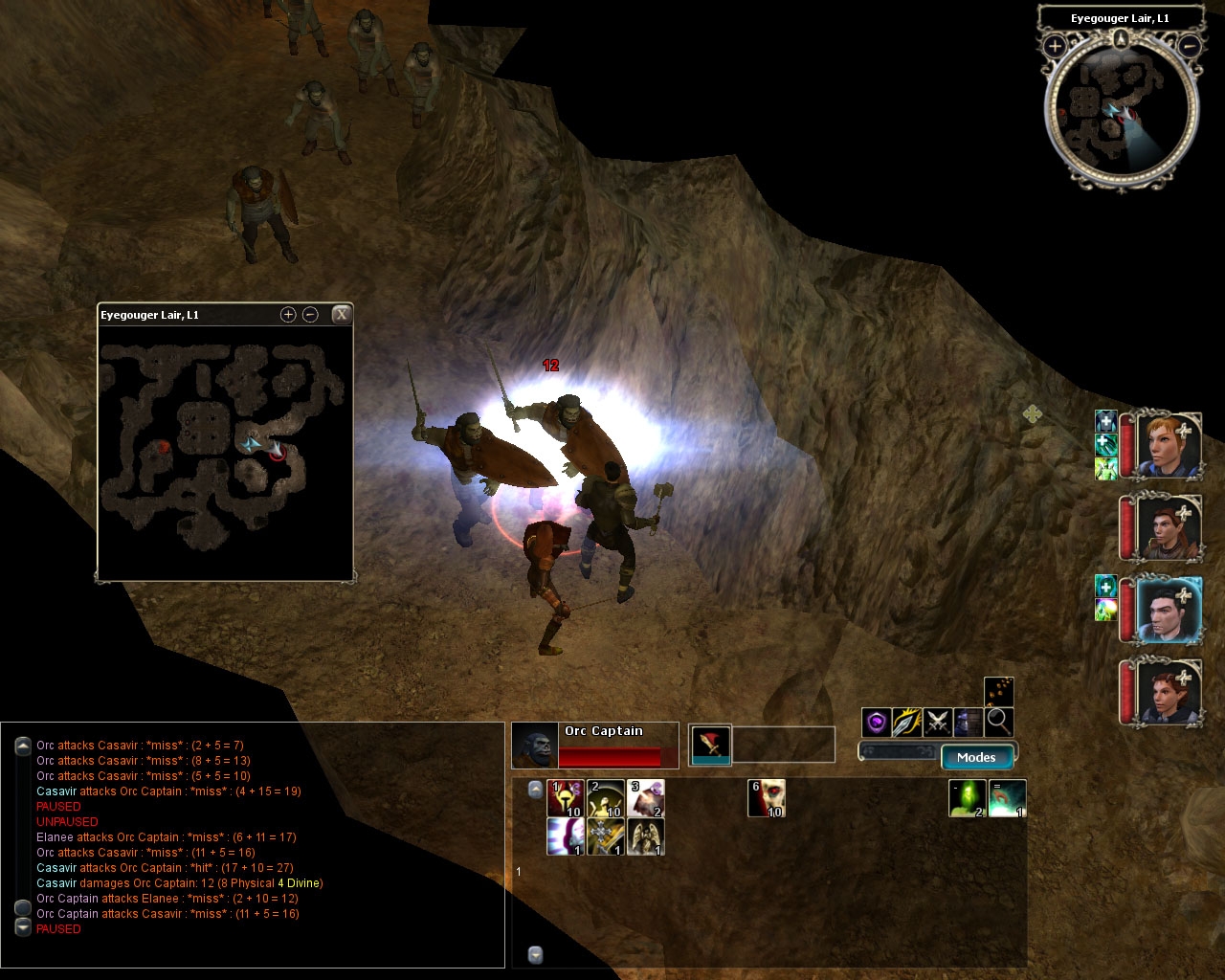
I felt the circular minimap was too constrictive, and the area map too large, so I shrank the area map to about half its height and width.
I was hoping to attain something closer to NWN1-style map, but all the actual map functionality is hardcoded and doesn't lend itself to anything beyond superficial changes. Oh well.
Excellent! I finally picked up NWN2 and this was one of the first things I loaded (along with Charlie's UI). With the clumsy stock layout I wasn't sure if I could deal with the game. I think that "mini-map" must have been made by a FPS gamer. For me, it was totally useless. Thanks. ps- Can you do user defined map notes? D _________________________ "In life, one and one don't make two. One and one make one." -The Who "Bargain"
Posted by tcdelaney at on12/09/06
I've reduced the size of this again for my personal use, and (importantly) reduced the size of the markers. I've also eliminated the minimap (though I haven't managed to get the big map to come up automatically ...). If you'd like the files, email me. Also, would you have any objections if I included the modified files with the UI mod pack I'm going to upload? I've also asked about including my fixes to your compact character stats on that page ...
Posted by cyricc at 2006-12-0101:16:00
"On a similar note, is it possible to replace the minimap with your smaller area map? That way you could have the small area map up all the time and still be able to press the 'M' key to get the original full size area map for the larger format. Might be useful to have it at 2 different scales." I'm afraid this exact request is not possible due to the one-sidedness of communication between the GUI and the game when it comes to displaying variable data (game sends GUI data. GUI cannot get data by itself. Means of sending most GUI data is hardcoded). However, it is possible to make a resized square minimap that retains normal minimap functionality, which I am working on.
Posted by Gilthonym at on12/01/06
Excellent, must have. Thanks for putting this together.
Posted by Kasdar at on11/30/06
I agree with The Ridge. This is an excellent addition to my UI. But if it would be possible to replace the minimap with the Small Area Map and keep the big one this would be ideal.
Posted by The at on11/24/06
Woot! Thanks Cyric. I'll give this a try. :) On a similar note, is it possible to replace the minimap with your smaller area map? That way you could have the small area map up all the time and still be able to press the 'M' key to get the original full size area map for the larger format. Might be useful to have it at 2 different scales. -R _________________________ NWN2 Voting Standards 10 - A Masterpiece, Genuinely Groundbreaking 9 - Outstanding, a Must Have 8 - Excellent, Recommended to Anyone 7 - Very Good, Deserves a Look 6 - Good, Qualified Recommendation 5 - Fair, Solid yet Unremarkable 4 - Some Merit, Requires Improvements 3 - Poor Execution, Potential Unrealized 2 - Very Little Appeal 1 - Not Recommended to Anyone
Posted by cyricc at 2006-11-2522:21:10
I hid the minimap by setting its width and height to 0 in the XML (apparently it ignores the "hidden" attribute). Not the most elegant way but hey, it works :P I'll upload the modified minimap.XML file.
Posted by Slygar at on03/27/07
yeah, it would be great if you could totally disable the small map. this one is much better..
Posted by DonC at 2006-11-2413:02:14
Kudos Cyricc! To me, the mini-map is too mini, and the map is to maxi I think your version is "just right". Is it only me, or does anyone else miss user-defined mapnotes?
Posted by The at on11/24/06
Thank you Cyric! This is exactly what I needed. Since the big map does everything the small map does and MORE (including showing tracking targets), I have stopped using the small map altogether. This version fits perfectly in the top left corner of my screen. My only peeve now is that the small map keeps "turning back on" whenever I move to a new area or reload a save. I wonder if there is any way to permanently disable the small map? -R _________________________ NWN2 Voting Standards 10 - A Masterpiece, Genuinely Groundbreaking 9 - Outstanding, a Must Have 8 - Excellent, Recommended to Anyone 7 - Very Good, Deserves a Look 6 - Good, Qualified Recommendation 5 - Fair, Solid yet Unremarkable 4 - Some Merit, Requires Improvements 3 - Poor Execution, Potential Unrealized 2 - Very Little Appeal 1 - Not Recommended to Anyone
10 - A Masterpiece, Genuinely Groundbreaking 9 - Outstanding, a Must Have 8 - Excellent, Recommended to Anyone 7 - Very Good, Deserves a Look 6 - Good, Qualified Recommendation 5 - Fair, Solid yet Unremarkable 4 - Some Merit, Requires Improvements 3 - Poor Execution, Potential Unrealized 2 - Very Little Appeal 1 - Not Recommended to Anyone






 Site
Site