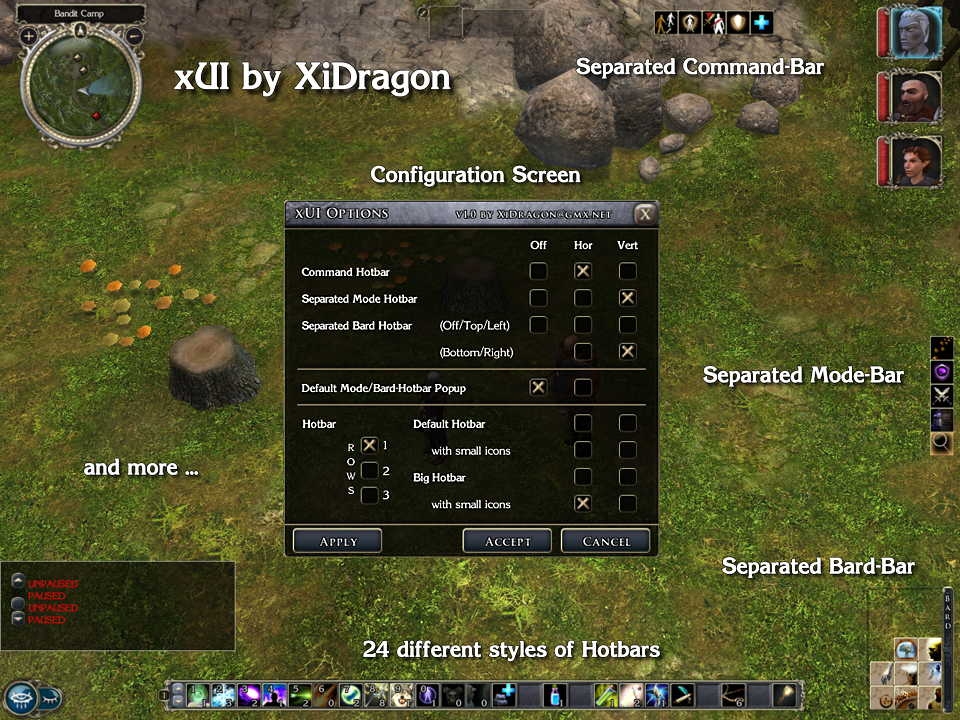
xUI GUI - Command bar, 24 Hotbars, Mode-, Bard Hotbar, Small Party Bar and much more, all configurable via ingame menues.
xUI v1.6 Build 8 for Neverwinter Nights 2
If you want to use this mod or parts of this mod in your own mod, you have to get my authorization first!
NEW in Version 1.6 build 3 to 8
=======================================
Build 8:
- xUI is now fully compatible with NWN2 + MoTB 1.13
Build 7:
- Fixed a bug that prevented the new custom portraits function of NWN 2 1.12 to work.
This only occured if you selected the optional xUI package "Comatiblity with FI Big Fonts UI 1.4" in the xUI installer/configurator.
Build 6:
- xUI is now fully compatible to the new NWN2 Patch 1.12
- Added install option to use xUI together with "Fire&Ice's Big Fonts UI" mod
!!! Only install this optional xUI package if you have "Fire&Ice's Big Fonts UI" mod v1.4 or v1.12 installed!
Build 4:
- Changed handling of GUI ini files for better future compatibility (see section installation for more details)
- Changed install path of xUI Scripts. They are now installed into a subfolder within the override folder.
Build 3:
- xUI is now completely compatible with NWN2 v1.11 and also with MotB v1.11
- Reimplemented option to turn off the standard NWN2 Mode-Bar because the original NWN 2 function to do that is not always working properly
NEW in Version 1.6x
=======================================
- Command Bar commandos can now be issued to targeted henchman or the complete party
(left click whole party, right click and click on target for just that henchman)
- Chat window can be turned off via xUI Options screen
- Small button to open and close the chat window
(located close to the NWN menu button)
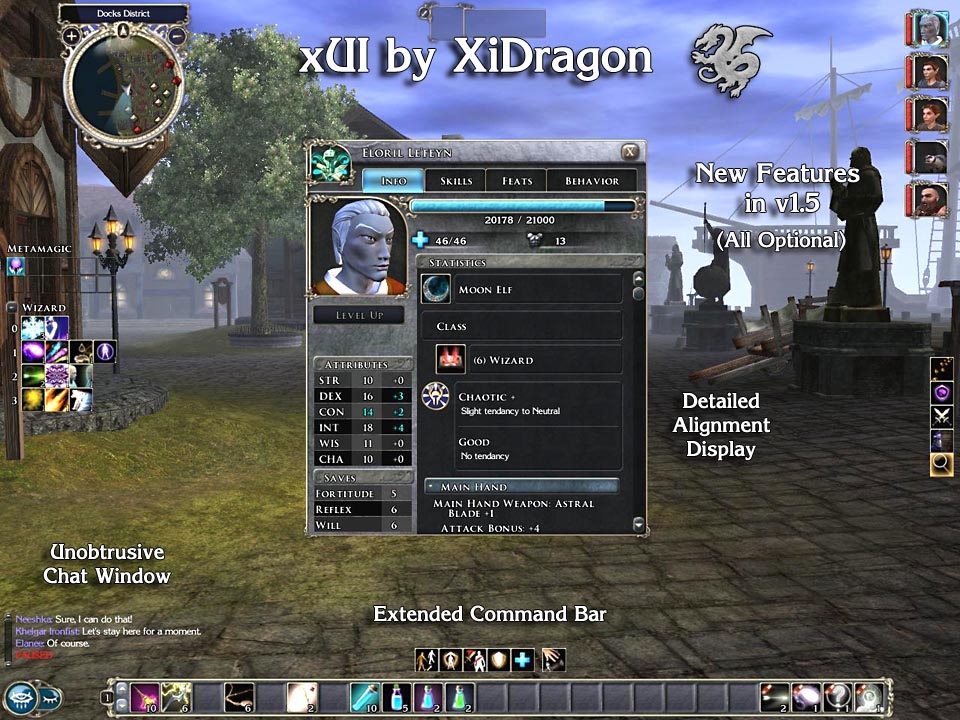
- Unobtrusive chat window (Standalone)
- Enhanced Character Screen (Standalone)
Displays a more detailed alignment and the party leaders Influence on henchman
- Optional additional buttons in the command bar
for switching puppet mode of henchman and equipping resp. unequipping weapons
- Enhanced xUI Config screen for choosing which buttons of the extended xUI Command Bar to activate
(only available when the extended xUI Command Bar and the Main package is installed)
- Some code optimizations
- Removed the option to switch off the default Mode Bar popup, because such a function is now implemented into NWN2 by default
(look under NWN2 Game Options -> Interface)
- Fix of small graphic glitch in the xUI Quickspell menu
- Enhanced Installer - Checks for older installed versions of xUI and asks for Startmenu folder ...
Features
=======================================
- Highly customizable
You can install /activate the elements of xUI you like.
- Ingame Configurator
- Installer and Uninstaller
- External Install Configurator
Lets you add and delete xUI optional installs after xUI was installed.
Main Package features
- Completely configurable via ingame menu and external configurator
- Every new GUI element is optional
- Loads automatically
- UI changes stay after rezoning
- xUI Configuration will be saved with savegame
- 24 differnt styles of hotbars
- Separated Command hotbar ("Stand Ground", "Guard Me" and so on)
- Separated Mode hotbar ("Parry", "Stealth" and so on)
- Separated Bard hotbar
- Std. Mode/Bard bar can be turned off
Optional Standalone Packages
(These packages also work without the main xUI GUI)
- Small Party bar
can be installed together with main package
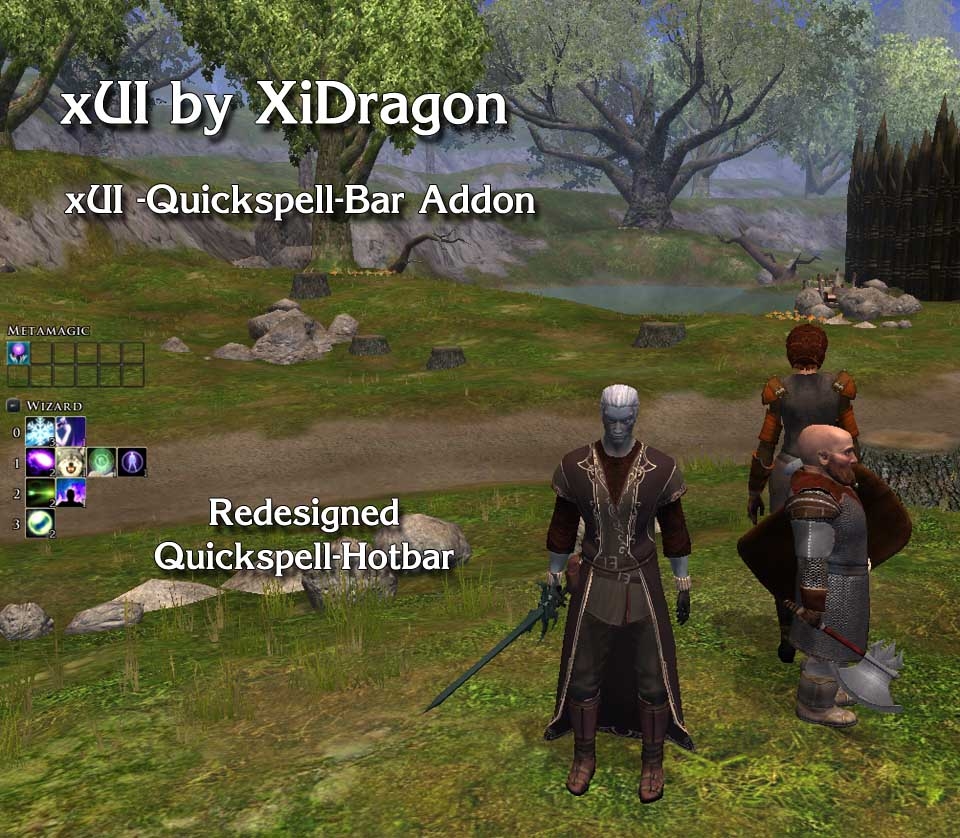
- Unobtrusive Quickcast hotbar
can be installed together with main package
- Command hotbar ("Stand Ground", "Guard Me" and so on)
can not be installed together with main package
- Unobtrusive chat window
can be installed together with main package
- Detailed alignment display on the character screen
can be installed together with main package
The optional installs are standalone versions that do not need the Main xUI to work.
FAQ
===========
1.
Question: How to move xUI elements around?
Answer: Every element that the xUI adds, except the small party bar and the quickspell bar, can be dragged around. They have an 8 pixel border around them where they can be dragged from.
2.
Question: What files will be overwritten by this UI?
Answer: None.
3.
Question: Does this work with PW's?
Answer: Yes, but xUI has to be installed on the server. There is right now no way around this and nothing I can influence because this is how NWN 2 is designed.
4.
Question: My xUI is not working properly since NWN 2 v1.04 how do I fix that?
Answer: Make sure you have installed at least xUI v1.4 and check that the following two NWN 2 options are activated:
- Game Options -> Interface -> Show Horizontal Hotbar 1
- Game Options -> Interface -> Show Modebar
Known problems
===========
1.
In multiplayer the xUI configuration might not be saved.
2.
Hotbar hotkeys do not work completely the same way they work in the default NWN 2 UI. Hotbar hotkeys will only work for the first row of the xUI hotbars. Have a look at the Readme for more details.
3.
At the moment the hotkeys for the hotbar do only work after you pressed Shift-1 once.
I am looking into this to find a solution.
Have fun
XiDragon
xUI History
===========
v1.6 build 8:
- Made xUI fully compatible with NWN2 + MoTB 1.13
v1.6 build 7:
- Fixed a bug that prevented the new custom portraits function of NWN 2 1.12 to work.
This only occured if you selected the optional xUI package "Comatiblity with FI Big Fonts UI 1.4" in the xUI installer/configurator.
v1.6 build 6:
- Made xUI compatible to the new NWN2 Patch 1.12
- Added install option for xUI compatibility files for "Fire&Ice's Big Fonts UI"
v1.6 build 4
- Changed handling of GUI ini files for better future compatibility
- Changed install path of xUI Scripts. They are now installed into a subfolder within the override folder.
v1.6 build 3
- Made xUI completely compatible with the latest NWN2 + MoTB Patch 1.111153
- Fixed the issue that the Minimodebar and Bardbar where not moveable anymore because of the last NWN2 patches
- Reimplemented option to turn off the standard NWN2 Mode-Bar because the original NWN 2 function to do that is not working properly
v1.6 build 1
- Code changes to make xUI compatible with NWN v1.1
- Command Bar commandos can now be issued to targeted henchman or the complete party
(left click whole party, right click and click on target for just that henchman)
- Chat window can be turned off via xUI Options screen
- Small button to open and close the chat window
(located close to the NWN menu button)
- Unobtrusive chat window (Standalone)
- Party Leaders Influence Display on character screen (Standalone)
- Optional additional buttons in the command bar
for switching puppet mode of henchman
- Enhanced xUI Config screen for choosing which buttons of the extended xUI Command Bar to activate
(only available when the extended xUI Command Bar and the Main package is installed)
- Some code optimizations
- Removed the option to switch off the default Mode Bar popup, because such a function is now implemented into NWN2 by defult
(look under NWN2 Game Options -> Interface)
- Fix of small graphic glitch in the xUI Quickspell menu
v1.5 build 1
- Unobtrusive chat window
- Detailed alignment display on character screen
- Optional button in command bar for equipping resp. unequipping weapons
- Some code optimizations
- Enhanced Installer - Checks for older installed versions of xUI, ask for Startmenu folder ...
...
(see the ReadMe for the full history)
Well... Last time I was around was in mid 2007 for xUI 1.4. If I recall correctly this mod was a useful improvement and it was nice. Had no look at the 1.6 version yet. Anyways, I'm here again cause I recently installed NWN2 and the two Expansions and now I write this due to your statement regarding the "thank yous". Some years ago I did some modding or programming for Ultima Online Freeshards, UT 99' up to UT 2004 and later for the Sims 2 and the Lineage 2 L2J Project. The motivation to go into details of these games was that they didn't work the way I wanted them to. I really don't know how many people thanked me for any released work and I don't care either cause after all I would have done it anyway for my personal use. But people, well, people in general won't think "ok, this fool did a great job with BlaBla and now I use BlaBla and ignore him for it makes him feel bad". No. People in general simply don't think at all. There's no bad intention hidden. They are driven by some emotion, maybe greed, maybe lazyness, and to fullfil the emotional need they have to do certain things that they'll do. Nothing beyond. Maybe they want to play NWN2 really bad. They find that for their best gaming experience there are certain mods required and they get them. As long as everything works together well they won't waste a thought about the creators of the mods. That's called human. Sure it's sad... Mankinds state is. Maybe you can see some sort of appreciation of your work in the number of downloads and the rating. Maybe you can forgive J.D. for preferring the mod over the ReadMe because the mod means fun and the ReadMe not. Thanks for sharing. :)
Posted by Dr. at on04/06/09
I would like to thank you for the efforts you've gone through making this mod. I am currently playing the main campaign but with SoZ installed. Therefore I only have a slight notion of the superbness your mod would endow nwn2 with. Hence my plea: please update your mod and don't give in to the people, who don't express their gratefulness properly, and the developers of SoZ, who are unable to make an addon without ruining the work of so many modders out there. Keep upt the good work!
Posted by Andros_Forever at on04/04/09
Hi there, I just added your mod for my UI interface and I have to say it is excellent, many thanks for this great UI setting. I have a problem though, I cannot access the XUI Options to configure the hotbars. Currently the bottom hotbar is not being displayed. - Game Options -> Interface -> Show Horizontal Hotbar 1 - Game Options -> Interface -> Show Modebar I already made sure those two are on, still when I click on XUI Options nothing shows up. Any pointers to fix this problem? _________________________ -------------Role Player since 1997-------------
Posted by cephasjames at on03/19/09
Thanks for the mod. I also voted. As per the idea of a modder getting thanks, I guess it depends on what the modder wants to get out of modding: the satisfaction of putting out a mod people will use or apprectiate or praise for their work. In my modding experience with other games I've learned not to expect praise (not because people can be ungrateful) because it's not about the praise, it's about putting out a product people will use and enjoy. That way if/when praise comes it's a surprise and a blessing. And if it never comes then I'll never be disappointed. But obviously each person is different. Where some excel others fail, and where some fail others excel. Anyway, thanks again for the mod. It really is a great mod. I hope you have a chance to update it to SoZ 1.22. I think A LOT of people would apprectiate it.
Posted by ailleus at on03/03/09
I don't know anything about modding, but i do know compilation and how to make ui look good. By far the best ui out there. I hope you get motivated soon and release Zehir version. Thank you for making NWN2+MotB so enjoyable - couldn't play without your ui. P.S. About leechers - probably it is not that they are (i do say thanks but so rarely that i classify as a leecher probably) lazy or ignorant to say thanks but in every webpage you have to register, login and after that finally be able to thank you. Of course the 1-2 minutes spent registering ect is small amount of time compared how long you mod but still ppl like to leave thank you note in 10 seconds and go on. If they can't thank you in a simple button click they will go on, that is most likely reason for 1/200 as you say:/ Best regards, Fan
Posted by Vadaghar at on02/04/09
Loved this UI ever since you first created it. Like others already mentioned I hope you release an updated version for SOZ. Regards, -V
Posted by chamda at on01/25/09
Gotta say, as a user (and voter) of this mod, I totally agree with Dragon's comments about "leeches". No, maybe people don't have time to "talk about the weather", but if you have time to download it, then you have time to drop a line and vote, or at least just vote. As an avid player with no skills for such things I greatly appreciate the work the modders do and think that a lot of them don't get the credit they desrve because so many people are to "busy" (read: lazy) to vote.
Posted by Xeron at 08:40:32 Voted9.50
XiDragon, I have been a long-time fan of this UI mod. I like it best for reasons noted in earlier posts. That said, I understand your sadness over the ungratefulness of most users. Unfortunately, it is what we, as an excuse-ridden, over-entitled culture have sown. The thanks and comments you have gotten are all you will get. The 0.5% of the population that has acknowledged you is truely happy with your work and would love to see it updated to continue to enjoy the fruits of your labor. The other 99.5%, not feeling they need to tell you they appreciate your efforts, are not likely to ever visit this page excet to download a new version. While I do not agree with it, it is the way it is, and shall be, for at least a generation. Things may change, but we (people) must change it; it won't happen by itself. Everyone needs a rant once-in-a-while (I do it daily), and yours is very valid. OK, now I will add my name to those requesting you to spend more of your time, doing something you enjoy (my assumption) and bring this truely great mod to full compatibility with SoZ and 1.21 (or 1.22 :). If I can assist in any way, please let me know. I will try to the best of my ability (some scripting and programming, but no art, cause I suck at it). _________________________ Endorsed by the Great Wazoo of Acron.
Posted by Wolfram at on12/19/08
It's one of the best UI add-ons, so I'd have given it a 10, but I had to subtract 2 points: 1 for only being available as an executable installer (I'd prefer an archive instead or in addition to .exe format) and 1 for the author's attitude as exhibited in the comments and description.
Posted by Gwennie1984 at on12/12/08
By far my favourite UI mod. I'm about halfway through the OC and it has been great. Thanks heaps.
10 - A Masterpiece, Genuinely Groundbreaking 9 - Outstanding, a Must Have 8 - Excellent, Recommended to Anyone 7 - Very Good, Deserves a Look 6 - Good, Qualified Recommendation 5 - Fair, Solid yet Unremarkable 4 - Some Merit, Requires Improvements 3 - Poor Execution, Potential Unrealized 2 - Very Little Appeal 1 - Not Recommended to Anyone






 Site
Site