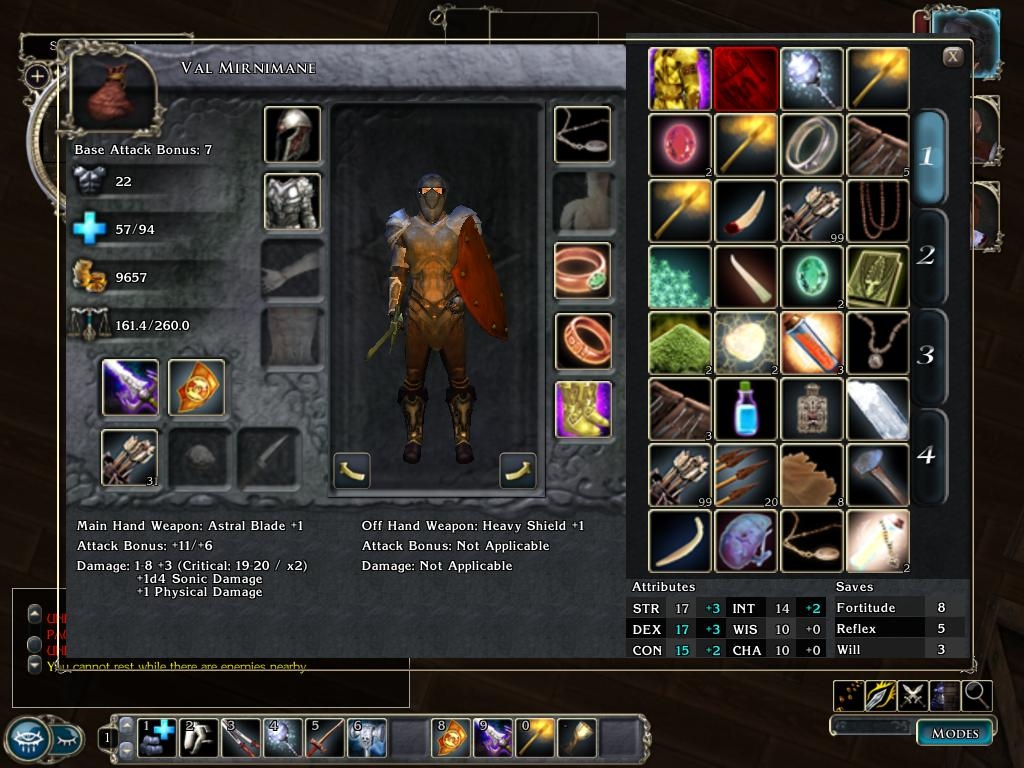
Adds Character Info to my Magnum-size Inventory including:
- Main & Offhand Weapon info
- Character Attributes
- Saving Throw info
- Base Attack Bonus
This info updates automatically when swapping items and requires no scrolling to view.
Note: It's possible that when equipping weapons with extremely long names, the name may be clipped. Let me know if it becomes a problem. Thanks!
UPDATE 12-6-06:
Revised .xml files for patch 1.03. Stylesheet no longer causes crash to desktop. Weapon info now updates correctly.
UPDATE 12-6-06:
Added OnDestroy command to UIScene.
Version 1.03 ONLY!
Rename to "inventoryscreen.xml" and
place in /My Documents/Neverwinter Nights 2/override
UPDATE 12/7/06: Added OnDestroy command to UIScene.
Posted by daidoji at 2009-03-29 08:19:42 Voted 9.75 on 03/29/09
Sorry for my two last post, i don't understand why it's appears here ^^;; and like i can't edit/erase ... So :
SORRY ! :( _________________________ Friendly,
Jacques.
Posted by daidoji at 2009-03-29 08:17:41 Voted 9.75 on 03/29/09
@ wootersl : You can. what you can't is giving directly something equiped. if you try to give something in the backpack (so NOT equiped) it will do it right.
@ tar1973 :
I have the last patch and no problem for me. Are you sure you don't have anything in your Mydocuments/override or neverwinter/ovverride ? _________________________ Friendly,
Jacques.
Posted by daidoji at 2009-03-29 08:14:10 Voted 9.75 on 03/29/09
I'm redoing the campaign, and i just love it this BG UI :D...
By the way, two question :
-> i've made some modif to incorporate Comp & Mon AI, perhaps you could do something about that and let it here ;) ?
-> Why in Plugin & not in UI Oo ? a coin of luck was necessary to find your prowess :D _________________________ Friendly,
Jacques.
Your mod look amazing, but it is not compatible with latest nwn2 pach. Is it possible to change the files? Anyway, I hope you will come up with a compatible mod. Keep up the good work :)
@ Wooters there's a UI mod for larger Character Icons ar even the Horizontal Frames will help you do that ;) _________________________ Mea Culpa's Demesne
Old Elven Saying: "Never say Never if you're gonna live forever!!!"
"I didn't do it, it wasn't my fault"
clubok:
I agree that to do this right will require changes by Obisidian. I used the OnCreate and idleexpiretime as means to an end. That end being to get my weapon info to update consistently. I was concerned with the idleexpiretime causing a performance prob, but a present in SP it hasn't been an issue. I intend to experiment with the OnDestroy/OnCreate to, if possible, eliminate the open request (assuming this doesn't as you mentioned disrupt the character screen more) . I wouldn't expect you to use this fix, but at present it's the only solution I can find to update my enchantment info. I'll play test this more to see if it causes a performance prob, but I don't expect it in SP, maybe in MP.
Serene:
I too run 1024x768. I know the screen is big, hence the Magnum in the title :P. It can be somewhat unwieldy and requires a different style of playing. Basically when I put this together I was digusted with Obsidian's small inventory and wanted to make it as large as possible and still be able to shop, etc. It's designed for people that are willing to make a few extra mouse clicks for the size tradeoff. I could make it smaller but you can't have your cake and eat it too. Something would have to go. I'm open to suggestions(ie.things to eliminate), but don't hold your breath waiting for a smaller version of the full package. At this point, I just don't think it would be practical. Bottom line: I might reduce the scale of this version by 10%+/- , but would this be enough for your liking? Otherwise, if you need something smaller I'm looking at a complete redesign. Sorry :(.
Corrosion: The OnCreate event works for me too - mostly. But I find that if I open the inventory screen, then open the character screen, then close the character screen, it stops working - at least until the next time I reopen the inventory screen. The problem is the OnRemove event on the character screen.
Another bug this introduces: Open up the character screen, and go to any tab other than the first. Now open up the inventory screen. The character screen no longer updates, at least until you switch tabs.
Two other potential disadvantages with this approach involve performance. First, using idleexpiretime like that forces the computer to recreate the screen each time you pull it up; this may cause a small delay.
Also, all Obsidian UIs seem to pair functions that request updates with functions that cancel the request. I assume that this is because there is a performance hit if the request is left on permanently. I would expect this effect to be more of an issue in multiplayer. Of course, one could always use the OnDestroy event to cancel the request, but then you risk screwing up the character window even more.
I think it's impossible to make this entirely bug-free without the following two changes from Obsidian:
1. Allow two or more functions to be called from a single OnAdd event.
2. Make update requests specific to the UI screen that called them; not to the whole client.
At this point, I think I won't add the fix to my version of this. It isn't clear to me that the original bug is any worse than the new ones. _________________________ Big Inventory Icons and Character Info Link
Readable Books Link
Less Obtrusive Spell Buffs Link
Hmm.. Let me redo that. Seems it doesn't like xml commands =P
I guess you can't post XML. Anyway, ( if this works ) just put brackets around the ! --- equipment slot button ---- thinger and it should work. I could just send you an updated stylesheet.xml and you can add it for optional download so xUI users can use this modification.
Alrighty. Now that it's working I had a chance to mess around with it. But before I comment let me tell everyone that if you use xUI you need to copy:
And put it below the one with in the name. Just save it and now it should work with xUI ( they both use Stylesheet.xml so you can't use both. You have to add to xUI's stylesheet ).
Also, please update your readme. UI mods do not go in the override directory. They go into the UI directory. That *is* why it's there ~-^.
You *do not* need to place this into the UI\default directory. instead, I suggest making a folder UI\MagnumInventory and put all the files in there. if you use xUI, update the stylesheet.xml in your xUI folder under UI\xUI with the above info.
There's no sense in having 8000000 files in the override directory. It just makes it hard to find stuff if you use lots of overrides like Even's PnP and AI settings, new models, and custom weapons/armor/items like myself.
Now onto my problems:
To put it bluntly. It's magnormous. It's so big it makes using items and transfering items to party members a hassle. It needs to be smaller. I don't know how you plan to do this, but please please please make it smaller. It's difficult to use in a 1024x768 environment. Also, as someone mentioned before, it makes it difficult to go shopping. It's a pain in the butt to work around. I actually had to close my inventory to use the scroll of lesser dispel on the pig during the tutorial, whereas I could simply use the scroll without closing my inventory prior to this modification.
you don't need to completely change what you have. I suggest making alternatives for us smaller resolution folks who don't have the computer to run in higher resolutions.
Thanks Mr. Corrosion! I'll vote when/if you make a smaller version ~-^
Posted updated files for patch 1.03. Weapon info now updates correctly, Woohoo! There is one teensy-weensy bug with the enchantment info update that I discovered, but I am not going to attempt to fix it at this time. Basically if you have the inventory open and then open the character screen on top of it, any weapon swapping you do will not update the enchantment info until you reopen the inventory. Pretty minor so I'm leaving it be :P.
clubok:
This was what I used to fix the update problem, it may work for you but I'm not positive because I think your inventory is more directly related to the character screen. Anyhoo, I placed these under UIScene:
idleexpiretime=0.5f
OnCreate=UIObject_Misc_RequestCharacterUpdates(0,"true","STATS")
Everybody, please let me know if you have any other problems with this. Also if you like it, feel free to vote ........
Posted by Patz at 2006-12-06 17:28:32 Voted 9.00 on 12/06/06
Hi again, Corrosion
Thanks for your quick reaction. I'm using NWN2 v1.01 because I've read here and there that v.1.02 was somewhat buggy. Hopefully the french version of v1.03 should be out soon...
Oh yes, I noticed another problem. When interacting with a merchant, the new inventory screen overlaps the merchant screen and is too large to be moved aside. I got rid of it by clicking it off, while keeping only the merchant screen but I guess you're already aware of this minor nuisance...
Best,
Corrosion: I use my version instead of yours (no accounting for preferences, eh?) so I am only judging by your description of the bug. But it sounds very much like the behavior that I've seen in my version both in 1.01 and 1.03 - and not only in the integrated screen, but also when the inventory and character screens are open simultaneously. From that fact, I concluded that the bug was Obsidian's.
If you do find a fix, please let me know what it is, so I can incorporate it into mine as well. _________________________ Big Inventory Icons and Character Info Link
Readable Books Link
Less Obtrusive Spell Buffs Link
You're english is great Patz. Just curious, what patch version are you using?
Posted by Patz at 2006-12-06 13:18:54 Voted 9.00 on 12/06/06
Hi Corrosion,
I confirm the clipping issue. I'm using a 2H sword (+2, Lathander something...) and its name gets clipped in the inventory.
Not a real problem though, but having the entire name would just look better...
Anyway, thanks a lot for your very fine work and please forgive my bad english, I'm french...
Actually I was just hoping you could cut the enchantments off. I just don't want them going beyond the window's boundaries.
For instance, let's say I have a weapon with 20 enchanments. I could only see let's say.. 6 of those in the inventory window, rather than having all 20 show, and 14 of them show outside the window in the game word.
I wasn't trying to be rude or anything ^-^. Actually, I'm quite worried about weapons with huge enchanments. I make items to test various encounters and some of these items have 20 or more enchantments. I'm curious if it will cause problems with the screen.
I think that bug isn't new with 1.03. It also affects my (related) inventory mod - and did before 1.03. I've also noticed that if you have the character screen open when you make the change, the character screen also sometimes doesn't get updated. So this bug isn't just part of your UI; it's part of the delivered update logic.
I suggest you don't hold up your 1.03 fix over it. _________________________ Big Inventory Icons and Character Info Link
Readable Books Link
Less Obtrusive Spell Buffs Link
Serene, relax and gimme a little time. I dove into it last night and I believe I've resolved the issues with the stylesheet, etc. Unfortunately, I discovered another problem. The inventory works great (for me anyway :))with the exception of the weapon damage info. All of the data updates correctly with the exception of any special damage info, ie. fire,slashing,etc. At this point if on opening the inventory you are equipped with a sword with say +1 Fire damage and then swap to a plain old dagger, the +1 Fire Damage remains on the screen. But if you should at that point open your character sheet screen, the data in the inventory updates correctly. Soooo, something is firing an update command on opening the character screen. I think I tracked this down, but now I need to figure out how to integrate it into the inventory. I'm not sure why this became a problem after the patch, but alas, it is. In short, I am working on it, but I don't want to release it until I know it works properly. At this point consider it a UI mod for version 1.01 & 1.02. Hopefully within the next couple days version 1.03.
Thanks! leave a comment when you finish so I can rush here and grab this excellent UI modification! From what I've played with, its the best Inventory UI modification I have seen. Period ^-^
OK, here we go. As noted above this works for the 1.02 patch. I assure it does :). I had not installed the 1.03Beta and evidently it causes numerous problems with my design. Now that the official 1.03 patch is out, I'll install ASAP (I'm at work right now.) and attempt to repair.
Oh yeah, I forgot to mention another. I can't move any items below the top row in the inventory. For instance, let's say in the main top 4 inventory slots I have a Leather Armor, Scimitar, Astral Sword, and 10 Cure Light Wounds potions. I can highlight these and move these; HOWEVER I cannot move these to any slot BELOW these 4 slots. In addition, I CANNOT move any item ANYWHERE below the top 4 slots. For instance, if I have a Magic bag below the cure light wounds. I can right click it, but I can't highlight the magic bag or move it anywhere.
Ok, I messed around with it. It seems the stylesheet.xml is incompatiable with 1.03 or is completely frigged up. Anyone who uses patch 1.03 I'd advice you not to download this until the user can fix his stylesheet problems. Until then I will refrain from voting. Anyway, my problems are as follows ( so you can fix them easier ):
When clicking on an empty inventory slot, my weapons/shields will automatically unequip (why?!).
When trying to move an item, my armor will unequip (my character is a nudist :O)
When trying to select inventory page 2, my armor unequips. When trying to select inventory page 4, all my items unequip. ( this is annoying, my friend. )
All weapons, armor, shields, rings, ANY equipped item does not show up in the equipment slots ( no icons what-so-ever ) but are equipped on my character ( no matter WHERE I place the icons, this is always true )
Stuff that seems to be working OK:
The Close button.
Tool tips ( hovering over HP, Encumbrance, even weapons, displays a tool tips )
Right clicking on my equipment slots displays the menu where I can examine, etc the equipped item.
The base attack bonuses, stat bonuses, item bonuses, weapon info, all show up fine and update correctly if I remove the items ( which is often considering it always removes them whenever I do.. *anything*)
That's all that seems to be working for me. Please fix your UI. It's the best inventory UI out right now and I'd love you forever if you could fix it!
The inventory is great; however there seems to be some issues with recongnizing commands. I play in 1024x768 1.03BETA patch and for some reason I cannot access any level of my inventory except level 1. Also, only the top 4 items can be moved. While I can equip, examine, right click, etc all others, I cannot move them.
Also, to the above poster: The Stylesheet and inventoryscreen go in the UI folder, not the overide ( as far as I know. It works if you put them in the UI and it shows up just fine! )
10 - A Masterpiece, Genuinely Groundbreaking 9 - Outstanding, a Must Have 8 - Excellent, Recommended to Anyone 7 - Very Good, Deserves a Look 6 - Good, Qualified Recommendation 5 - Fair, Solid yet Unremarkable 4 - Some Merit, Requires Improvements 3 - Poor Execution, Potential Unrealized 2 - Very Little Appeal 1 - Not Recommended to Anyone






 Site
Site









 at 2009-03-29 08:19:42
 at 2006-12-07 15:09:17


