Comments (30):
1 2 3
| Posted by Serene, at 2006-12-0516:32:33 | | I wasn't trying to be rude or anything ^-^. Actually, I'm quite worried about weapons with huge enchanments. I make items to test various encounters and some of these items have 20 or more enchantments. I'm curious if it will cause problems with the screen. |
| Posted by clubok at 2006-12-0516:29:43 | | Corrosion: I think that bug isn't new with 1.03. It also affects my (related) inventory mod - and did before 1.03. I've also noticed that if you have the character screen open when you make the change, the character screen also sometimes doesn't get updated. So this bug isn't just part of your UI; it's part of the delivered update logic. I suggest you don't hold up your 1.03 fix over it. _________________________ Big Inventory Icons and Character Info Link Readable Books Link Less Obtrusive Spell Buffs Link |
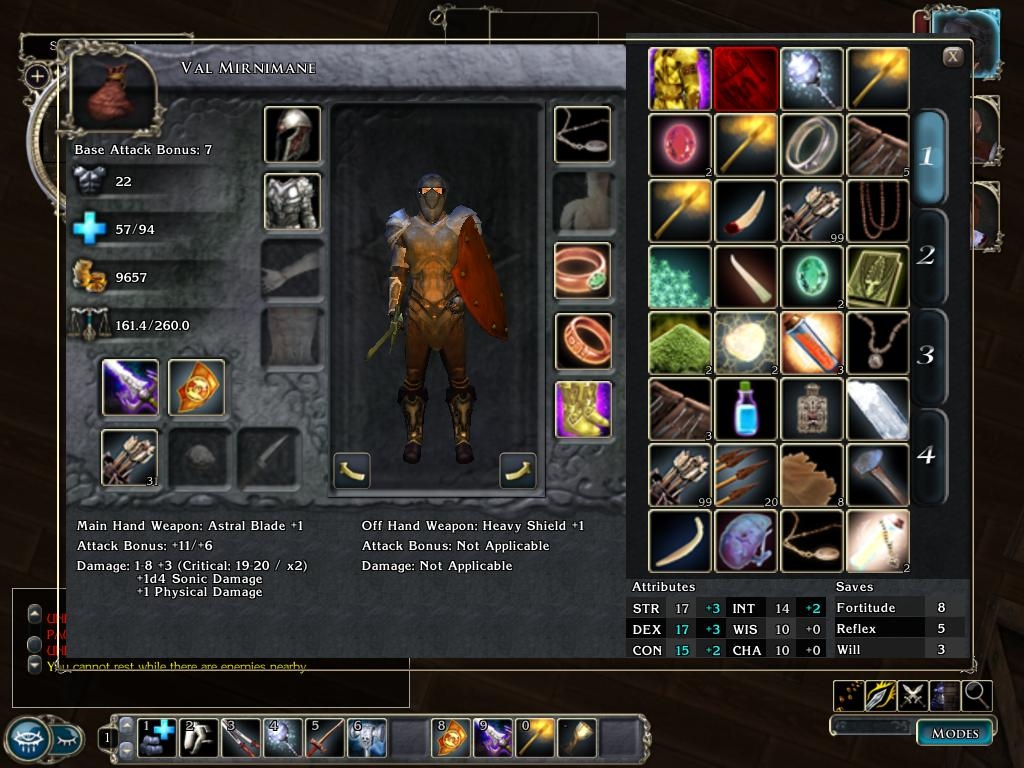
| Posted by Corrosion at 2006-12-0513:13:32 | | Serene, relax and gimme a little time. I dove into it last night and I believe I've resolved the issues with the stylesheet, etc. Unfortunately, I discovered another problem. The inventory works great (for me anyway :))with the exception of the weapon damage info. All of the data updates correctly with the exception of any special damage info, ie. fire,slashing,etc. At this point if on opening the inventory you are equipped with a sword with say +1 Fire damage and then swap to a plain old dagger, the +1 Fire Damage remains on the screen. But if you should at that point open your character sheet screen, the data in the inventory updates correctly. Soooo, something is firing an update command on opening the character screen. I think I tracked this down, but now I need to figure out how to integrate it into the inventory. I'm not sure why this became a problem after the patch, but alas, it is. In short, I am working on it, but I don't want to release it until I know it works properly. At this point consider it a UI mod for version 1.01 1.02. Hopefully within the next couple days version 1.03. |
| Posted by Serene, at 2006-12-0512:26:33 | | Any word on whether or not this is done? |
| Posted by Serene, at 2006-12-0420:11:44 | | Thanks! leave a comment when you finish so I can rush here and grab this excellent UI modification! From what I've played with, its the best Inventory UI modification I have seen. Period ^-^ |
| Posted by Corrosion at 2006-12-0416:35:11 | | OK, here we go. As noted above this works for the 1.02 patch. I assure it does :). I had not installed the 1.03Beta and evidently it causes numerous problems with my design. Now that the official 1.03 patch is out, I'll install ASAP (I'm at work right now.) and attempt to repair. |
| Posted by Serene, at 2006-12-0412:31:27 | | Oh, Patch 1.03 is out now. Official release ( not beta ) so I suggest you update your UI to work with it ASAP XD. |
| Posted by Serene, at 2006-12-0410:51:45 | | Oh yeah, I forgot to mention another. I can't move any items below the top row in the inventory. For instance, let's say in the main top 4 inventory slots I have a Leather Armor, Scimitar, Astral Sword, and 10 Cure Light Wounds potions. I can highlight these and move these; HOWEVER I cannot move these to any slot BELOW these 4 slots. In addition, I CANNOT move any item ANYWHERE below the top 4 slots. For instance, if I have a Magic bag below the cure light wounds. I can right click it, but I can't highlight the magic bag or move it anywhere. |
| Posted by Serene, at 2006-12-0410:48:58 | | Ok, I messed around with it. It seems the stylesheet.xml is incompatiable with 1.03 or is completely frigged up. Anyone who uses patch 1.03 I'd advice you not to download this until the user can fix his stylesheet problems. Until then I will refrain from voting. Anyway, my problems are as follows ( so you can fix them easier ): When clicking on an empty inventory slot, my weapons/shields will automatically unequip (why?!). When trying to move an item, my armor will unequip (my character is a nudist :O) When trying to select inventory page 2, my armor unequips. When trying to select inventory page 4, all my items unequip. ( this is annoying, my friend. ) All weapons, armor, shields, rings, ANY equipped item does not show up in the equipment slots ( no icons what-so-ever ) but are equipped on my character ( no matter WHERE I place the icons, this is always true ) Stuff that seems to be working OK: The Close button. Tool tips ( hovering over HP, Encumbrance, even weapons, displays a tool tips ) Right clicking on my equipment slots displays the menu where I can examine, etc the equipped item. The base attack bonuses, stat bonuses, item bonuses, weapon info, all show up fine and update correctly if I remove the items ( which is often considering it always removes them whenever I do.. *anything*) That's all that seems to be working for me. Please fix your UI. It's the best inventory UI out right now and I'd love you forever if you could fix it! |
| Posted by Serene, at 2006-12-0410:35:21 | | The inventory is great; however there seems to be some issues with recongnizing commands. I play in 1024x768 1.03BETA patch and for some reason I cannot access any level of my inventory except level 1. Also, only the top 4 items can be moved. While I can equip, examine, right click, etc all others, I cannot move them. Also, to the above poster: The Stylesheet and inventoryscreen go in the UI folder, not the overide ( as far as I know. It works if you put them in the UI and it shows up just fine! ) |
1 2 3
You must be Logged In to post comments in this section.
10 - A Masterpiece, Genuinely Groundbreaking
9 - Outstanding, a Must Have
8 - Excellent, Recommended to Anyone
7 - Very Good, Deserves a Look
6 - Good, Qualified Recommendation
5 - Fair, Solid yet Unremarkable
4 - Some Merit, Requires Improvements
3 - Poor Execution, Potential Unrealized
2 - Very Little Appeal
1 - Not Recommended to Anyone
|






 Site
Site