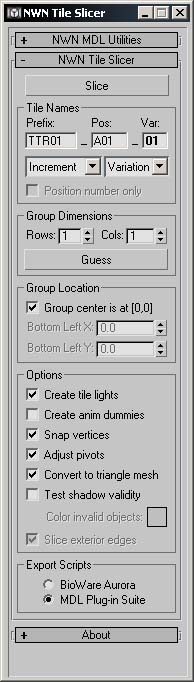
The NWN Tile Slicer is a utility for Discreet's 3ds max and gmax. It is designed to assist in the process of creating multi-tile groups for NWN tilesets. Specifically, it automates the process of converting a large model in 3ds max into a set of NWN tile models, ready for use in the game.
Nice Work. It does run in Gmax startup but of course you can't slice the tile yet because it only supports Bioware's Export scripts and MDL-plug in. Any word on when you guys might be able to update this program to be usable with Wayland's Gmax export script? I hope soon since I already created a 2x2 model for my module because I knew this program was coming out. I just didn't know it wasn't gonna be for Gmax yet. Keep up the good work and don't forget about us Gmax users. Modeling is just a hobby so I won't be spending the money for 3DS Max. I can get it illegally but I really don't want to and I don't trust cracked versions. Thanks!
Posted by roboius at 2003-06-2910:56:00
The scripts folder is in your 3ds max installation directory. There is a startup folder in that directory, scripts in there will be run automatically when you start the app.
Posted by ozzy at 2003-06-2907:15:00
Sry.I know i'm so stupid.But can you tell me where the i find these folder or i must doawnload some other things before i can take in this folder?
Posted by roboius at 2003-06-2818:57:00
Typo in link, fixed now.
Posted by Morphing at 2003-06-2816:07:00
The link refers me to your site, then I click on the download at your site, and its not working and I REALLY REALLY want this :) Thanks for the great work!
Posted by roboius at 2003-06-2815:17:00
Okay, version 0.6 is up, tile ordering is now correct. If you are using the MDL Plug-in Suite, you'll have to make sure you don't rotate the models around the Z axis on export.
Posted by roboius at 2003-06-2814:17:00
Okay, I've just found a problem with the tile ordering, I've been using scooter's plugin which rotates tiles by 180 degrees by default. I'm fixing this now, and will post an updated copy shortly.
Posted by roboius at 2003-06-2811:38:00
I am also working on a tutorial that will take you through the process step by step. If you're having trouble, you might want to wait for me to finish that off. You can access the tutorial from the Tile Slicer homepage.
Posted by roboius at 2003-06-2811:32:00
To use this script, simply place it in the startup scripts folder of your 3ds max installation, or select "MAXScript -> Run Script" on the menu from inside max.






 Site
Site