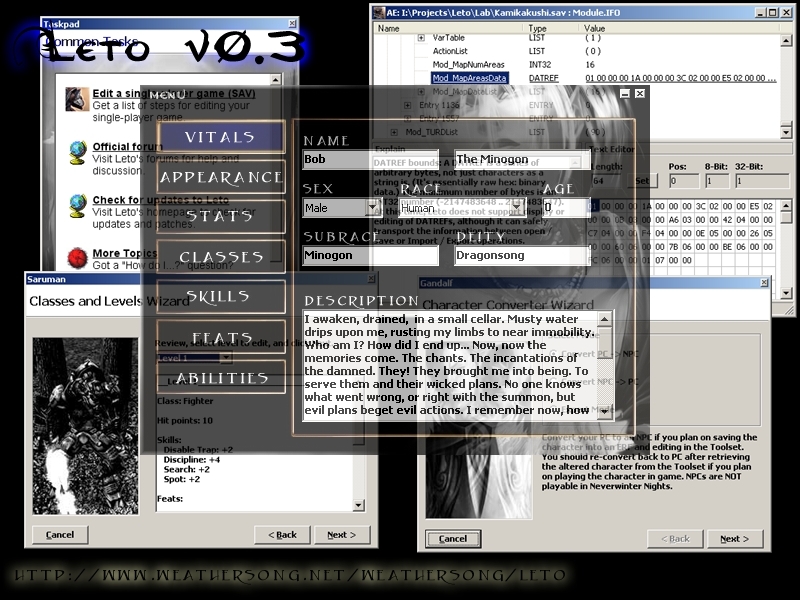
Leto is a Toolset Companion, designed primarily for character sheet editing, but also for low-level GFF editing in general. This is build 0.3.1.67, which supports SoU and HotU. Questions? Comments? Want to take a look at the beta for version 4? Please visit the forums: http://weathersong.infopop.cc/
@noisia
Leto 1.69 is the latest version, and is no longer supported as is this version as both authors have left the community. the official site no longer exists either. It really is a shame; no other editor comes close. _________________________ jml's list of community addons/overrides, etc. Link
Posted by IamDuff at 2010-12-05 17:00:26 Voted 10.00 on 12/05/10
Use to use this in odd scenarios where i needed a feat or something and didn't want to cheat any more than necessary.
Thank you
=)
hello - i just downloaded the 1.69 version of this but i can't make my DM character go past level 20. ideally, i'd like him to be level 60 (blackguard). could someone explain where i'm going wrong please and how to do it properly?
This is a very nice program that adds a new level to character creation.
For those who may have problems getting their characters into Toolset to edit, this is what I did:
1. Create the character in NWN
2. Open the character in Leto
3. Edit as you so desire
4. Save the character in the local vault (as a backup)
5. Go to "Tools" and then click on "Char Converter Wiz"
6. Select "Convert PC > NPC" and click Next
7. At this point, I left it as default and clicked the Finish button
8. Save your character in the ERF folder in the NWN directory.
9. At the next window, I simply clicked OK
10. Open up Toolset
11. Go to "File" and click "Import"
12. Find the ERF folder and double-click on your character
13. Click on �Paint Creatures� and click on �Custom� on the list below
14. There should be a little plus sign next to Custom 1. Click on it, and your character should appear underneath it. Double-click on it, and place your character in the module.
From there, you can edit your character as you so desire.
Posted by liamski at 2007-07-20 07:16:06 Voted 1.00 on 07/20/07
how you get this download
Posted by Tasardur at 2007-05-09 16:38:30 Voted 10.00 on 05/09/07
One of greatest tools.
Posted by Steve_Savicki at 2007-04-26 13:00:10 Voted 10.00 on 04/26/07
umm, sure _________________________ Steve's Characters - please don't forget to vote on them if you play them.
Unfortunately, it seems that Leto (current version) is all there is going to be. According to something I read, I *think* on their site, that there will not be another version nor will it be supported any longer.
As this is a wee bit old, I'd suggest hitting their site as listed above in the Description. _________________________ We are all born ignorant, but one must work to remain ignorant.
Hey Mr. Dave,
Do you have an update to the Lists.leto.xml? Also any hope of getting version 4.0.4 up and running. It looks much nicer! [Except for the "this tab is under construction" signs. _________________________ Doshi
Hey Mr. Dave,
Do you have an update to the Lists.leto.xml? Also any hope of getting version 4.0.4 up and running. It looks much nicer! [Except for the "this tab is under construction" signs. _________________________ Doshi
Posted by Tatem Tylnailo at 2007-02-17 14:04:01 Voted 9.00 on 02/17/07
Hi, this may help those like me who had to figure it out on their own.. but needed help along the way.
Hi,
Open Leto.. then open the character .bic file from the local vault folder in the NWN game directory.. Click on the word Menu, scroll to File > Open. then left click.. it will pop up a window to chose your pc file.
then click over the upper left word MENU with a Left Click.. scroll to Tools > Advanced Editor and Left Click again.
Go down to where it says Tail or Wings
For Wings and Tails...
the numbers are in the same order as the toolset.. so Angel wings are number two... since they are the second selection in the toolset from Zero... etc...
so right click over the word Tail or Wings and hover the mouse cursor over Edit Value and Left Click.. then enter the number in the same order as the toolset for making NPC characters for the wings or tail you want.
and the leto program is tricky.. you have to enter the altered number into the field.. then press enter.
then you have to right click and hover over refresh data.. then left click..
it will take you to the top of all the info... scroll down to make sure it reads as you entered.. but without being bold.
then right click and hover over Save File.. a small window will appear and say Leto is in your head at the top. just select OK with a left click over it.. then a window will appear with your PC .bic files.. just hover over the .bic character file you want to save over and left click over the name.. just once.. to bring the name into the File Name Field.. make sure the Save as Type field reads.. As ITP file..and save over the .bic character file by left clicking over Save.. and just close the advanced editing window.. and Leto.. you don't need to save the pc again from the MENU word.. it's done.
Load your mod. and bring in your pc.. that should work.. this worked for me, and I put it here to hopefully help where the instructions lacked.
Hmm... No instructions, eh?
When you first start it, there is a taskpad which gives you instructions.
When you are using the advanced editor, there is an "Explains" window in the lower left which gives you instructions.
The instructions are there. All you have to do is read them.
Also, in the taskpad, there is a link to the official forums, where you can find even more instructions. Again, all you have to do is read. _________________________ Me go beer!
Was wondering why it dosen't have instructions with myself. With something this vast, you'd think......well I'll stop for now, all the smart asses will start flaming me now.
okay, i admit it. i'm pretty much the most uncomputer savvy person--well ever--my 60 year old dad laughs at my feeble attempts to figure things out, but where exactly do i install this?
Posted by NineCoronas at 2006-12-15 17:08:12 Voted 10.00 on 12/15/06
Loverly. Easy to use as well. _________________________ "A dagger in the night is worth a thousand swords at dawn..."
Trial and error works fine I just have problems creating capref entrie's... they dissapear...
Posted by Malchior_of_Nakshur at 2006-12-06 14:48:23 Voted 10.00 on 07/06/06
I really think Version 4 should come with an instruction manual. There are so many things in Leto that I had to figure out on my own through trial and error.
I just downloaded Leto on recommendation. They told me that I could use Leto to take a character made in the toolset and transfer it to become a player character. Could someone help me? Thanks.
Posted by Gamer99 at 2006-08-15 13:51:56 Voted 10.00 on 08/15/06
When I started it up everything worked fine but when I went to the abilities tab there was nothing there is there a update I need to get to get the tab?
Posted by Malchior_of_Nakshur at 2006-07-06 19:33:32 Voted 10.00 on 07/06/06
The list of wings useable if you have CEP can be found if you search for my name on the vault and click on one of my custom characters. In order to give your character wings or a tail you must open a character in Leto(By opening the program and clicking on Menu, Open). You then click on Menu, Tools and scroll right to Advanced Editor. You then scroll down to Wings(or Tail) and input a number from the list. Finally you must then right click on Entry 0(which is at the top of the page) and click save File to save you character. Your character will now show up with the wings/tail you chose if you are playing a CEP module.
Hey, great tool so far Team Leto...just one question
I'm having a little trouble bringing in my custom portrait into leto's portraits folder and then having leto recognize it. I convert the file from tga to jpg format using windows media player then i erase the m from the filename and....bam! It doesn't pop up in the list of portraits. Maybe I'm converting it wrong or something, I dunno what i need to put in the filename besides erasing the m. I'm not an expert on this computer stuff so if I could get some feedback that'd be great.






 Site
Site









 at 2012-03-07 16:34:58
 at 2007-01-24 10:37:00


